
Product Overview
The Monster AI Translation Earbuds AC330 are designed to facilitate seamless global communication through real-time, two-way translation. These open-ear headphones offer a comfortable and secure fit for all-day wear, supporting 115 languages with up to 98% accuracy. Featuring multiple smart modes for various situations, long-lasting battery life, and IPX5 water resistance, they are ideal for travel, business, and everyday use.

Image: The Monster AI Translation Earbuds AC330, showcasing both earbuds and their stylish rotating charging case.
Key Features
- AI Chat Mode: Offers intelligent conversations and smart suggestions using DouBao and DeepSeek models.
- Four Smart Modes: Includes Headphones & Mobile Phone Mode, Dual Ear Mode, Simultaneous Interpretation Mode, and Scene Recording Mode for versatile use.
- 115-Language Real-Time Translation: Ensures effortless, two-way translation with up to 98% accuracy.
- Comfortable Open-Ear Design: Ergonomic fit weighing only 7g for all-day comfort and situational awareness.
- Extended Battery Life: Up to 8 hours on a single charge, and 24 hours total with the rotating charging case.
- IPX5 Water Resistance: Protects against sweat and light rain, suitable for active lifestyles.

Image: Illustration of the earbuds facilitating global communication, with various language greetings surrounding them.

Image: Visual representation of the five smart translation modes, including Simultaneous Interpretation, Live Recording, Headphones + Mobile, Audio and Video Calls, and Dual Ear Mode.
Setup
1. Charging the Earbuds
Before first use, fully charge the earbuds and the charging case. Connect the provided USB-C cable to the charging port on the case and a power source. The indicator lights on the case will show charging status. A full charge provides up to 8 hours of playtime for the earbuds and an additional 16 hours with the case.
2. Pairing with Your Device
- Ensure the earbuds are charged and inside the charging case.
- Open the charging case. The earbuds will automatically enter pairing mode, indicated by a flashing light on the earbuds.
- On your smartphone or tablet, go to Bluetooth settings and turn Bluetooth on.
- Select "Monster AC330" from the list of available devices.
- Once connected, a voice prompt will confirm successful pairing.
3. App Installation (Recommended)
For full functionality and access to all translation modes, download the dedicated Monster translation app from your device's app store. Follow the in-app instructions to complete setup and customize settings.
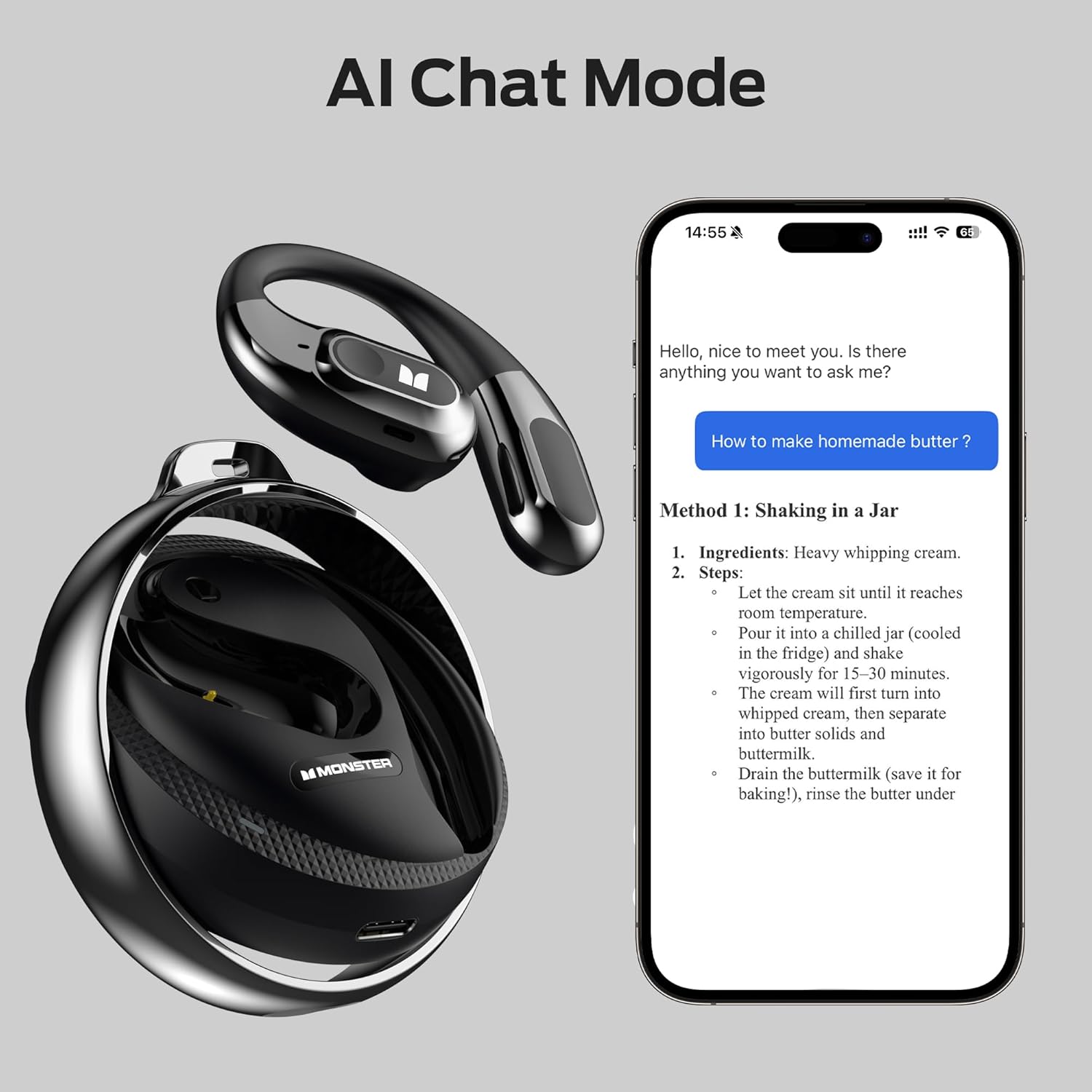
Image: The Monster AI Translation Earbuds securely placed within their rotating charging case, ready for charging or storage.
Operating Instructions
Power On/Off
- Power On: Open the charging case, and the earbuds will automatically power on and connect to the last paired device.
- Power Off: Place the earbuds back into the charging case and close the lid. They will automatically power off and begin charging.
Using Translation Modes
The Monster AC330 offers several intelligent translation modes, accessible via the dedicated mobile application:
- Headphones & Mobile Phone Mode: For real-time translation directly through your phone. Speak into your phone's microphone, and the translation will play through your earbuds.
- Dual Ear Mode: Designed for two-way conversations. Each person wears an earbud, allowing for seamless real-time translation between two individuals.
- Simultaneous Interpretation Mode: Ideal for lectures or presentations. The earbuds provide instant translation of spoken content, allowing you to follow along in your preferred language.
- Scene Recording Mode: Record important conversations and have them translated and transcribed for later review.
- AI Chat Mode: Engage in intelligent conversations with the AI, receiving quick responses and smart suggestions.
- Audio and Video Calls Mode: Provides real-time translation during audio and video calls, enabling effortless communication with global contacts.

Image: Two individuals engaged in a conversation, each wearing an earbud, demonstrating the Dual Ear Mode for seamless two-way translation across multiple languages.

Image: A person giving a presentation, with a smartphone displaying real-time translated text, illustrating the Instant Simultaneous Interpretation feature.

Image: The earbuds alongside a smartphone screen showing an AI chat interface, demonstrating the AI Chat Mode's ability to provide intelligent responses and suggestions.
Maintenance
- Cleaning: Regularly wipe the earbuds and charging case with a soft, dry, lint-free cloth. Do not use abrasive cleaners or solvents.
- Storage: When not in use, store the earbuds in their charging case to protect them from dust and damage. Keep them in a cool, dry place away from direct sunlight and extreme temperatures.
- Battery Care: To prolong battery life, avoid fully discharging the earbuds frequently. Charge them regularly, even if not in constant use.
- Water Resistance: The earbuds are IPX5 water resistant, meaning they can withstand sweat and light splashes. Do not submerge them in water or expose them to heavy rain. Dry them thoroughly if they get wet.
Troubleshooting
| Issue | Possible Solution |
|---|---|
| Earbuds not powering on | Ensure earbuds and charging case are fully charged. Place earbuds in case, close lid, then open again. |
| Cannot pair with device | Make sure Bluetooth is enabled on your device. Place earbuds back in case, close and open lid to re-enter pairing mode. Forget "Monster AC330" from your device's Bluetooth list and try pairing again. |
| No sound or low volume | Check device volume. Ensure earbuds are properly seated in your ears. Clean any debris from the earbud speakers. |
| Translation inaccuracy | Ensure a stable internet connection. Speak clearly and at a moderate pace. Check language settings in the app. Update the app to the latest version. |
| Earbuds not charging | Verify the charging cable and power adapter are working. Ensure charging contacts on earbuds and case are clean and free of debris. |
Specifications
| Feature | Detail |
|---|---|
| Model | Open Ear AC330 |
| Connectivity Technology | Wireless (Bluetooth 6.0) |
| Ear Placement | Open Ear |
| Water Resistance Level | IPX5 |
| Battery Life (Earbuds) | Up to 8 hours |
| Total Battery Life (with Case) | Up to 24 hours |
| Supported Languages | 115 (for translation) |
| Translation Accuracy | Up to 98% |
| Weight (Earbud) | Approx. 7g |
| Compatible Devices | Cellphones, Tablets, Laptops |
Warranty and Support
Your Monster AI Translation Earbuds AC330 come with a standard manufacturer's warranty. For detailed warranty information, including terms and conditions, please refer to the warranty card included in your product packaging or visit the official Monster website.
For technical support, troubleshooting assistance, or any product-related inquiries, please contact Monster customer service through their official support channels. Keep your proof of purchase handy when contacting support.
You can often find support contact information on the manufacturer's website or within the product's mobile application.


