
Introduction
This manual provides detailed instructions for the operation and maintenance of your BOBLOV M7 128G 1080P HD Body Camera. Designed for versatile recording, the M7 features a 180-degree rotatable lens, long-lasting battery, and built-in GPS for accurate location tracking. Please read this manual thoroughly before using your device to ensure optimal performance and longevity.
What's in the Box
Your BOBLOV M7 Body Camera package includes the following items:
- 1x BOBLOV M7 Body Camera
- 1x USB-C Cable
- 1x Fast Charger Plug
- 1x Short 360° Clip
- 1x Long 360° Clip
- 1x User Manual

Figure 1: All items included in the BOBLOV M7 Body Camera package.
Product Features
- 180° Rotating Lens: The lens can rotate 180 degrees, allowing for flexible shooting angles and versatile recording, ideal for various scenarios including first-person views or selfies.
- Powerful 4000mAh Battery: Equipped with a 4000mAh battery, the camera offers up to 12-15 hours of continuous recording, ensuring extended operation without frequent recharging.
- Built-in GPS: GPS functionality allows for precise location tagging of every video, providing undeniable proof of where and when events occurred. GPS data can track routes and locations.
- One-Touch Recording: Features an easy-to-access large button on the front or a side button for instant start and stop of recording, crucial in urgent or complex situations.
- Dedicated Car Mode: The camera can easily switch to car mode, functioning as a dashcam for continuous recording while driving (dash mount not included).
- Night Vision: Both night vision and front-facing lighting are available, ensuring clear recordings in low-light conditions, suitable for outdoor adventures or nighttime activities.
- Versatile Use: Comes with two pocket clips (one larger, one smaller) for various applications, including law enforcement, hiking, target shooting, outdoor sports, and food delivery.

Figure 2: The 180° rotatable lens provides flexible recording angles.

Figure 3: The 4000mAh battery provides extended recording capabilities.

Figure 4: Built-in GPS for accurate location tracking during recordings.

Figure 5: The prominent recording button allows for quick and easy operation.
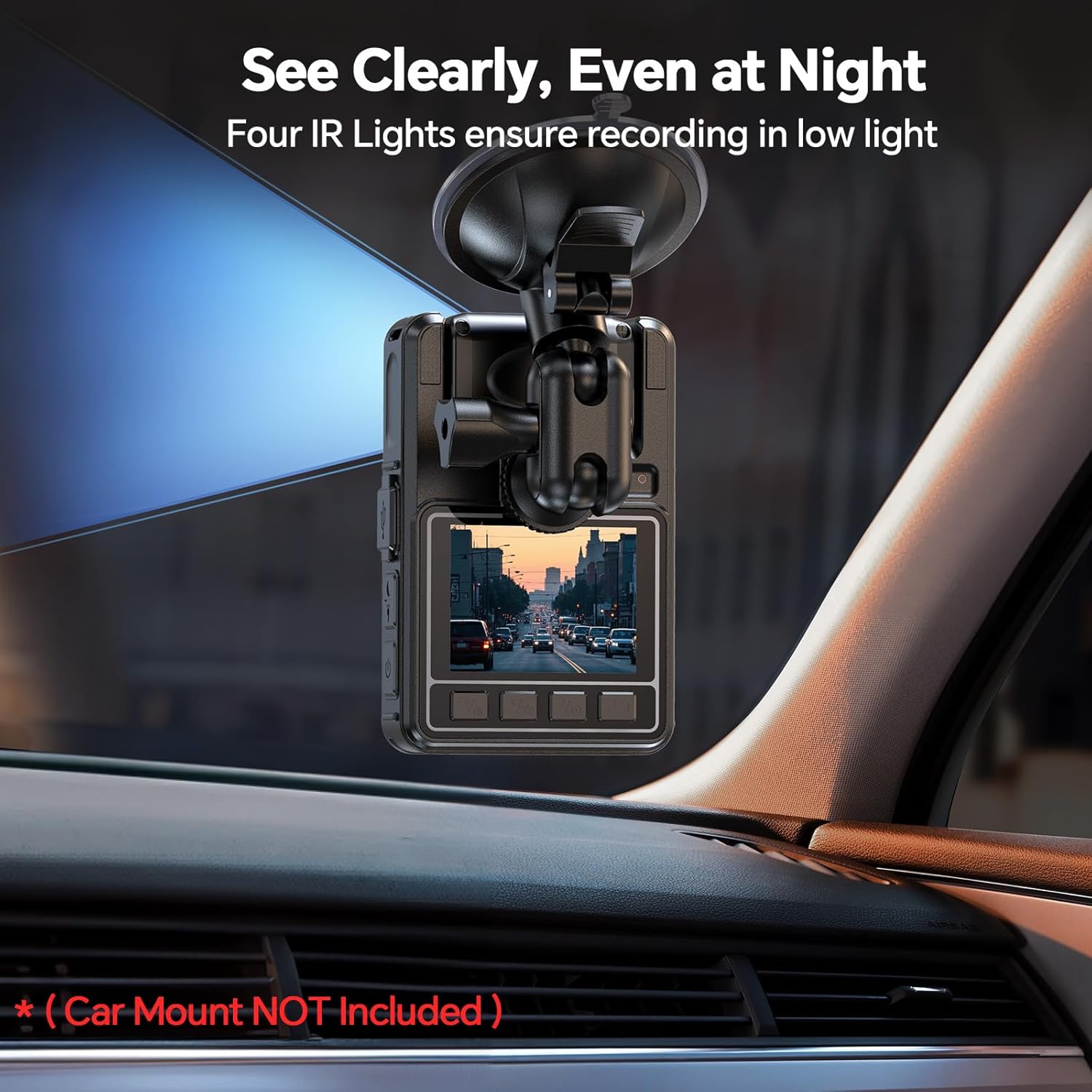
Figure 6: The camera can be used in car mode for dashcam functionality.
Setup
Charging the Device
Before first use, fully charge your BOBLOV M7 Body Camera using the provided USB-C cable and fast charger plug. The 4000mAh battery typically takes approximately 4 hours to fully charge.
Attaching the Clips
Select either the short 360° clip or the long 360° clip based on your intended use. Attach the chosen clip to the back of the camera. The clips allow for secure attachment to clothing, belts, or other gear.

Figure 7: The BOBLOV M7 camera with its included clips.
Operating Instructions
Powering On/Off
To power on the device, press and hold the power button located on the side. To power off, press and hold the same button until the device shuts down.
Video Recording
The BOBLOV M7 supports 1080P HD video recording. To start recording, press the large record button on the front or the dedicated video button on the side. A red indicator light will confirm recording is in progress. Press the button again to stop recording.
Photo Capture
To take a still photo, press the camera button on the side. The device will capture an image and save it to the internal storage.
Audio Recording
For audio-only recording, press the microphone button on the side. This feature is useful for discreetly capturing sound without video.
Siren Function
The device includes a siren feature for emergency situations. Press and hold the designated siren button on the side to activate the audible alarm and flashing lights. Release the button to deactivate.
Night Vision Activation
Activate night vision by pressing the dedicated button on the side. This will turn on the infrared (IR) lights, allowing for clear recording in low-light or no-light environments.
GPS Tracking
The built-in GPS automatically tags location data to your video recordings. To review your route and location, connect the camera to a computer using the provided USB-C cable. The included software (or compatible third-party software) will display your video alongside a map of your recorded path.
Video 1: An unboxing and feature demonstration of the BOBLOV M7 Body Camera, including a look at its accessories, button functions, and GPS tracking capabilities when connected to a computer.
Maintenance
To ensure the longevity and optimal performance of your BOBLOV M7 Body Camera, follow these maintenance guidelines:
- Cleaning: Use a soft, dry cloth to clean the camera body. For the lens, use a specialized lens cleaning cloth and solution to avoid scratches.
- Storage: Store the camera in a cool, dry place away from direct sunlight and extreme temperatures.
- Battery Care: Avoid fully discharging the battery frequently. Charge the device regularly, even if not in use, to maintain battery health.
- Firmware Updates: Check the official BOBLOV website periodically for any available firmware updates to improve performance and add new features.
Troubleshooting
If you encounter issues with your BOBLOV M7 Body Camera, refer to the following common troubleshooting steps:
| Problem | Possible Cause | Solution |
|---|---|---|
| Camera won't turn on | Low battery; Device frozen | Charge the camera fully; Press and hold the power button for 10 seconds to force restart. |
| Recording stops unexpectedly | Full storage; Low battery | Delete old files to free up space; Recharge the battery. |
| Poor video quality | Dirty lens; Low light conditions | Clean the lens; Ensure night vision is activated in low light. |
| GPS not tracking | Weak GPS signal; Software issue | Ensure clear view of the sky; Update GPS software on your computer. |
Specifications
| Feature | Detail |
|---|---|
| Brand | BOBLOV |
| Model Name | M7 |
| Item Weight | 14 ounces |
| Package Dimensions | 5.63 x 3.86 x 2.87 inches |
| Batteries | 1 Lithium Polymer batteries required (included) |
| Color | Black |
| Photo Sensor Technology | CMOS |
| Video Capture Resolution | 1080p |
| Maximum Focal Length | 20 |
| Maximum Aperture | 2 f |
| Video Capture Format | MOV |
| Screen Size | 2 Inches |
| Connectivity Technology | USB |
Warranty and Support
BOBLOV provides a 24-month product warranty for the M7 Body Camera. For any technical assistance or inquiries, quick response and lifetime technical support are available within 24 hours. Please refer to the contact information in your product packaging or visit the official BOBLOV website for support.

Figure 8: BOBLOV's commitment to customer satisfaction and support.