
Oben CQL-13
Oben CQL-13 Compact Carbon Fiber Travel Tripod User Manual
Model: CQL-13
Introduction
The Oben CQL-13 Compact Carbon Fiber Travel Tripod with Ball Head is engineered for photographers who require a lightweight, portable, and stable support system. Its advanced 8x carbon fiber construction ensures durability and a robust load capacity of 13 lb, accommodating various camera and lens configurations. This manual provides comprehensive instructions for setting up, operating, maintaining, and troubleshooting your Oben CQL-13 tripod, ensuring optimal performance and longevity.

Image: The Oben CQL-13 Compact Carbon Fiber Travel Tripod with its included ball head.
What's in the Box
Verify that all components are present upon unboxing:
- Oben CQL-13 Compact Carbon Fiber Travel Tripod with Ball Head
- Short Center Column
- 3 x Hex Key
- Carrying Case

Image: All items included in the Oben CQL-13 package: the folded tripod, the short center column, and the carrying case.
Setup
1. Unfolding the Tripod
- Grasp the tripod legs and gently pull them outwards until they click into their initial locked position.
- To extend each leg section, twist the internal twist locks counter-clockwise to loosen, pull the section to the desired length, and then twist clockwise to secure. The 5-section legs can be unlocked simultaneously with one twist at the end of each leg.
- Ensure all leg sections are fully extended and locked for maximum stability, or partially extended and locked for lower heights.

Image: The Oben CQL-13 tripod with all leg sections and the center column fully extended.
2. Attaching the Camera
- Locate the Arca-type quick release plate on the ball head.
- Loosen the quick release clamp knob on the ball head and slide the plate out.
- Attach the quick release plate to the 1/4"-20 tripod socket on the bottom of your camera. Ensure it is securely tightened, preferably with a coin or the provided hex key if necessary.
- Slide the camera with the attached quick release plate back into the ball head clamp. Tighten the clamp knob firmly to secure the camera.
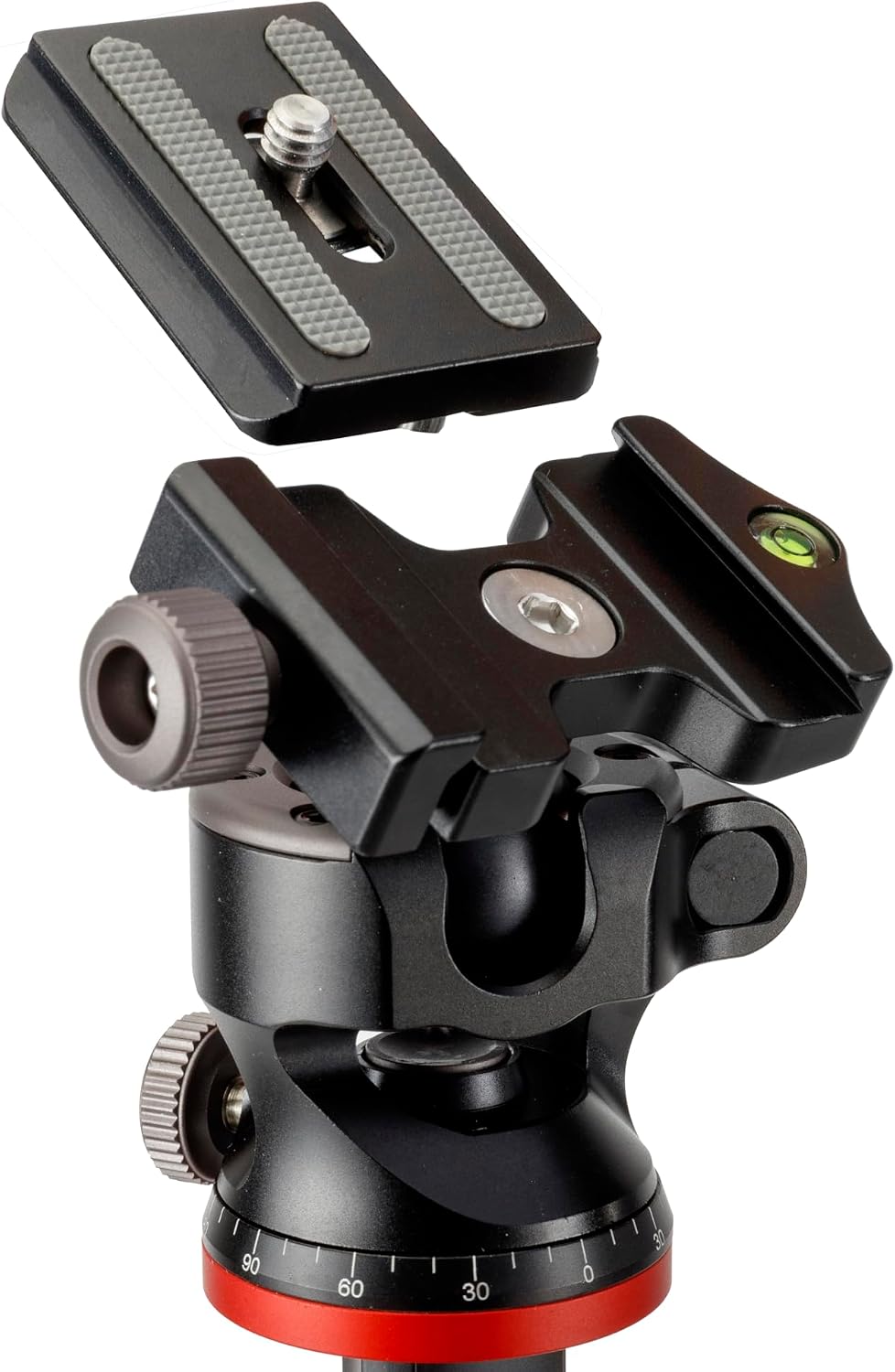
Image: A detailed view of the Oben CQL-13 ball head, showing the Arca-type quick release plate detached and the bubble level.
Operating Instructions
1. Adjusting Leg Angles
The CQL-13 features independent leg spread with three locking angles to adapt to various terrains and shooting requirements:
- Standard Angle: For general use and maximum height.
- Medium Angle (52°): Provides increased stability and a lower shooting position.
- Low Angle (82°): Ideal for macro photography or shooting from very low perspectives.
To adjust, press the angle lock tab at the top of each leg and move the leg to the desired position until it clicks securely into place.

Image: A visual representation of the Oben CQL-13 tripod's three adjustable leg angles: 21°, 52°, and 82°.
2. Adjusting Height and Center Column
The tripod's height can be adjusted by extending the leg sections and by raising or lowering the center column. To adjust the center column, loosen the center column lock knob, raise or lower the column to the desired height, and then tighten the knob firmly.
3. Reversible Center Column for Low-Angle Shots
For extreme low-angle or macro photography, the center column can be reversed:
- Loosen the center column lock knob and fully extend the center column.
- Pull the center column completely out of the tripod chassis.
- Flip the center column upside down and reinsert it into the tripod chassis from below.
- Tighten the center column lock knob to secure it. Your camera can now be mounted inverted for ground-level shooting.

Image: The Oben CQL-13 tripod demonstrating the reversible center column feature, allowing the camera to be positioned very close to the ground.
4. Using the Short Center Column
The included short center column allows for even lower camera positioning, down to 5 inches off the ground. To use it, remove the standard center column and replace it with the short center column. This is particularly useful for macro photography or achieving unique low-angle perspectives.

Image: The Oben CQL-13 tripod configured for extreme low-angle photography, utilizing the short center column.
5. Ball Head Operation
The double-action ball head provides precise control over camera positioning:
- Ball Lock Knob: Loosen this knob to adjust the camera's tilt and pan freely. Tighten it to lock the camera in position.
- Panoramic Lock Knob: This independent knob allows the ball head to rotate horizontally (pan) while keeping the tilt locked. Loosen to pan, tighten to lock.
- 90° Notch: The ball head features a 90° notch, allowing for quick and effortless switching from landscape to portrait orientation. Simply tilt the camera into the notch and secure the ball lock knob.
- Bubble Level: Use the integrated bubble level to ensure your camera is perfectly aligned with the horizon.

Image: The Oben CQL-13 tripod's ball head tilted 90 degrees into its dedicated notch, enabling quick transition to portrait orientation.
6. Using the Ballast Hook
A spring-loaded ballast hook is located at the bottom of the center column. In windy conditions or on uneven terrain, you can attach a weight (e.g., a sandbag, camera bag) to this hook to increase the tripod's stability and reduce vibrations.

Image: The Oben CQL-13 tripod with a weight bag attached to its spring-loaded ballast hook for enhanced stability.
Maintenance
Proper maintenance will extend the life and performance of your Oben CQL-13 tripod:
- Cleaning: After use, especially in dusty, sandy, or wet environments, wipe down the tripod with a soft, damp cloth. Avoid harsh chemicals.
- Leg Sections: Periodically extend all leg sections and wipe them clean to remove any grit that might interfere with smooth operation of the twist locks.
- Ball Head: Keep the ball head clean and free of dust. Do not lubricate the ball or locking mechanisms, as this can attract dirt and impair performance.
- Storage: Store the tripod in its carrying case in a dry, cool place when not in use.
- Screws and Joints: Occasionally check all screws and joints for tightness. Use the provided hex keys if any adjustments are needed.
Troubleshooting
- Problem: Tripod legs do not extend or retract smoothly.
- Solution: Ensure the twist locks are fully loosened. Clean the leg sections thoroughly to remove any dirt, sand, or debris that may be obstructing movement. Do not force the legs.
- Problem: Ball head does not hold camera securely or drifts.
- Solution: Ensure the quick release plate is securely attached to your camera and fully seated in the ball head clamp. Tighten the ball lock knob firmly. If the issue persists, check the load capacity of the tripod (13 lb) to ensure your equipment does not exceed it.
- Problem: Tripod feels unstable.
- Solution: Ensure all leg sections are fully extended and their twist locks are tightened. Verify that the leg angle locks are securely engaged at one of the three positions. On uneven ground, adjust each leg independently. Consider using the ballast hook with added weight for increased stability.
Specifications
| Feature | Detail |
|---|---|
| Model Name | CQL-13 |
| Load Capacity | 13 lb / 5.9 kg |
| Maximum Working Height | 51.1" / 129.8 cm |
| Minimum Working Height | 5" / 12.7 cm |
| Closed Length | 14.5" / 36.8 cm |
| Weight | 1.5 lb / 0.7 kg |
| Primary Material | Carbon Fiber |
| Leg Sections | 5 |
| Leg Lock Type | Twist Lock via Leg Rotation |
| Independent Leg Spread | Yes |
| Leg Positions | 3 Positions (21°, 52°, 82°) |
| Head Type | Ball Head (Double-Action) |
| Quick Release Plate | Arca-Type |
| Camera Mounting Screw | 1x 1/4"-20 Male |
| Center Column | Y-Tube, Removable, Reversible, Ballast Hook |
| Bubble Level | Yes |
Warranty Information
Oben products are designed for reliability and performance. For specific warranty terms and conditions, please refer to the warranty card included with your product or visit the official Oben website. Keep your proof of purchase for any warranty claims.
Customer Support
If you encounter any issues or have questions regarding your Oben CQL-13 tripod that are not covered in this manual, please contact Oben customer support. Contact information can typically be found on the Oben website or on the product packaging.
Related documentsCQL-13


Ask a question about this manual
Ask about setup, troubleshooting, compatibility, parts, safety, or missing instructions. Manuals+ will review the question and use this page’s manual context to help answer it.