
1. Introduction and Overview
This manual provides detailed instructions for the safe and efficient operation of your Toshiba 26L 6-in-1 Combined Microwave Oven, model MW3-AC26SFI(MG). This versatile appliance integrates multiple cooking functions, including microwave, air fry, grill, convection, combi, and steam, designed to offer a comprehensive cooking experience.

Image 1.1: The Toshiba 26L 6-in-1 Combined Microwave Oven in Morandi Grey, shown with its accompanying steamer accessory.
Key Features:
- Origin Inverter Technology: Provides linear power output and precise temperature control for consistent cooking results, reducing heating time and energy consumption. Operates quietly at 57dB.
- Chef Defrost: A professional defrost program that prevents uneven thawing, ensuring food is defrosted thoroughly without overcooking the exterior or undercooking the interior.
- Healthy Air Fry Automatic Menus: Features 7 automatic menus for healthier frying with minimal oil, utilizing powerful convection fan and heating elements for crispy results.
- Healthy Steam Cooking: Includes a dedicated steamer accessory for convenient and healthy steaming, preserving nutrients and moisture in food.
- 6-in-1 Versatility: Combines Microwave, Air Fry, Grill, Convection, Combi, and Steam functions, offering a space-saving and efficient cooking solution.
2. Important Safety Information
Please read all instructions carefully before using the appliance. Keep this manual for future reference.
- Do not attempt to operate this oven with the door open as this can result in harmful exposure to microwave energy.
- Do not place any object between the oven front face and the door or allow soil or cleaner residue to accumulate on sealing surfaces.
- Do not operate the oven if it is damaged. It is particularly important that the oven door closes properly and that there is no damage to the door (bent), hinges and latches (broken or loosened), or door seals and sealing surfaces.
- The oven should not be adjusted or repaired by anyone except properly qualified service personnel.
- Always ensure the appliance is properly grounded.
- Do not use corrosive chemicals or vapors in this appliance.
- Supervise children closely when the appliance is in use.
3. Product Components and Accessories
Your Toshiba microwave oven comes with the following components and accessories:
- Microwave Oven Unit
- Glass Turntable Plate
- Roller Ring
- Plastic Cooking Boxes (Steamer Accessory)
- Grill Rack (for grill/convection functions)
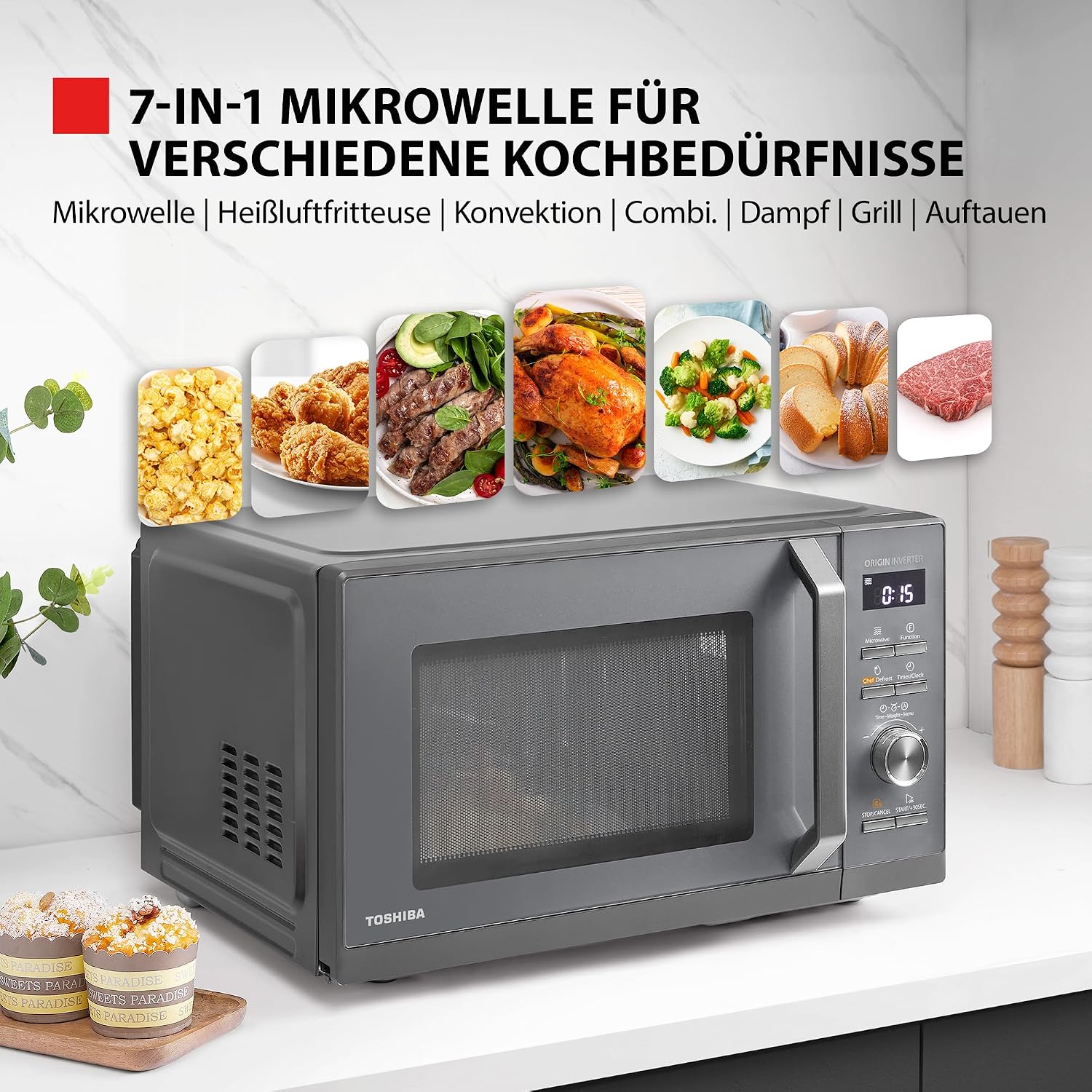
Image 3.1: The microwave oven interior showing the glass turntable and the steamer accessory in place.
4. Setup and Installation
The Toshiba MW3-AC26SFI(MG) is a freestanding microwave oven. Follow these steps for proper setup:
- Unpacking: Carefully remove the oven and all packing materials from the carton. Check the oven for any damage, such as dents or a misaligned door. Do not operate the oven if it is damaged.
- Placement: Place the oven on a flat, stable surface that can support its weight and the heaviest food item likely to be cooked in it. Ensure adequate ventilation space around the oven.
- Leave a minimum of 20 cm (7.9 inches) of space above the oven.
- Leave a minimum of 10 cm (3.9 inches) of space at the rear and sides.
- The front of the oven should be at least 8 cm (3.1 inches) from the edge of the counter to prevent tipping.
- Turntable Installation:
- Place the roller ring in the center of the oven cavity floor.
- Place the glass turntable plate on top of the roller ring, ensuring it sits securely in the center hub.
- Power Connection: Plug the power cord into a standard grounded electrical outlet. Ensure the voltage and frequency match the specifications listed on the oven's rating label.

Image 4.1: Diagram illustrating the dimensions of the Toshiba 26L microwave oven: 44.5 cm (height), 49.5 cm (width), and 29 cm (depth).
5. Operating Instructions
Your Toshiba microwave oven offers a variety of cooking modes and features. Familiarize yourself with the control panel and follow these instructions for optimal use.
5.1 Control Panel Overview
The control panel features a digital display, function buttons, a rotary knob for time/weight adjustment, and start/stop buttons.

Image 5.1: Close-up of the Toshiba microwave oven's control panel, showing the display, function buttons, and rotary dial.
5.2 Basic Microwave Cooking
- Place food in a microwave-safe container on the glass turntable.
- Close the door securely.
- Press the "Microwave" button.
- Use the rotary knob to set the desired cooking time.
- Press "START/+30SEC" to begin cooking. You can press "Microwave" again to adjust power levels if needed.
5.3 Origin Inverter Technology
The Origin Inverter technology ensures a continuous and precise power output, unlike traditional microwaves that cycle power on and off. This results in more evenly cooked food, faster heating, and reduced energy consumption. It also contributes to the oven's quiet operation (57dB).

Image 5.2: Visual representation of the Origin Inverter technology, showing even heat distribution within the microwave cavity.
5.4 Chef Defrost Function
The Chef Defrost program is designed for professional and efficient thawing. It intelligently adjusts power levels to prevent the outer layers of food from cooking while the inside remains frozen. This ensures uniform defrosting, preserving food quality.
- Place the frozen food on the turntable.
- Press the "Chef Defrost" button.
- Use the rotary knob to select the food type or weight as indicated on the display.
- Press "START/+30SEC".

Image 5.3: Graph comparing the faster and more even defrosting performance of Chef Defrost technology versus traditional defrost methods.
5.5 Healthy Air Fry Automatic Menus
Enjoy healthier versions of your favorite fried foods using the Air Fry function. The oven uses a powerful convection fan and heating elements to circulate hot air, creating a crispy texture with minimal oil.
There are 10 pre-set automatic menus for air frying. To use:
- Place food on the grill rack (if applicable for air frying) or in an air-fry safe dish.
- Press the "Function" button repeatedly until the Air Fry icon is selected, or directly select from the automatic menus.
- Use the rotary knob to select one of the 10 automatic air fry menus (e.g., A-1 Reheat, A-2 Potato, A-3 Meat, A-4 Vegetable, A-5 Fish, A-6 Pasta, A-7 Soup, A-8 Cake, A-9 Pizza, A-10 Chicken).
- Press "START/+30SEC".

Image 5.4: Display showing the 10 easy air fry preset menus, including options for various food types like potatoes, meat, fish, and chicken.
5.6 Healthy Steam Cooking with Steamer
The included steamer accessory allows for convenient and healthy steam cooking directly in your microwave. Water boils beneath the food tray, and the lid contains the moisture, ensuring food retains its nutrients and natural flavors. Ideal for vegetables and seafood.
- Fill the bottom part of the steamer with the recommended amount of water.
- Place food in the steamer basket.
- Cover with the lid and place the entire steamer on the turntable inside the oven.
- Select the "Steam" function (if available as a direct button) or use an appropriate automatic menu for steaming.
- Set cooking time and press "START/+30SEC".
5.7 6-in-1 Versatility (Microwave, Air Fry, Grill, Convection, Combi, Steam)
This appliance is designed to be a comprehensive cooking solution, combining six essential functions:
- Microwave: For rapid heating and cooking.
- Air Fry: For healthier crispy results with minimal oil.
- Grill: For browning and toasting.
- Convection: For baking and roasting with circulating hot air.
- Combi (Combination): Combines microwave with grill or convection for faster cooking with browning/crisping.
- Steam: For healthy, nutrient-preserving cooking with the steamer accessory.
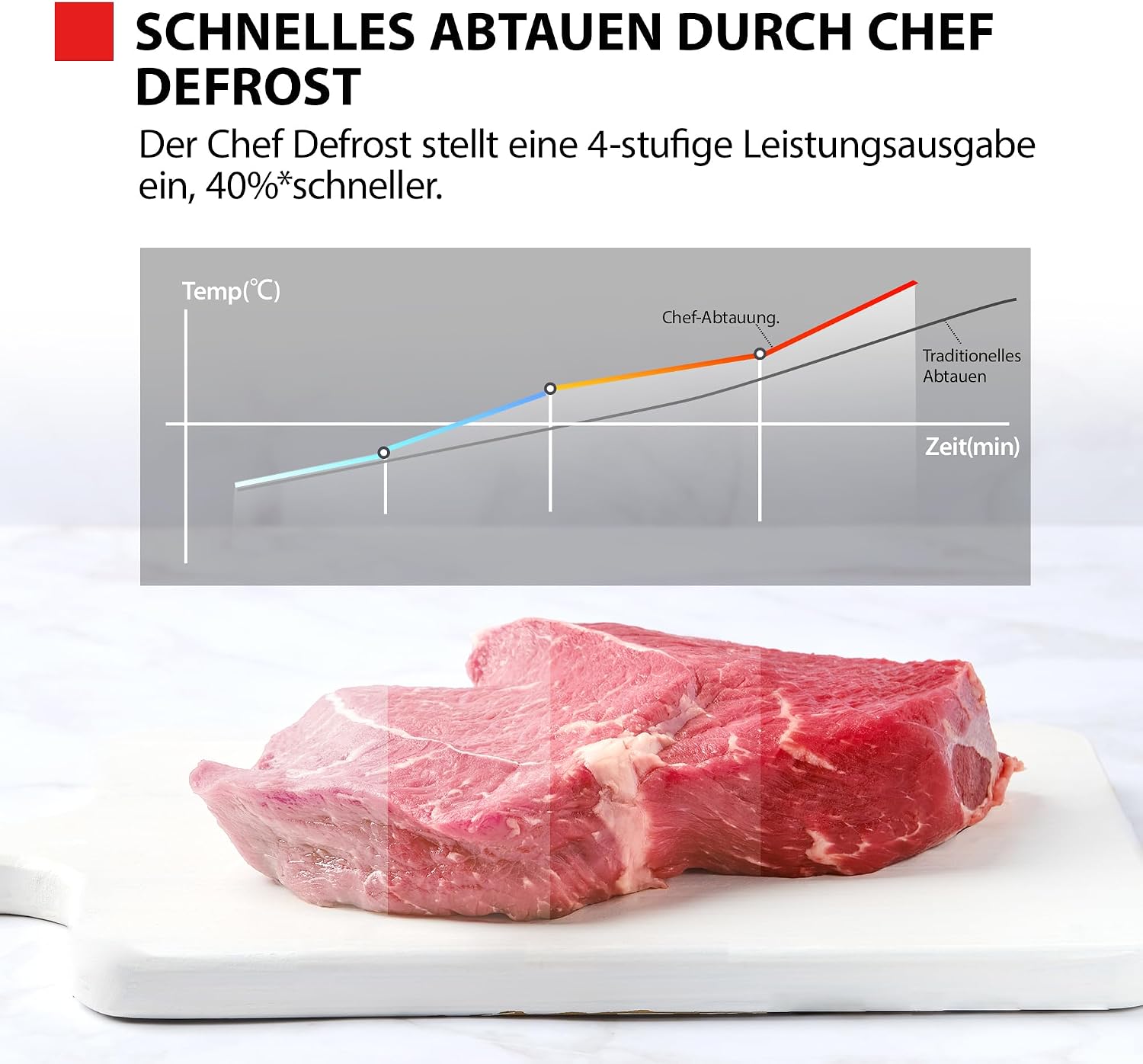
Image 5.5: Diagram illustrating the six primary cooking functions: Microwave, Convection, Grill, Defrost, Steam, and Air Fry, highlighting the ultimate versatility of the appliance.
6. Maintenance and Cleaning
Regular cleaning and maintenance will ensure the longevity and optimal performance of your microwave oven.
- Interior Cleaning: Wipe the oven cavity, door seals, and turntable support with a damp cloth after each use. For stubborn stains, use a mild detergent or a mixture of water and lemon juice. Do not use abrasive cleaners or scouring pads.
- Exterior Cleaning: Clean the exterior surfaces with a soft, damp cloth. Avoid getting water into the ventilation openings.
- Turntable and Roller Ring: The glass turntable and roller ring can be washed in warm, soapy water or in the dishwasher. Ensure they are completely dry before placing them back in the oven.
- Odor Removal: To remove odors, combine a cup of water with the juice of one lemon in a microwave-safe bowl. Microwave on high for 5 minutes, then let it sit in the oven for 10 minutes before wiping the interior.
- Power Disconnection: Always unplug the oven from the power outlet before cleaning or performing any maintenance.
7. Troubleshooting
If you encounter issues with your microwave oven, refer to the following common problems and solutions before contacting customer service.
| Problem | Possible Cause | Solution |
|---|---|---|
| Oven does not start. | Power cord not securely plugged in. Door not closed properly. Fuse blown or circuit breaker tripped. | Ensure plug is firmly in outlet. Close door securely. Check household fuse/circuit breaker. |
| Food is not heating. | Door not closed properly. Cooking time/power level not set. Incorrect cooking mode selected. | Ensure door is fully latched. Set appropriate time and power. Verify correct cooking mode (Microwave, Combi, etc.). |
| Turntable is noisy or not rotating. | Roller ring or turntable not positioned correctly. Food too large or heavy. Debris under turntable. | Reposition roller ring and turntable. Use smaller dish or divide food. Clean under the turntable. |
| Oven light not working. | Bulb needs replacement. | Contact qualified service personnel for bulb replacement. |
8. Specifications
Detailed technical specifications for the Toshiba 26L 6-in-1 Combined Microwave Oven:
- Brand: Toshiba
- Model Number: MW3-AC26SFI(MG)
- Capacity: 26 Liters
- Product Dimensions (L x W x H): 44.5 x 49.5 x 29 cm (17.5 x 19.5 x 11.4 inches)
- Weight: 14.49 kg (31.9 lbs)
- Installation Type: Freestanding
- Microwave Power: 900 Watts
- Grill Power: 1000 Watts
- Voltage: 230 Volts (AC)
- Color: Morandi Grey
- Material: Stainless Steel (interior and exterior)
- Special Features: Defrost, Grill Function, Timer, Turntable, Air Fry, Convection, Steam, Combi
- Included Components: Plastic cooking boxes (steamer), Roller Ring
- Country of Origin: China
9. Warranty and Support
For warranty information and customer support, please refer to the warranty card included with your product or visit the official Toshiba website for your region. Keep your purchase receipt as proof of purchase for warranty claims.
For technical assistance or service inquiries, please contact Toshiba customer support.


