Introduction
Thank you for choosing the EverBrite Rechargeable Underhood Work Light. This manual provides essential information for the safe and efficient use of your new work light. Please read it thoroughly before operation and retain it for future reference.
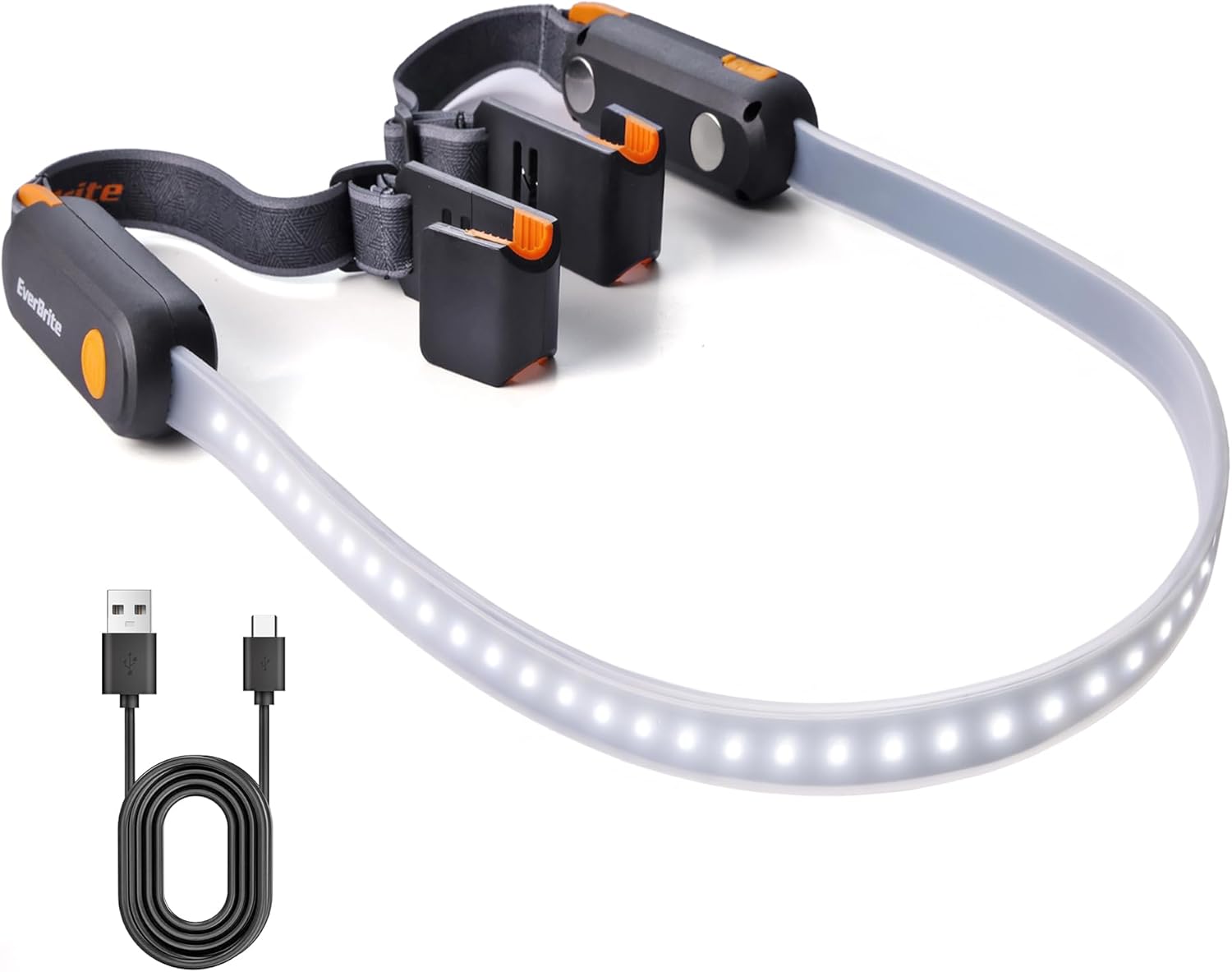
Image: The EverBrite Rechargeable Underhood Work Light, showing its flexible light strip and magnetic ends with adjustable straps.
Product Features
- Three Lighting Modes: High, Medium, and Low settings to adapt to various lighting requirements.
- USB-C Fast Charging: Equipped with two USB-C charging ports and LED indicators (red for charging, green for full charge).
- Magnetic Base Design: Integrated magnets allow secure attachment to metal surfaces for hands-free operation.
- Adjustable Elastic Strap: Durable nylon strap designed to fit vehicle hoods from 52 to 75 inches wide, providing a secure and flexible fit.
- Dual Hooks: Sturdy hooks on both ends offer additional stability and mounting options.
What's in the Box
- EverBrite Rechargeable Underhood Work Light (Model E111014AE)
- USB-C Charging Cable
- Instruction Manual

Image: Diagram showing the light strip, switch button, magnetic base, charging port, charging indicator, adjustable strap, and hook components.
Setup and Installation
- Prepare the Light: Unfold the work light. Ensure the elastic straps are properly attached to the magnetic ends.
- Position on Hood: Open the vehicle's hood. Place the magnetic ends of the light onto the metal frame of the hood. The magnets will securely hold the light in place.
- Secure with Straps: Extend the adjustable elastic straps over the hood. Hook the ends of the straps onto suitable points on the hood or vehicle frame to provide additional stability and prevent accidental dislodgement. Adjust the strap length to ensure a snug fit across the hood (compatible with hoods 52 to 75 inches wide).
- Adjust Light Direction: The flexible light strip can be bent and angled to direct illumination precisely where needed within the engine bay.

Image: The EverBrite work light installed under a car hood, illuminating the engine bay. The adjustable straps are visible.

Image: Close-up view of the hanging hooks on the EverBrite work light, designed for securing the fixture.

Image: The magnetic base of the EverBrite work light attached to a metal pegboard, demonstrating its hands-free capability.
Operating Instructions
- Power On/Off: Short press the switch button located on either end of the light to turn it ON.
- Cycle Through Modes: Once ON, short press the switch button repeatedly to cycle through the three lighting modes: High, Medium, Low, and then OFF.
- Mode Sequence: High Brightness → Medium Brightness → Low Brightness → OFF.

Image: The EverBrite work light displaying its three distinct lighting modes: Low (200LM, 14H), Medium (400LM, 6H), and High (900LM, 3.5H).
Video: An overview of the EverBrite Rechargeable Underhood Work Light, demonstrating its features and operation.
Charging Instructions
- Connect Charger: Locate the USB-C charging port on the side of the light. Open the protective cover and insert the provided USB-C cable.
- Monitor Charging Status: An LED indicator will illuminate red to show that the device is charging.
- Full Charge Indication: The LED indicator will turn green when the battery is fully charged. A full charge typically takes approximately 2 hours.
- Disconnect: Once fully charged, disconnect the USB-C cable and close the protective cover to maintain water resistance.
Caution: Do not operate the light while it is charging.

Image: Close-up of the EverBrite work light showing the USB-C charging port and the red/green LED charging indicators.
Maintenance
- Cleaning: Wipe the light with a soft, damp cloth. Do not use abrasive cleaners or solvents.
- Storage: Store the work light in a cool, dry place away from direct sunlight when not in use.
- Battery Care: To prolong battery life, charge the device fully before long-term storage and recharge every 3-6 months.
Troubleshooting
- Light Not Turning On:
- Ensure the battery is charged. Connect to a power source and check the charging indicator.
- Press the power button firmly.
- Light Not Holding Charge:
- Verify the charging cable and adapter are functioning correctly.
- Ensure the charging port is clean and free of debris.
- Magnets Not Holding Securely:
- Ensure the surface is clean and metallic.
- Use the adjustable straps and hooks for additional support, especially on uneven or painted surfaces.
Specifications
| Parameter | Value |
|---|---|
| Power Source | Lithium Ion Battery |
| Battery Capacity | 2200mAh |
| Max Brightness | 1000LM |
| Max Running Time (Low Mode) | Up to 14 hours |
| Max Running Time (High Mode) | Up to 3.5 hours |
| Weight | 10.9 ounces (310g) |
| Dimensions | 8.66 x 4.72 x 2.05 inches (1400*40*32MM) |
| Max Beam Distance | 40M |
| Charging Port | USB-C (2 ports) |
| Hood Compatibility | 52 to 75 inches wide |
Safety Information
- Do not look directly into the light source when operating on high brightness to avoid eye strain.
- Keep out of reach of children.
- Do not disassemble or modify the product.
- Avoid exposing the product to extreme temperatures or direct flame.
- Ensure the charging port cover is securely closed when not charging to maintain water resistance.
Warranty and Support
For warranty information or technical support, please refer to the contact details provided with your purchase or visit the official EverBrite website.


