
1. Introduction
Thank you for choosing the OOWOLF QC 3.0 Car Charger Adapter. This device is designed to expand your vehicle's charging capabilities, providing multiple USB ports and cigarette lighter sockets for various electronic devices. It features Quick Charge 3.0 technology for rapid charging and includes essential safety features to protect your devices and vehicle. Please read this manual thoroughly before use to ensure proper operation and safety.
2. Product Features
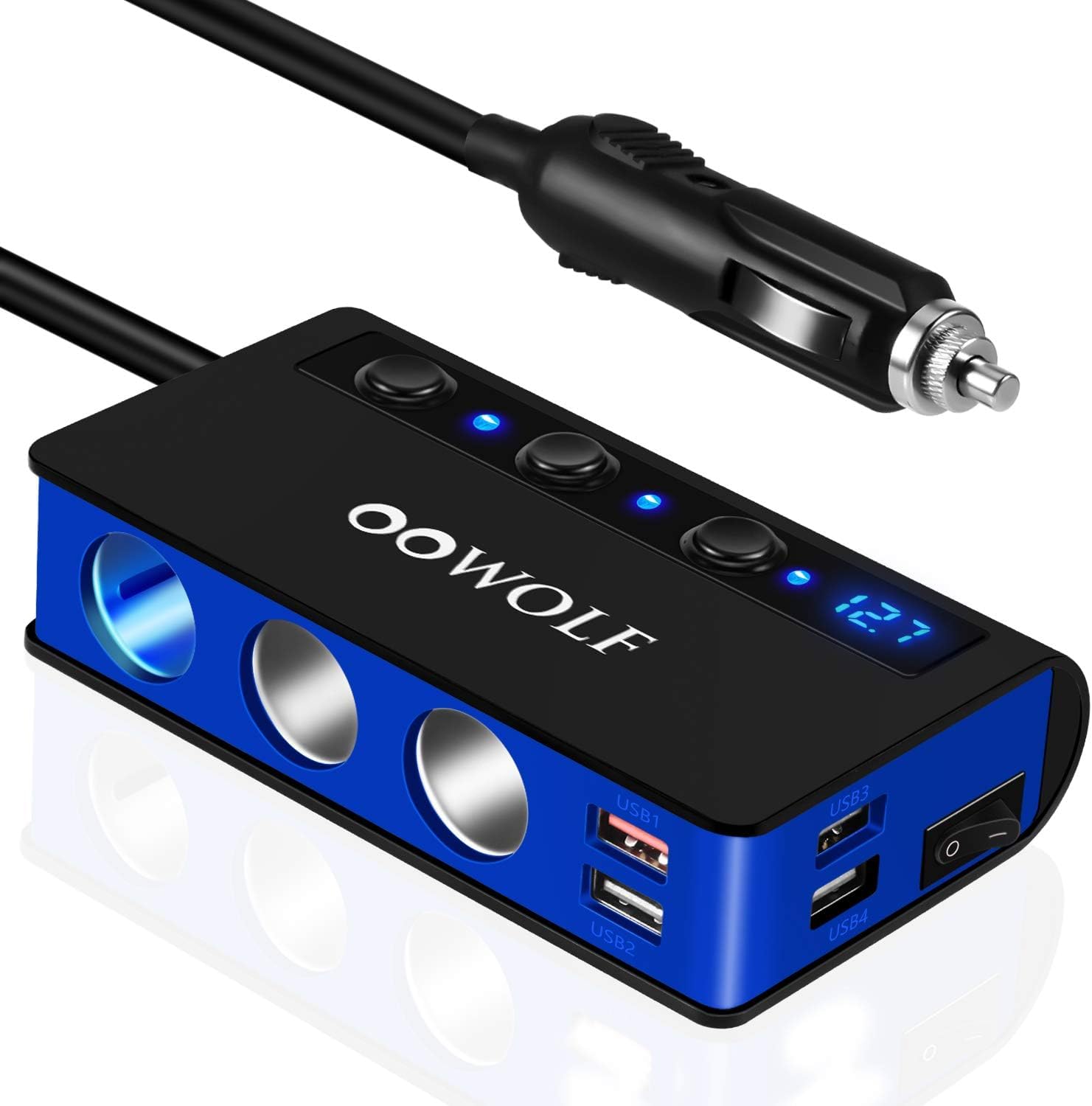
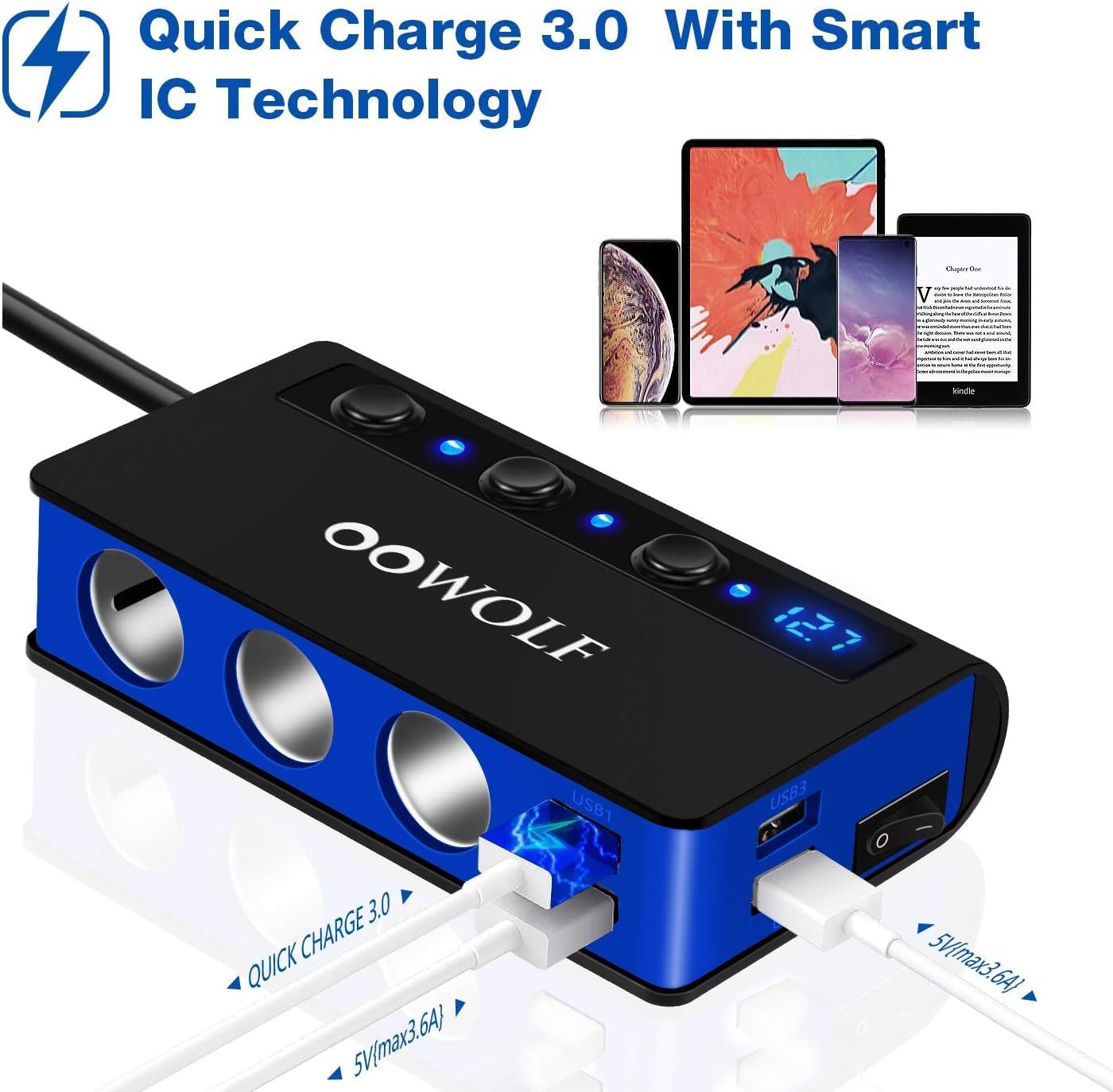
- Enhanced Charging Ports: Equipped with 4 USB ports, including one Quick Charge 3.0 port for up to 4x faster charging and three 3.6A USB-A ports.
- Triple Cigarette Lighter Sockets: Expands one car cigarette lighter socket into three 12V/24V sockets, supporting a total output of up to 180W (100W max per socket).
- Comprehensive Safety Protection: Features a built-in replaceable 10A fuse and advanced circuitry to prevent over-current, over-voltage, over-heating, and short-circuiting.
- Independent Power Switches & LED Voltmeter: Includes a master power switch for the entire unit and individual switches for each cigarette lighter socket. A blue LED display shows your car battery's real-time voltage.
- Wide Compatibility: Suitable for 12V/24V vehicles (cars, vans, trucks, buses) and compatible with a broad range of devices such as mobile phones, tablets, GPS, dash cameras, car vacuums, and seat heaters.
- Extended Cable Length: A 65cm (25.6 inch) cable allows for flexible placement and convenient access for rear-seat passengers.
3. Package Contents
Please check the package for the following items:
- 1 x OOWOLF QC 3.0 Car Charger Adapter
- 1 x USB Cable
- 2 x Spare 10A Fuses
- 1 x Instruction Manual

4. Setup and Installation
- Insert into Car Socket: Plug the OOWOLF car charger adapter's main plug firmly into your vehicle's 12V/24V cigarette lighter socket.
- Power On: Once connected, the blue LED voltmeter will illuminate, displaying your car battery's current voltage. Press the master power switch to activate the unit.
- Connect Devices: You can now connect your devices to the USB ports or plug car appliances into the 3 cigarette lighter sockets.
5. Operating Instructions
5.1 Using USB Charging Ports
- Connect your USB-powered devices (e.g., smartphones, tablets) to any of the four USB ports.
- The port labeled "QC 3.0" provides Quick Charge functionality for compatible devices.
- The other three USB ports provide standard 3.6A charging.
5.2 Using Cigarette Lighter Sockets
- Plug your 12V/24V car appliances (e.g., dash cam, GPS, car vacuum) into any of the three cigarette lighter sockets.
- Each socket has an independent power switch. Press the corresponding switch to turn the power on or off for that specific socket. This helps conserve power and extend the lifespan of your devices.

5.3 Voltage Monitoring
- The blue LED display continuously shows the real-time voltage of your car battery.
- A stable voltage reading indicates normal battery health. If the voltage drops significantly, it may indicate a low car battery or an issue with your vehicle's electrical system.

6. Safety Information and Maintenance
6.1 Safety Precautions
- Do not disassemble or modify the product.
- Keep the product away from water, fire, and extreme temperatures.
- Ensure the total power consumption of connected devices does not exceed 180W.
- Unplug the adapter when not in use or when leaving the vehicle for extended periods.
- The built-in 10A fuse protects against overloads. If the adapter stops working, the fuse may have blown.

6.2 Fuse Replacement
If the adapter ceases to function, the internal 10A fuse may need replacement. To replace the fuse:
- Unplug the adapter from the car's cigarette lighter socket.
- Unscrew the tip of the adapter's main plug.
- Carefully remove the old fuse and replace it with a new 10A fuse (two spare fuses are included in the package).
- Screw the tip back on securely.
6.3 Cleaning
Wipe the adapter with a soft, dry cloth. Do not use liquid cleaners or abrasive materials.
7. Troubleshooting
- No Power/LED Off:
- Ensure the adapter is fully inserted into the car's cigarette lighter socket.
- Check if the car's cigarette lighter socket is functional (test with another device).
- Check and replace the internal 10A fuse if blown (refer to Section 6.2).
- Ensure the master power switch on the adapter is turned ON.
- Devices Not Charging:
- For USB ports, ensure the USB cable is properly connected to both the device and the adapter.
- For cigarette lighter sockets, ensure the individual switch for that socket is turned ON.
- Verify that your device is compatible with the charging output (voltage/current).
- Check if the total power consumption of all connected devices exceeds 180W. Disconnect some devices if necessary.
- Slow Charging:
- Ensure your device supports Quick Charge 3.0 if using the QC 3.0 port.
- Use high-quality charging cables.
- Charging speed can be affected by the number of devices connected and their power requirements.
8. Specifications
| Brand | OOWOLF |
| Model Number | aa77c568-4714-4124-9081-ace088123f4e |
| Input Voltage | DC 12V / 24V |
| Total Power Output | 180W (Max) |
| Max Power per Socket | 100W |
| USB Ports | 1 x QC 3.0 Port, 3 x 3.6A USB-A Ports |
| Cigarette Lighter Sockets | 3 |
| Cable Length | 65 cm (25.6 inches) |
| Safety Features | 10A Replaceable Fuse, Over-voltage, Over-current, Over-heating, Short-circuit Protection |
| Color | Blue |
| Compatible Devices | Mobile phones, tablets, dash cams, GPS, car vacuums, seat heaters, etc. |

9. Warranty and Support
This OOWOLF product comes with a 1-year manufacturer warranty from the date of purchase. This warranty covers manufacturing defects and workmanship under normal use.
The warranty does not cover:
- Damage caused by misuse, abuse, accident, or neglect.
- Unauthorized repair or modification.
- Normal wear and tear.
For warranty claims or technical support, please contact OOWOLF customer service through the retailer where you purchased the product or visit the official OOWOLF website for contact information.