
Geloo 19-04280-STA
Geloo 19-04280-STA Running Board Controller Power Board Control Module User Manual
Brand: Geloo | Model: 19-04280-STA
1. Introduction
This manual provides comprehensive instructions for the installation, operation, and maintenance of the Geloo 19-04280-STA Running Board Controller Power Board Control Module. This module is designed as a direct replacement and upgrade for older A-04 and A-06 Amp Research power step controllers, ensuring seamless and efficient operation of your vehicle's automatic running boards.

Image 1.1: The Geloo 19-04280-STA Running Board Controller Module, a compact black electronic unit with multiple white connector ports.
2. Safety Information
Please read and understand all safety warnings and instructions before installing or operating this product. Failure to do so may result in property damage, injury, or improper function.
- Always disconnect the vehicle's battery before performing any electrical work to prevent short circuits and electrical shock.
- Ensure all connections are secure and properly insulated to prevent corrosion and electrical issues.
- Do not modify the module or its wiring. Any modifications may void the warranty and create safety hazards.
- Keep the module away from excessive heat, moisture, and corrosive substances.
- If you are unsure about any part of the installation process, consult a qualified automotive technician.
3. Package Contents
Verify that all components are present and undamaged upon opening the package.
- 1 x Geloo 19-04280-STA Running Board Controller Power Board Control Module
- 1 x Jumper (small white two-pin connector, if included for specific applications)
4. Specifications
| Feature | Detail |
|---|---|
| Model Number | 19-04280-STA |
| Replaces OEM Part Numbers | 19-04280-STA, 1904280STA |
| Color | Black |
| Material | Robust materials |
| Item Weight | Approximately 15.5 ounces (439 grams) |
| Package Dimensions | 7.48 x 4.33 x 1.96 inches (19 x 11 x 5 cm) |
| Automotive Fit Type | Vehicle Specific Fit |
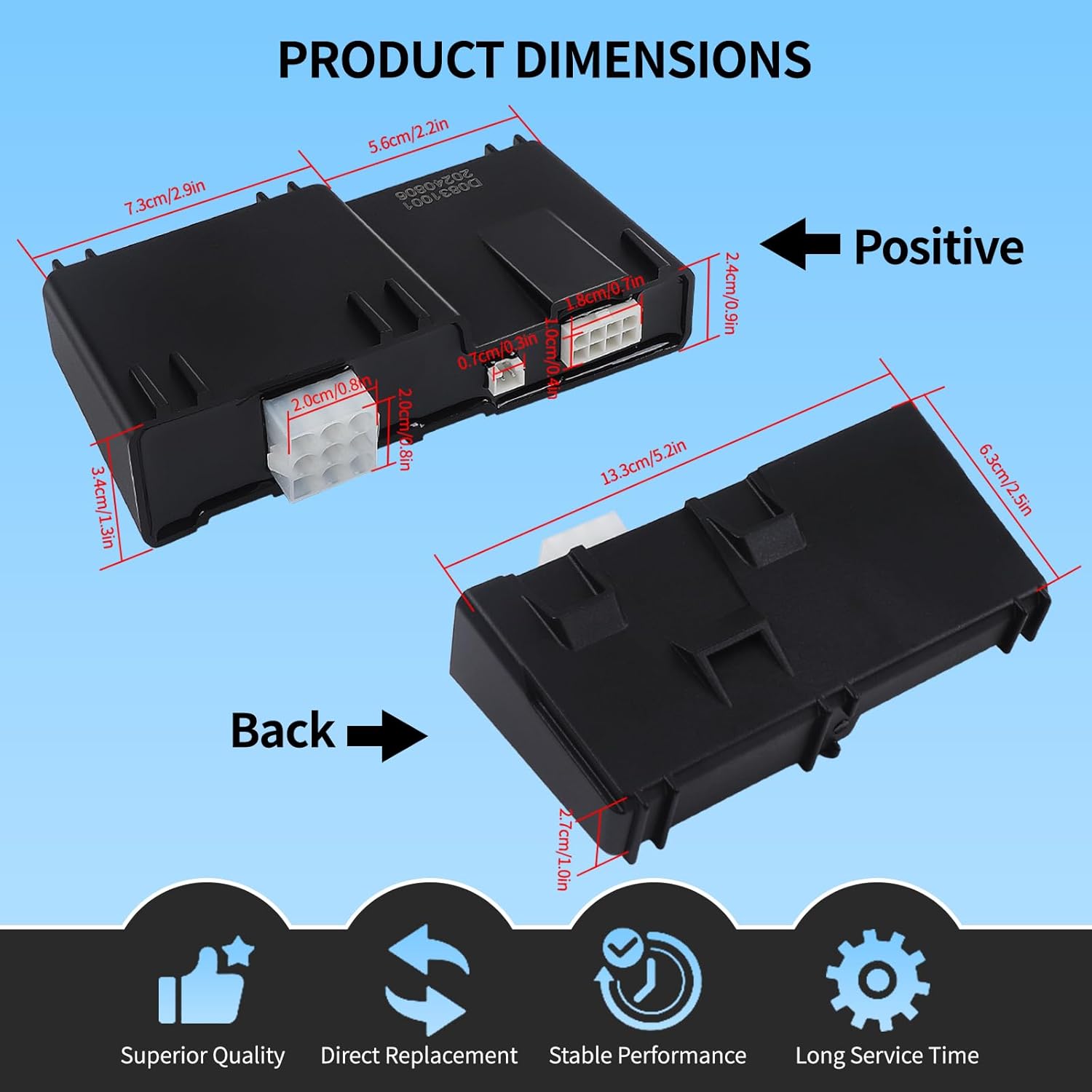
Image 4.1: Detailed dimensions of the Geloo 19-04280-STA module, showing measurements in both inches and centimeters for various sides and connector depths.
5. Compatibility and Fitment
This controller module is specifically designed for certain vehicle models and is a direct replacement for Amp Research A-04/A-06 controllers. Please verify your vehicle's compatibility before installation.
Compatible Models:
- 2015-2018 Chevrolet Silverado 2500 HD
- 2015-2018 Chevrolet Silverado 3500 HD
Not Suitable For:
- 2008 through 2012 Super Duty models
- 2002 and 2003 Super Duty models
- 2009 through 2012 F150 models

Image 5.1: Visual representation of compatible Chevrolet Silverado HD models (2015-2018) and incompatible Ford Super Duty and F150 models (various years).
6. Installation Guide
The Geloo 19-04280-STA controller module is designed for simple and convenient plug-and-play installation. Follow these steps carefully.
- Preparation: Ensure the vehicle's ignition is off and disconnect the negative terminal of the battery to prevent electrical hazards.
- Locate Existing Module: Identify the location of the existing running board controller module in your vehicle. This is typically found near the running board motors or under the vehicle's chassis.
- Disconnect Old Module: Carefully disconnect all wiring harnesses from the old controller module. Note the orientation and connection points if necessary, though the new module's connectors are designed to match.
- Connect New Module: Connect the wiring harnesses to the new Geloo 19-04280-STA module. Ensure all connections are firm and secure. The module features 9-pin, 2-pin, and 8-pin connectors. Refer to the pinout diagram below for detailed understanding.
- Secure Module: Mount the new module securely in the same location as the old one, or in a safe, dry place away from moving parts and excessive heat.
- Jumper Connection (If Applicable): If the module operates contrary to expectations after initial installation, connect the small two-pin jumper (if provided in your package) to the designated two-pin port on the module. This may be required for certain vehicle configurations or to resolve specific operational issues.
- Reconnect Battery: Reconnect the negative terminal of the vehicle's battery.
- Test Functionality: Test the running boards by opening and closing the vehicle doors to ensure they extend and retract properly.
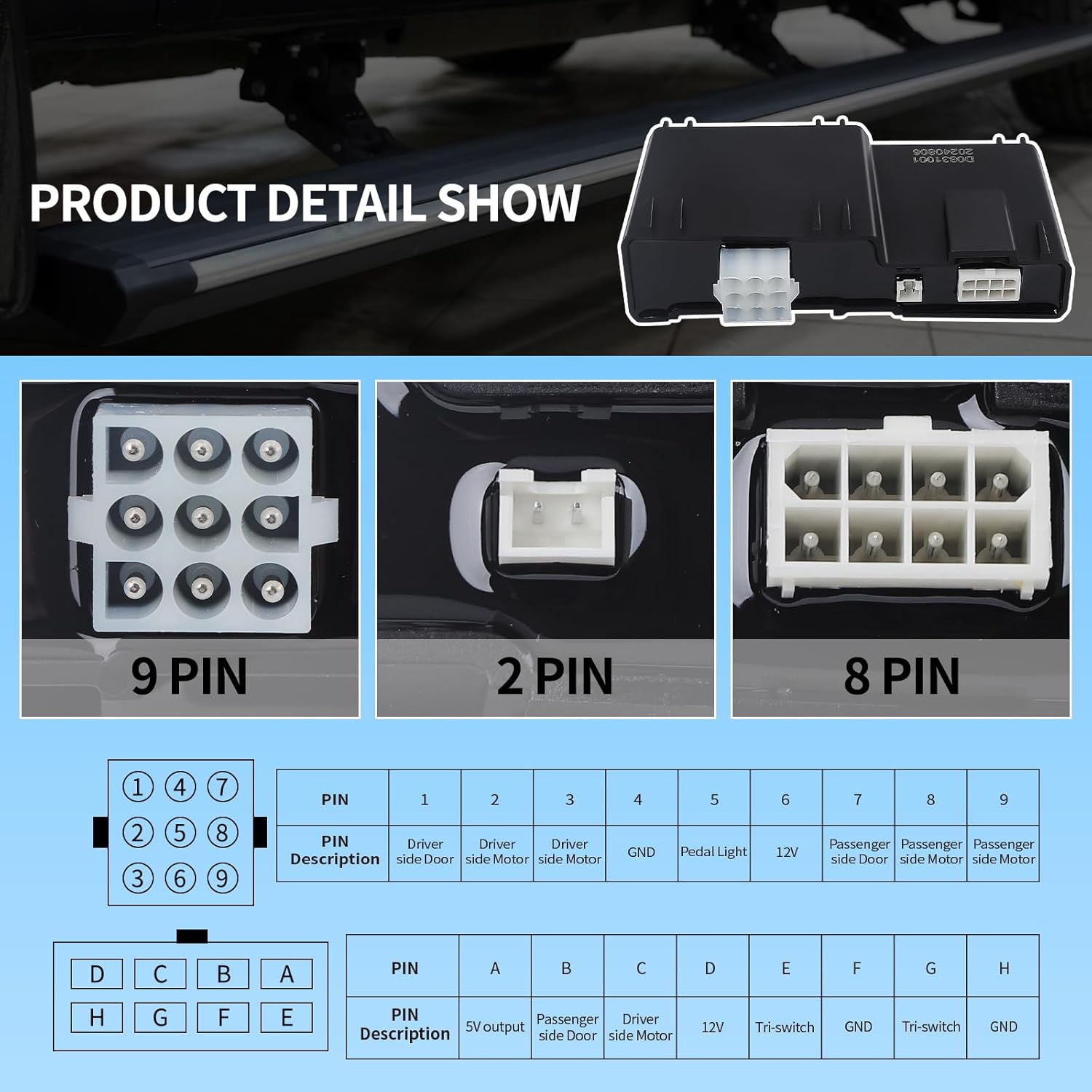
Image 6.1: Detailed view of the 9-pin, 2-pin, and 8-pin connectors, including a table describing the function of each pin (e.g., Driver side door, GND, 12V, Pedal Light, Motor).

Image 6.2: Close-up view illustrating where to connect the small two-pin jumper on the controller module, highlighted with red arrows.

Image 6.3: The Geloo 19-04280-STA controller module shown installed in a vehicle, demonstrating its compact size and integration with existing wiring.
7. Operation
Once installed, the Geloo 19-04280-STA controller module provides automatic and responsive control over your vehicle's power running boards.
- Automatic Extension: The running boards will automatically extend when a vehicle door is opened.
- Automatic Retraction: The running boards will automatically retract when all vehicle doors are closed.
- Seamless Experience: The system is designed to respond quickly, providing a convenient and comfortable experience for entering and exiting the vehicle.
8. Troubleshooting
If you encounter issues with your Geloo 19-04280-STA controller module, refer to the following common troubleshooting steps:
- Running Boards Not Extending/Retracting:
- Check all electrical connections to the module and motors for looseness or corrosion.
- Verify that the vehicle's battery is fully charged and providing adequate power.
- Ensure the module is correctly installed and the OEM part numbers match.
- If the module works contrary to expectations, ensure the two-pin jumper is connected or disconnected as per the installation instructions (Section 6, Step 6).
- Intermittent Operation:
- Inspect wiring for any signs of damage, pinching, or fraying.
- Check for any obstructions that might be preventing the running boards from moving freely.
- Module Not Powering On:
- Confirm that the vehicle's battery is connected and functional.
- Check the vehicle's fuses related to the running board system.
If problems persist after following these steps, contact customer support for further assistance.
9. Maintenance
The Geloo 19-04280-STA controller module is designed for long-term, maintenance-free operation. However, periodic checks can help ensure its longevity and optimal performance:
- Visual Inspection: Periodically inspect the module and its wiring for any signs of physical damage, corrosion, or loose connections.
- Cleanliness: Keep the module free from excessive dirt, dust, and moisture. Use a dry, soft cloth for cleaning.
- Running Board Mechanism: Ensure the running board mechanisms themselves are clean and lubricated according to their manufacturer's recommendations to prevent strain on the control module.
10. Warranty and Support
Geloo stands behind the quality of its products. For specific warranty details, please refer to the warranty information provided with your purchase or contact Geloo customer support directly. Keep your proof of purchase for warranty claims.
For technical support, troubleshooting assistance, or warranty inquiries, please contact Geloo customer service through the retailer where the product was purchased or visit the official Geloo website.
Contact Information:
- Website: Visit the Geloo Store on Amazon
- Email/Phone: Refer to your product packaging or the Geloo website for the most current contact details.
Related Documents - 19-04280-STA
 |
Ventilation Unit Service Parts and Model Compatibility This document lists service parts for ventilation units and their compatibility with various ventilation unit models. It details part numbers and indicates which models each part is compatible with, along with important information regarding the use of genuine replacement parts for optimal performance and safety. |
 |
SMC Modular F.R.L. Units Series AC Explore SMC's Modular F.R.L. Units Series AC, featuring enhanced visibility, energy-saving regulators, easy element replacement, and reduced maintenance space. Discover a comprehensive range of air preparation components for industrial automation, including air filters, regulators, lubricators, and separators. |
 |
Eco Battery Gen2 Lithium Batteries User Manual User manual for Eco Battery Gen2 Lithium Batteries, covering installation, use, care, troubleshooting, and technical specifications. |
 |
Royal Gourmet SE2805 Electric Smoker Parts List and Assembly Instructions Detailed parts list, hardware list, and step-by-step assembly instructions for the Royal Gourmet SE2805 electric smoker, including part numbers, quantities, and visual descriptions of assembly steps. |
 |
Barndo Kit Co Architectural Plan Set - Building Designs Detailed architectural plan set from Barndo Kit Co, featuring floor plans, elevations, foundation, framing, and construction details. Compliant with IRC 2021, these plans guide builders and homeowners through the construction process, emphasizing site-specific verification and local code adherence. |
 |
Operating Instructions for Miele Injector Modules A 620, A 621, and A 622 Comprehensive operating instructions for the Miele A 620, A 621, and A 622 injector modules designed for the automated reprocessing of laboratory glassware in Miele washer-disinfectors. |
Ask a question about this manual
Ask about setup, troubleshooting, compatibility, parts, safety, or missing instructions. Manuals+ will review the question and use this page’s manual context to help answer it.