
OKAI ES52 Zippy Pro
OKAI ES52 Zippy Pro Electric Scooter User Manual
Model: ES52 Zippy Pro | Brand: OKAI
Introduction
This user manual provides essential information for the safe and efficient operation, assembly, maintenance, and troubleshooting of your OKAI ES52 Zippy Pro Electric Scooter. Please read this manual thoroughly before using the scooter to ensure proper function and to prevent injury or damage.
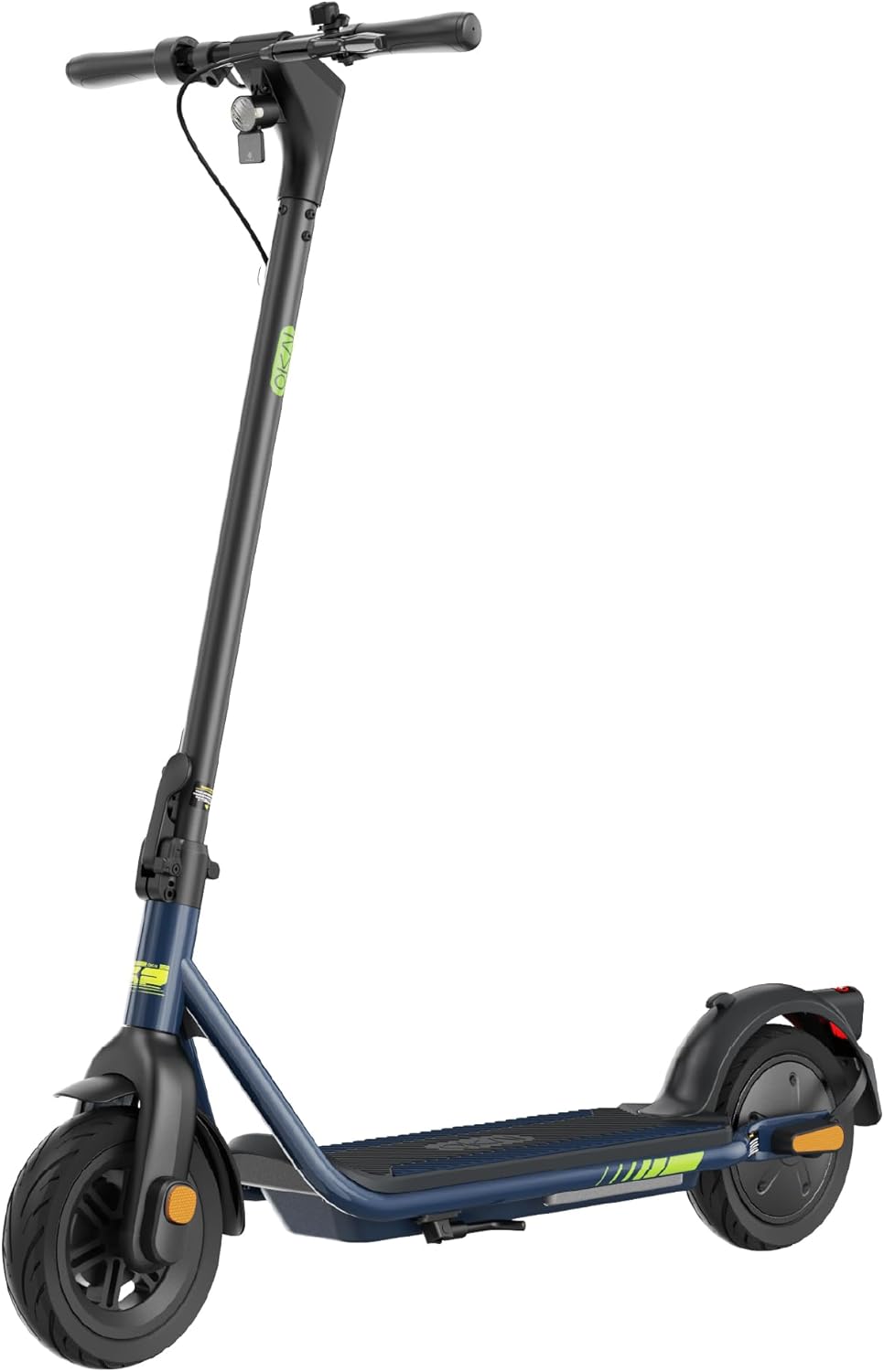
Figure 1: OKAI ES52 Zippy Pro Electric Scooter, showcasing its sleek design and foldable stem.
Safety Guidelines
Your safety is paramount. Adhere to all local traffic laws and regulations. Always wear a helmet and appropriate safety gear when riding. This scooter is designed for adult use and has a maximum weight limit of 220 pounds.
- UL 2272 Certified: The OKAI ES52 Zippy Pro electric scooter has passed UL 2272 certification, ensuring electrical safety.
- Braking System: Utilize the dual braking system, which includes a mechanical front brake and an electromagnetic rear brake, for effective stopping power.
- Environmental Conditions: Avoid riding in heavy rain, snow, or on icy surfaces. The pneumatic tires provide good traction but caution is advised in adverse conditions.
- Pre-Ride Check: Before each ride, inspect the tires for proper inflation, check brake functionality, and ensure all quick-release mechanisms are securely fastened.

Figure 2: The OKAI ES52 Zippy Pro Electric Scooter on a beach path, highlighting its UL Listed certification for safety standards.
Product Components
Familiarize yourself with the key components of your OKAI ES52 Zippy Pro scooter:
- Headlight: Bright LED light for improved visibility during night rides.
- Tail Light: High-visibility rear light for enhanced safety.
- Deck-side LED Lighting: Integrated LED lights along the deck for additional visibility and aesthetic appeal.
- 8.5-inch Pneumatic Tires: Air-filled tires designed to absorb shocks and provide a smoother ride over various terrains.
- Braking System: Consists of a mechanical drum brake on the front wheel and an E-brake for the rear wheel.
- Ring Bell: Manual bell for alerting pedestrians and other riders.
- High-Res LCD: Digital display providing real-time information such as speed, battery level, and riding mode.
- Folding Mechanism: Allows for compact storage and portability.

Figure 3: Detailed view of the scooter's lighting features, including the headlight, tail light, and deck-side LED illumination.
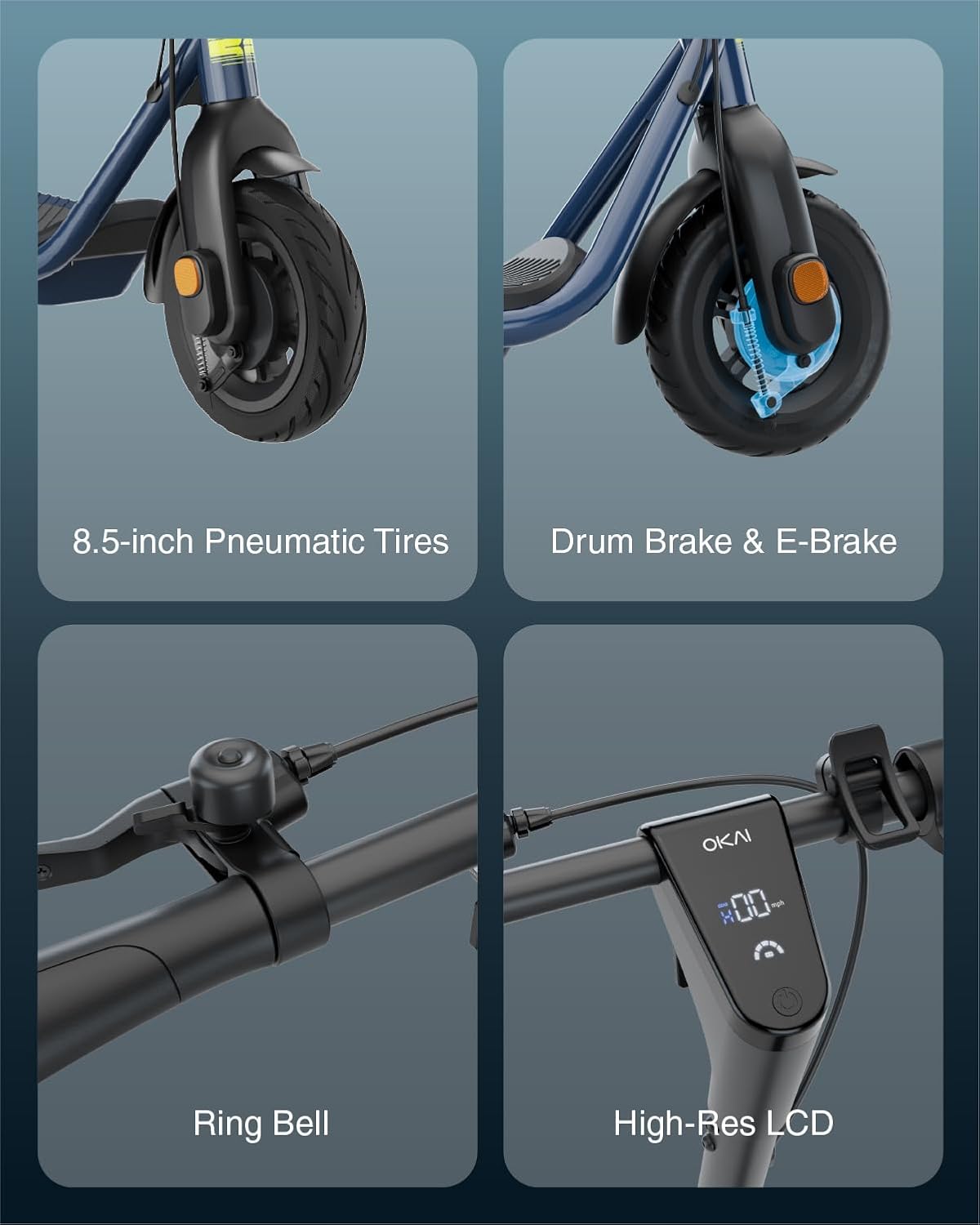
Figure 4: Key functional components including the 8.5-inch pneumatic tires, dual braking system, handlebar-mounted bell, and the high-resolution LCD display.
Assembly & First Use
The OKAI ES52 Zippy Pro scooter comes largely pre-assembled. Follow these steps for initial setup:
- Unfolding: Carefully unfold the scooter stem until it locks securely into place. Ensure the locking mechanism is fully engaged.
- Handlebar Attachment: If detached, attach the handlebars to the stem and tighten any securing screws using the provided tool kit.
- Initial Charge: Before first use, fully charge the scooter's battery. Connect the charger to the charging port and plug it into a standard electrical outlet. The charging time is approximately 6 hours.
- Tire Pressure: Check the pressure of both pneumatic tires and inflate to the recommended PSI if necessary.
- Brake Check: Test both the front mechanical brake and the rear E-brake to ensure they are functioning correctly.
Included components in the package are the scooter, user manual, charger, and a basic tool kit for assembly.
Operation
Operating your OKAI ES52 Zippy Pro scooter is straightforward:
- Power On/Off: Press and hold the power button on the display to turn the scooter on or off.
- Speed Modes: The scooter features 3 speed modes:
- Mode 1: Approximately 3 mph
- Mode 2: Approximately 9 mph
- Mode 3: Approximately 15.5 mph (Maximum Speed)
- Acceleration: Use the thumb throttle to control your speed. Apply gentle pressure for smooth acceleration.
- Braking: Apply the brake levers to slow down or stop. Use both brakes simultaneously for optimal stopping performance.
- Range: The scooter can achieve a maximum distance range of approximately 18.6 miles on a single charge when ridden at 9 mph. Actual range may vary based on terrain, rider weight, and riding style.
- Folding for Storage: To fold the scooter, disengage the locking mechanism on the stem and fold it down towards the deck until it clicks into place.

Figure 5: The scooter positioned on a boardwalk, illustrating its key performance metrics: up to 18.6 miles range, 15.5 mph max speed, and 600W peak motor power.
Maintenance and Care
Regular maintenance ensures the longevity and performance of your scooter:
- Cleaning: Wipe the scooter with a damp cloth. Do not use high-pressure water jets or immerse the scooter in water.
- Tire Maintenance: Regularly check tire pressure and inflate as needed. Inspect tires for wear and tear.
- Brake Adjustment: Periodically check brake pads and cables for wear. Adjust brakes if they feel loose or unresponsive.
- Battery Care:
- Charge the battery fully before long periods of storage.
- Store the scooter in a cool, dry place.
- Avoid completely draining the battery before recharging.
- Fastener Check: Periodically check all screws and bolts to ensure they are tight.
Troubleshooting
This section addresses common issues you might encounter:
| Problem | Possible Cause | Solution |
|---|---|---|
| Scooter does not power on. | Low battery; loose connections. | Charge the battery fully. Check all cable connections. |
| Reduced range or speed. | Low tire pressure; heavy load; riding uphill; cold weather. | Inflate tires to recommended pressure. Reduce load. Ride on flat terrain. Battery performance may decrease in cold. |
| Brakes feel weak. | Brake pads worn; cable loose. | Inspect brake pads for wear and replace if necessary. Adjust brake cable tension. |
| Unusual noises during operation. | Loose components; debris in wheels. | Check all fasteners for tightness. Inspect wheels and motor area for foreign objects. |
If the issue persists after attempting these solutions, please contact customer support.
Technical Specifications
| Feature | Detail |
|---|---|
| Brand | OKAI |
| Model Name | ES52 |
| Color | Blue |
| Age Range (Description) | Adult |
| Special Feature | Dual Braking System, Non Slip Deck, Lights, Foldable, Rechargeable |
| Weight Limit | 220 Pounds |
| Product Dimensions (LxWxH) | 46.6"L x 19.7"W x 45.3"H |
| Number of Wheels | 2 |
| Wheel Material | Pneumatic tire |
| Frame Material | Aluminum |
| Item Weight | 35.8 Pounds |
| Handlebar Type | Fixed |
| Wheel Size | 8.5 Inches |
| Wheel Type | Pneumatic |
| Suspension Type | Rigid |
| Grip Type | Ergonomic |
| Brake Style | Front: mechanical drum brake, Rear: electromagnetic brake |
| Charging Time | 6 Hours |
| Recommended Uses For Product | Commuting |
| Maximum Distance Range | 18.6 Miles |
| Manufacturer | Zhejiang Okai Vehicle Co., Ltd. |
| UPC | 810100340353 |
| Included Components | Manual, Charger, Tool kit |

Figure 6: Dimensional diagram of the OKAI ES52 Zippy Pro Electric Scooter, indicating its length, width, and height.
Warranty Information
The OKAI ES52 Zippy Pro Electric Scooter comes with a Limited Warranty provided by the manufacturer, Zhejiang Okai Vehicle Co., Ltd. For specific terms, conditions, and duration of the warranty, please refer to the warranty card included with your product or contact OKAI customer support.
Customer Support
For further assistance, technical support, or inquiries regarding your OKAI ES52 Zippy Pro Electric Scooter, please visit the official OKAI store or contact their customer service department.
Official OKAI Store: OKAI Amazon Store
Related documentsES52 Zippy Pro


Ask a question about this manual
Ask about setup, troubleshooting, compatibility, parts, safety, or missing instructions. Manuals+ will review the question and use this page’s manual context to help answer it.