
Introduction
This manual provides essential information for setting up, operating, maintaining, and troubleshooting your Alphawolf APad2 8-inch Android tablet. Please read this manual thoroughly to ensure proper use and to maximize your device's performance and longevity.

Image: Alphawolf APad2 Tablet, showcasing its sleek design and key features.
Setup
Package Contents
Before starting, ensure all items are present in the package:
- Alphawolf APad2 Tablet
- Dedicated Screen Protector Film (pre-applied or included separately)
- USB Type-C Cable
- Charging Adapter (5V/2A)
- SIM Card Pin
- User Manual (this document)

Image: Diagram illustrating the tablet's ports (card slot, volume buttons, reset, power button, Type-C charging port, headphone jack, front camera, back camera) and the included package contents.
Charging the Tablet
Before first use, fully charge the tablet. Connect the provided USB Type-C cable to the tablet's charging port and the charging adapter to a power outlet. The charging port is located on the side of the device.
Inserting SIM and MicroSD Cards
- Locate the SIM/MicroSD card tray on the side of the tablet.
- Insert the SIM card pin into the small hole next to the tray to eject it.
- Carefully place your Nano SIM card(s) and/or MicroSD card (up to 2TB, sold separately) into the designated slots on the tray. Ensure correct orientation.
- Gently push the tray back into the tablet until it clicks into place.

Image: Close-up of the Alphawolf APad2 tablet showing the SIM card tray with two Nano SIM cards and a MicroSD card inserted, indicating 4G LTE support.
Initial Power On
Press and hold the power button until the Alphawolf logo appears. Follow the on-screen instructions to complete the initial setup, including language selection, Wi-Fi connection, and Google account setup.
Operating Instructions
Display and Visual Experience
The APad2 features an 8.4-inch 2.5K FHD IPS display with a resolution of 2560x1600 pixels. This provides a clear and vibrant visual experience for various content, including videos, games, and e-books. The tablet supports Widevine L1, enabling high-definition streaming from platforms like Netflix, Amazon Prime Video, and Disney+.

Image: The Alphawolf APad2 display showing high-resolution content, highlighting 2.5K IPS and Widevine L1 support for streaming services.
Performance and Storage
Powered by the MediaTek Helio G99 octa-core processor, the APad2 delivers efficient performance for multitasking and demanding applications. It comes with 16GB of RAM (8GB physical + 8GB virtual expansion) and 256GB of internal storage, expandable up to 2TB via a MicroSD card (sold separately).

Image: Visual representation of the Alphawolf APad2's 16GB RAM (8GB+8GB virtual) and 256GB internal storage, with an arrow indicating 2TB MicroSD expansion capability.
Connectivity
- 4G LTE Communication: The tablet supports 4G LTE, allowing you to make calls and send SMS messages with a compatible SIM card.
- Wi-Fi: Enjoy stable and fast internet with 2.4G and 5G Wi-Fi support.
- Bluetooth 5.2: Connect wireless accessories such as headphones, speakers, and keyboards.
Camera and Face Recognition
The APad2 is equipped with an 8MP front camera and a 16MP rear camera, suitable for capturing photos, video calls, and online meetings. For enhanced security and convenience, the tablet includes face recognition unlock functionality.
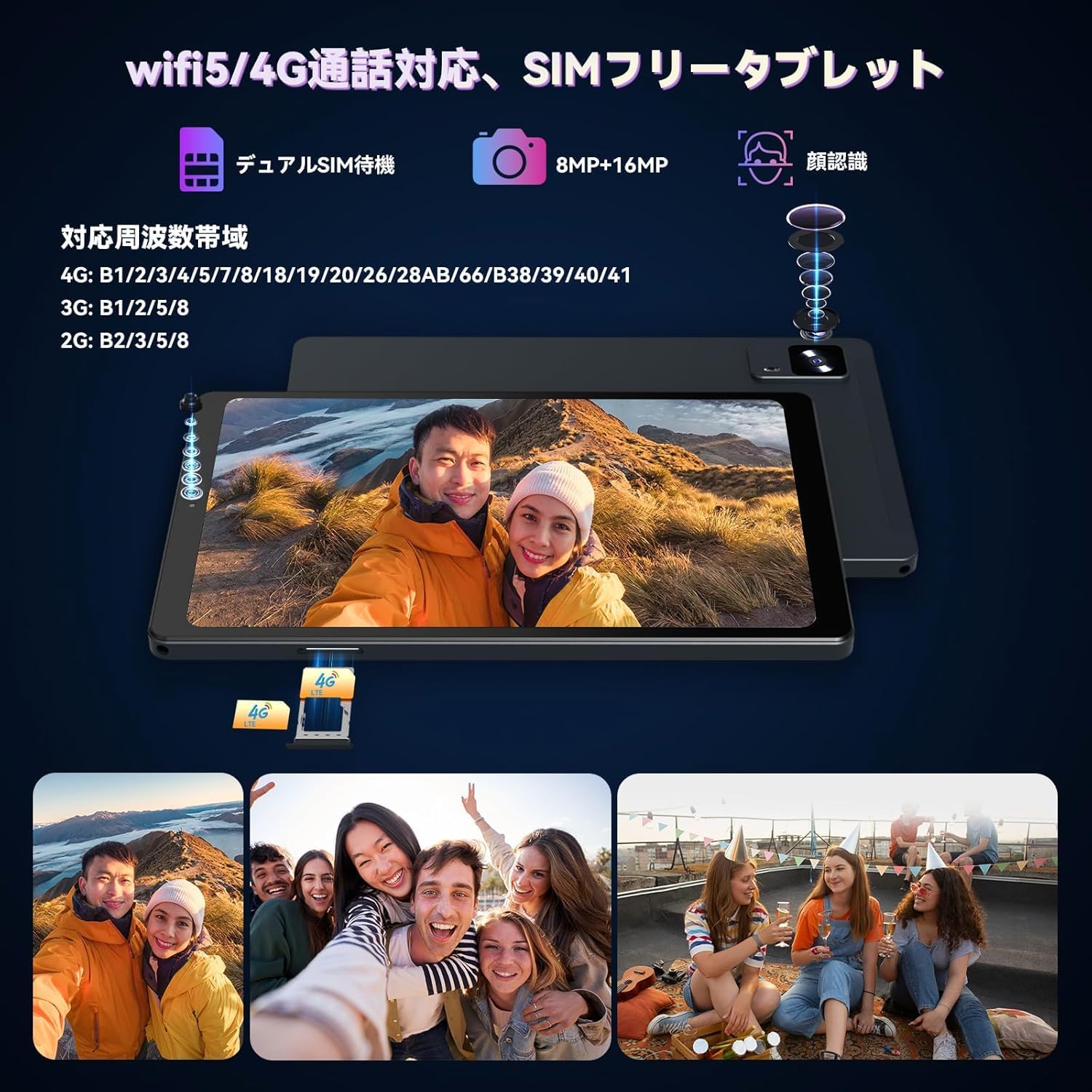
Image: The Alphawolf APad2 tablet showcasing its 8MP front camera and 16MP rear camera, along with an illustration of the face recognition feature in use.
Sensors and Navigation
The tablet integrates a high-precision 6-axis gyroscope (3-axis accelerometer and 3-axis gyroscope) for accurate motion sensing, enhancing gaming and navigation experiences. It also features GPS and an electronic compass for precise location services.

Image: A user playing a racing game on the Alphawolf APad2, illustrating the 6-axis gyroscope for enhanced control and haptic feedback.
Android 15 Features
Running on the latest Android 15 OS, the APad2 offers an optimized user experience with enhanced privacy protection, improved performance, an upgraded user interface, and advanced AI features. It also includes features like screen split for multitasking and wireless projection.

Image: The Alphawolf APad2 displaying various Android 15 features, including screen split, one-handed hold, and three-finger screenshot gesture.
Maintenance
Battery Care and Charging
The tablet is equipped with a 6500mAh lithium-ion battery, providing approximately 10 hours of usage. To ensure optimal battery life:
- Always use the Alphawolf original charging adapter (5V/2A) and USB Type-C cable.
- Avoid using the tablet for extended periods while it is charging, as this can generate excessive heat and potentially affect performance or battery health.
- Do not expose the tablet to extreme temperatures.

Image: The Alphawolf APad2 tablet connected to a Type-C charger, illustrating the 6500mAh battery and charging process.
General Care
- Keep the tablet clean using a soft, dry cloth.
- Avoid dropping the device or exposing it to strong impacts.
- Protect the screen with the included screen protector or a compatible case.
Troubleshooting
If you encounter any issues with your Alphawolf APad2 tablet, please refer to the following common solutions or contact customer support.
Common Issues and Solutions
- Device not powering on: Ensure the battery is charged. Connect the charger and wait a few minutes before attempting to power on again.
- Screen unresponsive: Try restarting the tablet by holding the power button. If unresponsive, use the reset pinhole (refer to the package contents diagram for location) with the provided SIM card pin.
- GPS Accuracy: Some users have reported varying GPS accuracy. Ensure you are in an open area with clear sky view for optimal satellite reception. If issues persist, verify GPS settings and consider contacting support.
- Speaker Volume: The speaker volume may be perceived as loud even at low settings. Adjust the volume to a comfortable level using the physical volume buttons.
- Slow Charging: The Alphawolf APad2 does not support fast charging. Charging times may vary. Ensure you are using the provided 5V/2A charger and cable.
- Connectivity Issues (Wi-Fi/4G LTE): Check if Wi-Fi is enabled and you are connected to the correct network. For 4G LTE, ensure your SIM card is properly inserted, activated, and your APN settings are correct.
For issues not listed here or if the problem persists, please contact Alphawolf customer support.
Specifications
| Feature | Detail |
|---|---|
| Brand | Alphawolf |
| Model | APad2 |
| Display Size | 8.4 inches |
| Display Resolution | 2560x1600 pixels (2.5K FHD IPS) |
| Processor | MediaTek Helio G99 Octa-core (2.0, 2.2 GHz) |
| GPU | Mali-G57 |
| RAM | 16GB (8GB physical + 8GB virtual) |
| Internal Storage | 256GB |
| Expandable Storage | Up to 2TB via MicroSD card (sold separately) |
| Operating System | Android 15 |
| Battery Capacity | 6500mAh Lithium-ion |
| Battery Life | Approximately 10 hours |
| Front Camera | 8MP |
| Rear Camera | 16MP |
| Connectivity | 4G LTE, Wi-Fi (802.11a/b/g/n/ac), Bluetooth 5.2 |
| Sensors | 6-axis Gyroscope, GPS, Electronic Compass |
| Ports | USB Type-C, 3.5mm Headphone Jack |
| Dimensions | 21.8 x 13.8 x 4.9 cm |
| Weight | 680 g |
| Other Features | Widevine L1, GMS Certified, Face Recognition |
Warranty and Support
Alphawolf is committed to providing excellent customer service. Your Alphawolf APad2 tablet comes with a 1-year quality guarantee from the date of purchase.
Warranty Coverage
In the event of initial defects or any product malfunctions during normal use within the warranty period, Alphawolf offers free repair or exchange services.
Customer Support and Contact Information
If you have any questions, concerns, or require assistance, please do not hesitate to contact us. We have a dedicated repair center in Tokyo to provide prompt after-sales service.
Contact Methods:
- Via Amazon: Go to "Your Account" → "Order History" → Select the relevant order → "Order Details" → "Seller" → "Ask a Question".
- Alphawolf Official LINE ID: @915qjdmf
- Email: service@alphawolf.cc

Image: An illustration depicting customer support services, including contact methods and warranty information.