
radtel RT-590 PLUS
Radtel RT-590 Plus Dual Band Ham Radio User Manual
Comprehensive guide for operating and maintaining your Radtel RT-590 Plus handheld radio.
1. Introduction to the Radtel RT-590 Plus
The Radtel RT-590 Plus is a versatile dual-band handheld radio designed for various communication needs, including amateur radio, air band reception, and NOAA weather alerts. It features a robust design, multiple charging options, and advanced functions like one-key frequency copy and VOX transmission.

Figure 1: Radtel RT-590 Plus with all included accessories, including the radio body, battery, antenna, belt clip, desktop charger, handstrap, programming cable, USB-C cable, and earpiece.
2. Setup
2.1 Package Contents
Verify that all items are present in your package:
- RT-590 Plus Radio Body (x1)
- Li-ion Battery Pack (x1)
- Dual Band Antenna (x1)
- Belt Clip (x1)
- English User Manual (x1)
- Desktop Charger (x1)
- Handstrap (x1)
- Programming Cable (x1)
- USB-C Cable (x1)
- Earpiece (x1)
2.2 Battery Installation and Charging
Insert the Li-ion battery pack into the compartment on the back of the radio until it clicks securely into place. Ensure proper alignment to avoid damage.
The RT-590 Plus supports multiple charging methods:
- Desktop Charger: Place the radio with the battery installed into the desktop charging cradle. The indicator light on the charger will show charging status.
- USB-C Charging: For emergency charging, connect the provided USB-C cable to the Type-C port on the side of the radio and to a compatible USB power source (e.g., wall adapter, power bank, computer USB port).

Figure 2: The USB-C port on the side of the radio for direct charging.

Figure 3: The radio can be charged via its desktop cradle or directly via USB-C from various sources like a notebook, power bank, or vehicle charger.
2.3 Antenna Attachment
Screw the dual-band antenna clockwise onto the antenna connector at the top of the radio until it is finger-tight. Do not overtighten.
2.4 Belt Clip Installation
Attach the belt clip to the designated slot on the back of the radio for convenient carrying.
3. Operating Instructions
3.1 Power On/Off
To power on the radio, rotate the Volume/Power Knob clockwise until you hear a click. To power off, rotate it counter-clockwise until it clicks off.
3.2 Frequency Range and Band Selection
The RT-590 Plus operates across a wide range of frequencies:
- Transmit/Receive (TX/RX): 144-148 MHz (VHF) and 420-450 MHz (UHF)
- Receive Only (RX): 136-600 MHz
- Air Band Receive: 108-136 MHz (AM)
- FM Radio: 67-108 MHz
Use the BAND button (key 1) to switch between the available frequency bands.

Figure 4: Visual representation of the RT-590 Plus's extensive frequency coverage.

Figure 5: The radio's capability for aviation reception (AM: 108-136 MHz RX).
3.3 Channel Mode and Frequency Mode
The radio can operate in two primary modes: Channel Mode (MR) and Frequency Mode (VFO).
- Channel Mode (MR): Allows you to select pre-programmed channels.
- Frequency Mode (VFO): Allows direct input of frequencies for manual tuning.
Press the VFO/MR button (key 3) to toggle between these modes.
Video 1: Demonstrates how to switch between channel mode and frequency mode on the Radtel RT-590 Plus.
3.4 One-Key Frequency Copy (Frequency Detective)
This feature allows the RT-590 Plus to quickly detect and copy the frequency and CTCSS/DCS tone from another radio within 1 meter, enabling immediate communication without manual programming.
To use this function, activate the "Frequency Detective" mode on your RT-590 Plus and place it near the transmitting radio. The radio will scan and display the detected frequency and tone, which can then be saved to a channel.
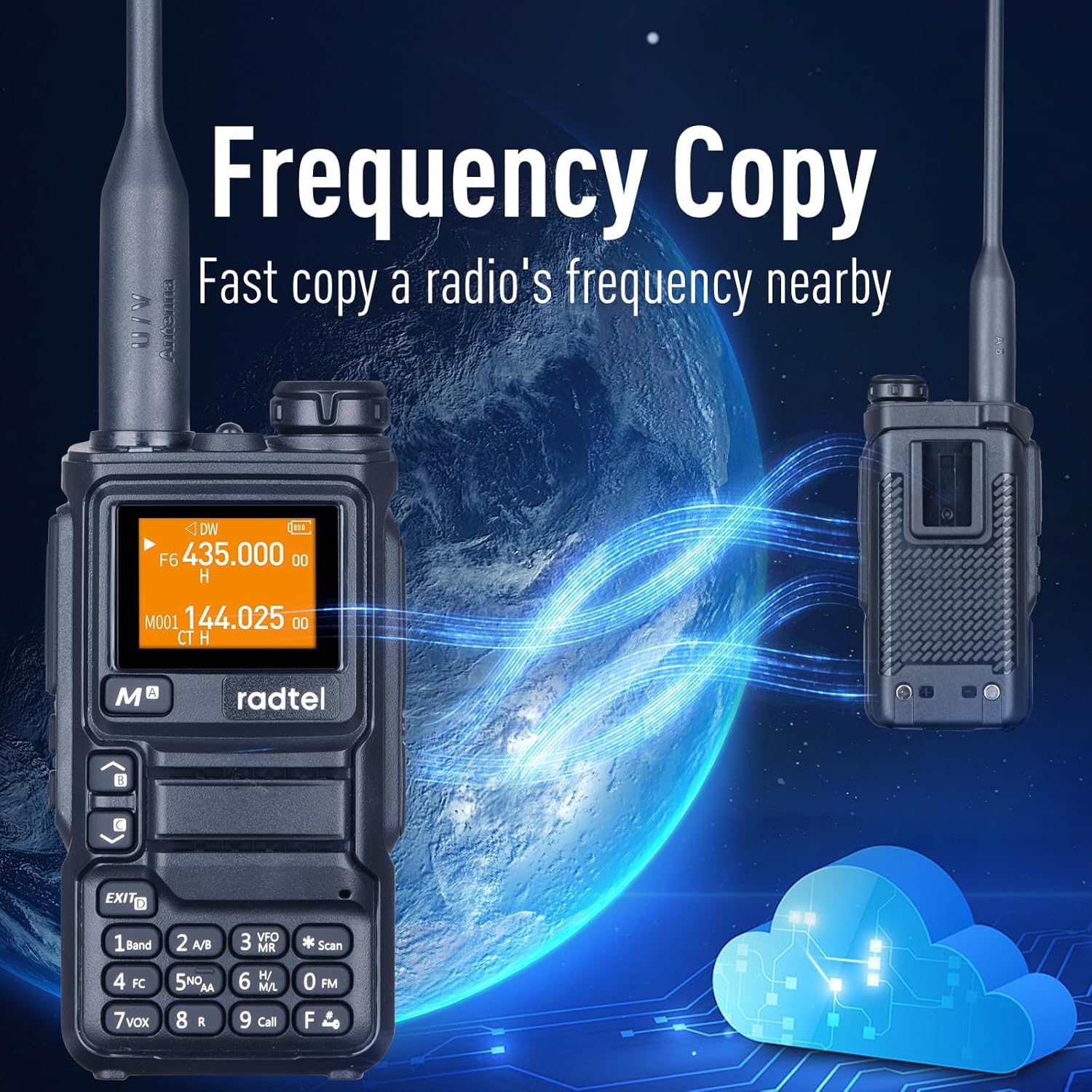
Figure 6: The radio's "Frequency Copy" feature, allowing quick replication of frequencies from nearby devices.
Video 2: Demonstrates the "fast copy a frequency from other radios" feature, showing how to quickly acquire and save frequencies.
3.5 VOX Function (Voice Operated Exchange)
The VOX function allows for hands-free transmission. When activated, the radio will automatically transmit when it detects your voice, eliminating the need to press the PTT (Push-To-Talk) button.
Refer to the detailed manual for VOX sensitivity adjustment.
Video 3: Shows how to switch between A and B main bands, which is often related to VOX or dual-watch functionality.
3.6 SCAN Function
The SCAN function allows the radio to automatically scan through frequencies or channels to detect active transmissions. Press the SCAN button (key *) to initiate scanning.
3.7 NOAA Emergency Weather Receiver
The RT-590 Plus includes a built-in NOAA Weather Alert feature, providing access to National Oceanic and Atmospheric Administration weather broadcasts for critical weather information and alerts.
Press the NOAA button (key 5) to access NOAA weather channels.
3.8 Flashlight and Emergency Alert
The radio is equipped with a built-in flashlight for illumination in low-light conditions and an emergency alert function for signaling distress.

Figure 7: The integrated flashlight on the top of the radio.
Video 4: Demonstrates how to activate the flashlight and emergency alert feature.
3.9 AM/FM Radio
In addition to communication bands, the RT-590 Plus can receive standard AM and FM radio broadcasts. Press the FM button (key 0) to enter FM radio mode.
3.10 Output Power Adjustment (L/M/H)
The radio supports adjustable output power levels (Low, Mid, High) to conserve battery life or extend range as needed. The maximum output power is 5 Watts.
Consult the full manual for specific steps to adjust output power.
3.11 Wireless Radio Replication
This feature allows for easy cloning of settings and channels between two compatible RT-590 Plus radios, simplifying setup for multiple units.
3.12 Frog Sound Tail Signal / Cross-band Intercom
The radio supports a "Frog Sound Tail Signal" for indicating the end of a transmission and cross-band intercom functionality for communication between different frequency bands.
3.13 Power-on Password
For added security, a power-on password can be set to prevent unauthorized use of the radio.
3.14 CHIRP Programming
The RT-590 Plus is compatible with CHIRP software, allowing for advanced programming and customization of channels, frequencies, and settings via a computer using the included programming cable.

Figure 8: The radio can be programmed via CHIRP software using a computer and the provided cable.
4. Maintenance
4.1 Battery Care
- Charge the battery fully before first use.
- Avoid overcharging or completely draining the battery to prolong its lifespan.
- Store the battery in a cool, dry place when not in use for extended periods.
4.2 Cleaning
Wipe the radio's exterior with a soft, damp cloth. Do not use harsh chemicals or abrasive cleaners. Ensure all ports are closed before cleaning.
4.3 Storage
Store the radio in a dry, dust-free environment away from direct sunlight and extreme temperatures. Remove the battery if storing for long periods.
5. Troubleshooting
5.1 Common Issues and Solutions
| Problem | Possible Cause | Solution |
|---|---|---|
| Radio does not power on. | Low or dead battery; incorrect battery installation. | Charge the battery fully. Reinstall the battery correctly. |
| Cannot transmit or receive. | Incorrect frequency/channel; antenna not properly attached; out of range. | Verify frequency/channel settings. Ensure antenna is securely attached. Move closer to the other radio or repeater. |
| Poor audio quality. | Low battery; interference; volume too low/high. | Charge battery. Move away from sources of interference. Adjust volume. |
| Frequency Copy not working. | Radios too far apart; transmitting radio not active. | Ensure radios are within 1 meter. Confirm the other radio is transmitting. |
6. Specifications
| Feature | Detail |
|---|---|
| Brand | radtel |
| Model Number | RT-590 PLUS |
| Item Weight | 1.1 pounds |
| Package Dimensions | 8.11 x 6.22 x 2.24 inches |
| Country of Origin | China |
| Batteries | 1 Lithium Ion battery required (included) |
| Number of Channels | 200 |
| Frequency Range (TX/RX) | 144-148MHz / 420-450MHz |
| Frequency Range (RX Only) | 136-600MHz (including 108-136MHz Air Band) |
| Talking Range Maximum | 5 Kilometer |
| Tuner Technology | UHF, VHF |
| Voltage | 7.4 Volts |
| Water Resistance Level | Not Water Resistant |
| Special Features | Custom Firmware Capability, Air Band Receive, Chirp Programming, Dual Band TX/RX, Multi band RX, NOAA Weather Alert, Flashlight, SCAN, VOX, AM/FM Radio, Type-C Charger |

Figure 9: Physical dimensions of the Radtel RT-590 Plus, showing its compact size.
7. Warranty and Support
7.1 Warranty Information
The Radtel RT-590 Plus comes with a 1-year warranty from the date of purchase, covering manufacturing defects. Please retain your proof of purchase for warranty claims.
7.2 Customer Support
For technical assistance, troubleshooting, or warranty inquiries, please contact Radtel customer support. Refer to the contact information provided in your product packaging or visit the official Radtel website.
You can also visit the Radtel Store on Amazon for additional product information and resources.
Related documentsRT-590 PLUS


Ask a question about this manual
Ask about setup, troubleshooting, compatibility, parts, safety, or missing instructions. Manuals+ will review the question and use this page’s manual context to help answer it.