Introduction
The BIGBIG WON BLITZ 2 Pro is a high-performance PC video game controller designed for an enhanced gaming experience. Featuring advanced TMR electromagnetic joysticks, a 2000Hz wireless polling rate, and 16 mechanical buttons, this controller offers precision, responsiveness, and durability. It is compatible with multiple platforms including PC and mobile devices, and includes a 1000Hz gyroscope for immersive motion control in FPS games.

Image: The BIGBIG WON BLITZ 2 Pro PC Video Game Controller in gray, showcasing its ergonomic design and button layout.
Setup Guide
Package Contents
Before you begin, please ensure all items are present in the package:
- BIGBIG WON BLITZ 2 Pro Controller
- 2.4G Wireless Adapter
- USB Charging Cable
- User Manual (this document)
Initial Charging
The controller is equipped with a 1000mAh Lithium Ion battery. For optimal performance, it is recommended to fully charge the controller before first use. Connect the USB charging cable to the controller's charging port and to a compatible USB power source (e.g., PC USB port, USB wall adapter).
Connecting Your Controller
The BLITZ 2 Pro offers multiple connection methods for various platforms:
- 2.4G Wireless Connection:
Insert the 2.4G wireless adapter into an available USB port on your PC or compatible device. Power on the controller. The controller should automatically pair with the adapter. This connection method provides a professional-level 2000Hz polling rate for ultra-low latency.
- Bluetooth Connection:
Enable Bluetooth on your mobile device (iOS/Android) or PC. Put the controller into Bluetooth pairing mode (refer to the controller's specific button combination for pairing, usually a dedicated Bluetooth button or a combination of buttons). Select "BIGBIG WON BLITZ 2 Pro" from the list of available devices on your host device to complete pairing.
- Wired Connection:
Connect the controller directly to your PC or compatible device using the provided USB charging cable. The controller will function as a wired gamepad, also supporting a 2000Hz polling rate.
The controller is compatible with PC, mobile devices (iOS, Android), and Nintendo Switch. For optimal performance on PC, ensure your system drivers are up to date.
Operating Instructions
Controller Features and Layout
The BLITZ 2 Pro is engineered with a comprehensive set of features for competitive gaming:
- TMR Electromagnetic Joysticks: Designed for superior centering accuracy and precise resets, minimizing drift.
- 16 Mechanical Buttons: Provide crisp, tactile feedback and high durability.
- Mechanical D-Pad: Features conductive rubber paired with esports-grade mechanical switches for comfortable feel and crisp feedback, ensuring smooth combos.
- Dual-Layer Microswitch ABXY Buttons: Silicone parts added for sharp response and comfortable feeling.
- Microswitch Trigger Buttons: Spring-loaded design for fast response and low triggering force, suitable for various grip styles.
- 4 Additional Remappable Buttons (M1-M4): Located on the back for advanced customization and macro assignments.
- 1000Hz Gyroscope: Provides silky smooth somatosensory experience for motion control, especially in FPS games.
- Ergonomic Grip: Refined design for comfortable four-finger or six-finger operation.
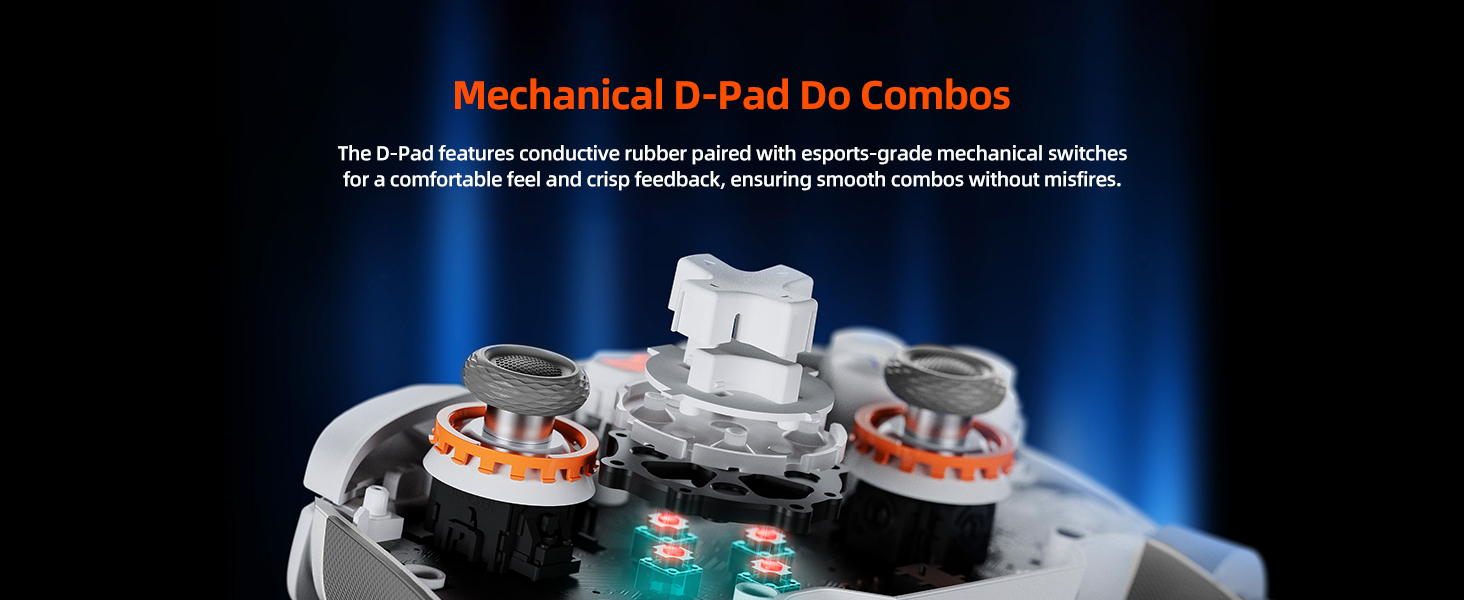
Image: Close-up view of the mechanical D-Pad, highlighting its internal structure for precise input.
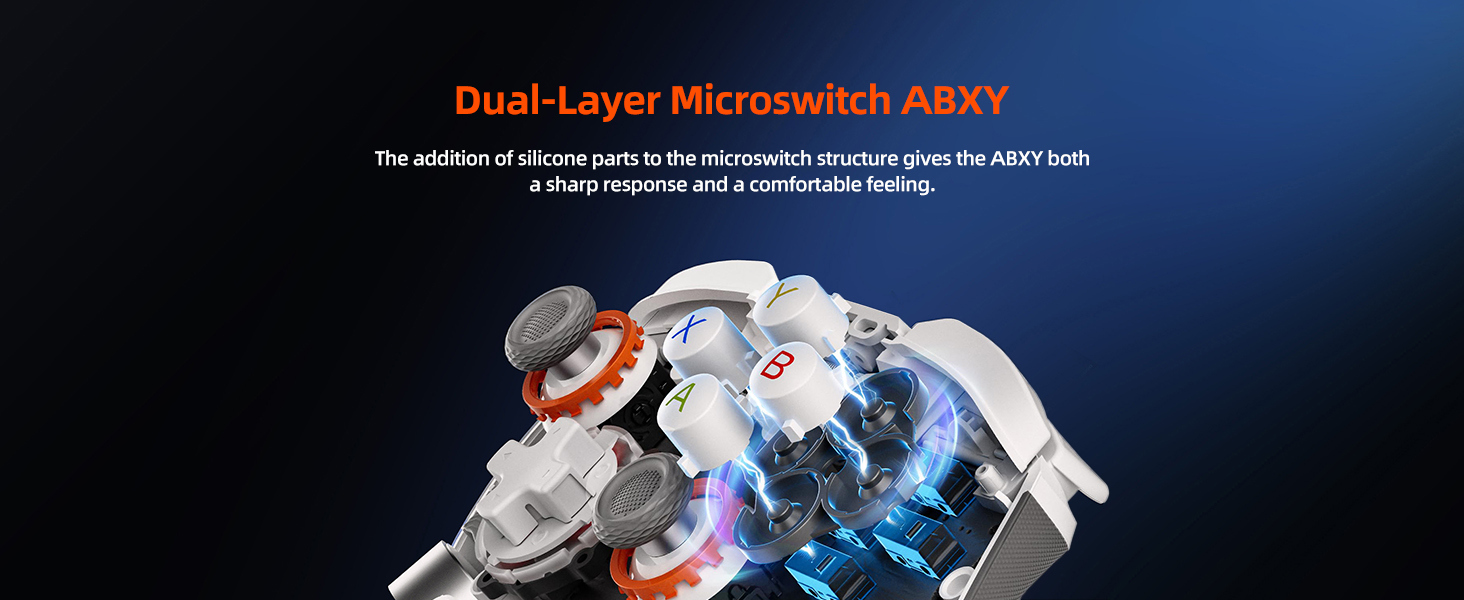
Image: Illustration of the Dual-Layer Microswitch ABXY buttons, showing the silicone components for improved feel.
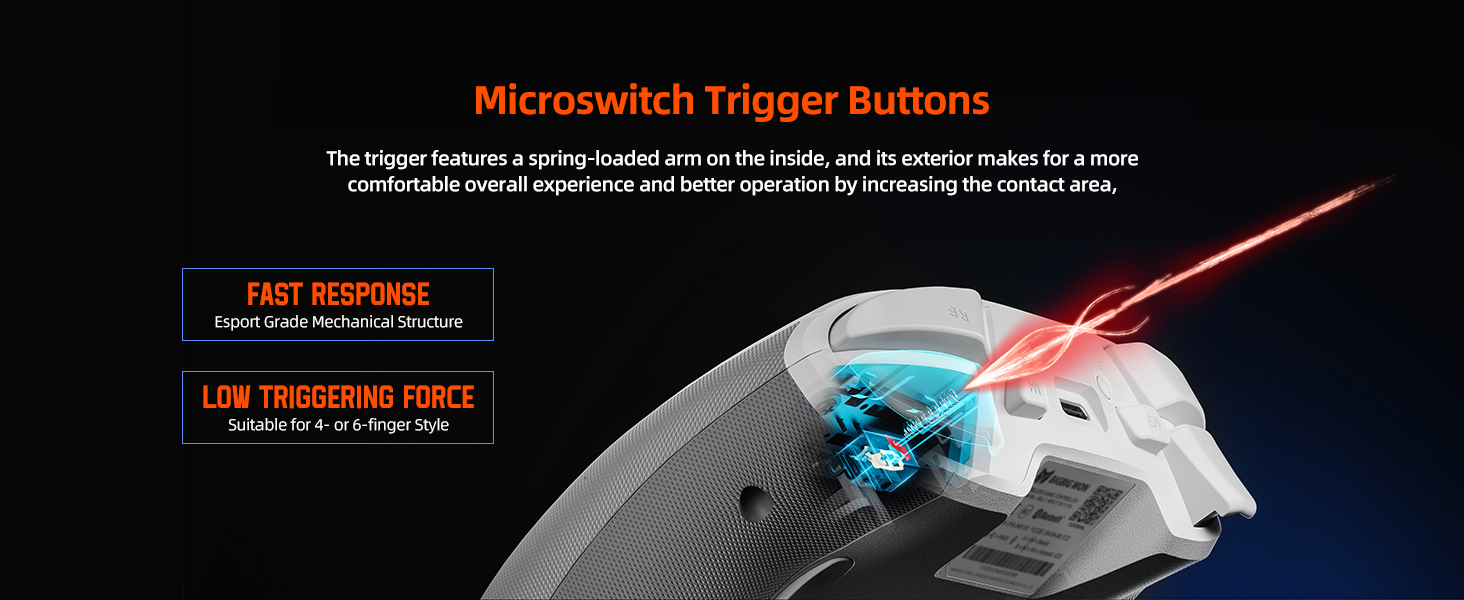
Image: Diagram illustrating the internal mechanism of the microswitch trigger buttons, emphasizing fast response.
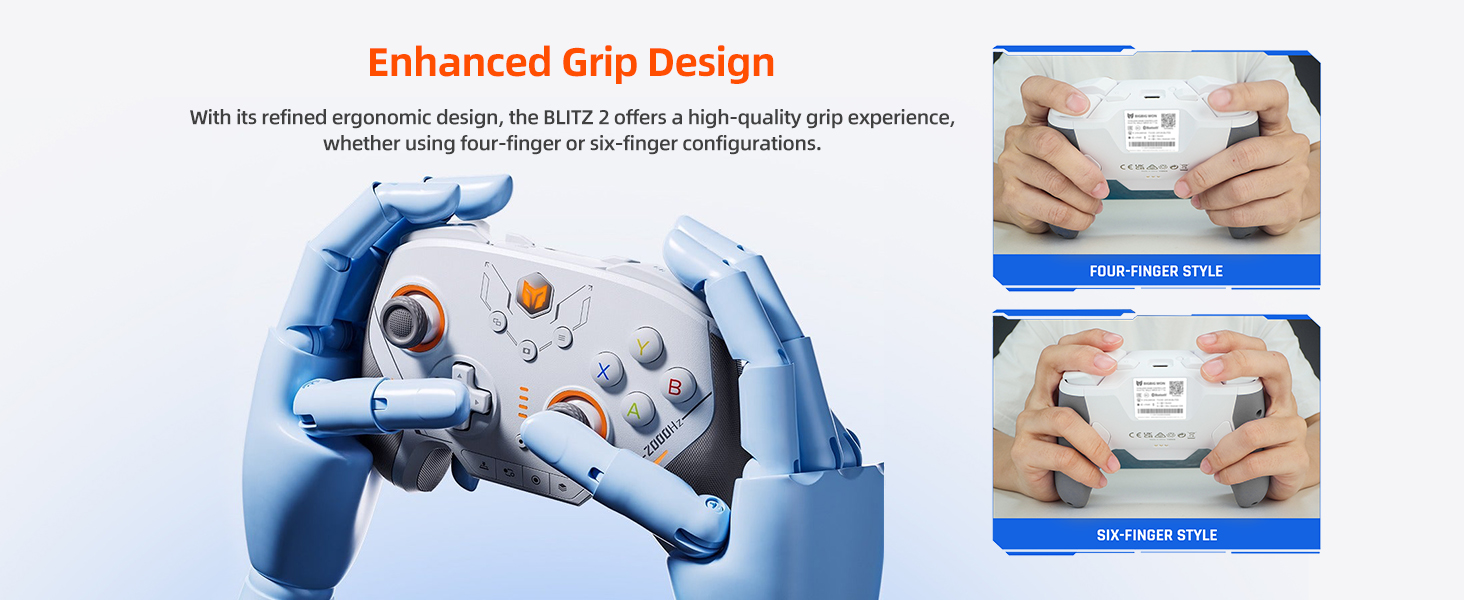
Image: Demonstrates different grip styles (four-finger and six-finger) with the controller's ergonomic design.
Using the PC & Mobile App (Mojiang Assistant)
The BIGBIG WON BLITZ 2 Pro controller can be extensively customized using the dedicated PC and mobile application, "Mojiang Assistant". This application allows for real-time setting adjustments, firmware updates, and macro programming.
- Parameter Adjustment: Fine-tune joystick sensitivity, trigger dead zones, and other control parameters.
- Button Mapping & Macros: Remap buttons and create complex macros for the additional M1-M4 buttons.
- Firmware Updates: Keep your controller's firmware up-to-date for the latest features and performance improvements.
- Motion Control Sensitivity: Adjust the 1000Hz gyroscope's sensitivity for precise aiming in games.
The mobile app is available on both the App Store and Google Play. For PC, download the software from the official BIGBIG WON website.
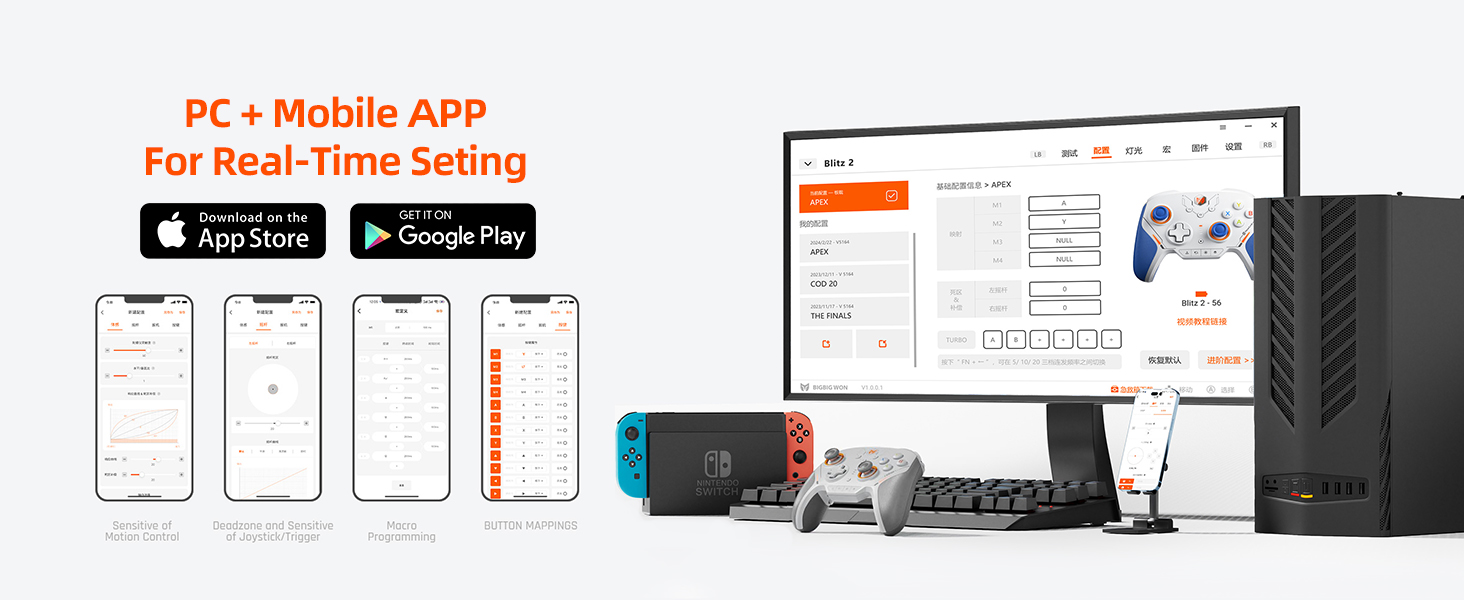
Image: Overview of the PC and mobile application interface for controller settings and customization.
Maintenance
Proper maintenance ensures the longevity and optimal performance of your BIGBIG WON BLITZ 2 Pro controller.
- Cleaning: Use a soft, dry cloth to wipe down the controller regularly. For stubborn dirt, a slightly damp cloth can be used, but ensure no moisture enters the internal components. Avoid harsh chemicals or abrasive cleaners.
- Storage: Store the controller in a cool, dry place away from direct sunlight, extreme temperatures, and excessive humidity.
- Battery Care: To preserve battery life, avoid fully discharging the controller frequently. If storing for an extended period, charge the battery to approximately 50% before storage and recharge every few months.
- Joystick & Button Longevity: While designed for durability, avoid excessive force or impact on joysticks and buttons.
Troubleshooting
If you encounter issues with your BIGBIG WON BLITZ 2 Pro controller, refer to the following common troubleshooting steps:
| Problem | Possible Cause / Solution |
|---|---|
| Controller not connecting/disconnecting frequently |
|
| Buttons/Joysticks unresponsive or drifting |
|
| Controller not charging |
|
| App not detecting controller |
|
Specifications
| Feature | Detail |
|---|---|
| Model | BLITZ 2 Pro |
| Connectivity | 2.4G Wireless, Bluetooth, Wired (USB) |
| Polling Rate | 2000Hz (Wireless & Wired) |
| Gyroscope | 1000Hz |
| Joysticks | TMR Electromagnetic, ALPS Joysticks (2 Million Cycles Operating Life) |
| Buttons | 16 Mechanical Buttons (including ABXY, D-Pad, Triggers, Shoulder, M1-M4) |
| Battery | 1 Lithium Ion battery (1000mAh) |
| Compatibility | PC, Mobile (iOS, Android), Nintendo Switch, STEAM |
| Product Dimensions | 3.94 x 3.15 x 2.76 inches |
| Item Weight | 1.17 pounds |
| Manufacturer | BIGBIG WON |
Warranty and Support
For warranty information and technical support, please refer to the official BIGBIG WON website or contact their customer service directly. The Mojiang Assistant application also serves as a valuable resource for updates and support.
Official Website: www.bigbigwon.com


