
1. Introduction
This manual provides detailed instructions for the installation, operation, and maintenance of your zhiroad Dashcam Hardwire Kit. This kit is designed to provide a stable power supply to your car camera, enabling 24-hour parking monitoring and featuring low voltage protection to safeguard your vehicle's battery. Please read this manual thoroughly before installation and use to ensure proper function and safety.
2. Product Components
The zhiroad Dashcam Hardwire Kit includes the following components:
- Dashcam Hardwire Kit (main unit with Type-C connector)
- Fuse Tap (various types may be included for compatibility)
- Installation Tools (e.g., fuse puller)
- 13-foot Power Cable

Image: Overview of the zhiroad Dashcam Hardwire Kit and its included components.
3. Specifications
| Input Voltage | 12V-24V DC |
| Output Voltage | 5V DC |
| Output Current | 2A (Type-C Connector) |
| Cable Length | 13 feet (approximately 4 meters) |
| Low Voltage Protection | Automatically cuts power when car battery voltage is too low (e.g., below 11.6V) |
| Connector Type | USB Type-C |
| Dimensions | 7.87 x 5.12 x 1.97 inches (Product Package) |
| Item Weight | 1.76 ounces (50 grams) |
4. Installation Guide
The zhiroad Dashcam Hardwire Kit is designed for easy installation. However, if you are unfamiliar with car electrical systems, it is recommended to seek professional assistance.
4.1. Preparation
- Ensure your vehicle is turned off and the ignition key is removed.
- Locate your vehicle's fuse box. This is typically found under the dashboard, in the glove compartment, or under the hood. Consult your vehicle's owner's manual for the exact location.
- Identify a suitable fuse slot for the ACC (Accessory) and BAT+ (Constant Power) connections.
- Use the included fuse tap to connect to the chosen fuse slots.
4.2. Wiring Connections
The hardwire kit has three main wires:
- Yellow Wire (BAT+): Connects to a constant power fuse slot (always on, even when the car is off). This is essential for 24-hour parking monitoring.
- Red Wire (ACC): Connects to an accessory fuse slot (powers on and off with the ignition).
- Black Wire (GND): Connects to a metal bolt or screw on the vehicle's chassis for a ground connection.

Image: Simplified wiring diagram showing connections for Yellow (ACC+ or Bat+), Red (ACC), and Black (Ground) wires.
4.3. Wiring Methods (Parking Monitoring vs. Ignition Only)
There are two primary wiring methods depending on your desired functionality:
Method 1: ACC Wiring (Ignition On/Off)
In this configuration, the dashcam will only receive power when the vehicle's ignition is on. Parking monitoring will not be active.
- Connect the Red Wire to an ACC fuse slot.
- Connect the Yellow Wire to the same ACC fuse slot as the Red Wire.
- Connect the Black Wire to a ground point.
Method 2: 24-Hour Surveillance Wiring (Parking Monitoring)
This configuration enables continuous power to the dashcam for 24-hour parking monitoring, even when the vehicle is off. The low voltage protection feature will prevent battery drain.
- Connect the Red Wire to an ACC fuse slot.
- Connect the Yellow Wire to a BAT+ (constant power) fuse slot.
- Connect the Black Wire to a ground point.
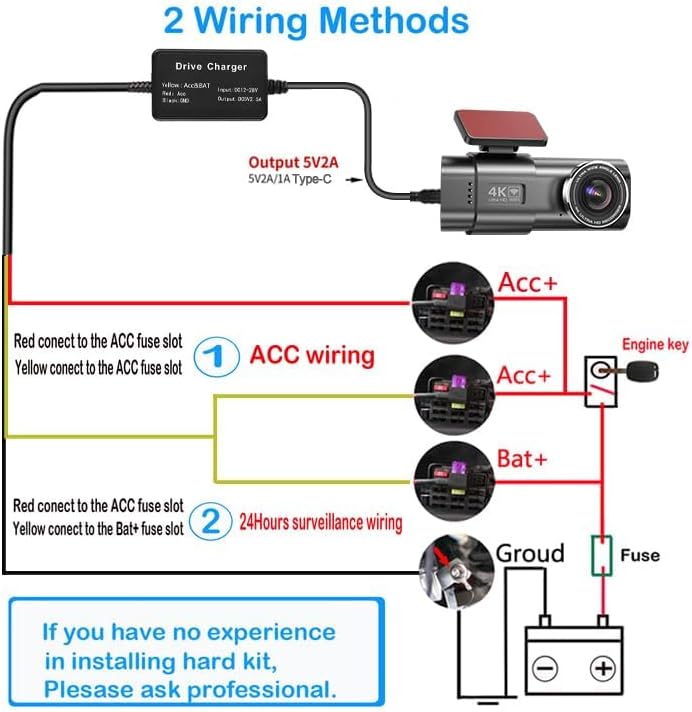
Image: Detailed diagram illustrating both ACC wiring and 24-hour surveillance wiring methods. Consult this diagram carefully for correct connections.
Important: After connecting the wires, ensure all connections are secure and tidy. Route the power cable discreetly to your dashcam. If you have no experience in installing hardwire kits, please consult a professional.
5. Operation
Once correctly installed, the zhiroad Dashcam Hardwire Kit operates automatically to provide power to your connected device.
5.1. Stable Power Supply
The kit ensures a stable 5V/2A power output to your dashcam or other compatible devices (GPS, radar detectors) from your vehicle's 12V-24V electrical system. This prevents power fluctuations that can affect device performance.

Image: The hardwire kit providing power to a dashcam, GPS unit, and radar detector, demonstrating its compatibility.
5.2. 24-Hour Parking Monitoring
When wired for 24-hour surveillance (Method 2 in Installation Guide), the kit continuously supplies power to your dashcam, allowing it to record even when the vehicle is parked and the ignition is off. This feature helps protect your vehicle from incidents like theft or collisions while unattended.
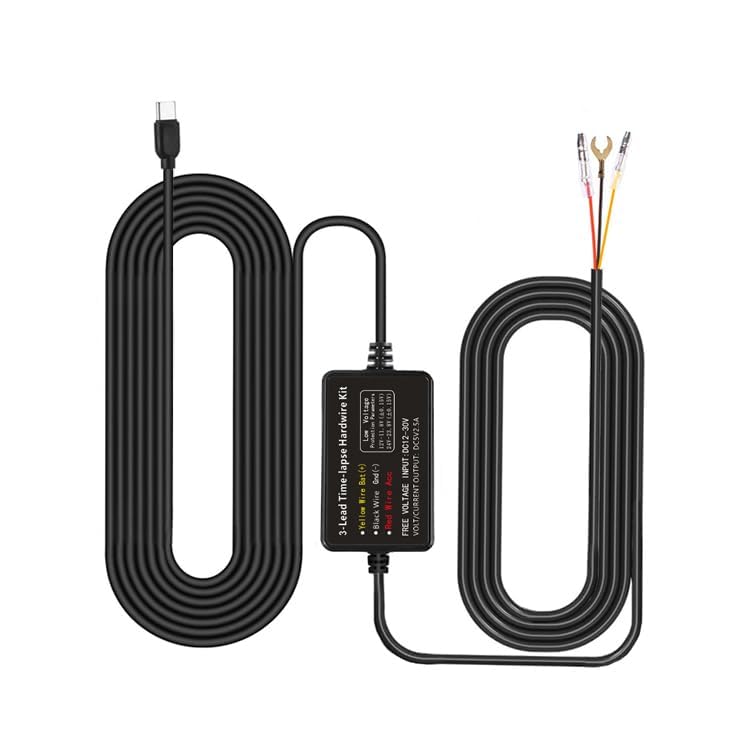
Image: Illustration of 24-hour surveillance and the low voltage protection mechanism, showing the battery icon and car scenarios.
5.3. Low Voltage Protection
The hardwire kit incorporates intelligent low voltage protection. If your car battery's voltage drops below a safe threshold (e.g., 11.6V), the kit will automatically cut off power to the dashcam. This prevents excessive battery drain and ensures your vehicle has enough power to start, protecting the car battery from damage.
6. Maintenance
The zhiroad Dashcam Hardwire Kit requires minimal maintenance. Follow these guidelines to ensure optimal performance and longevity:
- Regular Checks: Periodically inspect the wiring connections to ensure they remain secure and free from corrosion or damage.
- Cleanliness: Keep the hardwire kit and its connections free from dust and debris. Use a dry, soft cloth for cleaning.
- Avoid Water Exposure: Ensure the unit is not exposed to water or excessive moisture, as this can cause electrical damage.
- Cable Management: Ensure cables are not pinched, stretched, or exposed to sharp edges, which could lead to damage.
7. Troubleshooting
If you encounter issues with your zhiroad Dashcam Hardwire Kit, refer to the following common problems and solutions:
Problem: Dashcam does not power on.
- Check Connections: Ensure all three wires (Yellow, Red, Black) are securely connected to their respective points (BAT+, ACC, Ground).
- Check Fuses: Verify that the fuses in the fuse tap and the original fuse in the vehicle's fuse box are intact and not blown. Replace if necessary.
- Vehicle Battery Voltage: If the vehicle battery voltage is too low, the low voltage protection feature may have activated, preventing the dashcam from powering on. Start your vehicle to recharge the battery.
- Dashcam Compatibility: Ensure your dashcam requires a 5V Type-C power input.
Problem: Parking monitoring does not work.
- Wiring Method: Confirm that the kit is wired using the "24-Hour Surveillance Wiring" method (Yellow wire to constant power, Red wire to ACC).
- Dashcam Settings: Ensure your dashcam's parking mode feature is enabled in its settings.
- Battery Voltage: If the car battery voltage drops below the low voltage protection threshold, parking monitoring will cease to prevent battery drain.
Problem: Car battery drains quickly.
- Low Voltage Protection: The kit has built-in low voltage protection. If your battery is still draining, it might indicate an issue with your vehicle's battery or charging system, or the dashcam itself is consuming excessive power.
- Check Threshold: Ensure the low voltage cut-off threshold is appropriate for your vehicle (if adjustable by the dashcam).
If these steps do not resolve the issue, please contact customer support for further assistance.
8. Safety Information
Please observe the following safety precautions:
- Always disconnect the vehicle's battery or ensure the ignition is off before performing any electrical work.
- Do not attempt to modify the hardwire kit. Unauthorized modifications can lead to electrical hazards and void the warranty.
- Ensure all wiring is properly insulated and secured to prevent short circuits or interference with vehicle components.
- Keep the product away from extreme temperatures, direct sunlight, and corrosive chemicals.
- If you are unsure about any installation step, consult a qualified automotive technician.
9. Warranty and Support
zhiroad is committed to providing reliable products and excellent customer service.
- Warranty: This product comes with a 3-year warranty covering free returns and exchanges for manufacturing defects.
- Returns: You may return the product within 30 days without providing a reason.
- Technical Support: For any technical inquiries, installation assistance, or troubleshooting not covered in this manual, please contact our customer support team. We aim to reply to emails within 24 hours and provide satisfactory solutions.
For support, please refer to the contact information provided with your purchase or visit the official zhiroad website.