
1. Product Overview
The AUTOOL GOGO8-US Digital Manometer is a precision instrument designed for measuring gas pressure and differential pressure. It features a dual-port design for synchronous detection, a backlit LCD display, and supports 12 different pressure units. This device is suitable for applications such as HVAC duct pressure monitoring, filter blockage diagnosis, cleanroom micro-pressure control, and gas appliance maintenance.

Figure 1: AUTOOL GOGO8-US Digital Manometer with accessories.
Key Features:
- Measurement Range: ±20.68 kPa / ±2.999 psi.
- Accuracy: ±0.3% FSO (Full Scale Output).
- Response Time: 0.5 seconds.
- Unit Support: 12 selectable units including PSI, inHg, inH₂O, ftH₂O, kPa, mbar, Bar, kgcm², ozin², mmHg, cmH₂O, Pa.
- Dual-Port Detection: Real-time display of pressure difference (P1-P2).
- Data Functions: Data storage (100 groups), Data Hold, Max/Min value recording.
- Display: Large backlit LCD for clear readings in various lighting conditions.
- Power Management: Automatic shutdown after 15 minutes of inactivity, low battery warning.
- Calibration: One-button zero calibration.
2. What's in the Box
Upon unpacking, please verify that all items listed below are present and in good condition:
- AUTOOL GOGO8-US Digital Manometer
- Flexible Tubes (2 pieces)
- Metal Adapter
- User Manual

Figure 2: Package contents of the Digital Manometer.
3. Setup
3.1 Battery Installation
- Locate the battery compartment on the back of the manometer.
- Open the battery cover.
- Insert one 9V battery, ensuring correct polarity.
- Close the battery cover securely.
3.2 Connecting Tubes and Adapters
- Identify the two tube connectors on the top of the manometer: Tube Connector (-) and Tube Connector (+).
- Connect the flexible tubes to the desired ports based on your measurement requirements (e.g., for differential pressure, connect one tube to each port).
- If needed, attach the metal adapter to one of the flexible tubes for specific connection points.

Figure 3: Manometer components and dimensions.
4. Operating Instructions
4.1 Power On/Off
- Press the ON/OFF button (red power icon) to turn the device on.
- Press and hold the ON/OFF button to turn the device off.
4.2 Zero Calibration
Before each measurement, especially for differential pressure, it is recommended to perform a zero calibration to ensure accuracy.
- Ensure both pressure ports are open to atmospheric pressure or disconnected from any pressure source.
- Long press the HOLD button to clear any zero drift and calibrate the device to zero.
4.3 Unit Selection
The manometer supports 12 different pressure units.
- Press the UNITS button to cycle through the available pressure units (PSI, inHg, inH₂O, ftH₂O, kPa, mbar, Bar, kgcm², ozin², mmHg, cmH₂O, Pa).
4.4 Differential Pressure Measurement (P1-P2)
The device automatically displays the pressure difference between the two ports (P1-P2).
- Connect the higher pressure source to the (+) port and the lower pressure source to the (-) port for positive readings, or vice-versa.
- The display will show the real-time pressure difference.

Figure 4: Dual-port for positive and negative pressure measurement.
4.5 Data Hold
- Press the HOLD button briefly to freeze the current reading on the display.
- Press the HOLD button again to release the data hold function.
4.6 Max/Min Value Recording
To capture the maximum and minimum pressure values during a measurement period:
- Long press the MAX button to activate Max/Min recording mode. The display will show 'MAX' or 'MIN'.
- Briefly press the MAX button to toggle between MAX and MIN values.
- Long press the MAX button again to exit Max/Min recording mode.
4.7 Backlight Display
- Press the °C/°F button briefly to turn the backlight on or off.

Figure 5: LCD Backlight Display for enhanced visibility.
4.8 Data Storage
The device can store up to 100 groups of readings.
- Short press the °C/°F key to save the current reading.
- Use the DIF and MAX keys to scroll through stored data.
5. Maintenance
5.1 Cleaning
- Wipe the device with a soft, dry cloth. Do not use abrasive cleaners or solvents.
- Ensure the pressure ports are free from dust and debris.
5.2 Battery Replacement
When the low battery indicator appears on the display, replace the 9V battery promptly to ensure accurate operation.
- Follow the battery installation steps in Section 3.1.

Figure 6: Low Battery Reminder and Auto Shutdown feature.
5.3 Storage
- Store the manometer in a cool, dry place, away from direct sunlight and extreme temperatures.
- Remove the battery if the device will not be used for an extended period to prevent leakage.
6. Troubleshooting
| Problem | Possible Cause | Solution |
|---|---|---|
| Device does not power on | Dead or incorrectly installed battery | Check battery polarity or replace with a new 9V battery. |
| Inaccurate readings / Zero drift | Environmental factors or sensor drift | Perform one-button zero calibration by long pressing the HOLD button. Ensure ports are open to atmosphere during calibration. |
| Display shows "Err0" | Exceeds positive pressure range | The measured pressure is above the maximum positive range. Reduce pressure or use a device with a higher range. |
| Display shows "Err1" | Exceeds negative pressure range | The measured pressure is below the minimum negative range. Reduce vacuum or use a device with a wider negative range. |
| Backlight not working | Backlight off or low battery | Press the °C/°F button to toggle backlight. Check battery level and replace if low. |
| Auto-shutdown occurs too quickly | Normal operation (15 minutes inactivity) | This is a power-saving feature. The device will shut down after 15 minutes of no operation. |
7. Specifications
| Parameter | Value |
|---|---|
| Measuring Range | ±20.68 kPa / ±2.999 PSI |
| Measurement Units | 12 (PSI, inHg, inH₂O, ftH₂O, kPa, mbar, Bar, kgcm², ozin², mmHg, cmH₂O, Pa) |
| Accuracy | ±0.3% FSO (25°C) |
| Repeatability | ±0.2% (Max±0.5%FSO) |
| Linearity / Hysteresis | ±0.29% FSO (25°C) |
| Measurement Rate | 0.5 seconds |
| Data Storage | 100 groups |
| Maximum Pressure | 20 KPa |
| Working Temperature | 0°C to 50°C (32°F to 122°F) |
| Storage Temperature | -10°C to 60°C (14°F to 140°F) |
| Power Supply | 9V battery |
| Automatic Shut-down Time | 15 minutes |
| Dimensions | 164 x 70 x 32 mm (6.5 x 2.8 x 1.3 inches) |
| Weight | 200g (0.44 lbs) |
| Material | Acrylonitrile Butadiene Styrene (ABS) |
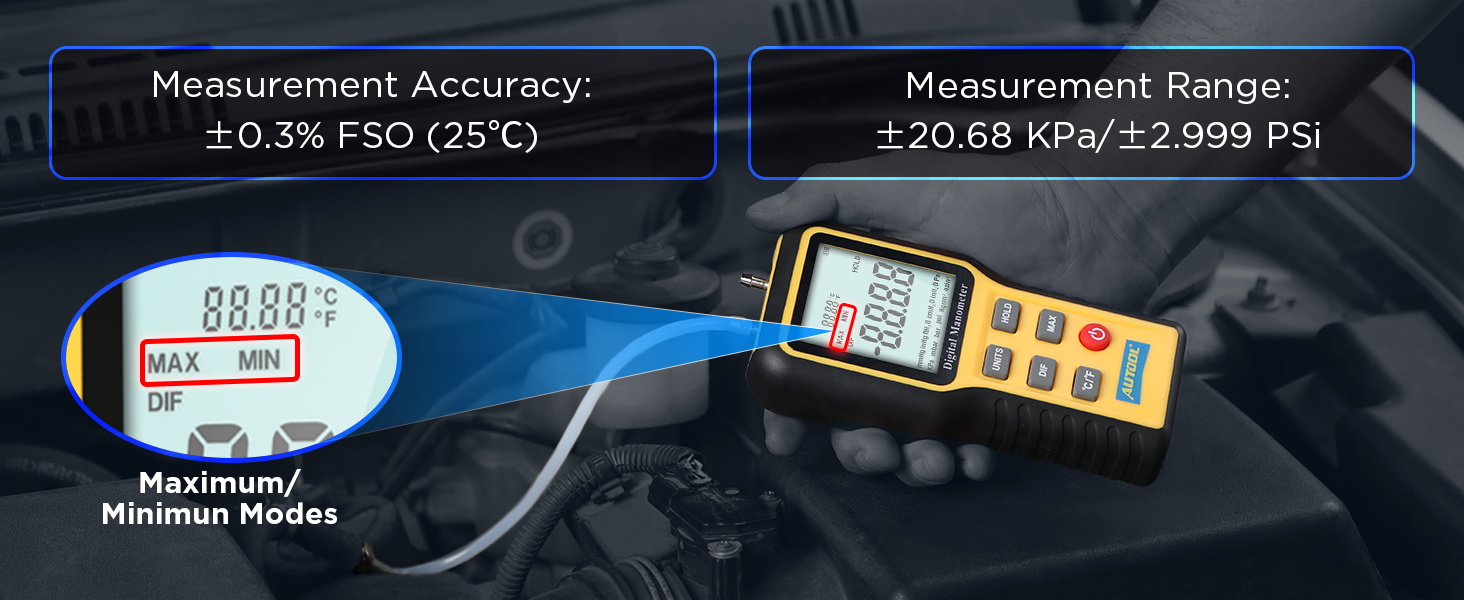
Figure 7: Detailed product specifications.
8. Warranty and Support
8.1 Warranty Information
The AUTOOL GOGO8-US Digital Manometer comes with a Three Years Warranty against manufacturing defects. If the manometer exhibits any defects within this period, AUTOOL will provide a replacement or a suitable solution to ensure customer satisfaction without delay.
8.2 Technical Support
AUTOOL provides lifetime technical support for this product. For any technical assistance, operational queries, or warranty claims, please contact AUTOOL customer service. We are committed to responding to your inquiries within 24 hours.