
1. Introduction
Thank you for choosing the Duux Zone Ceramic Heater. This compact and efficient electric heater is designed to provide comfortable warmth in various indoor environments. Featuring a ceramic heating element, multiple heat settings, and oscillation, it offers personalized climate control. Please read this manual thoroughly before use to ensure safe and optimal operation.

Image 1.1: Duux Zone Ceramic Heater (White)
2. Safety Instructions
WARNING: Read all safety warnings and instructions. Failure to follow the warnings and instructions may result in electric shock, fire, or serious injury.
- Always place the heater on a firm, level surface.
- Do not cover the heater or block the air inlets/outlets.
- Keep flammable materials (furniture, curtains, paper, clothing, etc.) at least 1 meter (3 feet) from the front, sides, and rear of the heater.
- Do not use the heater in areas where gasoline, paint, or flammable liquids are stored.
- This appliance is equipped with an integrated overheat protection system. If the heater overheats, it will automatically shut off. Unplug the unit, allow it to cool, and remove any obstructions before restarting.
- The Zone heater also features tip-over protection. If the heater is accidentally knocked over, it will automatically switch off. Place it upright on a stable surface to resume operation.
- Thanks to its IP21 protection rating, the Zone heater can be safely used in damp rooms, such as bathrooms, provided it is not directly exposed to water spray.
- Do not operate any heater with a damaged cord or plug, or after the heater malfunctions or has been dropped or damaged in any manner.
- Unplug the heater when not in use.
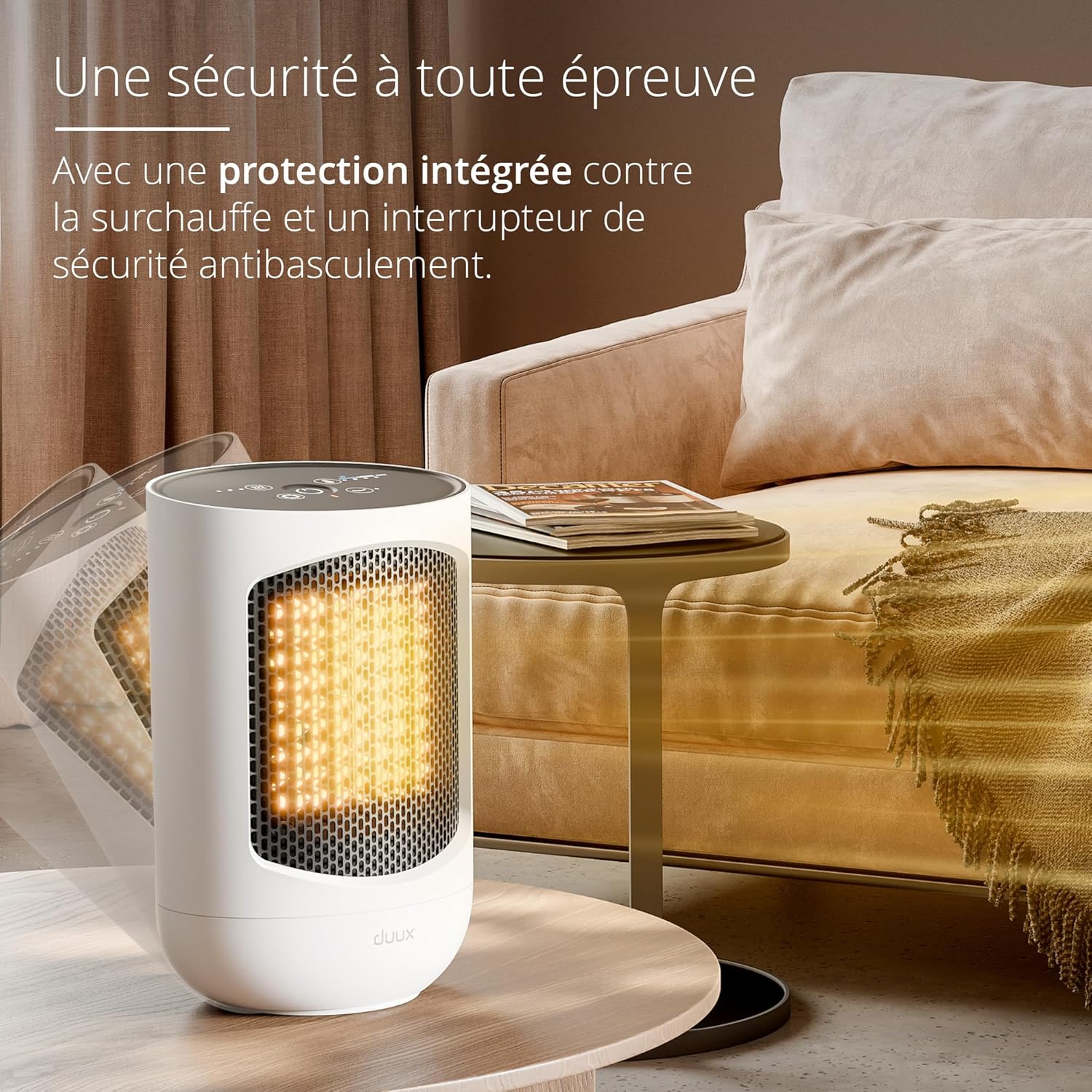
Image 2.1: Tip-over protection feature
3. Package Contents
Please check the contents of your package. If any items are missing or damaged, contact your retailer.
- Duux Zone Ceramic Heater Unit
- User Manual
4. Product Overview
The Duux Zone Ceramic Heater features intuitive touch controls located on the top panel for easy operation.

Image 4.1: Top Control Panel
Control Functions:
- Power Button: Turns the unit on/off.
- Heating Settings: Cycles through three heating modes (low, medium, high).
- Cooling Mode: Activates fan-only mode for air circulation without heat.
- Oscillation: Activates or deactivates the 60-degree horizontal oscillation function.
- Thermostat Options: Selects from four preset thermostat levels to maintain desired room temperature.
5. Setup
- Unpack the heater and remove all packaging materials.
- Place the heater on a stable, flat, and heat-resistant surface. Ensure there is at least 1 meter (3 feet) of clear space around the heater to allow for proper airflow.
- Plug the power cord into a grounded electrical outlet. Ensure the voltage matches the specifications of the heater (240 Volts).
6. Operating Instructions
The Duux Zone heater offers flexible control over your environment with its various modes and settings.
Power On/Off
- Press the Power button on the top panel to turn the heater on or off.
Heating Modes
The heater provides powerful heat up to 1500 W. Press the Heating Settings button to cycle through the three available heating levels:
- Low Heat
- Medium Heat
- High Heat (up to 1500W)
Cooling Mode (Fan Only)
For warmer days, you can switch to cooling mode. Press the Cooling Mode button to activate the fan without heat, providing air circulation.
Thermostat Control
The Zone heater features four preset thermostat options to maintain your desired room temperature. Press the Thermostat Options button to select the appropriate setting.
Oscillation Function
To distribute heat evenly across your room, activate the horizontal oscillation. Press the Oscillation button to start or stop the 60-degree horizontal swing.

Image 6.1: Horizontal Oscillation for even heat distribution
7. Maintenance
Regular cleaning and maintenance will help ensure the longevity and efficient operation of your Duux Zone Ceramic Heater.
Cleaning
- Always unplug the heater and allow it to cool completely before cleaning.
- Wipe the exterior surfaces with a soft, damp cloth. Do not use abrasive cleaners or solvents.
- Use a vacuum cleaner with a brush attachment to gently remove dust from the air inlets and outlets.
- Never immerse the heater in water or any other liquid.
Storage
When not in use, store the heater in a cool, dry place, preferably in its original packaging, away from direct sunlight and moisture.
8. Troubleshooting
If you encounter issues with your Duux Zone Ceramic Heater, please refer to the following common problems and solutions:
| Problem | Possible Cause | Solution |
|---|---|---|
| Heater does not turn on. | No power, tip-over switch activated, or overheat protection activated. | Check power outlet. Ensure heater is upright on a stable surface. Unplug, allow to cool for 30 minutes, then plug back in. |
| No heat output. | Heater is in cooling mode, or thermostat setting is too low. | Ensure a heating mode is selected. Adjust thermostat to a higher setting. |
| Oscillation not working. | Oscillation function is not activated. | Press the Oscillation button on the control panel. |
| Unusual noise or smell. | Dust accumulation, or internal component issue. | Unplug immediately. Clean the heater as per maintenance instructions. If problem persists, discontinue use and contact support. |
If the problem persists after attempting these solutions, please contact Duux customer support.
9. Specifications
Technical details for the Duux Zone Ceramic Heater (Model DXCH43).

Image 9.1: Key Features and Dimensions
| Feature | Detail |
|---|---|
| Brand | Duux |
| Model Number | DXCH43 |
| Color | White |
| Product Dimensions (L x W x H) | 12 x 23.7 x 15.5 cm |
| Item Weight | 1.4 Kilograms |
| Power | 1500 Watts |
| Voltage | 240 Volts |
| Number of Speeds | 3 |
| Special Features | Adjustable thermostat, horizontal oscillation, energy-saving, automatic shut-off, overheat protection, tip-over protection |
| Form Factor | Compact, table heater |
| Indoor/Outdoor Use | Indoor |
| Recommended Uses | Home, Bathroom |
| Mounting Type | Tabletop |
| Burner Type | Ceramic |
| Spare Parts Availability | 10 Years |
10. Warranty and Support
Duux products are manufactured to high-quality standards. For information regarding the warranty period and conditions, please refer to the warranty card included with your purchase or visit the official Duux website.
For technical support, troubleshooting assistance, or to inquire about spare parts, please contact Duux customer service through their official channels. Please have your model number (DXCH43) and purchase details ready when contacting support.


