
1. Introduction
The JINBEI H1S is a versatile 2-in-1 lighting solution designed for photographers and videographers using Sony cameras. It functions both as a powerful camera flash speedlite and a continuous LED video light. This manual provides detailed instructions for its setup, operation, and maintenance to ensure optimal performance.

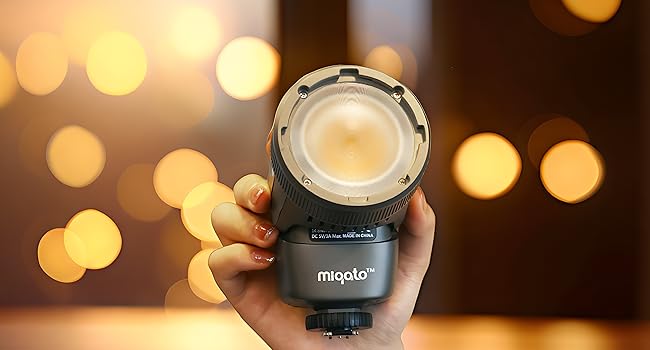
The JINBEI H1S unit, a compact 2-in-1 flash and LED video light, shown with its hot shoe mount.
2. Product Overview and Key Features
The JINBEI H1S combines the functionality of a flash speedlite and a continuous LED video light into a single, compact unit. Key features include:
- Dual Functionality: Operates as both a flash speedlite and a continuous LED video light.
- Flash Mode: GN28, 0.05~1.5s recycle time, supports HSS/TTL, front and rear curtain synchronization.
- LED Video Light Mode: Maximum illumination of 4150Lux (6500K with reflector), stable flicker-free bi-color lighting.
- Adjustable Brightness & Color Temperature: Brightness from 0% to 100%, color temperature from 2700K to 6500K.
- High Color Accuracy: Ra>95 / TLCI>97 for accurate color reproduction.
- Built-in Fresnel Lens: Enhances brightness and provides even light spread.
- Integrated Wireless System: JINBEI 2.4GHz wireless system for master or slave flash control.
- HD Color Touch Screen: Easy and intuitive operation with customizable font colors.
- Built-in Battery: 2000mAh lithium battery, providing approximately 60 minutes of full light or 120 minutes of half light.
- Lightweight Design: Weighs only 405g for portability.
- 9 Preset Lighting Scene Effects: Adds creative elements to video content.
- 3W LED Modeling Lamp: Adjustable in steps from 01 to 09.

An illustration highlighting the dual functionality of the JINBEI H1S, detailing its flash mode capabilities (GN28, >1000 flashes, TTL HSS) and LED video light features (2700-6500K, 9 light effects).
3. Setup
3.1 Unpacking and Initial Inspection
Carefully unpack all components from the box. Verify that all items listed in the 'What's in the Box' section are present and undamaged. If any items are missing or damaged, contact customer support.
3.2 Charging the Battery
The JINBEI H1S has a built-in 2000mAh lithium battery. Before first use, fully charge the device using the provided Type-C cable. Connect the Type-C cable to the charging port on the unit and the other end to a suitable USB power source (e.g., computer, USB wall adapter). The charging indicator on the screen will show the charging status.
3.3 Attaching to Camera
The H1S is equipped with a Sony-specific hot shoe mount. Slide the hot shoe base of the H1S into your Sony camera's hot shoe slot. Secure it by tightening the locking wheel until the unit is firmly attached. Ensure proper alignment to prevent damage to the hot shoe contacts.

A visual comparison of the H1 integrated hot shoe and the H1S Sony hot shoe, illustrating compatibility with various camera brands.

The JINBEI H1S unit securely mounted onto a camera's hot shoe.
3.4 Powering On/Off
Press and hold the power button located on the unit's body to turn the H1S on or off. The HD color touch screen will illuminate upon startup.
4. Operating Modes
The JINBEI H1S offers two primary operating modes: Flash Mode and LED Video Light Mode. You can switch between these modes using the touch screen interface.
Two scenarios demonstrating the JINBEI H1S: one showing it mounted on a camera for flash photography, and another depicting its use as a continuous LED light for video or live streaming.
4.1 Flash Mode
In Flash Mode, the H1S functions as a traditional speedlite, providing a burst of light for still photography.
- Guide Number (GN): GN28.
- Recycle Time: Fast recycle time of 0.05~1.5 seconds.
- Synchronization: Supports High-Speed Sync (HSS) and Through-The-Lens (TTL) metering. Also supports front and rear curtain synchronization.
- Power Adjustment: Adjust flash power output via the touch screen.
4.2 LED Video Light Mode
In LED Video Light Mode, the H1S provides continuous illumination suitable for video recording, vlogging, and live streaming.
- Brightness Control: Adjust brightness from 0% to 100% using the touch screen.
- Color Temperature: Adjust color temperature from 2700K (warm) to 6500K (cool) to match ambient light or achieve desired creative effects.
- Scene Effects: Access 9 preset lighting scene effects for dynamic video creation.
- Battery Life: Approximately 60 minutes at full power, or 120 minutes at half power.

A close-up view of the JINBEI H1S's high-definition color touch screen, showing various operational settings and controls.
5. Advanced Features
5.1 Wireless System (Master/Slave)
The JINBEI H1S features a built-in 2.4GHz wireless system, allowing it to function as a master or slave unit. This enables wireless control of other compatible JINBEI flashes, expanding your creative lighting possibilities.
5.2 Modeling Lamp
A 3W LED modeling lamp is integrated into the unit, which can be adjusted in steps from 01 to 09. This helps visualize the light's effect before firing the main flash or during continuous lighting setup.
5.3 Fresnel Lens
The H1S incorporates a professional Fresnel lens, which enhances the light's brightness by up to three times and ensures a soft, evenly spread light effect.

A front view of the JINBEI H1S, highlighting its built-in Fresnel lens designed to enhance brightness and provide even light spread.
6. Maintenance
To ensure the longevity and optimal performance of your JINBEI H1S, follow these maintenance guidelines:
- Cleaning: Use a soft, dry cloth to clean the exterior of the unit. For the screen and lens, use a microfiber cloth specifically designed for optics. Avoid abrasive cleaners or solvents.
- Storage: Store the unit in its provided carry bag in a cool, dry place away from direct sunlight and extreme temperatures.
- Battery Care: For long-term storage, charge the battery to approximately 50-60% every three months to maintain battery health.
- Avoid Impact: Protect the unit from drops and impacts, which can damage internal components or the screen.
7. Troubleshooting
If you encounter issues with your JINBEI H1S, refer to the following common problems and solutions:
- Unit Does Not Power On:
- Ensure the battery is sufficiently charged. Connect to a power source using the Type-C cable.
- Press and hold the power button for a few seconds to initiate startup.
- Flash Not Firing:
- Check if the unit is securely mounted on the camera's hot shoe and the locking wheel is tightened.
- Verify that the camera's flash settings are correctly configured.
- Ensure the H1S is in Flash Mode.
- Allow sufficient time for the flash to recycle (indicator light will confirm readiness).
- LED Light Not Illuminating:
- Ensure the H1S is in LED Video Light Mode.
- Check the brightness setting on the touch screen; it may be set to 0%.
- Verify battery charge level.
- Touch Screen Unresponsive:
- Restart the unit by powering it off and then on again.
- Ensure the screen is clean and dry.
If problems persist after attempting these solutions, please contact JINBEI customer support.
8. Specifications
| Brand | JINBEI |
| Model Number | JINBEI H1S |
| Compatible Mountings | Sony Alpha |
| Battery Life (Full Light) | Approx. 1 Hour |
| Number of Batteries | 1 Lithium Ion (included) |
| Wireless Technology | RF (2.4GHz) |
| Mount Type | Hot Shoe Mount |
| Flash Guide Number | GN28 |
| Flash Recycle Time | 0.05~1.5s |
| LED Illumination (6500K with reflector) | 4150Lux |
| Color Temperature Range | 2700K to 6500K |
| Color Accuracy | Ra>95 / TLCI>97 |
9. What's in the Box
The JINBEI H1S package includes the following items:
- 1 x JINBEI H1S LED Camera Speedlite for Sony
- 1 x Cold shoe base
- 1 x Type-C cable
- 1 x Carry bag

Contents of the JINBEI H1S package, including the LED Speedlite unit, a cold shoe base, a protective carry bag, and a Type-C charging cable.
10. Warranty and Support
The JINBEI H1S comes with a one-year manufacturer's warranty. For warranty claims, technical support, or any product-related inquiries, please refer to the contact information provided with your purchase or visit the official JINBEI website.