
Ulefone Note 18 Pro
Ulefone Note 18 Pro Smartphone User Manual
Model: Note 18 Pro
1. Introduction
This manual provides essential information for the proper use and maintenance of your Ulefone Note 18 Pro smartphone. Please read this manual carefully before using the device to ensure optimal performance and longevity.

Figure 1.1: Ulefone Note 18 Pro Smartphone Overview
The image displays the Ulefone Note 18 Pro smartphone in white. The front shows the display with "Android 14" and "12GB+256GB" text, indicating its operating system and memory configuration. The back highlights the triple camera setup and the Ulefone branding.
2. What's in the Box
Verify that all items are present in your package:
- Ulefone Note 18 Pro Smartphone
- 1x TPU Protective Case
- 1x Type-C to Type-C Charger Cable (1m)
- 1x AC Power Charger (18W/US Plug)
- 1x Tempered Glass Screen Protector
- 1x SIM Needle
3. Initial Setup
3.1. SIM Card and TF Card Installation
The device supports dual SIM dual standby and expandable storage via a TF card.
- Locate the SIM card tray on the side of the phone.
- Insert the provided SIM needle into the small hole on the tray to eject it.
- Place your Nano-SIM card(s) and/or TF card into the designated slots on the tray. Ensure correct orientation.
- Carefully reinsert the tray into the phone.
3.2. Charging the Device
Before first use, fully charge your Ulefone Note 18 Pro.
- Connect the Type-C end of the charger cable to the phone's charging port.
- Connect the other end of the cable to the 18W AC Power Charger.
- Plug the AC Power Charger into a wall outlet.
- The charging indicator will appear on the screen. Disconnect the charger once the battery is full.

Figure 3.2.1: Charging the Ulefone Note 18 Pro
This image shows the Ulefone Note 18 Pro being charged via a USB-C cable. The screen displays a battery icon with a lightning bolt, indicating active charging, and a percentage of 98.17%. Text overlays highlight the 5450mAh battery and estimated usage times: 30 hours talk time, 295 hours standby, and 12 hours video playback.
4. Operating Your Device
4.1. Power On/Off and Restart
- Power On: Press and hold the Power button until the Ulefone logo appears.
- Power Off: Press and hold the Power button, then select "Power off" from the options.
- Restart: Press and hold the Power button, then select "Restart" from the options.
4.2. Display and Navigation
The Ulefone Note 18 Pro features a 6.78-inch HD+ punch-hole display with a 90Hz refresh rate, protected by Corning Gorilla Glass.

Figure 4.2.1: Display Specifications
This image highlights the display features of the Ulefone Note 18 Pro. It shows a large smartphone screen with a snowboarder, emphasizing the 6.78-inch size. Key specifications listed are 1640*720 HD+ resolution, 90Hz refresh rate, punch-hole display design, and Corning Gorilla Glass protection.
4.3. Camera Functions
The device is equipped with a versatile camera system:
- Main Camera: 64MP high-resolution with Sony IMX682 sensor.
- Ultra Wide-angle Camera: 50MP with a 117.3° field of view.
- Selfie Camera: 32MP for clear front-facing photos.

Figure 4.3.1: Camera System Overview
This image illustrates the camera capabilities of the Ulefone Note 18 Pro. It shows a close-up of the rear camera module, labeling the 64MP Main Camera and 50MP Ultra Wide-angle camera. Below, a smartphone screen displays a selfie being taken, with text indicating a 32MP Selfie Camera.
4.4. Performance and Storage
Powered by the MTK Helio G91 chipset, the Note 18 Pro offers smooth performance. It comes with 12GB RAM (6GB physical + 6GB virtual) and 256GB internal storage, expandable up to 2TB via TF card.

Figure 4.4.1: Processor and Memory
This image depicts the internal components of the Ulefone Note 18 Pro, focusing on the MediaTek Helio G91 processor. Text highlights the memory configuration: Up to 12GB RAM (6GB physical + 6GB virtual), 256GB ROM, and support for up to 2TB TF card expansion.
4.5. Connectivity and Special Features
- NFC: For contactless payments and data transfer.
- IR Remote Control: Transforms your phone into a universal remote for compatible appliances.
- Global 4G Bands: Supports dual SIM dual standby. (Note: Not compatible with AT&T, Cricket).
- GPS: Built-in GPS, GLONASS, BeiDou, and Galileo for accurate navigation.
- Other Connectivity: Bluetooth, Wi-Fi, 3.5 mm Audio Jack.
- Headset-free FM Radio: Enjoy radio without needing headphones as an antenna.

Figure 4.5.1: NFC and IR Blaster
This image illustrates two key connectivity features. The top section shows a hand holding the Ulefone Note 18 Pro near a payment terminal, with the NFC and G Pay logos, indicating contactless payment capability. The bottom section shows the phone being used as an IR remote control for a television, with icons for various compatible appliances like TV, projector, fan, and air conditioner.
4.6. Custom Key
The programmable Custom Key allows you to assign various functions for quick access with a single click, double click, or long press.
- One Click: Start Sound recording, Open flashlight, Screenshots, Open Zello, Open SOS, Open Game Mode.
- Double Click: Assignable to various functions.
- Long Press: Assignable to various functions.

Figure 4.6.1: Custom Key Functionality
This image details the "Innovative Custom Key" feature of the Ulefone Note 18 Pro. It shows the side of the phone with the custom key, and a list of actions that can be assigned to "One Click", "Double Click", and "Long Press" gestures. Examples include "Start Soundrecording", "Open flashlight", "Screenshots", "Open Zello", "Open SOS", and "Open Game Mode".
4.7. Security Features
The device supports both Face Unlock and Fingerprint ID for secure and convenient access.

Figure 4.7.1: Biometric Security
This image displays various features of the Ulefone Note 18 Pro. In the bottom right, it highlights "Fingerprint Reader + Face Recognition" with an icon of a face and a fingerprint, indicating the phone's biometric security options.
5. Maintenance and Care
- Cleaning: Use a soft, lint-free cloth to clean the screen and body. Avoid harsh chemicals.
- Protection: Utilize the provided TPU protective case and tempered glass screen protector to guard against drops and scratches.
- Temperature: Avoid exposing the device to extreme temperatures (hot or cold).
- Water Resistance: The device is splash-proof. Avoid submerging it in water or exposing it to high-pressure water jets.

Figure 5.1: Protection and Splash Resistance
This image showcases two protective aspects of the Ulefone Note 18 Pro. On the left, it displays the phone alongside a clear TPU protective case, labeled "Free TPU Phone Case". On the right, the phone is shown with water droplets on its surface, indicating its "Splash Waterproof" capability.
6. Troubleshooting
If you encounter issues with your device, try the following common solutions:
- Device not turning on: Ensure the battery is charged. Connect to the charger for at least 10 minutes before attempting to power on.
- Screen frozen/unresponsive: Press and hold the Power button for about 10-15 seconds to force a restart.
- Poor network signal: Check if your SIM card is properly inserted. Move to an area with better network coverage.
- Apps crashing: Clear the cache of the problematic app or reinstall it. Ensure your system software is up to date.
- Battery draining quickly: Reduce screen brightness, close unused apps, disable unnecessary background processes, and limit location services.
For more complex issues, refer to the official Ulefone support website or contact customer service.
7. Specifications
| Feature | Specification |
|---|---|
| Model Name | Note 18 Pro |
| Operating System | Android 14 |
| Processor | MTK Helio G91 (2 GHz CPU Speed) |
| RAM | 12 GB (6GB physical + 6GB virtual) |
| Internal Storage | 256 GB |
| Expandable Storage | Up to 2TB TF card |
| Screen Size | 6.78 Inches |
| Resolution | 1640x720 HD+ (1080P Scanner Resolution) |
| Refresh Rate | 90 Hz |
| Main Camera | 64MP |
| Ultra Wide-angle Camera | 50MP |
| Front Camera | 32MP |
| Battery Capacity | 5450 mAh |
| Charging | 18W Fast Charging |
| Talk Time | 30 Hours |
| Standby Time | 295 Hours |
| Video Playback Time | 12 Hours |
| Connectivity | Bluetooth, Wi-Fi, Infrared, NFC, GPS, GLONASS, BeiDou, Galileo |
| Audio Jack | 3.5 mm |
| Dimensions | 6.65 x 3.02 x 0.35 inches |
| Item Weight | 7.8 ounces |
| Color | White |
8. Warranty and Support
Your Ulefone Note 18 Pro comes with a US Warranty. For specific warranty terms and conditions, please refer to the warranty card included in your product packaging or visit the official Ulefone website.
For technical support, troubleshooting assistance, or service inquiries, please contact Ulefone customer support through their official channels. Keep your purchase receipt and product serial number (found on the device or packaging) handy when contacting support.
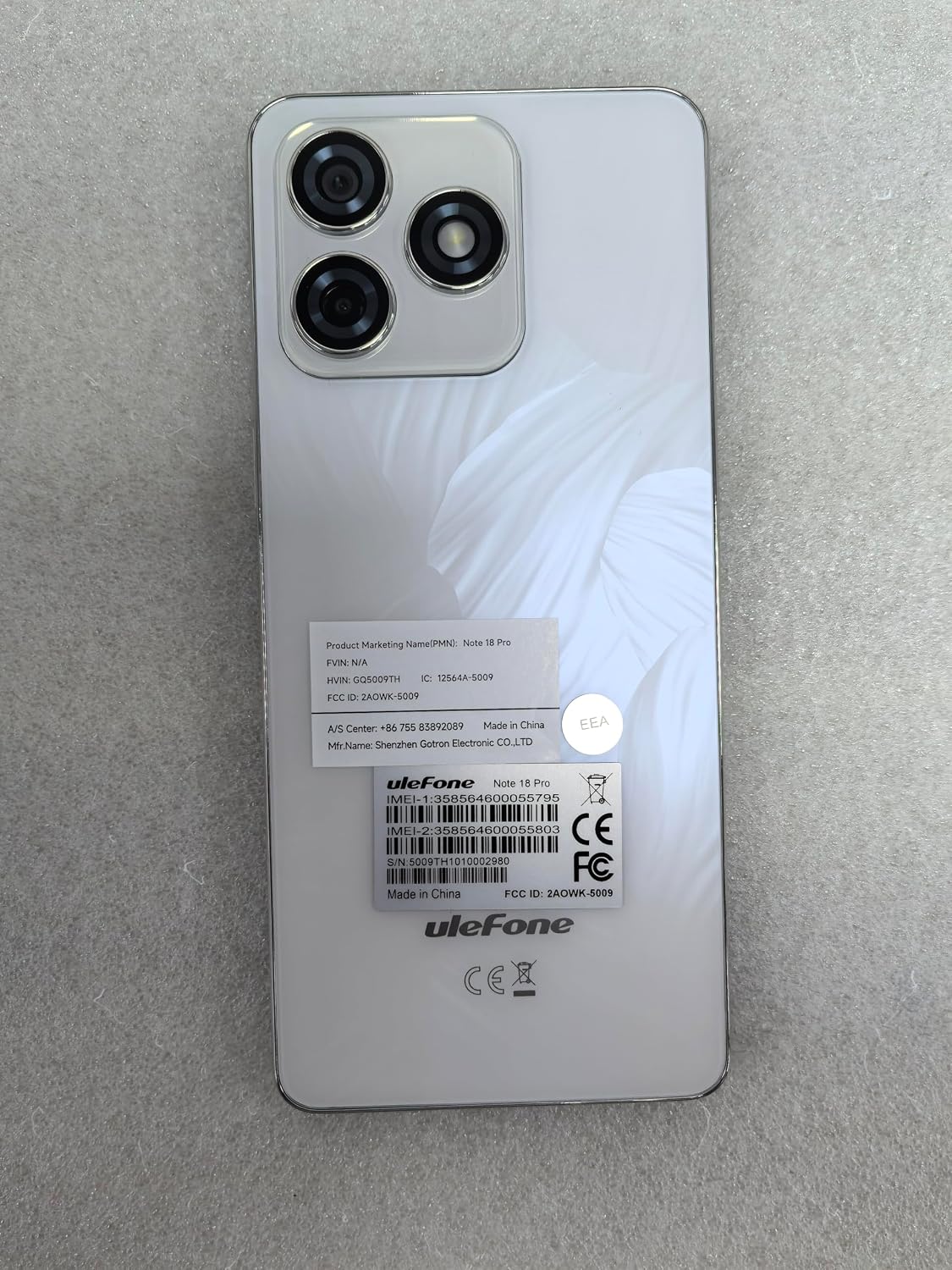
Figure 8.1: Product Information Labels
This image shows the back of the Ulefone Note 18 Pro smartphone, displaying various regulatory and product information labels. These labels include the product marketing name "Note 18 Pro", FCC ID, IC, IMEI numbers, and manufacturer details, which are important for warranty and support purposes.
Related documentsNote 18 Pro


Ask a question about this manual
Ask about setup, troubleshooting, compatibility, parts, safety, or missing instructions. Manuals+ will review the question and use this page’s manual context to help answer it.