1. Introduction
This manual provides essential information for the safe and efficient operation of your SKYWORTH 50G6500G 50-inch 4K UHD Google TV. Please read this manual thoroughly before using the television and retain it for future reference.
The SKYWORTH 50G6500G features a 50-inch 4K UHD (3840 x 2160) LED display, Google TV operating system, Chameleon Extreme 2.0 picture processing, HDR10 support, Eye Care 2.0 technology, Game Mode, and DTS Studio Sound. It includes multiple connectivity options such as 3 HDMI ports and 2 USB ports, along with Wi-Fi (2.4G+5G) and Bluetooth.

Image 1.1: Front view of the SKYWORTH 50G6500G 50-inch TV.
2. Safety Information
To ensure safe operation and prevent damage, observe the following precautions:
- Power Source: Connect the TV only to an AC power supply within the specified voltage range.
- Ventilation: Ensure adequate ventilation around the TV. Do not block ventilation openings.
- Water and Moisture: Do not expose the TV to rain, moisture, or excessive humidity.
- Heat Sources: Keep the TV away from direct sunlight, radiators, heat registers, stoves, or other heat-producing appliances.
- Cleaning: Unplug the TV before cleaning. Use a soft, dry cloth. Avoid liquid cleaners.
- Mounting: Follow instructions carefully when mounting the TV on a wall or installing the stand.
- Children: Supervise children to prevent them from climbing on the TV or stand.
- Servicing: Do not attempt to service the TV yourself. Refer all servicing to qualified service personnel.
3. Package Contents
Verify that all items are present in the packaging:
- SKYWORTH 50G6500G 50-inch 4K UHD Google TV
- Remote Control (Find-my Remote)
- Power Cable
- TV Stand (2 pieces)
- Screws for Stand Installation
- User Manual (this document)
- Quick Start Guide
4. Setup
4.1. Unpacking
Carefully remove the TV and all accessories from the packaging. It is recommended to retain the original packaging for future transport or servicing needs.
4.2. Stand Installation
If you are not wall-mounting the TV, attach the included stands:
- Place the TV face down on a soft, flat surface to prevent screen damage.
- Align each stand with the corresponding slots on the bottom of the TV.
- Secure each stand with the provided screws. Ensure they are tightened firmly.
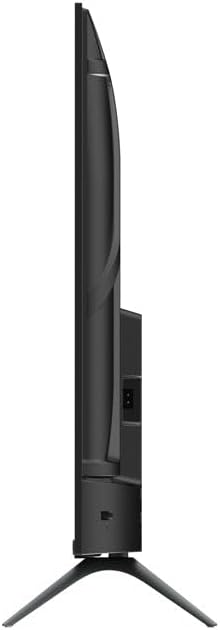
Image 4.1: Side view of the TV with stand.
4.3. Connecting External Devices
The TV offers various ports for connecting external devices:
- HDMI: Connect Blu-ray players, gaming consoles, or set-top boxes to the 3 HDMI ports.
- USB: Connect USB drives for media playback to the 2 USB ports.
- Antenna/Cable: Connect your antenna or cable TV signal to the DVB-T/T2/S2 input.
- Ethernet: For a stable internet connection, connect an Ethernet cable to the LAN port.
- Audio Out: Use the digital audio output for external sound systems.

Image 4.2: TV side view with ports.
4.4. Power Connection and Initial Setup
- Connect the power cable to the TV and then to a wall outlet.
- Press the power button on the remote control or TV to turn it on.
- Follow the on-screen instructions to complete the initial setup, including language selection, network connection (Wi-Fi or Ethernet), and Google account sign-in.
5. Operating the TV
5.1. Remote Control
The included remote control allows you to navigate the TV's features. The 'Find-my Remote' function assists in locating the remote if misplaced.
5.2. Google TV Interface
Your TV runs on Google TV, providing a personalized home screen with content recommendations from your subscriptions. Use the remote to navigate through apps, movies, shows, and settings.

Image 5.1: Overview of the Google TV ecosystem and interface.
5.3. Key Features
- Chameleon Extreme 2.0: This technology enhances picture quality by improving super resolution, contrast, and dynamic noise reduction.
- HDR10: Experience a wider range of colors and contrasts, bringing more depth and realism to compatible content.
- Eye Care 2.0 / Low Blue Light: Designed to reduce eye strain during prolonged viewing by minimizing harmful blue light emissions.
- Game Mode: Optimizes display settings for gaming, reducing input lag and enhancing responsiveness.
- Filmmaker Mode: Disables post-processing effects to preserve the original creative intent of films, providing a cinematic experience.
- DTS Studio Sound: Delivers immersive audio quality for an enhanced listening experience.

Image 5.2: Chameleon Extreme 2.0 technology demonstration.

Image 5.3: Low Blue Light feature explanation.

Image 5.4: Filmmaker Mode for cinematic viewing.
6. Maintenance
6.1. Cleaning the Screen
Gently wipe the screen with a soft, lint-free cloth. For stubborn marks, lightly dampen the cloth with water or a specialized screen cleaner. Do not spray liquid directly onto the screen.
6.2. Cleaning the Cabinet
Wipe the TV cabinet with a soft, dry cloth. Avoid using abrasive cleaners, waxes, or solvents as they can damage the finish.
7. Troubleshooting
If you encounter issues with your TV, refer to the following common problems and solutions:
| Problem | Possible Solution |
|---|---|
| No power | Check if the power cable is securely connected to the TV and the power outlet. Ensure the outlet is functional. |
| No picture, but sound is present | Verify the correct input source is selected. Check external device connections. |
| No sound, but picture is present | Check volume settings and ensure mute is off. Verify external audio connections if applicable. |
| Remote control not working | Replace batteries. Ensure no obstructions between the remote and the TV. |
| Cannot connect to Wi-Fi | Check router status. Re-enter Wi-Fi password. Try restarting the TV and router. |
8. Specifications
| Feature | Detail |
|---|---|
| Model Number | 50G6500G |
| Screen Size | 50 Inches |
| Display Technology | LED |
| Resolution | 4K UHD (3840 x 2160) |
| Refresh Rate | 60 Hz |
| Brightness | 250 nits |
| Operating System | Google TV |
| Connectivity | 3x HDMI, 2x USB, Wi-Fi (2.4G+5G), Bluetooth |
| Audio | 2x 12W Speakers, DTS Studio Sound |
| Special Features | Chameleon Extreme 2.0, HDR10, Eye Care 2.0, Game Mode, Filmmaker Mode, Find-my Remote |
| Product Dimensions (with stand) | 111W x 64.7H x 25D cm (approx.) |
| Product Dimensions (without stand) | 111W x 64.7H x 8D cm (approx.) |
| Weight (with stand) | 7.9 kg (approx.) |
| Weight (without stand) | 7.8 kg (approx.) |
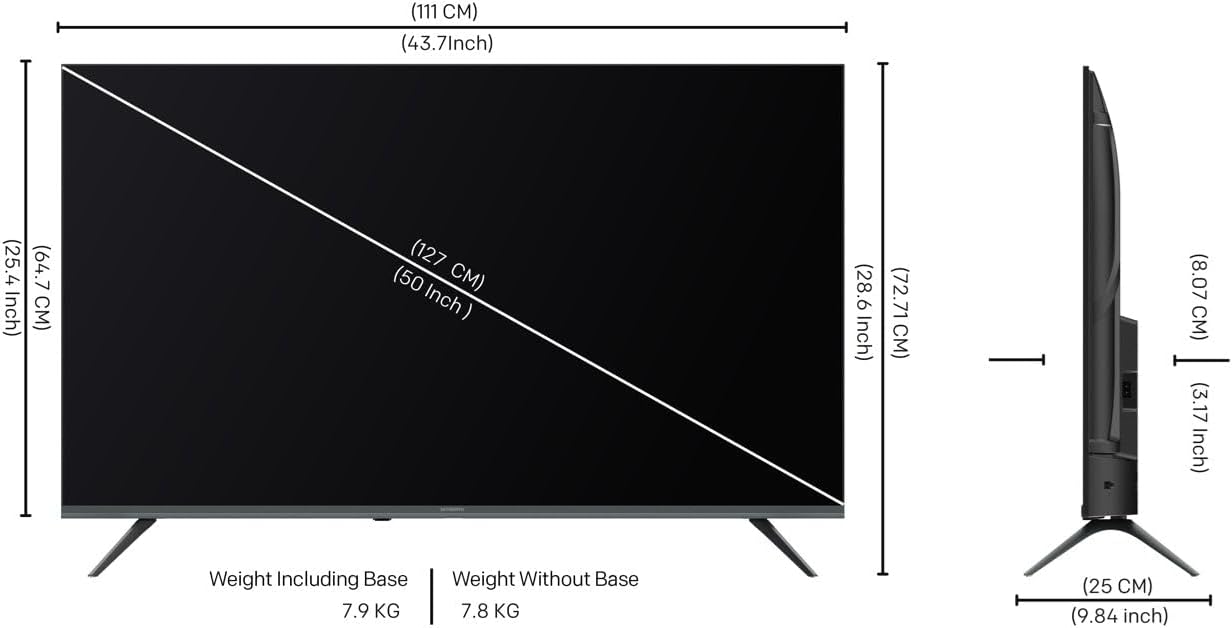
Image 8.1: TV dimensions diagram.
9. Warranty and Support
9.1. Warranty Information
Your SKYWORTH 50G6500G television comes with a 2-year warranty from the date of purchase. This warranty covers manufacturing defects under normal use. Please retain your proof of purchase for warranty claims.
The warranty does not cover damage caused by misuse, accidents, unauthorized modifications, or improper installation.
9.2. Customer Support
For technical assistance, troubleshooting beyond this manual, or warranty service, please contact SKYWORTH customer support. Refer to the contact information provided with your product packaging or visit the official SKYWORTH website for regional support details.


