1. Safety Information
Please read and understand this entire manual before attempting to assemble, operate, or install the product. Failure to follow these instructions could result in electric shock, fire, or serious personal injury.
- Ensure power is disconnected at the circuit breaker before installation.
- All wiring must be in accordance with national and local electrical codes.
- The fan must be mounted to a ceiling joist or a suitable support structure capable of supporting the fan's weight (12 pounds).
- Do not bend blade holders during installation or operation.
- Ensure all connections are tight and secure.
- This fan is suitable for indoor and covered outdoor use.
2. Package Contents
Verify that all parts are included before beginning installation. If any parts are missing or damaged, do not proceed with assembly.
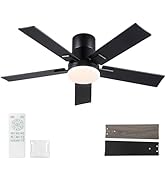
Image: All components of the Rayqueen 42-inch ceiling fan laid out, including the motor housing, blades, light kit, remote control, downrods, and hardware.
- Motor Housing
- Fan Blades (5) - Dual-sided (Matte Black and Wood Grain)
- Blade Brackets (5)
- Light Kit (24W LED, 2000LM)
- Remote Control with Wall Mount Bracket
- Receiver for Remote Control
- Downrod (various sizes may be included)
- Mounting Bracket
- Hardware Pack (screws, wire nuts, washers)
- Installation Manual
3. Setup and Installation
Follow these steps carefully for proper and safe installation. Basic tools are required.
3.1. Blade Assembly
Attach the fan blades to the blade brackets using the provided screws and washers. Ensure the desired blade finish (Matte Black or Wood Grain) is facing downwards.
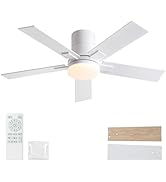
Image: Close-up of a hand attaching a fan blade to its bracket with screws, demonstrating the dual-sided blade feature.
3.2. Downrod and Motor Assembly
Connect the downrod to the motor housing. Feed the motor wires through the downrod. Secure the downrod with the provided pin and screws. The modular design simplifies this process.
Video: Demonstrates the assembly of the downrod and motor for the Rayqueen 1175 Ceiling Fan Downrod Series.
Video: Shows the black downrod assembly for the Rayqueen 1175 Ceiling Fan, highlighting the connection points.
3.3. Mounting and Wiring
Secure the mounting bracket to the ceiling electrical box. Hang the fan assembly onto the mounting bracket. Connect the electrical wires (live, neutral, ground) from the ceiling to the fan's receiver unit, then connect the receiver to the fan motor. Ensure all connections are properly insulated with wire nuts.

Image: A close-up view of the ceiling mounting bracket with electrical wires connected, showing the receiver unit tucked inside.
3.4. Light Kit Installation
Connect the LED light kit wires to the corresponding wires from the fan motor. Secure the light kit to the bottom of the fan assembly.

Image: The fully assembled Rayqueen 42-inch ceiling fan, showcasing the integrated LED light kit.
4. Operating Instructions
Your Rayqueen ceiling fan is operated using the included remote control.
4.1. Remote Control Functions

Image: A detailed diagram of the remote control, labeling buttons for fan speed, light control, timer, and reverse function.
- Fan ON/OFF: Press the power button to turn the fan on or off.
- Fan Speed (1-6): Select desired fan speed from 1 (lowest) to 6 (highest).
- Light ON/OFF: Toggle the light on or off.
- Light Brightness (+/-): Adjust the brightness of the LED light (20%-100%).
- Color Temperature (3000K/4500K/6000K): Cycle through warm white (3000K), natural white (4500K), and cool white (6000K) light options.
- Reverse Airflow: Press the reverse button to change the direction of the fan blades for summer (downward airflow) or winter (upward airflow) operation.
- Timer (1H/3H/6H): Set the fan to automatically turn off after 1, 3, or 6 hours.
- Sleep Mode: Activates a gentle, quiet fan setting for undisturbed rest.
- Memory Function: The fan and light settings will retain their last state when turned off and on again.

Image: The ceiling fan's LED light displaying the three adjustable color temperatures (3000K, 4500K, 6000K).

Image: A visual representation of the fan's reversible airflow, showing downward air for cooling in summer and upward air for heat circulation in winter.
5. Maintenance
Regular maintenance ensures optimal performance and longevity of your ceiling fan.
- Cleaning: To avoid damage to the finish, clean the fan with a soft, damp cloth. Do not use abrasive cleaners or solvents.
- Blade Cleaning: Dust the fan blades regularly to prevent dust buildup, which can affect airflow and balance.
- Tightening Screws: Periodically check all screws on the fan and mounting hardware to ensure they are tight.
- Modular Design: Key components such as fan blades, light cover, LED light, and remote are replaceable. Contact customer support for spare parts.
6. Troubleshooting
If you experience issues with your fan, refer to the following common problems and solutions:
| Problem | Possible Cause | Solution |
|---|---|---|
| Fan does not start | Loose wiring, no power, remote not paired. | Check circuit breaker. Ensure all wiring connections are secure. Re-pair remote control if necessary (refer to remote pairing instructions in full manual). |
| Fan wobbles | Loose blades, uneven blades, improper mounting. | Ensure all blade screws are tight. Check if blades are bent or damaged. Verify mounting bracket is securely attached to a ceiling joist. Use balancing kit if needed. |
| Light does not work | Loose light kit wiring, faulty LED module. | Check light kit wiring connections. If LED module is faulty, contact customer support for replacement. |
| Remote control not working | Dead batteries, remote not paired, signal interference. | Replace batteries (2 AAA included). Re-pair remote control. Ensure no obstructions between remote and fan. |
7. Specifications
| Feature | Detail |
|---|---|
| Brand | Rayqueen |
| Model Name | DY1175-5B/42 |
| Color | Black |
| Electric Fan Design | Ceiling Fan |
| Power Source | DC |
| Style | Modern |
| Product Dimensions | 42"D x 42"W x 12.2"H |
| Room Type | Bedroom, Dining Room, Kids Room, Living Room, Patio |
| Special Features | Cooling and Air Circulation, Dimmable fan light, Fan direction memory function, Fan light memory function, Fan speed memory function |
| Recommended Uses | Indoor |
| Noise Level | 32 Decibels |
| Wattage | 24 watts (LED Light) |
| Finish Type | Matte |
| Number of Blades | 5 |
| Air Flow Capacity | 4000 Cubic Feet Per Minute |
| Voltage | 120 Volts |
| Item Weight | 12 Pounds |
| Indoor/Outdoor Usage | Indoor, Outdoor (Covered) |
| Specification Met | ETL |
| Control Method | Remote |
| Number of Power Levels | 6 |
| Motor Type | DC |
| Installation Type | Downrod Mount |
| Batteries | 2 AAA batteries required (included) |
8. Warranty and Support
Your Rayqueen ceiling fan is ETL-certified for safety. For any questions, replacements, spare parts, or repair assistance, please contact our 24/7 customer support via Amazon Message.


