
1. Important Safety Instructions
Read all safety warnings, instructions, illustrations, and specifications provided with this power tool. Failure to follow all instructions listed below may result in electric shock, fire, and/or serious injury.
- Work Area Safety: Keep your work area clean and well-lit. Cluttered or dark areas invite accidents. Do not operate power tools in explosive atmospheres, such as in the presence of flammable liquids, gases, or dust.
- Electrical Safety: Power tool plugs must match the outlet. Never modify the plug in any way. Do not expose power tools to rain or wet conditions. Water entering a power tool will increase the risk of electric shock.
- Personal Safety: Always wear eye protection. Use appropriate personal protective equipment such as dust masks, non-skid safety shoes, hard hats, or hearing protection when necessary. Stay alert, watch what you are doing, and use common sense when operating a power tool.
- Tool Use and Care: Do not force the power tool. Use the correct power tool for your application. Disconnect the battery pack from the power tool before making any adjustments, changing accessories, or storing power tools.
- Battery Pack Use and Care: Recharge only with the charger specified by the manufacturer. Do not use battery packs with any other power tools. When the battery pack is not in use, keep it away from other metal objects.
2. Package Contents
The LEEIKOO 21V Cordless Drill Driver package includes the following items:
- 1 x Cordless Drill Driver
- 2 x 2.0Ah Li-ion Batteries
- 1 x Battery Charger
- 6 x Screwdriver Bits
- 1 x Hex Screwdriver Holder
- 2 x Brad Point Drill Bits (for wood)
- 2 x Twist Drill Bits (for metal)
- 2 x Stone Drill Bits (for masonry)
- 1 x Flexible Drill Shaft
- 1 x Belt Clip
- 1 x Carry Case

Image: The complete set of the LEEIKOO 21V Cordless Drill Driver, including the drill, two batteries, charger, and various bits and accessories, all neatly arranged with the carry case.
3. Product Overview
Familiarize yourself with the components of your LEEIKOO Cordless Drill Driver for optimal use and safety.

Image: A detailed view of the LEEIKOO 21V Cordless Drill Driver, showcasing its main components such as the chuck, torque adjustment ring, speed selector, handle, and battery.
- Chuck: Holds drill bits and screwdriver bits securely.
- Torque Adjustment Ring: Allows selection of 18 torque settings plus a drill mode for various materials.
- Speed Selector: Switches between two speed ranges (Low/High).
- Forward/Reverse Switch: Controls the rotation direction and locks the trigger.
- Trigger Switch: Activates the drill and controls variable speed.
- LED Work Light: Illuminates the work area for improved visibility.
- Battery Pack: Provides power to the drill.
- Battery Release Buttons: Used to detach the battery from the drill.
4. Setup
4.1 Battery Charging and Installation
Ensure the battery is fully charged before first use.
- Connect the charger to a power outlet.
- Slide the battery pack onto the charger until it clicks into place. The battery indicator lights will show charging progress. A full charge typically takes 2.5 hours.
- Once charged, remove the battery from the charger.
- To install the battery on the drill, align the battery with the base of the drill and slide it in until it clicks securely.
- To remove the battery, press the battery release buttons on both sides of the battery and slide it out.

Image: The LEEIKOO drill showing its battery indicator lights, which provide real-time charge status, and a separate battery being charged, highlighting the ease of monitoring and charging.
4.2 Installing/Removing Drill Bits
- Ensure the drill is in the locked position (center position of the Forward/Reverse switch).
- Rotate the chuck counter-clockwise to open the jaws.
- Insert the desired drill bit or screwdriver bit into the chuck. Ensure it is inserted as far as possible.
- Rotate the chuck clockwise to tighten the jaws securely around the bit. Hand-tighten firmly.
- To remove a bit, rotate the chuck counter-clockwise to loosen the jaws and pull the bit out.
5. Operating Instructions
5.1 Power On/Off and Variable Speed
The drill is activated by pressing the trigger switch. The speed is variable depending on how much the trigger is pressed.
5.2 Speed Selection (0-550 RPM / 0-1850 RPM)
The drill features a two-speed gearbox for different applications:
- Low Speed (0-550 RPM): Select '1' on the speed selector. Ideal for screwdriving applications and drilling larger holes in softer materials where higher torque is required.
- High Speed (0-1850 RPM): Select '2' on the speed selector. Suitable for drilling smaller holes and applications requiring higher speed with less torque.
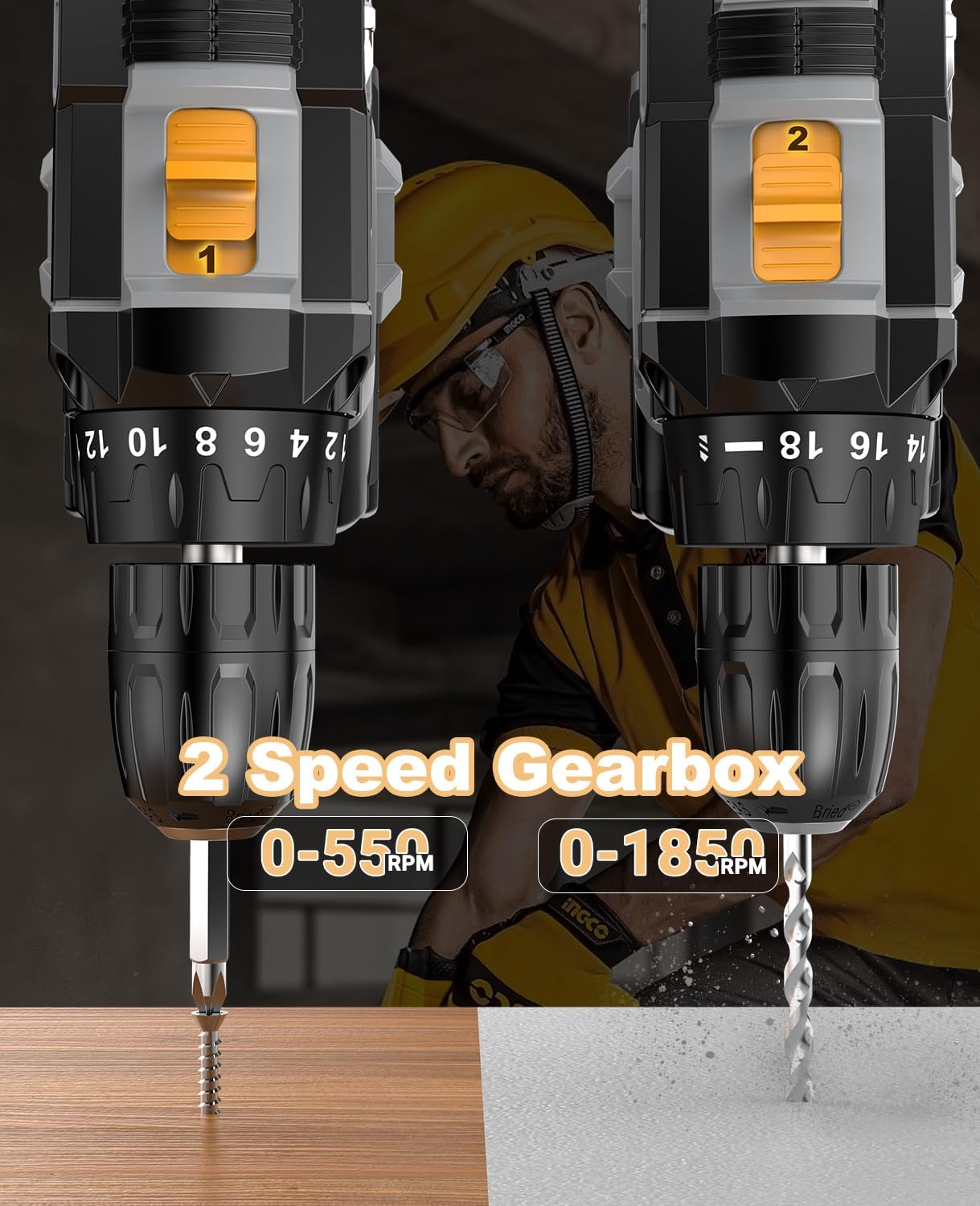
Image: A close-up of the LEEIKOO drill highlighting the 2-speed gearbox selector, indicating the low-speed (0-550 RPM) for screwdriving and high-speed (0-1850 RPM) for drilling.
5.3 Torque Adjustment (18+1 Settings)
The torque adjustment ring allows you to set the clutch to the appropriate torque for your application, preventing overtightening or stripping screws.
- Rotate the torque adjustment ring to select one of the 18 torque settings. Lower numbers are for smaller screws or softer materials, higher numbers for larger screws or harder materials.
- Select the drill symbol for drilling applications, which bypasses the clutch for maximum torque (42 N.m).

Image: The LEEIKOO drill's chuck area, illustrating the 18+1 torque settings, which allow precise control for various materials and applications, from delicate tasks to heavy-duty drilling.
5.4 Forward/Reverse/Lock Switch
This switch controls the direction of rotation and locks the trigger for safety.
- Forward: Push the switch to the left for clockwise rotation (for driving screws or drilling).
- Reverse: Push the switch to the right for counter-clockwise rotation (for removing screws).
- Lock: Place the switch in the center position to lock the trigger, preventing accidental startup. Always engage the lock when changing bits, making adjustments, or storing the tool.
5.5 LED Work Light
The integrated LED light automatically illuminates when the trigger is pressed, providing visibility in dimly lit work areas.

Image: The LEEIKOO drill in use, demonstrating its built-in LED light effectively illuminating the work surface, improving visibility and precision in dark environments.
6. Maintenance
Regular maintenance ensures the longevity and optimal performance of your drill.
- Cleaning: After each use, wipe the tool with a clean, damp cloth. Do not use harsh chemicals or abrasive cleaners. Keep the ventilation openings clear of dust and debris.
- Battery Care: Store batteries in a cool, dry place away from direct sunlight and extreme temperatures. Do not store fully discharged batteries for extended periods. Recharge them periodically if not in use.
- Chuck Maintenance: Periodically clean the chuck jaws to ensure proper gripping of bits.
- Storage: Store the drill and all accessories in the provided carry case in a dry, secure location, out of reach of children.
7. Troubleshooting
Refer to this section for common issues and their solutions.
| Problem | Possible Cause | Solution |
|---|---|---|
| Drill does not start | Battery not charged; Battery not properly installed; Forward/Reverse switch in lock position. | Charge battery; Reinstall battery securely; Move switch to forward or reverse position. |
| Loss of power during operation | Battery low; Overload. | Recharge battery; Reduce pressure on the drill or use a lower speed/higher torque setting. |
| Bit slips in chuck | Chuck not tightened sufficiently; Bit shank is dirty or damaged. | Retighten chuck firmly; Clean or replace bit. |
| Overheating | Continuous heavy use; Blocked ventilation. | Allow tool to cool down; Clear ventilation slots. |
8. Specifications
Technical specifications for the LEEIKOO 21V Cordless Drill Driver.
| Feature | Specification |
|---|---|
| Model Number | DZL00071EU |
| Voltage | 21 Volt |
| Battery Type | Li-ion |
| Battery Capacity | 2000 mAh (2.0 Ah) |
| Max Torque | 42 Newton Meters (N.m) |
| No-Load Speed (Low) | 0-550 RPM |
| No-Load Speed (High) | 0-1850 RPM |
| Torque Settings | 18+1 (Drill Mode) |
| Chuck Size | 10 mm (Autobloccante) |
| Weight | 2.57 Kilograms |
| Dimensions | 32 x 24.6 x 10.5 cm |
| Special Features | LED Work Light, Comfortable Grip, Cordless |
9. Warranty and Support
LEEIKOO is committed to providing high-quality products and customer satisfaction. For any questions, concerns, or warranty claims regarding your Cordless Drill Driver, please refer to the contact information provided on your product packaging or the seller's platform where the purchase was made.
Our dedicated support team is available to assist you with product inquiries, technical assistance, and troubleshooting. Please have your model number (DZL00071EU) and purchase details ready when contacting support.

Image: A customer support representative wearing a headset and smiling, symbolizing available assistance for product inquiries and support.