
1. Introduction
The MOREFINE M9 Mini PC is a compact and powerful desktop computer designed for various tasks, from office work to home entertainment. It features a 12th Gen Intel Alder Lake-N100 processor, 16GB DDR4 RAM, and a 500GB NVMe SSD, offering efficient performance in a small form factor. This manual provides essential information for setting up, operating, maintaining, and troubleshooting your device.

Image 1.1: Front view of the MOREFINE M9 Mini PC.
2. What's in the Box
Upon unboxing your MOREFINE M9 Mini PC, please ensure all the following items are present:
- 1 x MOREFINE M9 Mini PC
- 1 x Power Adapter
- 1 x User Manual (this document)
- 1 x HDMI Cable
- 1 x Mounting Bracket with Screws (for VESA mounting)
Video 2.1: Unboxing and overview of included items and connectivity ports.
3. Setup
Follow these steps to set up your MOREFINE M9 Mini PC:
- Connect to Display: Connect your monitor(s) to the Mini PC using the provided HDMI cable. The device supports dual 4K@60Hz displays via its two HDMI 2.0 ports.
- Connect Peripherals: Plug in your keyboard, mouse, and any other USB devices into the available USB 3.2 Gen1 ports (two on the front, two on the back).
- Network Connection: For wired internet, connect an Ethernet cable to the 2.5G LAN port. For wireless, the device supports WiFi 6.
- Power On: Connect the power adapter to the DC input port on the back of the Mini PC, then plug it into a power outlet. Press the power button on the front of the device to turn it on.

Image 3.1: Front view showing USB 3.2 Gen1 ports and power button.
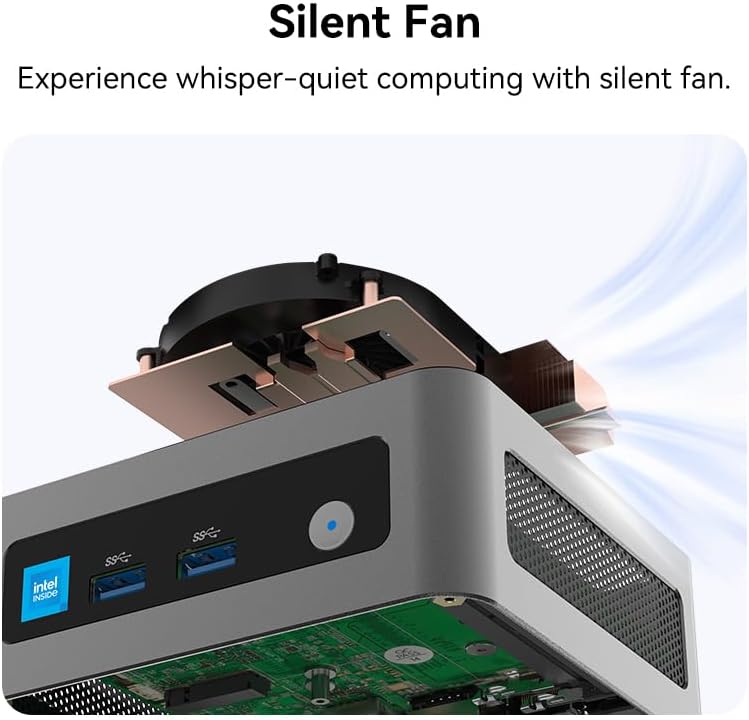
Image 3.2: Rear view showing power input, audio jack, HDMI ports, LAN, and additional USB ports.
4. Operating Instructions
The MOREFINE M9 Mini PC is designed for ease of use and versatility:
- Dual Display Support: Utilize the two HDMI 2.0 ports to connect two 4K@60Hz monitors simultaneously, enhancing productivity for multitasking.
- Wireless Connectivity: Benefit from fast and stable wireless connections with built-in WiFi 6 (802.11ax) and Bluetooth 5.2 for connecting wireless peripherals.
- Advanced Features: The Mini PC supports Wake-on-LAN (WOL), PXE Boot, and Auto Power On, allowing for flexible deployment and remote management.
- Performance: Powered by the 12th Gen Intel Alder Lake-N100 processor and 16GB DDR4 RAM, it handles daily computing tasks, office applications, and 4K video playback smoothly.
Video 4.1: Overview of the MOREFINE M9 Mini PC's features and capabilities.

Image 4.1: The Mini PC supporting a dual 4K display setup for enhanced productivity.
5. Maintenance
To ensure optimal performance and longevity of your Mini PC:
- Cooling System: The M9 Mini PC features a silent fan for efficient heat dissipation. Ensure proper airflow around the device and keep vents clear of obstructions.
- Storage Upgrades: The device includes two storage slots: one M.2 2280 NVMe PCIe 3.0 x2 and one M.2 2242 SATA. You can upgrade the built-in 512GB M.2 NVMe SSD up to 2TB. Refer to the internal diagram for slot locations.
- Software Updates: Regularly update your operating system and drivers to maintain security and performance.
Video 5.1: Noise test demonstrating the quiet operation of the Mini PC's cooling system.

Image 5.1: Internal layout of the Mini PC, highlighting the M.2 NVMe and SATA slots for storage expansion.
6. Troubleshooting
If you encounter issues with your MOREFINE M9 Mini PC, consider the following:
- No Power: Ensure the power adapter is securely connected to both the Mini PC and a working power outlet. Try a different outlet if necessary.
- No Display: Verify that the HDMI cable is correctly connected to both the Mini PC and the monitor. Check the monitor's input source settings.
- Peripheral Issues: If a keyboard, mouse, or other USB device is not responding, try connecting it to a different USB port. Ensure drivers are up to date if applicable.
- Performance Problems: Close unnecessary applications, check for background processes, and ensure the device has adequate ventilation.
- Defective Unit: If you suspect a hardware defect, please contact MOREFINE customer support for assistance.
- Software Updates: For operating system or driver updates, refer to the official MOREFINE support channels or contact customer service for guidance.
7. Specifications
Key technical specifications for the MOREFINE M9 Mini PC (Model M600):
| Feature | Detail |
|---|---|
| Processor | 12th Gen Intel Alder Lake-N100 (4C/4T, 6MB Cache, up to 3.4 GHz) |
| Graphics | Intel UHD Graphics (4K@60Hz output) |
| RAM | 16GB DDR4 3200MHz (expandable up to 32GB) |
| Storage | 500GB M.2 NVMe SSD (PCIe 3.0 x2, expandable up to 2TB) |
| Additional Storage Slot | 1 x M.2 2242 SATA |
| Wireless Connectivity | WiFi 6 (802.11ax), Bluetooth 5.2 |
| Wired Connectivity | 1 x 2.5G Gigabit Ethernet RJ45 |
| USB Ports | 4 x USB 3.2 Gen1 (up to 10Gbps) |
| Video Output | 2 x HDMI 2.0 (supports 4K@60Hz dual display) |
| Audio | 1 x 3.5mm Audio Jack |
| Dimensions | 4.44 x 4.13 x 1.65 inches (113 x 105 x 42 mm) |
| Weight | Approximately 2.9 Grams (device only) |

Image 7.1: Diagram illustrating the Intel Alder Lake N100 Processor architecture.
8. Warranty and Support
Your MOREFINE M9 Mini PC comes with a manufacturer's warranty and dedicated customer support.
- Warranty: The product is covered by a 1-Year Manufacturer's Warranty. Please retain your proof of purchase for warranty claims.
- Customer Support: For any technical assistance, troubleshooting, or warranty inquiries, please contact MOREFINE official customer support. You can typically find contact information on the MOREFINE official website or through your purchase platform.


