
1. Introduction
Thank you for purchasing the Philco Portable CD Player Boombox. This versatile audio system combines modern and classic audio playback options, including CD, cassette, FM radio, and Bluetooth connectivity. This manual provides essential information for safe and efficient use of your device.
2. Important Safety Instructions
- Read all instructions before operating the device.
- Keep this manual for future reference.
- Do not expose the unit to rain or moisture to prevent fire or electric shock.
- Ensure proper ventilation; do not block any ventilation openings.
- Use only attachments/accessories specified by the manufacturer.
- Unplug the unit during lightning storms or when unused for long periods.
- Refer all servicing to qualified service personnel.
- Do not open the casing; there are no user-serviceable parts inside.
- Avoid placing the unit near heat sources such as radiators, heat registers, stoves, or other apparatus (including amplifiers) that produce heat.
3. Product Components and Controls
Familiarize yourself with the various parts and controls of your Philco Portable CD Player Boombox.
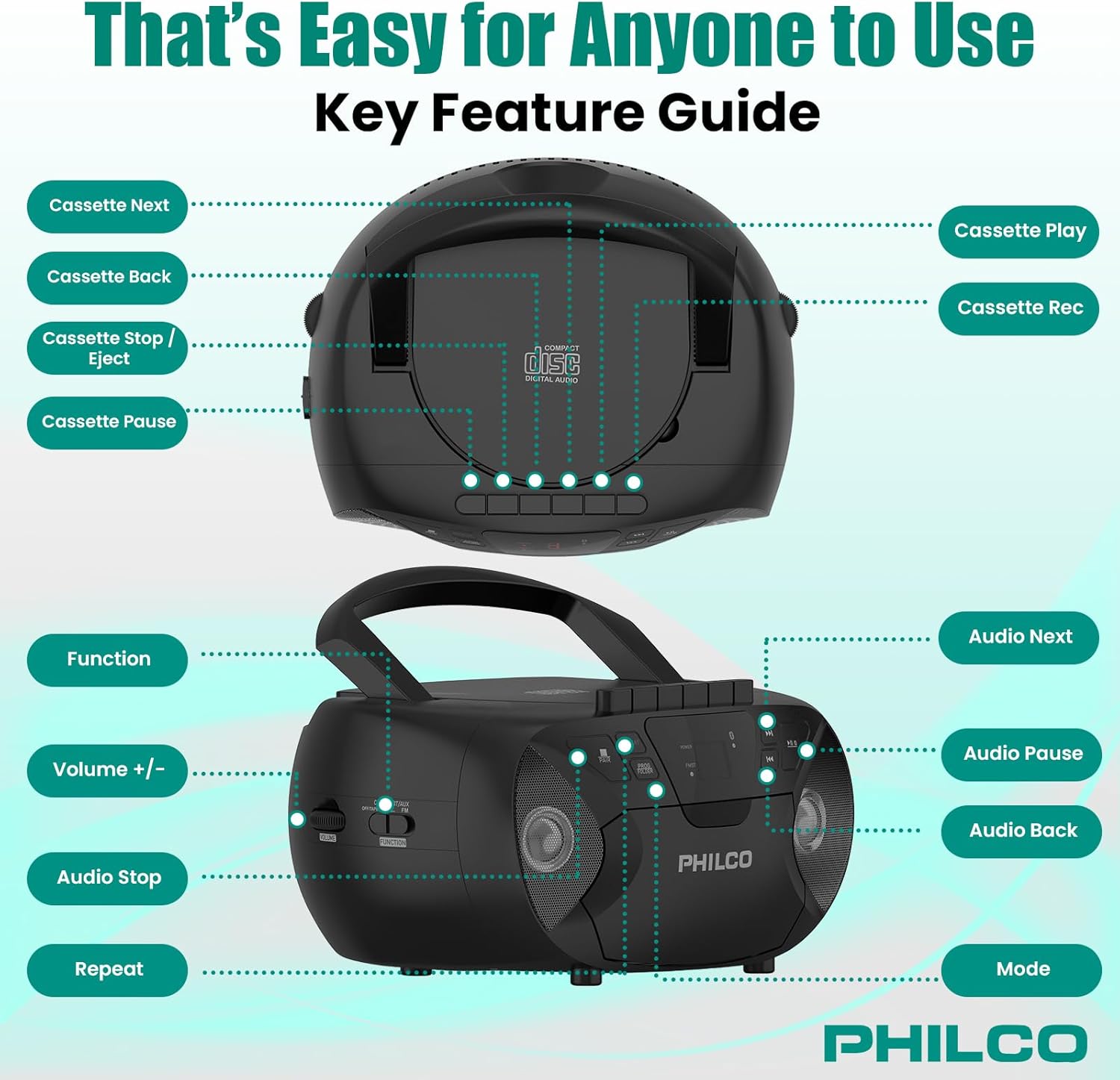
Image 3.1: Top and side view of the Philco Boombox with key controls labeled. This image shows the layout of buttons for cassette functions (Next, Back, Stop/Eject, Pause, Play, Record) and audio controls (Next, Pause, Back, Mode, Volume, Function, Stop, Repeat).
Front Panel Controls:
- POWER Button: Turns the unit on or off.
- MODE Button: Switches between CD, Cassette, FM Radio, Bluetooth, and AUX modes.
- PLAY/PAUSE Button (CD/Bluetooth): Starts or pauses playback.
- STOP Button (CD/Bluetooth): Stops playback.
- SKIP/SEARCH Buttons (<< / >>): Skips tracks or fast forwards/rewinds.
- VOLUME Control: Adjusts the audio output level.
- FM TUNER Dial: Selects FM radio stations.
Cassette Deck Controls:
- PLAY Button: Starts cassette playback.
- RECORD Button: Initiates cassette recording (from CD, FM, or AUX).
- REWIND/FAST FORWARD Buttons: Rewinds or fast forwards the tape.
- STOP/EJECT Button: Stops tape playback/recording and opens the cassette door.
- PAUSE Button: Temporarily pauses cassette playback/recording.
Rear/Side Panel Connections:
- AC Power Input: Connects the AC power cord.
- Battery Compartment: Holds 6 x 'C' size batteries (not included) for portable use.
- AUX IN Jack (3.5mm): Connects external audio devices.
- HEADPHONE Jack (3.5mm): For private listening with headphones.
- FM Antenna: Extendable antenna for improved FM reception.
4. Setup
4.1 Powering the Unit
Your Philco Boombox can be powered by either AC power or batteries.

Image 4.1: Illustration of AC power connection and battery installation for the Philco Boombox.
AC Power:
- Ensure the unit is turned off.
- Connect the supplied AC power cord to the AC power input jack on the back of the unit.
- Plug the other end of the AC power cord into a standard wall outlet (AC 120V ~ 60Hz).
Battery Power:
- Ensure the unit is turned off and disconnected from AC power.
- Open the battery compartment cover located on the bottom or rear of the unit.
- Insert 6 x 'C' size batteries (not included), observing the correct polarity (+/-) as indicated inside the compartment.
- Close the battery compartment cover securely.
Note: When using AC power, batteries are automatically disconnected. Remove batteries if the unit will not be used for an extended period to prevent leakage.
4.2 Initial Power On
Press the POWER button to turn on the unit. The unit will typically default to the last used mode or CD mode.
5. Operation
5.1 CD Player Operation
Image 5.1: Demonstrating the top-loading CD compartment for disc insertion.
- Press the MODE button until "CD" mode is selected.
- Open the CD compartment door by gently lifting it.
- Place a CD (CD-R, CD-RW, MP3, WMA compatible) onto the spindle with the label side facing up.
- Close the CD compartment door securely.
- Press the PLAY/PAUSE button to start playback.
- Use the SKIP/SEARCH buttons (<< / >>) to navigate between tracks.
- Press the STOP button to end playback.
- Press the REPEAT button to repeat the current track or all tracks.
5.2 Cassette Player/Recorder Operation

Image 5.2: View of the cassette deck with a tape loaded, ready for playback or recording.
Playing a Cassette:
- Press the MODE button until "TAPE" or "CASSETTE" mode is selected.
- Press the STOP/EJECT button to open the cassette door.
- Insert a cassette tape with the open edge facing upwards and the side to be played facing you.
- Close the cassette door.
- Press the PLAY button to start playback.
- Use REWIND/FAST FORWARD buttons to navigate the tape.
- Press the STOP/EJECT button to stop playback and eject the tape.
Recording to Cassette:
- Insert a blank cassette tape into the cassette deck.
- Select the desired source (CD, FM Radio, or AUX) using the MODE button.
- Start playback on the source (e.g., play a CD track, tune to an FM station).
- Press the RECORD button on the cassette deck. The PLAY button will also engage.
- To pause recording, press the PAUSE button. Press it again to resume.
- To stop recording, press the STOP/EJECT button.
5.3 FM Radio Operation
- Press the MODE button until "FM" mode is selected.
- Extend the FM telescopic antenna for optimal reception.
- Rotate the FM TUNER dial to select your desired radio station.
- Adjust the VOLUME control to your preferred listening level.
5.4 Bluetooth Audio Streaming

Image 5.3: The Philco Boombox wirelessly connected to a smartphone via Bluetooth for audio streaming.
- Press the MODE button until "BT" or "BLUETOOTH" mode is selected. The unit will enter pairing mode, indicated by a flashing Bluetooth indicator.
- On your Bluetooth-enabled device (e.g., smartphone, tablet), enable Bluetooth and search for available devices.
- Select "PHILCO BOOMBOX" (or similar name) from the list of devices to pair.
- Once paired, the Bluetooth indicator will stop flashing and remain solid.
- Start playing audio on your connected device. The sound will be streamed to the boombox.
- Adjust volume on both the boombox and your connected device.
Important Note: This boombox is designed to receive audio via Bluetooth from other devices. It cannot transmit audio to Bluetooth headphones, earbuds, or speakers.
5.5 AUX Input Operation

Image 5.4: The AUX input jack on the Philco Boombox, used for connecting external audio sources.
- Connect one end of a 3.5mm audio cable (not included) to the AUX IN jack on the boombox.
- Connect the other end of the audio cable to the headphone jack or audio output of your external device (e.g., MP3 player, smartphone).
- Press the MODE button until "AUX" mode is selected.
- Start playing audio on your external device.
- Adjust the volume on both the boombox and your external device.
5.6 Headphone Use
For private listening, plug any standard 3.5mm headphones into the HEADPHONE jack. The internal speakers will automatically mute.
6. Maintenance
6.1 Cleaning the Unit
- Wipe the exterior of the unit with a soft, damp cloth. Do not use abrasive cleaners or solvents.
- For the CD lens, use a specialized CD lens cleaning kit.
- For the cassette deck, periodically clean the tape heads and pinch rollers with a cotton swab lightly dampened with isopropyl alcohol.
6.2 Battery Care
- Remove batteries if the unit will not be used for an extended period to prevent battery leakage and corrosion.
- Do not mix old and new batteries, or different types of batteries.
- Dispose of used batteries responsibly according to local regulations.
7. Troubleshooting
| Problem | Possible Cause | Solution |
|---|---|---|
| No power | AC cord not connected; Batteries depleted or incorrectly inserted. | Check AC cord connection; Replace batteries or ensure correct polarity. |
| No sound from CD/Cassette/Radio/Bluetooth/AUX | Volume too low; Incorrect mode selected; Headphones connected; CD/Cassette inserted incorrectly or damaged; Bluetooth not paired. | Increase volume; Select correct mode; Disconnect headphones; Check/replace media; Re-pair Bluetooth device. |
| CD skips | CD dirty or scratched; Unit on an unstable surface. | Clean or replace CD; Place unit on a stable, flat surface. |
| Poor FM reception | Antenna not extended; Weak signal. | Fully extend and adjust the FM antenna; Try moving the unit to a different location. |
| Bluetooth device won't pair | Boombox not in pairing mode; Device too far; Bluetooth already connected to another device. | Ensure boombox is in BT pairing mode; Move device closer; Disconnect from other devices and try again. |
| Cassette tape not playing/recording correctly | Tape damaged; Tape heads dirty; Buttons stuck (as per review). | Try a different tape; Clean tape heads; If buttons are stuck, gently try to free them or contact support if persistent. |
8. Specifications
- Brand: Philco
- Model: B0DHYKCWYN
- Connectivity Technology: Bluetooth
- Color: Black
- Speaker Type: Stereo
- Item Dimensions (L x W x H): 10.08 x 5.71 x 10.75 inches
- Power Source: AC 120V ~ 60Hz or 6 x 'C' Batteries (not included)
- Compatible Devices: MP3 Player (via AUX)
- Supported Audio Formats: CD, CD-R, CD-RW, MP3, WMA (from CD)
- Number of Speakers: 2
- Audio Output Mode: Stereo
- Bluetooth Support: Yes (receive only)
- Built-In Media: CD, Cassette, FM Radio
9. Warranty and Support
9.1 Warranty Information
For specific warranty details, please refer to the warranty card included with your product or visit the official Philco website. Warranty terms and conditions may vary by region and retailer.
9.2 Customer Support
If you encounter any issues or have questions not covered in this manual, please visit the official Philco website for support resources, FAQs, and contact information. You can typically find support links on the product page where you purchased the item or by searching for "Philco customer support" online.

