
1. Product Overview
The ANGEWOZ Keyless Entry Remote Kit provides a replacement or additional key fob for compatible Chrysler, Dodge, and Jeep vehicles. This kit includes a 3-button key fob (Lock, Unlock, Panic) and an OBD programming device, allowing for self-programming without specialized tools or dealership visits. The key fob is designed to match the functionality and appearance of your vehicle's original remote.

Image 1.1: The ANGEWOZ 3-Button Keyless Entry Remote Kit, showing the key fob and the OBD programming device.
2. Compatibility
This keyless entry remote kit is compatible with specific Chrysler, Dodge, and Jeep models. It is crucial to verify your vehicle's make, model, and year, as well as the FCC ID of your original remote, before attempting to program this device. The compatible FCC IDs for this kit are OHT692427AA and OHT692413AA.

Image 2.1: A visual representation of compatible vehicle models and years for the keyless entry remote kit.
Compatible Vehicles:
- Chrysler: 200 (2011-2014), PT Cruiser (2006-2010), Sebring (2007-2009)
- Dodge: Avenger (2008-2014), Caliber (2007-2012), Nitro (2007-2011), Dakota (2005-2011), Durango (2007-2009), Magnum (2005-2007), Ram (2007-2009)
- Jeep: Compass (2007-2017), Grand Cherokee (2005-2007), Liberty (2010-2012), Patriot (2007-2017), Wrangler (2007-2018)
Important Note: This kit will not add new functionalities to your vehicle. Only the original remote features will work, regardless of the buttons included on the new key fob. Ensure the FCC ID on your existing key matches OHT692427AA or OHT692413AA.
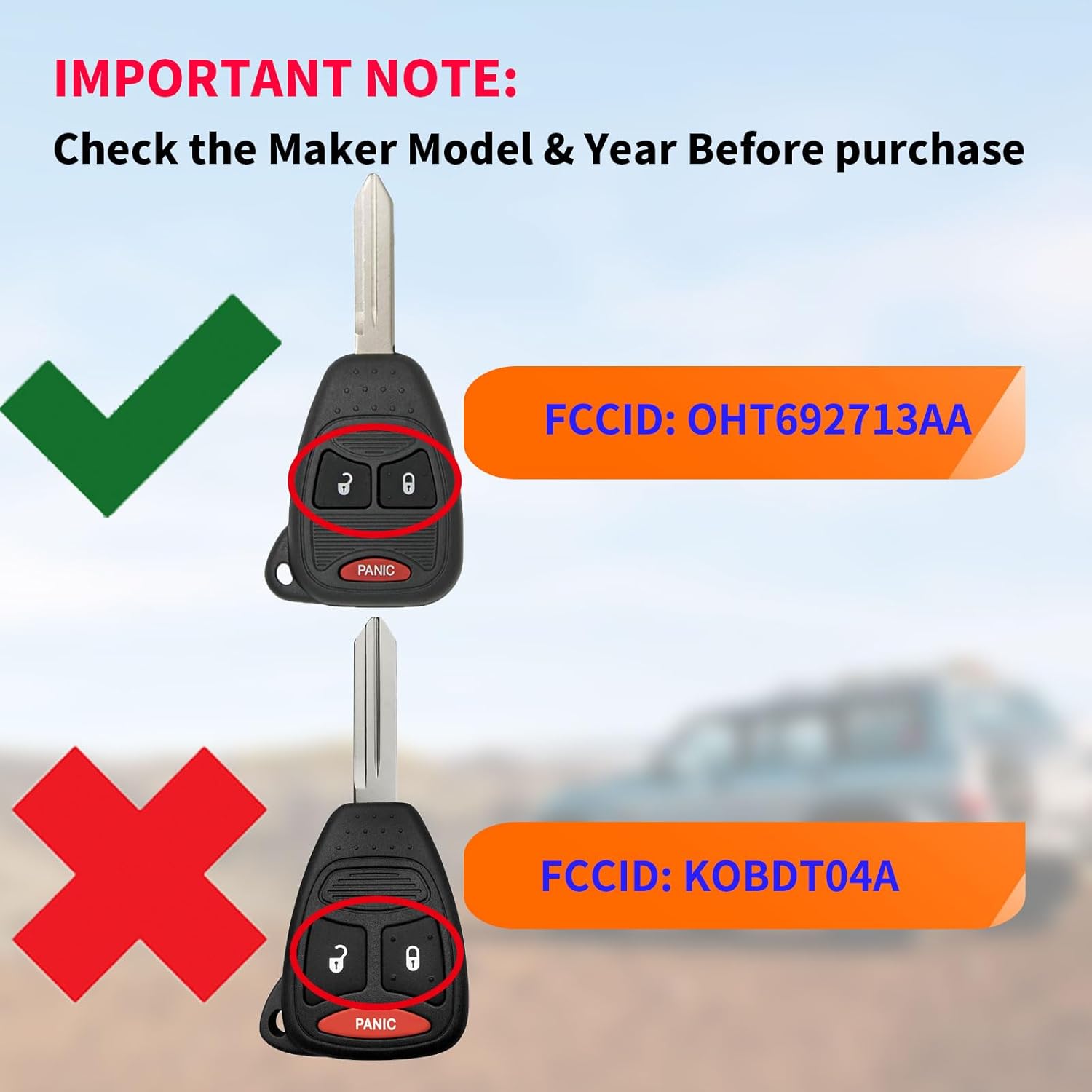
Image 2.2: Visual guide emphasizing the importance of matching the correct FCC ID (OHT692713AA shown as correct example, KOBDT04A as incorrect) for compatibility.
3. What's in the Box
- 1 x 3-Button Key Fob (with uncut key blade)
- 1 x OBD Programming Device
4. Setup and Programming Instructions
This kit requires at least one currently working key to successfully program a new key fob. If you do not have a working key, professional assistance may be required.
Preparation:
- Ensure your vehicle's battery is fully charged.
- Have all existing working keys and the new key fob ready.
- It is recommended to have the new key blade cut by a locksmith or hardware store before programming the remote functions.
Programming Steps:
- Locate OBD-II Port: Find your vehicle's OBD-II port, typically located under the dashboard on the driver's side.
- Connect Programmer: Plug the provided OBD programming device firmly into the OBD-II port. Ensure a secure connection.
- Insert Working Key: Insert your existing, working key into the ignition and turn it to the 'ON' position (just before the engine starts, without cranking). Leave it in this position for at least 5 seconds, but no more than 15 seconds.
- Remove Working Key: Turn the working key to the 'OFF' position and remove it from the ignition.
- Insert New Key: Within 10 seconds of removing the working key, insert the new key fob (with the cut key blade) into the ignition. Turn it to the 'ON' position.
- Wait for Confirmation: The vehicle's security light should illuminate and then turn off, or you may hear a chime, indicating successful programming. This process typically takes a few seconds.
- Test New Key Fob: Remove the new key from the ignition. Test all buttons (Lock, Unlock, Panic) to ensure they function correctly. Also, test starting the vehicle with the new key.
- Repeat for Additional Keys (if applicable): If you have multiple new key fobs to program, repeat steps 5-7 for each additional key within 10 seconds of removing the previous new key.
- Disconnect Programmer: Once all keys are programmed, remove the OBD programming device from the port.

Image 4.1: Illustration of the key fob and OBD programming device, with a visual cue for locating the OBD port in a vehicle.
5. Operating the Key Fob
The key fob features three primary buttons:
- Lock Button: Press once to lock all vehicle doors.
- Unlock Button: Press once to unlock the driver's door, or twice to unlock all doors (may vary by vehicle settings).
- Panic Button: Press and hold for a few seconds to activate the vehicle's alarm system. Press again to deactivate.

Image 5.1: The key fob in use, demonstrating its functionality with a vehicle.
6. Maintenance
Battery Replacement:
The key fob is powered by a coin cell battery (typically CR2032, though specifications mention '1 C batteries required' which is likely a typo for a key fob). When the remote's range decreases or it stops responding, the battery may need replacement.
- Carefully open the key fob casing using a small flat-head screwdriver or a coin.
- Note the orientation of the existing battery.
- Remove the old battery and insert a new CR2032 (or equivalent) battery with the positive (+) side facing up.
- Snap the key fob casing back together securely.
General Care:
- Keep the key fob dry and away from extreme temperatures.
- Avoid dropping the key fob or subjecting it to strong impacts.
- Clean the exterior with a soft, dry cloth if necessary.
7. Troubleshooting
- Key Fob Not Programming:
- Ensure you have at least one working key for the vehicle.
- Verify the OBD programming device is securely plugged into the port.
- Confirm the new key fob's FCC ID matches the compatible IDs (OHT692427AA/OHT692413AA).
- Follow the programming steps precisely, paying close attention to timing (e.g., 10-second windows).
- Check the key fob battery.
- Remote Not Responding After Programming:
- Re-attempt the programming sequence.
- Ensure the key fob battery is correctly installed and has sufficient charge.
- Test the remote functions at a closer range to the vehicle.
- Reduced Remote Range:
- Replace the key fob battery.
- Ensure there are no strong radio frequency interferences in the area.
- Key Blade Does Not Turn Ignition:
- Verify the key blade was cut correctly by a professional locksmith.
- Ensure the key is fully inserted into the ignition.
8. Specifications
| Feature | Detail |
|---|---|
| Model Number | OBDDONGLE_CHRYOHT27AA_3B |
| FCC ID Compatibility | OHT692427AA / OHT692413AA |
| Buttons | Lock, Unlock, Panic |
| Product Dimensions | 6 x 5 x 2 inches |
| Item Weight | 4.2 ounces |
| Battery Requirement | 1 x Coin Cell Battery (e.g., CR2032, user to verify) |
| Max Supported Devices | 1 (per programming session, multiple fobs can be programmed sequentially) |
| Color | Black |
9. Warranty and Support
Warranty Information:
Specific warranty details for the ANGEWOZ Keyless Entry Remote Kit are not provided in this manual. Please refer to the product packaging or contact your retailer for warranty terms and conditions.
Customer Support:
For technical assistance, troubleshooting, or inquiries regarding your ANGEWOZ Keyless Entry Remote Kit, please contact the seller or manufacturer through the platform where the product was purchased. Provide your order number and a detailed description of the issue for prompt support.