
1. Introduction
Thank you for choosing the maylit Rechargeable Motion Sensor Ceiling Lights. This product is designed to provide convenient, wireless illumination with adjustable brightness and color temperature, featuring intelligent motion sensing capabilities. Please read this manual thoroughly before use to ensure proper installation and operation.
2. Safety Information
- Do not disassemble, repair, or modify the product. Unauthorized modifications may cause damage or injury.
- Keep the product away from water and high humidity environments. This product is not water resistant.
- Do not expose the product to extreme temperatures or direct sunlight for prolonged periods.
- Use only the provided USB charging cables for recharging.
- Ensure the installation surface is clean and dry before applying adhesive tapes or mounting with screws.
3. Package Contents
Please verify that all items are present in your package:
- 2 x Rechargeable Ceiling Lights
- 2 x USB Charging Cables
- 2 x Remotes
- 2 x Metal Sheets
- 4 x Double-sided Adhesive Tapes
- 4 x Screws
- 1 x Instruction Manual

4. Product Overview
The maylit ceiling light features a slim design (0.5 inches thick, 8 inches square) and integrates a motion sensor, light sensor, and rechargeable battery. The included remote control allows for easy adjustment of settings.
4.1 Remote Control Functions
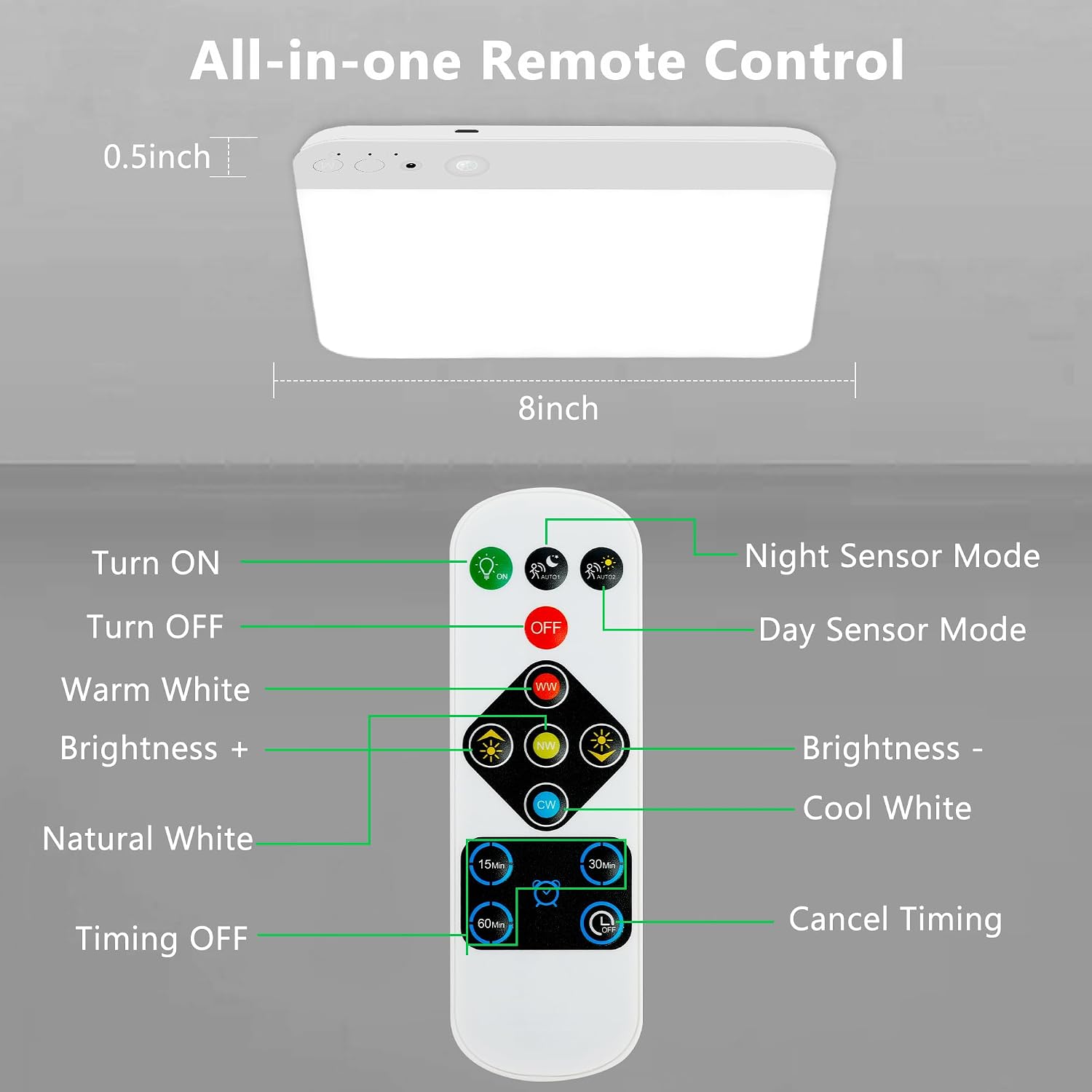
- ON: Turns the light on.
- OFF: Turns the light off.
- Night Sensor Mode: Activates motion sensor only in low light conditions.
- Day Sensor Mode: Activates motion sensor in all light conditions.
- Warm White (WW): Sets color temperature to warm white (3000K).
- Natural White: Sets color temperature to natural white (4000K).
- Cool White (CW): Sets color temperature to cool white (6500K).
- Brightness + / -: Adjusts light brightness.
- 15min / 30min / 60min: Sets auto-off timer for continuous illumination mode.
- Cancel Timing: Disables the auto-off timer.
5. Setup
5.1 Charging the Light
Before first use, fully charge the ceiling light. The light is powered by a 4200mAh rechargeable battery.
- Connect the provided USB charging cable to the charging port on the light.
- Connect the other end of the USB cable to a standard USB power adapter (not included).
- The charging indicator light will be red while charging.
- Once fully charged (approximately 5-6 hours), the indicator light will turn green.

5.2 Installation
The maylit ceiling light offers cordless installation using either magnetic attraction or adhesive tapes/screws.
- Magnetic Attraction: The light has built-in magnets. For metal surfaces, simply attach the light directly.
- Adhesive/Screw Installation: For non-metal surfaces, use the provided metal sheets.
- Step 1: Place the metal sheet on the desired installation spot.
- Step 2: Peel off the protective film from the double-sided adhesive tape and apply it to the metal sheet.
- Step 3: Paste the metal sheet firmly onto the clean, dry surface. Alternatively, use the provided screws to secure the metal sheet.
- Step 4: Attach the ceiling light to the metal sheet using its magnetic base.

6. Operating Instructions
6.1 Adjusting Color Temperature and Brightness
Use the remote control to customize the light output:
- Press WW for Warm White (3000K).
- Press Natural White for Natural White (4000K).
- Press CW for Cool White (6500K).
- Use Brightness + or Brightness - buttons to adjust the light intensity from 10% to 100%.

6.2 Motion Sensor Modes
The light features two motion sensor modes and a continuous ON mode:
- Day Sensor Mode: The light will detect motion within a 120° range and up to 20 feet, turning on for 20 seconds regardless of ambient light conditions.
- Night Sensor Mode: The light will only activate upon motion detection when the ambient light is low, conserving battery life.
- ON Mode: The light will remain continuously illuminated until manually turned off or a timer is set.

6.3 Timer Function
In continuous ON mode, you can set the light to automatically shut off after a specified duration:
- Press 15min, 30min, or 60min on the remote to set the auto-off timer.
- Press Cancel Timing to disable the timer function.
7. Maintenance
7.1 Cleaning
To clean the light, gently wipe the surface with a soft, dry cloth. Do not use abrasive cleaners or solvents.
7.2 Battery Care
- Recharge the battery when the light output diminishes or the charging indicator signals low battery.
- Avoid completely draining the battery frequently to prolong its lifespan.
- If storing the light for an extended period, charge it to approximately 50% every 3-6 months.
8. Troubleshooting
| Problem | Possible Cause | Solution |
|---|---|---|
| Light does not turn on. | Battery is depleted. | Recharge the light fully. |
| Light is in the wrong sensor mode for current ambient light. | Switch to Day Sensor Mode or ON Mode. | |
| Motion sensor not working. | Obstruction in sensor's path. | Ensure clear line of sight for the sensor. |
| Sensor mode is incorrect (e.g., Night Sensor in bright room). | Adjust sensor mode via remote. | |
| Remote control not responding. | Remote battery is low or depleted. | Replace remote battery (if applicable, check manual for type). |
| Obstruction between remote and light. | Ensure clear path; point remote directly at light. | |
| Battery life is shorter than expected. | Frequent activation in motion sensor mode or continuous ON mode. | Optimize sensor mode for usage area (e.g., Night Sensor for less traffic). Ensure full charge before use. |
9. Specifications
| Feature | Detail |
|---|---|
| Brand | maylit |
| Model Name | 2 Pack Ceiling Lights Rechargeable |
| Item Model Number | Ceiling Lights-S |
| Color | White |
| Material | Plastic (Acrylonitrile Butadiene Styrene) |
| Product Dimensions | 8"L x 8"W x 0.5"H |
| Item Weight | 2.12 pounds (for 2 lights) |
| Power Source | Battery Powered |
| Battery Capacity | 4200mAh (Rechargeable) |
| Charging Time | Approx. 5-6 hours |
| Battery Life (Motion Sensor Mode) | Up to 1 month (30-90 days) |
| Battery Life (Continuous ON Mode) | Up to 10 hours |
| Brightness | 250 Lumen |
| Wattage | 2.5 watts |
| Voltage | 5 Volts (DC) |
| Light Source Type | LED |
| Number of Light Sources | 386 |
| Color Temperature | Warm White, Natural White, Cool White (Adjustable) |
| Control Method | Remote, Touch |
| Motion Sensor Range | 120° detection angle, 3-20ft range |
| Installation Type | Magnetic or Adhesive |
| Indoor/Outdoor Usage | Indoor |
| Water Resistance Level | Not Water Resistant |
10. Warranty
This maylit product comes with a 2-Year Warranty from the date of purchase. This warranty covers manufacturing defects and issues arising from normal use. It does not cover damage caused by misuse, accidents, unauthorized modifications, or improper installation.
11. Customer Support
For any questions, concerns, or technical assistance, please contact maylit customer support. Refer to your purchase documentation or the seller's information for contact details.