
1. Introduction
The ANCEL DS160 Scan Tool is a professional-grade diagnostic device specifically designed for Porsche vehicles. It offers comprehensive system diagnostics, powerful bi-directional control, and over 30 maintenance and reset functions. This manual provides detailed instructions on how to set up, operate, and maintain your DS160 scan tool to ensure optimal performance and accurate vehicle diagnostics.
2. What's in the Box
Upon opening your ANCEL DS160 package, please verify that all the following items are included:
- 1 x DS160 Scanner Unit
- 1 x Charging Cable
- 1 x OBDII Diagnostic Cable
- 1 x User Manual
- 1 x Protective Carrying Box

Image: The ANCEL DS160 scanner, its diagnostic cable, charging cable, and the included protective case.
3. Product Overview
3.1 Key Features
- 30+ Maintenance Services: Equipped with a comprehensive range of professional reset functions, including Steering Angle/Brake-pad Reset, Seat/Windows Calibration, ABS Bleed, Battery Match, Injector Coding, Electric Throttle Relearn, Gearbox Learn, Set Total Mileage, Stop/Start Setting, Tyre Size Adjustment, and more.
- All-Systems Scan Tool: Provides complete coverage of all major vehicle systems, including Engine, Airbag, Transmission, ABS, SAS, 4WD, PSM, PCM, PASM, Gateway, EKPS, and more.
- Powerful Bi-directional Control: Enables sending commands to multiple vehicle systems for in-depth testing, such as controlling mirrors, sunroofs, air conditioning, seats, and doors.
- ECU Offline Coding: Allows customization of car settings, refreshing hidden features, and disabling unwanted features for energy saving or better driving. Note: Does not support programming functions or online coding.
- Efficient Auto VIN: Automatically identifies essential vehicle details like make, model, and year by scanning the VIN.
- WiFi Lifetime Free Updates: Ensures the device remains up to date with the latest vehicle models and diagnostic features.
- Instant Online Customer Chat: Provides immediate support for urgent issues directly through the device.
- Free Protection Case: A sturdy, water-resistant case is included to protect the diagnostic tool.
3.2 Device Components and Specifications
The DS160 features a 5-inch touch screen and robust internal hardware for efficient operation.

Image: Overview of the DS160's hardware and software, highlighting its 5-inch touch screen and internal components.
- Display: 5-inch Touch Screen
- Battery: 1500 mAh Lithium Polymer (included)
- Processor: 1.3 GHz 4-Core CPU
- Memory: 2GB RAM, 32GB ROM
- Connectivity: 2.4GHz WiFi (does not support 5G)
- Operating System: Android 6.0
- Supported Languages: 20 languages
3.3 Vehicle Compatibility
The ANCEL DS160 is compatible with a wide range of Porsche models from 1996 to 2024. Please note that specific function coverage may vary by vehicle model and year. For detailed compatibility, it is recommended to contact customer service with your VIN.
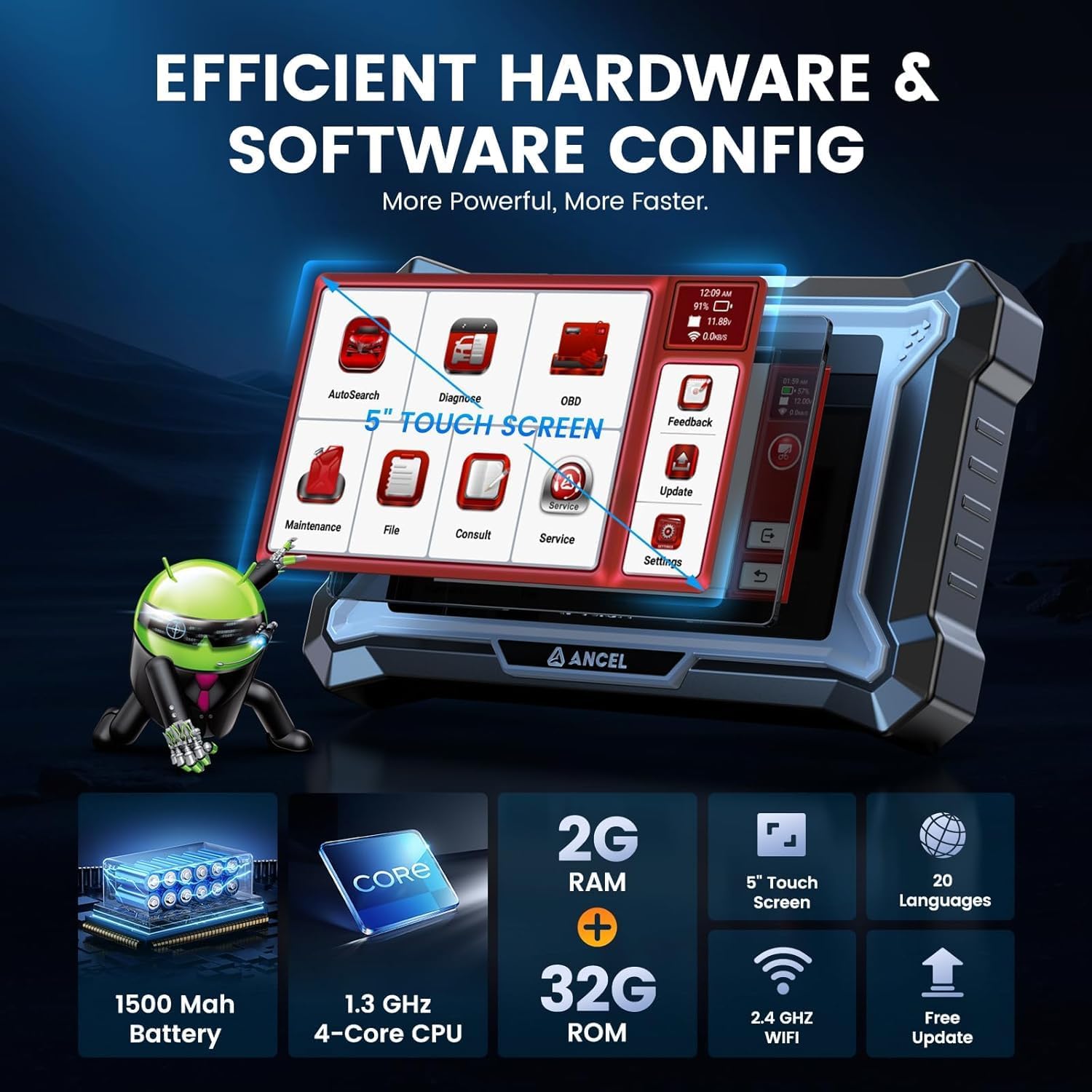
Image: Compatibility chart for ANCEL DS160, listing supported Porsche models and years.
Compatible Porsche Models (1996-2024):
- Macan, Cayenne, Panamera, 911
- Boxster, Cayman, Cayenne-9PA (Up To 2010)
- Cayenne-92A (2011-2017), Cayenne-9YA (As Of 2018)
- Panamera (970), Panamera (971)
- 911 (991), 911 (997), 911 (996) Turto, GT2 (996), GT3 (996), 911(964/993)
- Boxster (981), Boxster (982), Boxster (986), Boxster (987)
- Cayman (981), Cayman (982), Cayman (987), Cayman, GT4, Carrera GT, 918 Spyder, Taycan.
4. Setup
4.1 Initial Power On
- Ensure the DS160 is fully charged using the provided charging cable.
- Press and hold the power button to turn on the device.
- Follow the on-screen prompts to select your preferred language and time zone.
4.2 Connecting to Vehicle
- Locate the OBDII port in your Porsche vehicle. This is typically found under the dashboard on the driver's side.
- Connect the diagnostic cable to the DS160 scanner and then to the vehicle's OBDII port.
- Turn the vehicle's ignition to the 'ON' position (engine off).
4.3 Wi-Fi Connection
A stable Wi-Fi connection is crucial for software updates and accessing online features.
- From the main menu, tap 'Settings'.
- Select 'Wi-Fi' and turn it on.
- Choose your desired 2.4GHz network from the list and enter the password if prompted. Note: The device does not support 5G networks.
5. Operating Instructions
5.1 Navigation
The DS160 features an intuitive touch screen interface. Navigate through menus by tapping icons and options. Use the back button (usually a curved arrow icon) to return to the previous screen.
5.2 Auto VIN Scan
The Auto VIN feature allows for quick vehicle identification, streamlining the diagnostic process.
- From the main menu, tap 'AutoSearch' or 'Diagnose'.
- The device will automatically attempt to read the vehicle's VIN.
- Confirm the vehicle information displayed on the screen.
5.3 Full System Diagnosis
The DS160 can scan all available electronic control units (ECUs) in your Porsche for fault codes and live data.
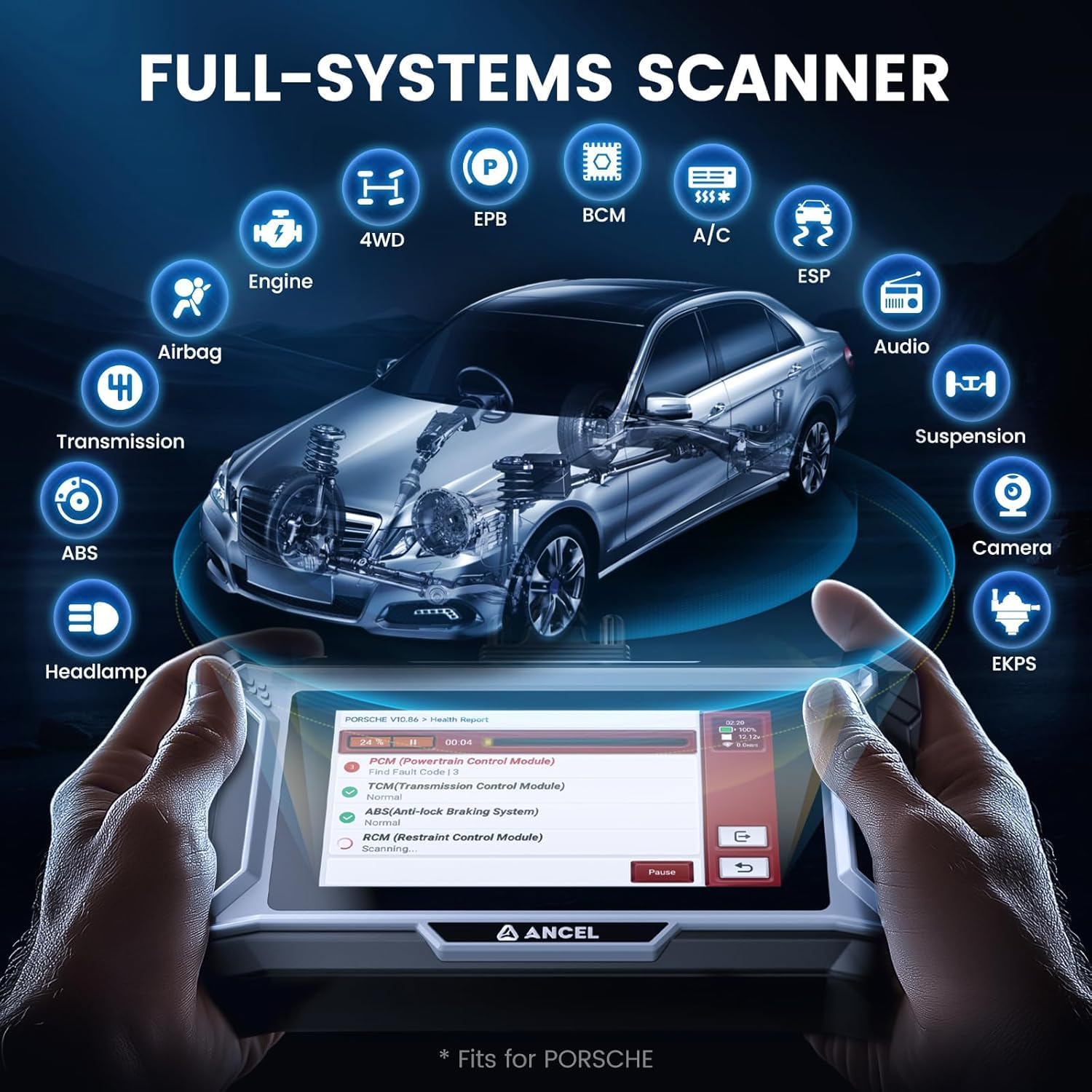
Image: The DS160 performing a comprehensive scan across all vehicle systems.
- After Auto VIN scan, select 'Health Report' or 'Full System Scan'.
- The tool will scan all accessible systems and display any detected Diagnostic Trouble Codes (DTCs).
- You can then view detailed descriptions of the codes, live data streams, and perform specific tests.
5.4 Reading and Clearing Diagnostic Trouble Codes (DTCs)
This function allows you to retrieve and erase fault codes from the vehicle's ECUs.

Image: Visual representation of complete OBD2 diagnostic capabilities.
- From the diagnostic menu for a specific system, select 'Read Codes' to view current, pending, and historic DTCs.
- After addressing the underlying issue, select 'Clear Codes' to erase the DTCs from the ECU. Note: Fault codes can only be cleared after the fault has been repaired.
5.5 Live Data Stream
View real-time data from various sensors and components, which is essential for diagnosing intermittent problems.
- In a system's diagnostic menu, select 'Live Data'.
- Choose the data parameters you wish to monitor. Data can be displayed in text, graph, or gauge format.
5.6 Special Functions (30+ Maintenance Services)
The DS160 offers a wide array of service functions for common maintenance tasks.

Image: Examples of the 30+ maintenance services available on the DS160.
To access these functions, navigate to the 'Maintenance' menu or select 'Diagnose - Vehicle Brand - System - Special Functions'.
- ABS Bleeding: Ensures safe driving by expelling air for optimal brake performance.

Image: Visual guide for ABS bleeding.
- Steering Angle Reset: Essential for maintaining vehicle stability and control after steering system repairs.

Image: Visual guide for steering angle reset.
- Injector Coding: For diagnosing and correcting engine performance issues, injector maintenance, and vehicle upgrades.

Image: Visual guide for injector coding.
- Battery Matching: Registering a new battery optimizes its performance and extends lifespan.

Image: Visual guide for battery matching.
- Other functions include Brake-pad Reset, Seat/Windows Calibration, Electric Throttle Relearn, Gearbox Learn, Set Total Mileage, Stop/Start Setting, Tyre Size Adjustment, and more.
5.7 Bi-directional Control / Active Test
This powerful feature allows you to send commands to vehicle components to test their functionality directly, aiding in precise diagnostics.

Image: The DS160 demonstrating bi-directional control capabilities.
Examples of active tests include:
- A/C Test: Diagnose A/C system to identify issues like low refrigerant or compressor failure.

Image: Visual guide for A/C system test.
- Lights Test: Check the operation of headlights, taillights, brake lights, turn signals, and flashers.

Image: Visual guide for vehicle lights test.
- Wipers Test: Check the functionality of your vehicle's wiper system.

Image: Visual guide for windshield wipers test.
- Windows/Mirrors/Doors Test: Check the operation of your vehicle's windows, mirrors, and doors.

Image: Visual guide for windows, mirrors, and doors test.
- EVAP Test: Conduct regular EVAP active tests to detect system leaks and malfunctions.

Image: Visual guide for EVAP system test.
5.8 ECU Offline Coding
This function allows for customization of certain vehicle settings. It can be used to refresh hidden features or disable unwanted features for improved energy efficiency or driving experience.

Image: The DS160 performing advanced ECU coding.
Note: The DS160 Porsche does not support programming functions. It does not support online coding, and coding functions vary by model & year.
6. Maintenance
6.1 Software Updates
The DS160 offers lifetime free software updates via Wi-Fi to ensure compatibility with the latest vehicle models and diagnostic features.
Video: A short demonstration of how to perform a one-click software update on the ANCEL DS160 scan tool. This video shows the user navigating to the update section and initiating the download and installation process.
- Ensure the device is connected to a stable 2.4GHz Wi-Fi network.
- From the main menu, tap 'Update'.
- Select the available software updates and tap 'Upgrade'.
- Allow the update process to complete without interruption.
Notice: Poor network conditions may lead to update failure. Only 2.4GHz networks are supported, not 5G.
6.2 Cleaning and Storage
- Clean the device screen and exterior with a soft, damp cloth. Avoid abrasive cleaners or solvents.
- Store the DS160 in its protective carrying case when not in use to guard against scratches, drops, and dust.
- Keep the device in a dry environment, away from extreme temperatures.
7. Troubleshooting
This section addresses common issues you might encounter with your ANCEL DS160 scan tool.
- Device not powering on: Ensure the battery is charged. If connected to the vehicle, ensure the ignition is on and the OBDII connection is secure.
- No communication with vehicle: Check the OBDII cable connection. Ensure the vehicle's ignition is on. Verify that your vehicle is OBDII compliant (most Porsche vehicles since 1996 are). Poor contact of the OBD2 interface may lead to failure to work.
- Update failure: Ensure a strong and stable 2.4GHz Wi-Fi connection. Avoid interrupting the update process.
- Special function not working: Reset functions and system functions vary by car model. Provide your VIN to customer service for confirmation of compatibility. If the Adblue system has a fault, the ECU may enter self-protection mode and refuse commands; repair the fault first.
- Cannot clear fault codes: Fault codes can only be cleared after the underlying issue has been repaired.
If you encounter issues not covered here, please refer to the support section.
8. Specifications
| Attribute | Value |
|---|---|
| Manufacturer | ANCEL |
| Brand | ANCEL |
| Model | DS160 PORSCHE |
| Item Weight | 2.05 pounds |
| Product Dimensions | 9.45 x 2.36 x 8.27 inches |
| Item model number | DS160 PORSCHE |
| Batteries | 1 Lithium Polymer batteries required (included) |
| Operating System | Android 6.0 |
9. Warranty & Support
9.1 Lifetime Free Updates
The ANCEL DS160 comes with lifetime free software updates for vehicle and maintenance software, ensuring your device remains current with the latest automotive technologies and models.
9.2 Online Customer Support
For immediate assistance, the DS160 offers an instant online customer chat service directly through the device. This allows for quick resolution of inquiries and complex concerns.

Image: The DS160's online chat service interface for customer support.
You can also reach out via email for support:
- Email: support@romondestech.com
9.3 Protection Plans
Optional protection plans are available for extended coverage beyond the standard warranty. Please refer to the product purchase page for details on 3-Year and 4-Year protection plans.

