
G63
Smart Light Sound Machine User Manual
Model: G63 | Brand: Generic
1. Introduction
The Generic G63 Smart Light Sound Machine is a versatile device designed to enhance your daily routine and improve sleep quality. It integrates multiple functions including a smart LED light with seven color selections, a natural sleep aid sound machine, an alarm clock with sunrise simulation, and a convenient 10W wireless charging pad for compatible devices. This manual provides detailed instructions for setup, operation, and maintenance of your new device.

Image: The Generic G63 Smart Light Sound Machine, showcasing its design with integrated clock, wireless charging pad, and vibrant LED lighting.
2. Safety Information
- Do not expose the device to water or excessive humidity.
- Avoid dropping or subjecting the device to strong impacts.
- Use only the provided or recommended power adapter (5V/2A) to prevent damage.
- Keep the device away from heat sources and direct sunlight.
- Do not attempt to disassemble or repair the device yourself. Contact qualified service personnel.
- Ensure proper ventilation around the device, especially during wireless charging.
3. Package Contents
Please check the package for the following items:
- Generic G63 Smart Light Sound Machine
- USB-C Charging Cable
- Remote Control
- User Manual (this document)
4. Product Features
- Multi-functional Lamp: Combines smart lighting, sound machine, and alarm clock.
- Wireless Charging: Integrated 10W wireless charging pad for compatible smartphones and devices.
- Dynamic Lighting: Seven selectable LED light colors with dimmable options and sunrise simulation.
- Sound Machine: Features natural sleep aid sounds and can function as a Bluetooth speaker (V5.2, 3W).
- Alarm Clock: Digital display with alarm function.
- Voice-Activated Adjustment: Lights can change to the rhythm of music or be adjusted via voice commands.
- 360° Surround Sound Structure: Designed for immersive audio experience.
- Portable Design: Built-in 3.7V/300MAH battery for 2-3 hours of use.
5. Setup
5.1 Initial Charging
Before first use, fully charge the Smart Light Sound Machine. Connect the provided USB-C charging cable to the device's charging port and the other end to a 5V/2A power adapter (not included) or a compatible USB power source. The charging indicator will show the charging status. A full charge takes approximately 2.5 hours.
5.2 Placement
Place the device on a stable, flat surface, such as a bedside table or desk. Ensure there is adequate space around the device for ventilation, especially for the wireless charging function.
6. Operating Instructions

Image: Key Function Introduction, showing the control buttons on the device's base for volume, call management, and light effects.
6.1 Power On/Off
Press and hold the power button (usually indicated by a power symbol) for a few seconds to turn the device on or off. The digital display will illuminate when the device is powered on.
6.2 Time Setting
To set the time, refer to the specific instructions in your remote control's manual or the device's on-screen prompts. Typically, there is a dedicated button for time setting, followed by using volume/navigation buttons to adjust hours and minutes. Confirm your selection to save the time.
6.3 Light Control
Press the "Mode/Switch Light Effect" button (often labeled 'M' or a light bulb icon) to cycle through the seven available light colors and effects. Hold the button to dim or brighten the light. The sunrise simulation feature can be activated through the alarm settings.

Image: The Smart Light Sound Machine providing ambient light in a bedroom setting, demonstrating its use as a sleep aid.
6.4 Sound Control and Bluetooth Pairing
Bluetooth Pairing: Turn on the device. Activate Bluetooth on your smartphone or audio device and search for "G63" or "Smart Light Sound Machine" in the list of available devices. Select it to pair. A confirmation sound will indicate successful pairing.
Volume Adjustment: Use the "Volume Down/Previous Song" buttons (often labeled with '-' and '+' or arrow icons) on the device or remote control to adjust the volume. Short press for volume, long press to skip tracks.
Playing Sounds: Once paired via Bluetooth, you can play music or select from the device's built-in natural sleep aid sounds. Use the mode button to switch between Bluetooth audio and internal sound modes.

Image: The Smart Light Sound Machine emitting colorful lights and musical notes, illustrating its audio capabilities.
6.5 Alarm Clock Function
To set an alarm, locate the alarm button (often an alarm clock icon) on the device or remote. Press it to enter alarm setting mode. Use the navigation buttons to set the desired alarm time and select the alarm sound or sunrise simulation option. Confirm to save the alarm. To snooze or turn off the alarm, refer to the specific button functions on the device.
6.6 Wireless Charging
Place your Qi-compatible smartphone or device on the designated wireless charging pad located on the base of the Smart Light Sound Machine. Ensure the device is centered on the pad for optimal charging. The charging indicator on your phone will confirm that charging has begun. This device supports up to 10W wireless charging.

Image: The Smart Light Sound Machine with a smartphone on its wireless charging pad. Note: While the image indicates 5W, the product specifications state 10W wireless charging capability.
6.7 Voice-Activated Adjustment
The device supports intelligent voice-activated adjustments. When enabled, the lights can change in rhythm with music or be adjusted by voice commands. Refer to the device's specific voice command prompts or the remote control for activation and usage details.
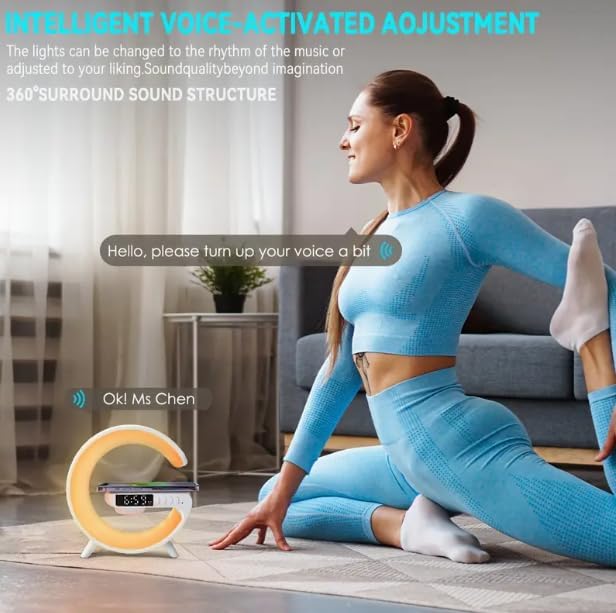
Image: Illustration of the voice-activated adjustment feature, where the device responds to spoken commands.
7. Maintenance
- Cleaning: Use a soft, dry cloth to clean the surface of the device. Do not use abrasive cleaners or solvents.
- Storage: When not in use for extended periods, store the device in a cool, dry place away from direct sunlight.
- Battery Care: To prolong battery life, avoid fully discharging the device frequently. Charge it regularly, even if not in constant use.
8. Troubleshooting
| Problem | Possible Cause | Solution |
|---|---|---|
| Device does not turn on. | Low battery; Power cable not connected properly. | Charge the device fully. Ensure the USB-C cable is securely connected to both the device and a working power source. |
| No sound from speaker. | Volume too low; Not paired via Bluetooth; Incorrect mode selected. | Increase volume. Re-pair Bluetooth device. Ensure the device is in Bluetooth audio mode if playing from an external source. |
| Wireless charging not working. | Phone not Qi-compatible; Phone not centered; Foreign objects on pad; Device not powered on. | Ensure your phone supports Qi wireless charging. Re-position phone on the center of the pad. Remove any metal objects or thick cases. Ensure the Smart Light Sound Machine is powered on. |
| Cannot set or change time/alarm. | Incorrect button sequence; Firmware issue. | Refer to the specific instructions for time/alarm setting in the manual or remote control guide. Try resetting the device if issues persist. |
| Lights not changing or dimming. | Incorrect button usage; Device malfunction. | Ensure you are using the correct button ("Mode/Switch Light Effect") and pressing/holding it as instructed. |
9. Specifications
| Model | G63 |
| Dimensions (L x W x H) | 5.7"D x 5.7"W x 2.17"H (approx. 150x54x157mm) |
| Item Weight | 7.3 Ounces |
| Bluetooth Version | V5.2 |
| Speaker Power | 3W |
| Battery | 3.7V/300MAH |
| Use Time | 2-3 Hours |
| Charging Time | 2.5 Hours |
| Charging Port | Type C |
| Charging Input | 5V/2A |
| Wireless Charging Output | 10W |
| Light Source Type | LED (7 colors) |
| Material | Plastic |
| Included Components | Remote Control |

Image: Product Size diagram, illustrating the physical dimensions of the Smart Light Sound Machine.
10. Warranty and Support
This product comes with a standard manufacturer's warranty. Please refer to the warranty card included in your package for specific terms and conditions. For technical support, troubleshooting assistance, or warranty claims, please contact the retailer or manufacturer directly using the contact information provided with your purchase.
For further assistance, please visit the Generic brand's official support website or contact their customer service.
Ask a question about this manual
Ask about setup, troubleshooting, compatibility, parts, safety, or missing instructions. Manuals+ will review the question and use this page’s manual context to help answer it.