
Midea MDWPF1433CSS-W-EU
Midea 60 CM 14-Place Setting Inox Dishwasher Instruction Manual
Model: MDWPF1433CSS-W-EU
1. Introduction
Thank you for choosing the Midea 60 CM 14-Place Setting Inox Dishwasher. This manual provides essential information for the safe and efficient use of your appliance. Please read these instructions carefully before installation and operation, and retain them for future reference.
1.1 Safety Information
Always follow basic safety precautions when using electrical appliances to reduce the risk of fire, electric shock, or injury. Ensure the appliance is properly grounded. Do not attempt to repair or replace any part of your dishwasher unless specifically recommended in this manual. All servicing should be referred to a qualified technician.
2. Product Overview
The Midea MDWPF1433CSS-W-EU is a freestanding 60 CM dishwasher designed for efficient cleaning of up to 14 place settings. It features advanced technology for optimal performance and user convenience.
2.1 Key Features
- 14 Place Settings Capacity: Accommodates a large volume of dishes, ideal for families.
- Hygiene Care Technology: Level 3 hygiene certification, capable of eliminating 99.99% of viruses.
- 10 Wash Programs: Offers a variety of cycles including Eco, Intensive, Regular Hygiene, and Rapid.
- SmartHome App Control: Manage and monitor your dishwasher remotely via a smartphone application.
- Automatic Door Opening: Enhances drying efficiency and reduces odors.
- Half-Load Function: Optimizes water and energy consumption for smaller loads.
- Delayed Start: Program the wash cycle to begin at a more convenient time.
- Child Lock: Prevents unintended operation by children.
- Antibacterial Filter: Contributes to a cleaner washing environment.
2.2 Product Components

Figure 1: Front view of the Midea 60 CM Inox Dishwasher, showcasing its design and control panel.

Figure 2: Interior view demonstrating the adjustable upper basket and lower rack for dish placement.

Figure 3: Detailed diagram showing the adjustable upper basket and the typical load capacity for 14 place settings, including various dish types.
3. Setup and Installation
This Midea dishwasher is designed for freestanding installation. Proper installation is crucial for optimal performance and safety. It is recommended that installation be performed by a qualified technician.
3.1 Unpacking
Carefully remove all packaging materials. Inspect the dishwasher for any damage incurred during transit. Report any damage to your retailer immediately.
3.2 Positioning the Appliance
Place the dishwasher on a flat, stable surface. Ensure there is adequate space around the appliance for proper ventilation and access for maintenance. The product dimensions are 60 cm (depth) x 59.8 cm (width) x 84.5 cm (height).

Figure 4: Product dimensions and necessary measurements for installation.
3.3 Water and Electrical Connections
- Water Supply: Connect the water inlet hose to a cold water supply with a minimum pressure of 0.04 MPa and a maximum of 1 MPa. Ensure all connections are tight to prevent leaks.
- Drainage: Connect the drain hose to a suitable drain pipe, ensuring it is securely fastened and positioned to prevent backflow.
- Electrical Supply: The dishwasher requires a 220 Volt electrical supply. Ensure the power outlet is properly grounded and matches the appliance's requirements. Do not use extension cords or adapters.
4. Operating Instructions
This section details how to use your Midea dishwasher, including program selection and special functions.
4.1 Loading the Dishwasher
Load dishes carefully, ensuring that water spray can reach all surfaces. Avoid overcrowding. Place larger items in the lower basket and smaller, delicate items in the upper basket. Utensils should be placed in the cutlery basket.
4.2 Adding Detergent and Rinse Aid
Fill the detergent dispenser with the appropriate amount of dishwasher detergent. Add rinse aid to the rinse aid dispenser as needed to ensure streak-free drying.
4.3 Program Selection
The dishwasher offers 10 wash programs to suit various cleaning needs. Select the desired program using the control panel or the SmartHome app.
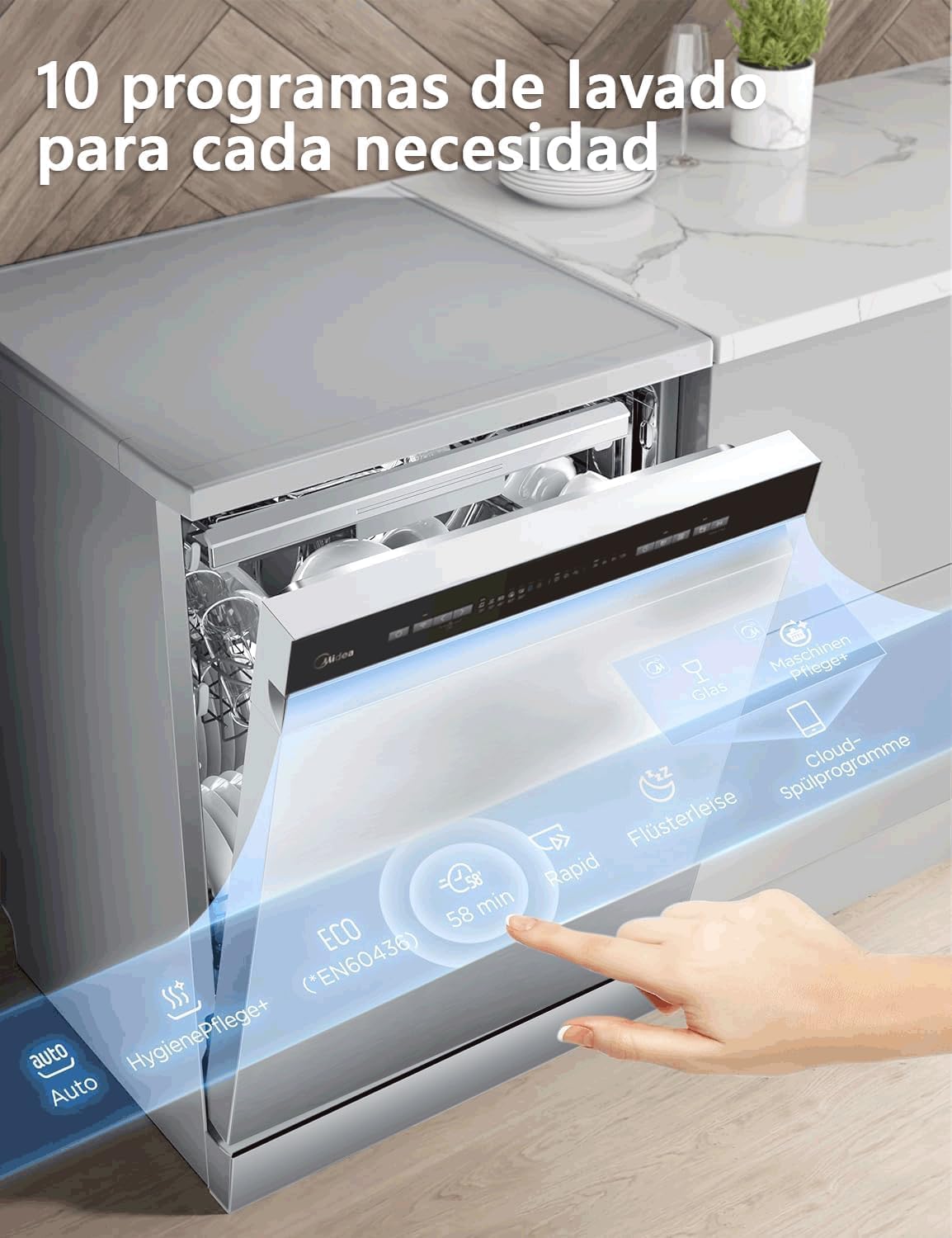
Figure 5: Control panel displaying available wash programs.
- Eco: Energy-efficient program for normally soiled dishes.
- Intensive: For heavily soiled dishes and pots.
- Regular Hygiene: Provides enhanced hygiene for dishes.
- Rapid: Quick wash for lightly soiled items.
- 90 Minutes: A standard wash cycle for everyday use.
4.4 Special Functions
- Half-Load: Reduces water and energy consumption when washing fewer dishes.
- Delayed Start: Set a delay for the wash cycle to start at a later time (e.g., during off-peak electricity hours).
- Automatic Door Opening: The door opens automatically at the end of the cycle to facilitate drying and prevent condensation.

Figure 6: Automatic door opening for enhanced drying.
4.5 SmartHome App Control
The dishwasher can be controlled and monitored via the Midea SmartHome application on your smartphone. This allows for remote program selection, status checks, and access to additional features.

Figure 7: Controlling the dishwasher using the SmartHome application.
5. Maintenance and Care
Regular maintenance ensures the longevity and optimal performance of your dishwasher.
5.1 Cleaning the Filters
The dishwasher is equipped with an antibacterial filter system. Regularly clean the filters to prevent food particles from clogging and affecting wash performance. Refer to the detailed instructions in the full user manual for filter removal and cleaning.
5.2 Self-Cleaning Function
Utilize the dishwasher's self-cleaning function to maintain internal hygiene and prevent odor buildup. This feature simplifies the cleaning process for the appliance itself.
5.3 Exterior and Interior Cleaning
Wipe the exterior of the dishwasher with a soft, damp cloth. For the interior, periodically run an empty cycle with a dishwasher cleaner to remove grease and limescale deposits.
6. Troubleshooting
Before contacting customer service, please refer to the following common issues and their solutions.
| Problem | Possible Cause | Solution |
|---|---|---|
| Dishwasher does not start | Power cord not plugged in; door not closed properly; fuse blown. | Check power connection; ensure door is latched; check household fuse/circuit breaker. |
| Dishes are not clean | Improper loading; insufficient detergent; clogged spray arms; incorrect program selected. | Reload dishes correctly; add more detergent; clean spray arm nozzles; select a more intensive program. |
| Water not draining | Clogged drain hose or filter; drain pump malfunction. | Clean drain hose and filters; if problem persists, contact service. |
| Drying results are poor | No rinse aid; rapid cycle used (which may not include a full drying phase). | Refill rinse aid dispenser; select a program with a dedicated drying phase or ensure automatic door opening is active. |
For more detailed troubleshooting or issues not listed here, please consult the complete user manual or contact Midea customer support.
7. Technical Specifications
| Specification | Value |
|---|---|
| Model Number | MDWPF1433CSS-W-EU |
| Brand | Midea |
| Capacity | 14 Place Settings |
| Dimensions (W x D x H) | 59.8 x 60 x 84.5 cm |
| Weight | 36 kg |
| Voltage | 220 Volts |
| Noise Level | 47 dB |
| Energy Efficiency Class | C |
| Water Consumption (Eco program) | 10.2 Liters |
| Number of Programs | 10 |
| Material | Stainless Steel |
| Installation Type | Freestanding |
| Controls Type | Application |
7.1 Energy Label Information

Figure 8: Energy label for Midea Dishwasher MDWPF1433CSS-W-EU.
For detailed energy information, you can visit the EPREL database: https://eprel.ec.europa.eu/qr/1865120
8. Warranty and Support
8.1 Warranty Information
This Midea dishwasher comes with a 2-year warranty covering parts and service. Please retain your proof of purchase for warranty claims.
8.2 Customer Support
Midea offers comprehensive technical support with 170 service points distributed across the Iberian Peninsula, Canary Islands, and Portugal.
- Email: assistanza@midea.com
- Website: https://www.midea.com/it
- Phone: +390296193015
When contacting support, please have your model number (MDWPF1433CSS-W-EU) and purchase date available.
Related documentsMDWPF1433CSS-W-EU


Ask a question about this manual
Ask about setup, troubleshooting, compatibility, parts, safety, or missing instructions. Manuals+ will review the question and use this page’s manual context to help answer it.