
1. Introduction
Thank you for purchasing the Bewinner Portable Bluetooth Speaker. This manual provides essential information for setting up, operating, and maintaining your speaker. Please read it carefully before use to ensure optimal performance and longevity of your device.
Key Features:
- Classic Wooden Case Structure: Features a walnut wood grain shell with a black net design for an elegant aesthetic.
- Dual Speakers with Independent Bass Guide Hole: Enhances sound quality with strong bass and clear tones.
- Intelligent Sound Processing Technology: Improves clarity, layering, and power for a dynamic audio experience.
- Bluetooth 5.0 Connectivity: Supports wireless connection up to 10 meters with mobile phones, tablets, and computers.
- Multiple Playback Options: Includes AUX sound cable, USB disk, and small memory card (up to 32GB) playback.
- Built-in FM Radio: Enhances radio sensitivity for stable signal reception.
2. Package Contents
Please check the package for the following items:
- 1 x Bewinner Portable Bluetooth Speaker
- 1 x Instruction Manual
- 1 x USB Charging Cable
- 1 x 3.5mm AUX Sound Cable
3. Product Overview and Controls
Familiarize yourself with the speaker's ports and controls:
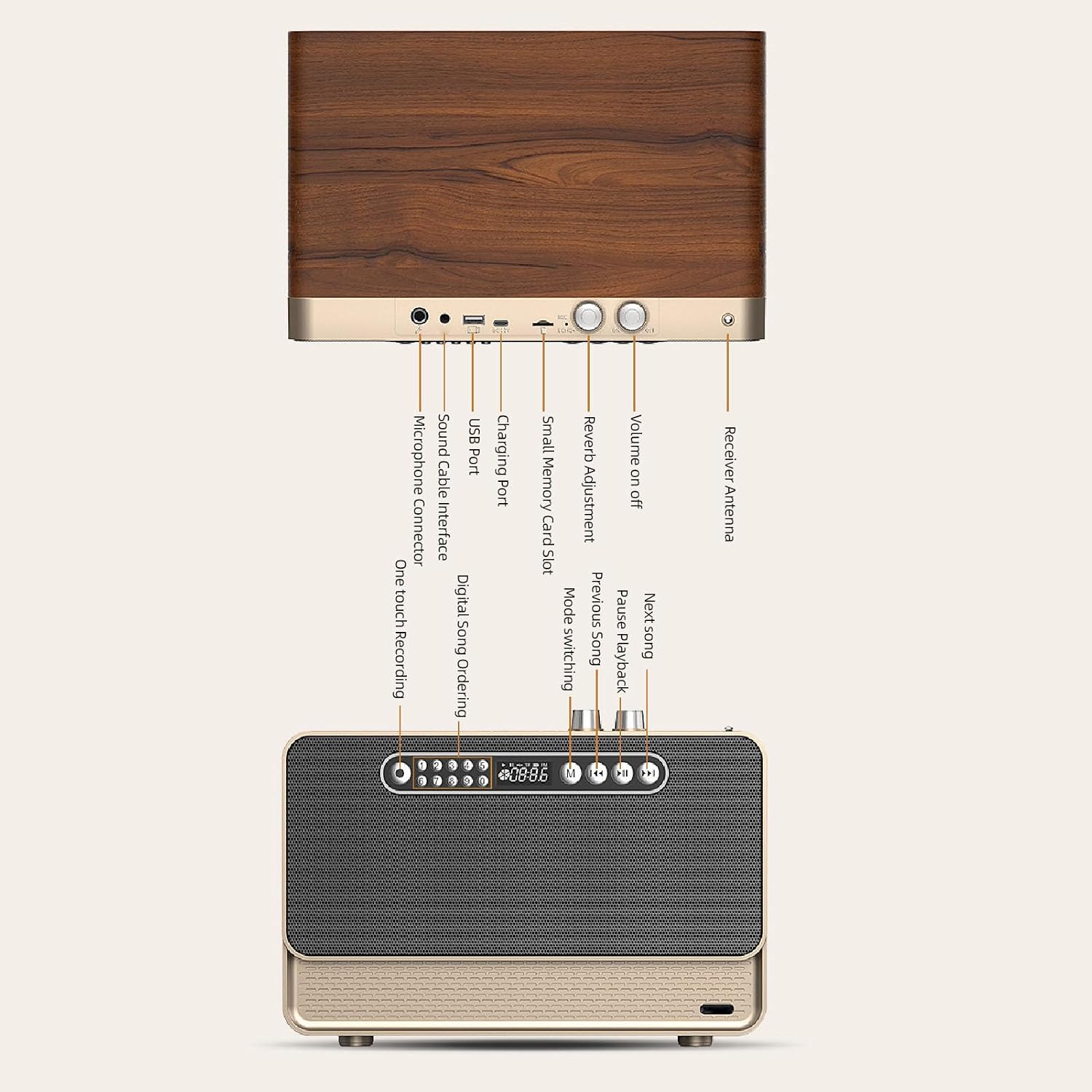
Image: Detailed diagram showing the various ports and control buttons on the Bewinner Portable Bluetooth Speaker, including the volume knob, charging port, USB port, small memory card slot, sound cable interface, microphone connector, and receiver antenna.
- Volume On/Off: Rotary knob to power the speaker on/off and adjust volume.
- Reverb Adjustment: Knob for adjusting sound reverb effect.
- Receiver Antenna: Extend for improved FM radio reception.
- Charging Port: Connect the USB charging cable here.
- USB Port: For USB disk playback.
- Small Memory Card Slot: Insert a small memory card (up to 32GB) for playback.
- Sound Cable Interface (AUX): Connect the 3.5mm AUX cable for wired audio input.
- Microphone Connector: For external microphone input (if supported).
- One-touch Recording: Button for recording functions.
- Digital Song Ordering: Buttons for direct song selection.
- Mode Switching (M): Button to switch between Bluetooth, AUX, FM, USB, and Memory Card modes.
- Previous Song / Next Song: Buttons for track navigation.
- Pause/Playback: Button to play or pause audio.
4. Setup
4.1 Charging the Speaker
Before first use, fully charge the speaker. Connect the provided USB charging cable to the speaker's charging port and the other end to a 5V USB power adapter (not included) or a computer's USB port. The charging indicator will show the charging status and turn off when fully charged.
4.2 Powering On/Off
Rotate the Volume On/Off knob clockwise to power on the speaker. Rotate it counter-clockwise until it clicks to power off the speaker.
5. Operating Instructions
5.1 Bluetooth Connection
- Power on the speaker. The speaker will automatically enter Bluetooth pairing mode, indicated by a flashing light or an audible prompt.
- On your mobile phone, tablet, or computer, enable Bluetooth and search for available devices.
- Select "Bewinner Speaker" (or similar name) from the list of devices to pair.
- Once paired, the speaker will confirm with an audible prompt, and the indicator light will become solid.
- You can now play audio from your device through the speaker. The connection distance is up to 10 meters.
5.2 AUX Sound Cable Playback
For wired audio connection:

Image: The Bewinner Portable Bluetooth Speaker connected to a laptop using the 3.5mm AUX sound cable, demonstrating wired audio playback.
- Connect one end of the provided 3.5mm AUX sound cable to the speaker's Sound Cable Interface.
- Connect the other end to the audio output jack of your computer, phone, or other audio device.
- Press the Mode Switching (M) button on the speaker until it enters AUX mode.
- Play audio from your connected device.
5.3 USB Disk and Small Memory Card Playback
The speaker supports playback from USB disks and small memory cards (up to 32GB) with MP3, WAV, and WMA formats.

Image: A close-up of the Bewinner Portable Bluetooth Speaker with a USB flash drive inserted into its USB port, illustrating USB disk playback capability.
- Insert a USB disk into the USB Port or a small memory card into the Small Memory Card Slot.
- The speaker will automatically detect the storage device and begin playing audio files. If not, press the Mode Switching (M) button to select the correct mode.
- Use the Previous Song, Next Song, and Pause/Playback buttons to control music playback.
5.4 FM Radio Function
To use the built-in FM radio:

Image: The Bewinner Portable Bluetooth Speaker with its telescopic antenna extended, highlighting its FM radio functionality and ability to receive stable signals.
- Extend the Receiver Antenna for better signal reception.
- Press the Mode Switching (M) button until the speaker enters FM radio mode.
- The speaker will automatically scan and save available FM stations.
- Use the Previous Song and Next Song buttons to navigate between saved stations.
5.5 Sound Enhancement

Image: A stylized depiction of a microchip with the word 'BASS' prominently displayed, symbolizing the speaker's intelligent sound processing technology that enhances bass and overall audio quality.
The speaker features intelligent sound processing technology to improve audio clarity, layering, and power. The dual speakers with independent bass guide holes contribute to a powerful and dynamic bass response.

Image: An exploded view of the Bewinner Portable Bluetooth Speaker, revealing its internal dual speakers and independent bass guide holes, illustrating the design for enhanced sound quality and powerful bass.
6. Maintenance
- Keep the speaker away from water, moisture, and extreme temperatures.
- Clean the speaker with a soft, dry cloth. Do not use abrasive cleaners or solvents.
- Avoid dropping or subjecting the speaker to strong impacts.
- When not in use for extended periods, store the speaker in a cool, dry place and charge it periodically to maintain battery health.
7. Troubleshooting
- No Power: Ensure the speaker is charged. Check the power knob is turned on.
- No Sound: Check the volume level on both the speaker and the connected device. Ensure the correct input mode (Bluetooth, AUX, USB, Memory Card, FM) is selected.
- Bluetooth Pairing Issues: Make sure the speaker is in pairing mode. Disable and re-enable Bluetooth on your device. Move closer to the speaker to ensure it's within the 10-meter range.
- Poor FM Reception: Extend the receiver antenna fully. Try repositioning the speaker for better signal.
- USB/Memory Card Not Playing: Ensure the audio files are in supported formats (MP3, WAV, WMA). Check that the storage device is properly inserted and not corrupted.
8. Specifications
| Feature | Specification |
|---|---|
| Model Number | Bewinner25s87k4n0e |
| Brand | Bewinner |
| Material | Synthetic Fiber Wood |
| Bluetooth Version | 5.0 |
| Battery Capacity | 3000mAh Li Polymer (Built-in) |
| Charging Voltage | 5V |
| Small Memory Card Support | Maximum 32GB (Excluded) |
| Music Media Support | MP3, WAV, WMA |
| Product Dimensions | 13.78 x 10.63 x 10.24 inches |
| Item Weight | 6.75 pounds |
| Connectivity Technology | Bluetooth, AUX, USB, Memory Card, FM Radio |
| Power Source | Battery Powered |
| Recommended Uses | Indoor/Outdoor |
9. Warranty and Support
This product comes with a standard manufacturer's warranty. Please refer to the warranty card included in your package for specific terms and conditions. For technical support, troubleshooting assistance, or warranty claims, please contact Bewinner customer service through the retailer where the product was purchased.