
Introduction
This manual provides comprehensive instructions for the assembly, operation, maintenance, and troubleshooting of your SEDETA L Shaped Gaming Desk with Hutch, Model LSJ-black. Please read this guide carefully before beginning assembly or use to ensure proper setup and longevity of your product.
The SEDETA L Shaped Gaming Desk is designed for versatility, offering configurations as an L-shaped corner desk or a straight two-person desk. It features integrated LED lighting, a power outlet with USB ports, a pegboard, storage shelves, a keyboard tray, and a storage bag.
Important Safety Information
Always assemble the desk carefully, ensuring all parts are properly secured and leveled. Failure to do so may result in instability and potential injury.
To prevent damage to the desk surface, always use coasters for beverages. Prolonged exposure to condensation can cause swelling and damage to the engineered wood material.
Setup and Assembly
Your SEDETA L Shaped Gaming Desk is designed for straightforward assembly. All necessary tools are included in the package. It is recommended that one person performs the assembly, though two people may make certain steps easier.
Assembly Tips:
- Read Instructions Carefully: Before starting, review all steps in the provided assembly manual.
- Do Not Overtighten: Initially, tighten screws just enough to hold components together. Fully tighten all screws only after the entire structure is assembled and aligned. This allows for minor adjustments during construction.
- Identify Parts: All pieces are labeled and organized in separate bags. Match parts to the diagrams in the assembly manual.
Desk Configuration Options:
The desk offers a reversible design, allowing it to be configured as an L-shaped corner desk or a straight 78.7-inch long desk. The top hutch can also be placed on either the left or right side to suit your space and needs.
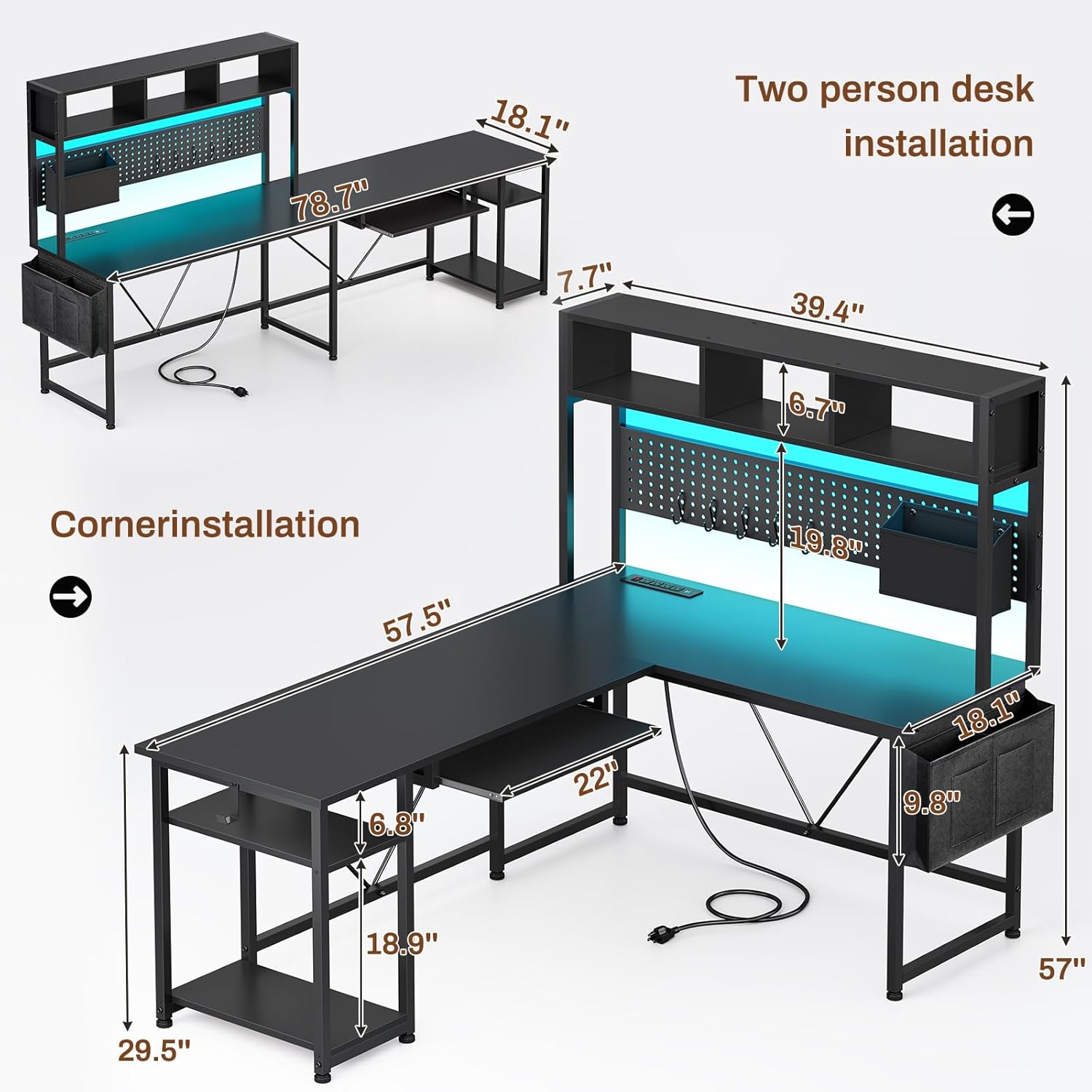
Image: Diagram illustrating the dimensions for both L-shaped and straight configurations. The L-shaped desk measures 57.5 inches on one side and 39.4 inches on the other, with a height of 57 inches including the hutch. The straight configuration extends to 78.7 inches in length.

Image: This diagram displays four possible ways to configure the desk, highlighting its reversible and adaptable design for various room layouts and user preferences, including both L-shaped and straight setups.
Operating Instructions
LED Lighting System:
The desk features an integrated RGB LED lighting system with over 60,000 color options and 29 flashing modes. Control is available via a physical key control or a dedicated smartphone application.
- Key Control: Use the inline controller to cycle through colors and modes, and to turn the lights on/off.
- APP Control: Download the specified application to access advanced features, including music sync (with a built-in adjustable microphone) and timing functions.

Image: A detailed view of the LED lighting system, showcasing both the physical key control and the smartphone application interface for managing over 60,000 colors, music sync, and timing functions.
Integrated Power Outlet:
The desk includes a recessed power strip to conveniently charge multiple devices. It features 4 AC outlets (125V/12A) and 2 USB ports (5V/2A).
- Power Switch: An on/off switch allows for one-button power control, enhancing safety and energy efficiency.
- Usage: Connect cell phones, tablets, notebooks, and other electronic devices directly to the integrated outlets.

Image: A close-up view of the integrated power outlet, clearly showing its 4 AC outlets, 2 USB ports, and the red on/off power switch for convenient and safe device charging.
Storage Features:
The desk is equipped with various storage solutions to keep your workspace organized.
- Hutch: The top hutch provides open shelving for files, books, or decorative items.
- Pegboard: A 39.4-inch long pegboard is included for hanging accessories. It comes with 5 S-hooks and a storage bag.
- Keyboard Tray: A pull-out keyboard tray (22 inches wide) accommodates most standard keyboards and mice.
- Storage Bag: A fabric storage bag attaches to the side of the desk, offering additional space for small items and freeing up desktop area.
- Iron Hook: A dedicated iron hook is provided for hanging headphones or a backpack.

Image: A detailed view of the pegboard area, showing the included storage bag, S-hooks, and various items like headphones and office supplies neatly organized.
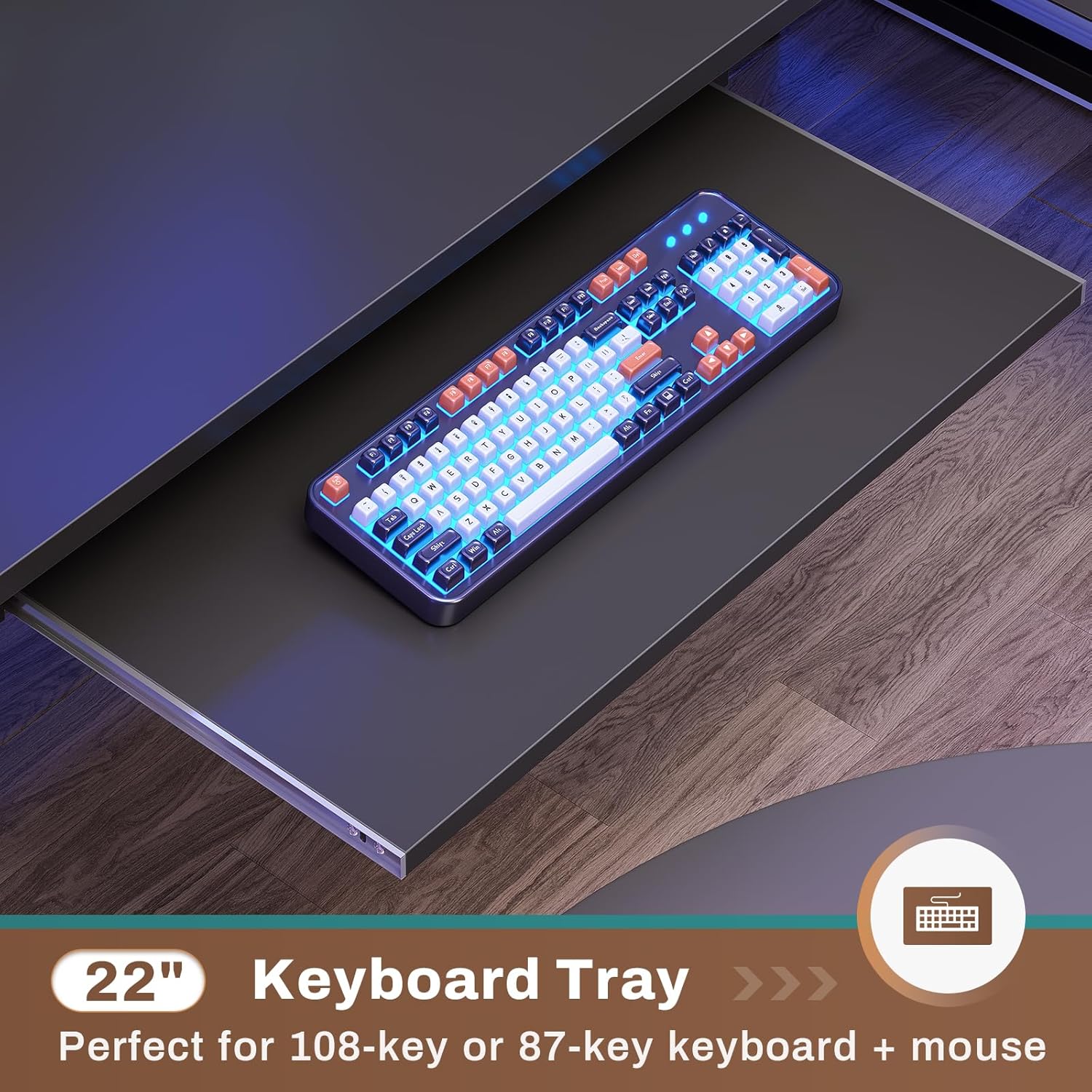
Image: A close-up of the 22-inch pull-out keyboard tray, demonstrating its functionality for holding a keyboard and mouse, optimizing desktop space.

Image: A detailed view of the fabric storage bag attached to the side of the desk, showing its compartments for organizing small items like pens, notebooks, and other accessories.

Image: A close-up of the sturdy iron hook, designed for conveniently hanging headphones, bags, or other items, keeping them easily accessible and off the desk surface.
Maintenance
General Cleaning:
Wipe the desk surfaces with a soft, damp cloth. Avoid using harsh chemicals or abrasive cleaners, as these can damage the finish. Dry immediately with a clean cloth.
Surface Protection:
The desk surface is made of engineered wood. To prevent damage from moisture, always use coasters under drinks. Condensation from cold beverages can cause the material to swell and warp over time.
LED Strip Care:
Ensure the LED strip is securely attached. If the adhesive begins to peel, gently re-secure it. Avoid pulling on the cable, as this can dislodge the strip.
Troubleshooting
Desk Instability:
If the desk feels wobbly, check all screws and bolts to ensure they are fully tightened. The desk also includes adjustable leg pads to stabilize it on uneven floors. Adjust each leg pad until the desk is level and stable.
LED Strip Not Adhering:
If the LED strip is peeling, gently press it back into place. For persistent issues, consider using additional adhesive tape to secure it.
Keyboard Tray Not Smooth:
If the keyboard tray does not slide smoothly, check the runners for any obstructions or debris. Ensure all screws securing the tray mechanism are properly tightened. Applying a small amount of silicone lubricant to the runners may also improve smoothness.
Power Outlet Not Working:
Ensure the desk's power cord is securely plugged into a functional wall outlet. Check that the on/off switch on the integrated power strip is in the 'on' position. If issues persist, test the wall outlet with another device.
Specifications
| Feature | Detail |
|---|---|
| Brand | SEDETA |
| Model Number | LSJ-black |
| Product Dimensions | 18.1"D x 57.5"W x 57"H (L-shape) |
| Color | Black |
| Style | Industrial |
| Base Material | Iron |
| Top Material Type | Engineered Wood |
| Special Features | Built-In USB Outlet, Keyboard Tray Included, Reversible, LED Lights, Pegboard, Storage Bag, Hutch |
| Recommended Uses | Gaming, Working, Writing |
| Required Assembly | Yes |
| Recommended Assembly People | 1 |
| Number Of Shelves | 2 (on hutch) |
| Item Weight | 50 Pounds |
| Power Outlet | 4 AC Outlets (125V/12A), 2 USB Ports (5V/2A), On/Off Switch |
Warranty Information
This SEDETA product comes with a limited warranty. For specific details regarding warranty coverage, duration, and terms, please refer to the warranty documentation included with your purchase or contact SEDETA customer support directly.
Customer Support
Should you encounter any issues, have questions about assembly, or require assistance with your SEDETA L Shaped Gaming Desk, please contact SEDETA customer support. Refer to the contact information provided in your product packaging or visit the official SEDETA website for support options.