
HIWONDER JetRover Developer Kit & Jetson Nano 4GB
HIWONDER JetRover Developer Kit & Jetson Nano 4GB Robot Car Instruction Manual
Brand: HIWONDER | Model: JetRover Developer Kit & Jetson Nano 4GB
1. Introduction
The HIWONDER JetRover is a professional robotic platform designed for learning and development in ROS1 & ROS2 environments. Powered by a Jetson controller, it integrates advanced AI capabilities including large AI models, Lidar SLAM mapping, AI vision, a 6DOF robotic arm, voice control, and smart sorting functionalities. This manual provides essential information for setting up, operating, and exploring the full potential of your JetRover.
Key Features:
- Smart ROS Robots Driven by AI: Professional platform for ROS1 & ROS2 learning, leveraging deep learning frameworks and MediaPipe development.
- SLAM Development and Diverse Configuration: Equipped with 3D depth camera, Lidar, and microphone array for precise multi-point navigation, TEB path planning, and dynamic obstacle avoidance.
- High-performance Vision Robot Arm: Features a 6DOF vision robotic arm with intelligent serial bus servos and an HD camera for object-grabbing tasks.
- Empowered by Large AI Model: Integrates multimodal models with ChatGPT for enhanced perception, reasoning, and human-robot interaction.
- Robot Control Across Platforms: Multiple control methods including WonderAi app (iOS/Android), wireless handle, ROS, and keyboard.
2. Product Overview
The JetRover Developer Kit is a comprehensive package designed for advanced robotics education and development. Below is an overview of its main components and capabilities.

Figure 2.1: HIWONDER JetRover Robot Car with 6DOF Robotic Arm and various sensors.
2.1. Main Components and Features
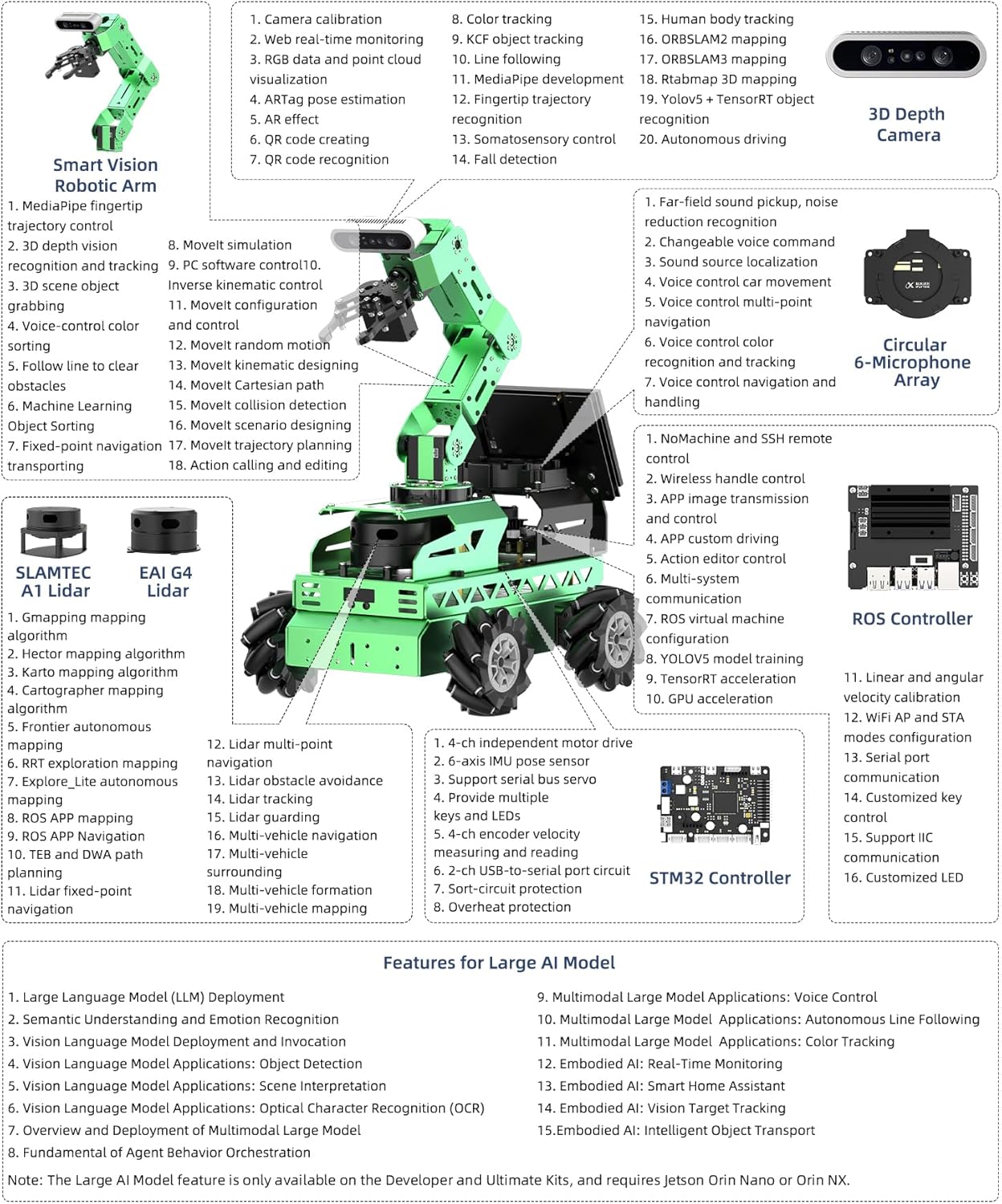
Figure 2.2: Detailed breakdown of JetRover's smart arm, SLAMTEC A1 Lidar, EAI G4 Lidar, 3D Depth Camera, Circular 6-Microphone Array, STM32 Controller, and features for Large AI Models.
2.2. Kit Comparison
The JetRover Developer and Ultimate Kits, paired with Jetson Orin Nano and Orin NX, are recommended for full Large AI model applications due to their comprehensive feature sets and high performance.

Figure 2.3: Comparison of JetRover Standard, Advanced, Developer, and Ultimate Kits, highlighting differences in Lidar, 3D Depth Camera, LCD screen, and Microphone Array availability.
3. Setup
The JetRover Developer Kit comes pre-assembled. This section outlines the initial steps to power on and connect your robot.
3.1. Initial Power-up and Connection
- Ensure the battery is fully charged. The kit includes a Lithium Ion battery.
- Connect the power adapter to the robot.
- Power on the Jetson Nano 4GB developer kit.
- Connect to the robot's Wi-Fi network or via Ethernet.
- Access the robot's interface via a web browser or the WonderAi app.
For detailed assembly instructions, please refer to the comprehensive tutorials provided with the kit.
4. Operating Modes and Capabilities
4.1. SLAM Mapping and Navigation
The JetRover utilizes Lidar and 3D depth camera data for Simultaneous Localization and Mapping (SLAM), enabling it to build maps of its environment and navigate autonomously.

Figure 4.1: JetRover demonstrating Lidar mapping using Cartographer, Hector, Karto, and Gmapping algorithms, alongside voice navigation and obstacle avoidance.
Video 4.1: Demonstration of ROS2 & ROS1 AI robot car with Lidar, autonomous driving, SLAM mapping & navigation.
4.2. AI Vision and Object Manipulation
The integrated 3D depth camera and 6DOF robotic arm allow for advanced AI vision tasks, including object detection, tracking, and manipulation.

Figure 4.2: JetRover performing intelligent sorting of colored blocks into corresponding containers using its robotic arm and AI vision.
Video 4.2: Demonstration of 3D SLAM + Grasping, showing the Jetson & ROS robot car with 6Dof robot arm navigating, locating, and picking objects.
4.3. Voice Control and Human-Robot Interaction
With its 6-microphone array and ChatGPT integration, the JetRover supports natural language processing for voice commands and interactive experiences.

Figure 4.3: JetRover responding to voice commands for waste sorting and object picking, demonstrating sound source localization.
Video 4.3: Demonstration of AI voice control smart robot car with 6DOF robot arm, showcasing interaction and learning capabilities.
5. Advanced Features
5.1. Lidar Exclusive Functions
The SLAMTEC A1 Lidar provides 360-degree omnidirectional laser scanning for accurate mapping, multi-point navigation, obstacle avoidance, and multi-vehicle coordination.
Figure 5.1: Lidar functions including mapping (Cartographer, Hector, Karto, Gmapping), voice navigation, obstacle avoidance, multi-vehicle navigation, and Lidar tracking.
5.2. 3D Depth Camera Exclusive Functions
The 3D depth camera enables advanced vision capabilities such as 3D SLAM mapping, depth map data generation, KCF target tracking, augmented reality (AR), road sign detection, and MediaPipe development.
Figure 5.2: 3D Depth Camera functions including RTAB-VSLAM 3D mapping and navigation, depth map data, point cloud, KCF target tracking, augmented reality (AR), road sign detection, and MediaPipe development.
5.3. Far-field Microphone Array
The integrated 6-microphone array provides sound source localization, speech recognition, and voice interaction, enhancing the robot's ability to understand and respond to verbal commands.
Figure 5.3: Far-field microphone array functions including sound source localization, voice line following, and voice navigation.
6. Software and Development
6.1. ROS1 & ROS2 System Image
The JetRover supports both ROS1 and ROS2, offering real-time control, modular development, and broader applications. Docker container technology is adopted for application packaging.

Figure 6.1: Comparison of ROS1 and ROS2, and the adoption of Docker container technology for system deployment.
6.2. Simulation and URDF Models
The JetRover provides tools for body simulation control and URDF model display in RViz, facilitating algorithm debugging and improvement.

Figure 6.2: Body simulation control for algorithm verification and URDF model display in RViz for observing mapping and navigation performance.
6.3. Learning Capabilities
The JetRover offers extensive learning opportunities across various functions and AI model capabilities.

Figure 6.3: A comprehensive list of learning topics covering robot underlying functions, mapping, human-machine interaction, vision processing, deep learning, and AI model capabilities.
7. Packing List
The JetRover Developer Kit includes the following components:

Figure 7.1: Visual representation of the JetRover Developer Packing List, including the robot, Lidar, charger, controller, 7-inch LCD screen, 6-microphone array, 3D depth camera, and accessories.
8. Specifications
Detailed technical specifications for the HIWONDER JetRover M1 model and its key components.

Figure 8.1: Table of JetRover M1 specifications (Chassis type, Size, Weight, Motor, Encoder, ROS controller, Control method, USB expansion, Operating system, Software, Communication method, Programming language, Servo type, Package weight, Package size) and detailed dimensions.

Figure 8.2: DaBai Depth Camera specifications including Model, Accuracy, Field of View, UVC, Resolution, Supporting OS, Data Interface, Power consumption, Safety, Working range, 3D technology, Working scene, and Operating temperature.

Figure 8.3: Vision Robot Arm and Serial Bus Servo specifications for HTD-35H, HX-12H, HTS-21H, and HTS-20H servos, detailing Product weight, Dimensions, Operating voltage, Moving speed, Stall torque, Rotation range, Control method, Communication baud rate, Protection, Parameter feedback, and Gear Category.

Figure 8.4: SLAMTEC A1 and EAI G4 Lidar specifications including Lidar model, Ranging radius, Ranging frequency, Scanning frequency, Angle resolution, Sampling frequency, Communication rate, and Ranging accuracy.

Figure 8.5: Far-field Microphone Array specifications including Pickup distance, Supported languages, Robot integration, Audio noise reduction, Coverage angle, Command phrase recognition, and Linux Development.

Figure 8.6: Details of the USB HUB (5A high-current DC-DC power supply, 4 USB ports, built-in overcurrent/overheat protection) and the ROS Robot Control Board (STM32F407VET6 main control chip, IMU attitude sensor, various ports and buttons).
9. Warranty and Support
For warranty information, technical support, and troubleshooting, please refer to the official HIWONDER website or contact their customer service. Detailed guides and resources are available to assist with any inquiries or issues.
Related documentsJetRover Developer Kit & Jetson Nano 4GB


Ask a question about this manual
Ask about setup, troubleshooting, compatibility, parts, safety, or missing instructions. Manuals+ will review the question and use this page’s manual context to help answer it.