
1. Introduction
Thank you for choosing the MDCMDCM Solar Lights Outdoor Waterproof Motion Sensor. This manual provides essential information for the proper installation, operation, and maintenance of your solar lights. Please read it thoroughly before use and retain it for future reference.
2. Safety Information
- Installation: Ensure the mounting surface is stable and can support the weight of the light. Avoid installing near flammable materials or in areas prone to extreme heat.
- Solar Panel Placement: For optimal charging, install the solar panel in a location that receives direct sunlight for at least 6-8 hours daily. Shaded areas will reduce charging efficiency and light duration.
- Water Resistance: The product is IP65 waterproof, suitable for outdoor use. However, avoid submerging the unit in water.
- Battery: The integrated battery is not user-replaceable. Do not attempt to open the unit or replace the battery.
- Light Source: Do not stare directly into the LED lights when they are active, as this may cause eye strain.
- Children: Keep the product and its components out of reach of children.
3. Package Contents
Verify that all items are present in the package:
- MDCMDCM Solar Motion Sensor Light (2 units)
- Remote Control (2 units)
- Mounting Screws and Wall Plugs (8 sets)
- User Manual (1 unit)
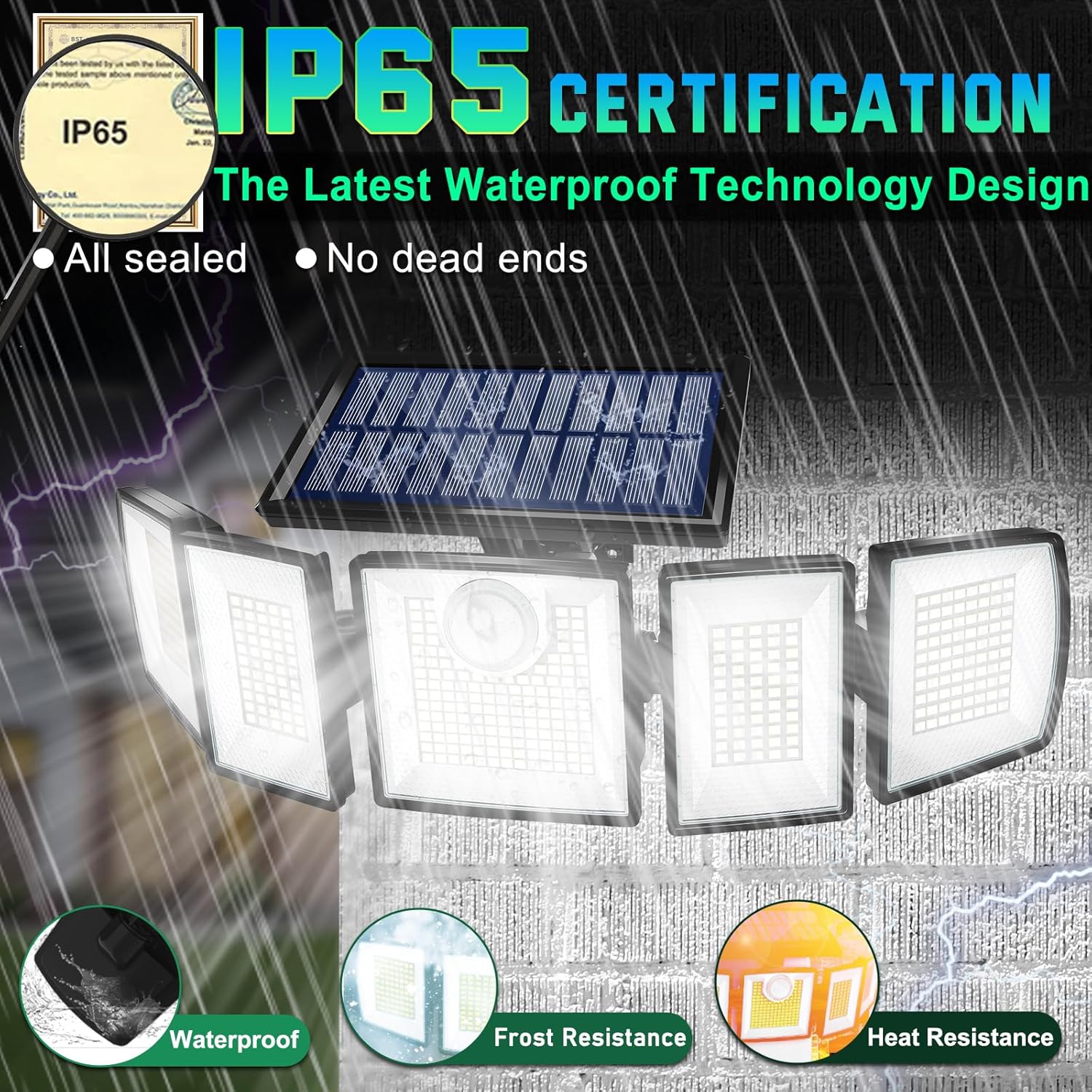
Figure 3.1: Package Contents and Installation Diagram
4. Product Overview
The MDCMDCM Solar Light features a multi-head design for wide illumination and a built-in PIR motion sensor. The solar panel charges the internal battery during the day, and the light activates automatically at night based on selected modes.

Figure 4.1: Adjustable Light Heads and Solar Panel
The five light heads are independently adjustable, allowing for a 360-degree illumination angle to cover specific areas as needed.
5. Setup and Installation
Follow these steps for proper installation:
- Choose Location: Select an outdoor location where the solar panel can receive maximum direct sunlight throughout the day. Avoid areas under eaves, trees, or other obstructions that may block sunlight. A recommended installation height is approximately 6.5 feet (2 meters).
- Mark Drill Holes: Hold the light's mounting base against the desired surface and mark the positions for the mounting screws.
- Drill Holes: Use an appropriate drill bit to drill holes at the marked positions. Insert the wall plugs into the drilled holes.
- Mount the Light: Align the light's mounting base with the holes and secure it using the provided screws.
- Adjust Light Heads: Once mounted, adjust the five light heads to direct illumination to your desired areas. The heads can be rotated up, down, left, and right.
- Initial Charge: Allow the solar light to charge for at least 6-8 hours in direct sunlight before its first use to ensure optimal battery performance.

Figure 5.1: Motion Sensor Detection Range and Coverage
6. Operating Instructions
The solar light is controlled by the included remote control. Ensure the remote has a clear line of sight to the light for effective operation.
6.1. Remote Control Functions
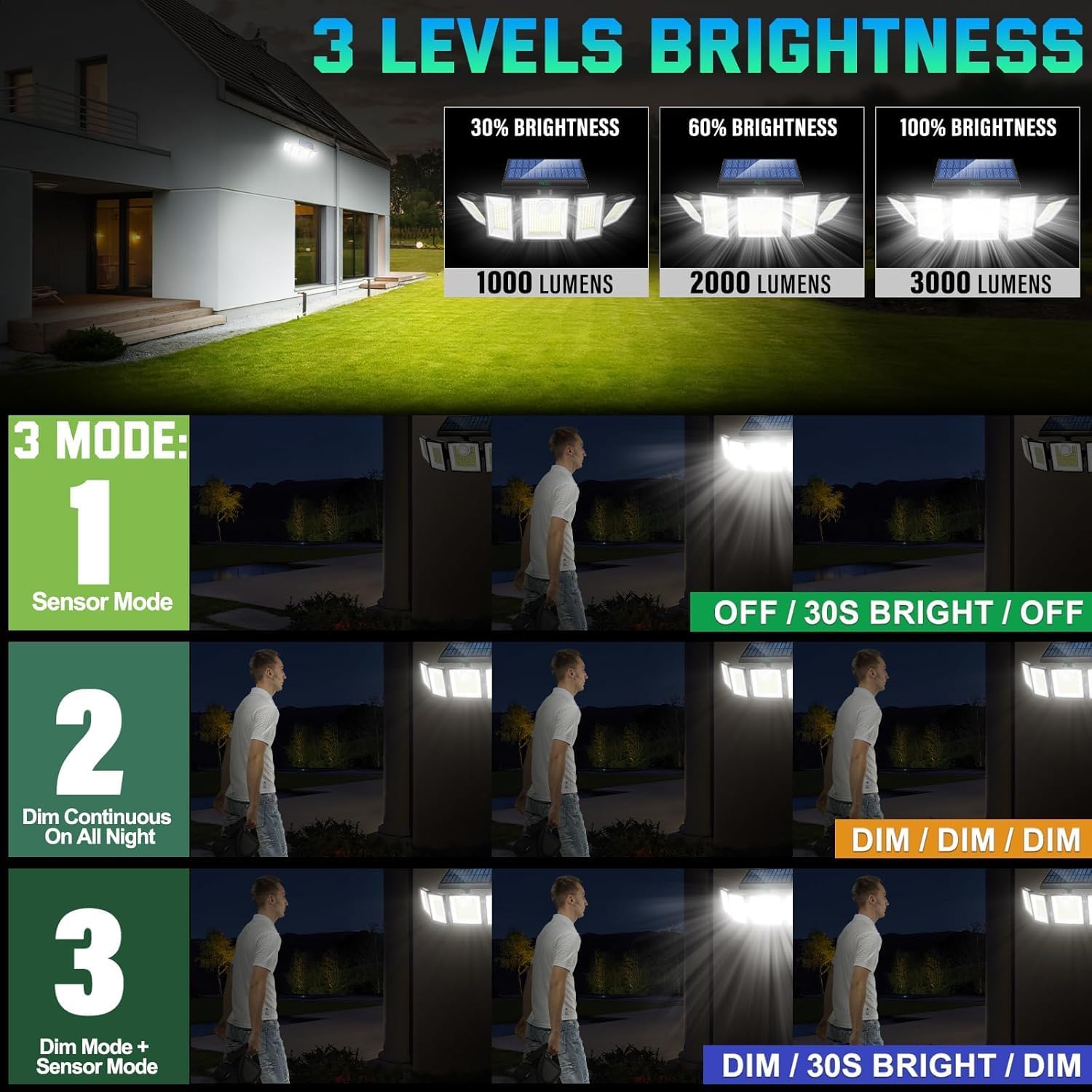
Figure 6.1: Brightness Levels and Lighting Modes
- ON/OFF Button: Turns the light on or off.
- Brightness Adjustment (A/B buttons): Adjusts the light output to 30% (1000 Lumens), 60% (2000 Lumens), or 100% (3000 Lumens).
- Mode 1 (Sensor Mode): The light remains off until motion is detected. Upon detection, it illuminates at 100% brightness for approximately 30 seconds, then turns off.
- Mode 2 (Dim Continuous On All Night): The light stays on at a continuous dim brightness throughout the night, regardless of motion.
- Mode 3 (Dim + Sensor Mode): The light stays on at a continuous dim brightness throughout the night. When motion is detected, it brightens to 100% for approximately 30 seconds, then returns to dim brightness.
6.2. Video Demonstration
Video 6.1: MDCMDCM Solar Motion Lights Outdoor User Package - This video demonstrates the unboxing and basic features of the MDCMDCM solar motion lights, including their adjustable heads and remote control functionality.
7. Charging
The MDCMDCM Solar Light is equipped with a high-efficiency solar panel. During daylight hours, the solar panel converts sunlight into electrical energy, which is stored in the internal 2400mAh battery. The light automatically detects ambient light levels and will only operate in its selected mode when it is dark enough. Ensure the solar panel is clean and free from obstructions for optimal charging performance.
8. Maintenance
- Cleaning: Regularly wipe the solar panel and light heads with a soft, damp cloth to remove dust, dirt, or debris. A clean solar panel ensures efficient charging.
- Inspection: Periodically check the mounting screws to ensure the light remains securely attached.
- Environmental Factors: In areas with heavy snow or ice, ensure the solar panel is cleared to allow for charging.
9. Troubleshooting
If you encounter issues with your solar light, refer to the following table for common problems and solutions:
| Problem | Possible Cause | Solution |
|---|---|---|
| Light does not turn on at night. | Insufficient solar charge. | Ensure the solar panel receives 6-8 hours of direct sunlight daily. Clean the solar panel. |
| Light duration is short. | Insufficient solar charge or cold weather. | Relocate the light to a sunnier spot. Battery performance may be reduced in cold temperatures. |
| Motion sensor not working. | Sensor obstructed or incorrect mode selected. | Clear any obstructions from the sensor. Ensure Mode 1 or Mode 3 is selected via remote. |
| Remote control not responding. | Battery in remote is dead or remote is too far. | Replace the remote control battery. Ensure remote is within effective range and has a clear line of sight. |
| Light flickers or is dim. | Low battery charge. | Allow the light to charge for a full day in direct sunlight. |
10. Specifications
| Feature | Detail |
|---|---|
| Brand | MDCMDCM |
| Model Name | MDCMDCM Solar Lights Outdoor |
| LED Quantity | 416 LEDs |
| Brightness | Up to 3000 Lumens |
| Color Temperature | 7000 Kelvin (Cool White) |
| Battery Capacity | 2400mAh |
| Motion Sensor Detection Range | 15-32 ft (4.5-9.7 m) |
| Motion Sensor Detection Angle | 180° |
| Illumination Angle | 360° (adjustable heads) |
| Water Resistance Rating | IP65 |
| Material | Plastic (High-strength ABS) |
| Power Source | Solar Powered |
| Control Method | Remote Control |
| Product Dimensions | 14"L x 5"W x 4"H (35.5cm L x 12.7cm W x 10.1cm H) |
| Item Weight | 2.64 Pounds (1.2 kg) |
11. Warranty and Support
MDCMDCM offers a lifetime warranty for this product, ensuring its quality and performance. If you experience any issues or require assistance, please contact MDCMDCM customer support through the retailer's platform or the contact information provided with your purchase. Please retain your proof of purchase for warranty claims.

