
VEVOR XC-HF-2
VEVOR Commercial Dual-Head Round Waffle Maker XC-HF-2 Instruction Manual
Model: XC-HF-2
1. Introduction
Thank you for choosing the VEVOR Commercial Dual-Head Round Waffle Maker. This manual provides essential information for the safe and efficient operation, maintenance, and troubleshooting of your appliance. Please read it thoroughly before first use and retain it for future reference.
Important Safety Instructions
- Always ensure the appliance is placed on a stable, heat-resistant surface.
- Do not immerse the appliance, cord, or plug in water or other liquids.
- Keep hands and utensils away from the heating plates during operation to prevent burns.
- Unplug the appliance from the power outlet when not in use and before cleaning.
- Do not operate the appliance with a damaged cord or plug, or if it malfunctions or has been damaged in any manner.
- This appliance is for commercial use; ensure proper ventilation in the operating area.
2. Product Overview
The VEVOR Commercial Dual-Head Round Waffle Maker is designed for efficient and consistent waffle production. It features independent temperature and time controls for each waffle plate, allowing for simultaneous preparation of two waffles with customized settings.

Image: The VEVOR Commercial Dual-Head Round Waffle Maker shown with various accessories including sponges, brushes, food clips, and a whisk.
Key Features:
- High Power Output: 2460W for rapid heating and quick waffle production.
- Dual Independent Controls: Separate temperature (122-572°F / 50-300°C) and time controls for each waffle plate.
- Non-Stick Coating: Ensures easy release of waffles and simplifies cleaning.
- Durable Construction: Made with stainless steel for longevity and stability.
- Heat-Resistant Handles: Spiral design handles to prevent accidental burns.
- Spill Channels: Integrated design to manage batter overflow and keep countertops clean.

Image: Detailed view highlighting the heat-resistant handles, overflow prevention drip tray, sturdy stainless steel body, and overall compact design of the waffle maker.
3. Specifications
| Feature | Detail |
|---|---|
| Model Number | XC-HF-2 |
| Power | 2460W |
| Voltage | (Typically 110-120V for US market, check product label for exact voltage) |
| Temperature Range | 122-572°F / 50-300°C |
| Timer Range | 0-5 minutes |
| Material | Stainless Steel, Non-stick coating |
| Product Dimensions (L x W x H) | 19.69"D x 18.5"W x 10.24"H (500 x 470 x 260 mm) |
| Item Weight | 21.4 lbs / 9.7 kg |
| UPC | 197988769170 |
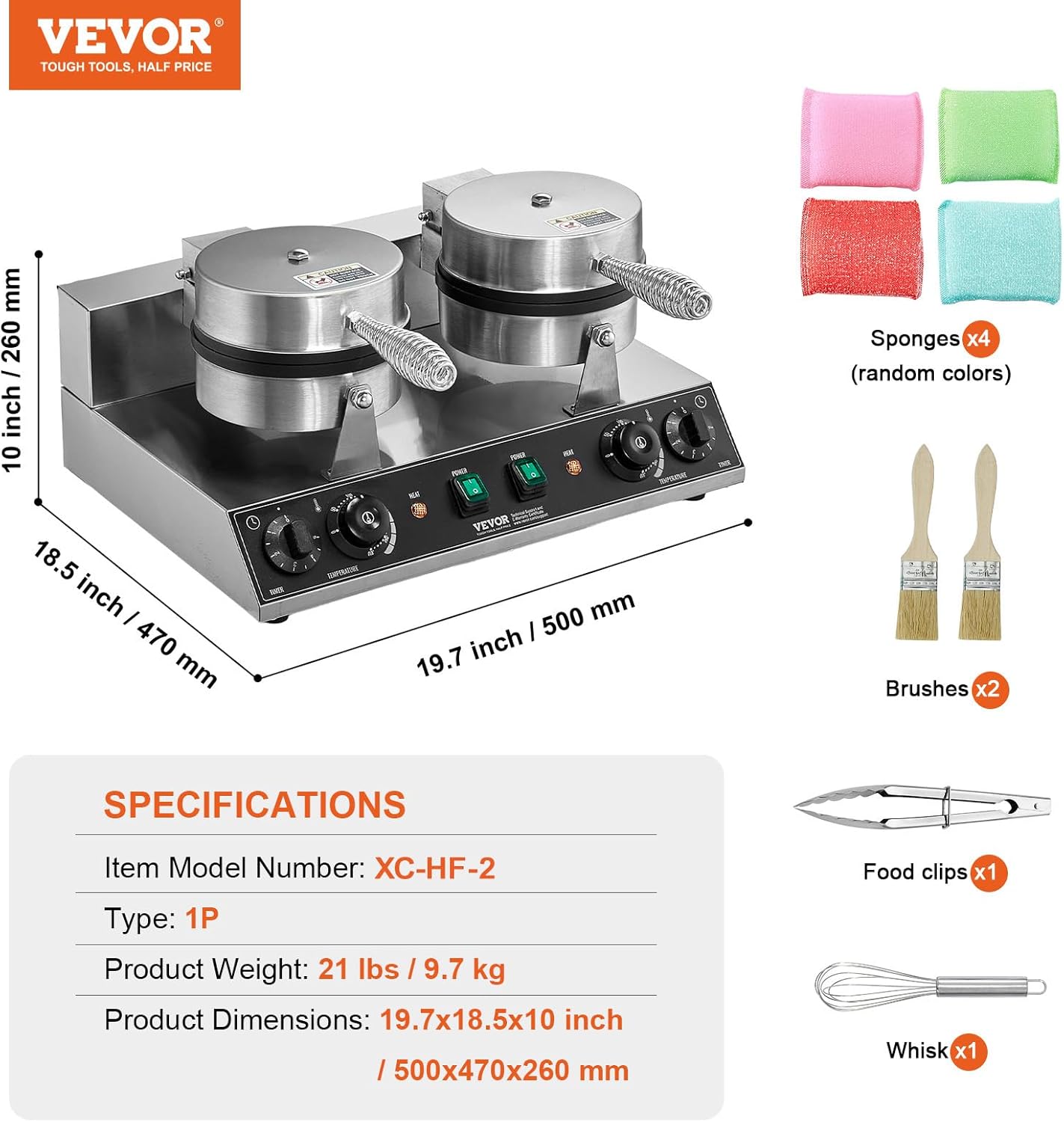
Image: A visual representation of the product's dimensions and key specifications, along with a list of included accessories.
4. Setup
- Unpacking: Carefully remove the waffle maker and all accessories from the packaging. Retain packaging for future storage or transport.
- Initial Cleaning: Before first use, wipe down the exterior of the appliance with a damp cloth. Clean the non-stick waffle plates with a soft, damp cloth or sponge. Do not use abrasive cleaners or scourers. Ensure all parts are completely dry before plugging in.
- Placement: Place the waffle maker on a flat, stable, and heat-resistant surface. Ensure there is adequate clearance around the appliance for ventilation and to prevent heat damage to surrounding surfaces.
- Power Connection: Ensure the power switch is in the "OFF" position. Plug the power cord into a grounded electrical outlet with the correct voltage (refer to specifications).
5. Operation
Follow these steps for optimal waffle preparation:
- Preheating: Close the waffle plates. Turn on the power switch for the desired waffle head(s). Set the temperature control knob to your desired cooking temperature (e.g., 350°F / 175°C for standard waffles). The "HEAT" indicator light will illuminate. Allow the appliance to preheat until the "HEAT" light turns off, indicating the set temperature has been reached. This typically takes a few minutes.
- Prepare Batter: While preheating, prepare your waffle batter.
- Apply Oil (Optional): For the first use or if waffles begin to stick, lightly brush a small amount of cooking oil onto the non-stick plates. This is generally not required for subsequent uses due to the non-stick coating.
- Pour Batter: Open the waffle plate. Pour the appropriate amount of batter onto the center of the lower waffle plate. Do not overfill, as batter will expand during cooking.
- Close and Cook: Carefully close the upper waffle plate. Set the timer knob to your desired cooking time (e.g., 3-5 minutes, depending on desired crispness). The timer will count down and emit an audible signal when complete.
- Remove Waffle: Once cooking is complete and the timer sounds, open the waffle plate. Use a heat-resistant, non-metallic utensil (e.g., wooden or silicone spatula) to carefully remove the cooked waffle. Do not use metal utensils, as they can damage the non-stick coating.
- Repeat: Close the waffle plate and repeat the process for additional waffles.

Image: The control panel with independent temperature and time control knobs for precise cooking adjustments.

Image: A visual guide demonstrating the three simple steps to make waffles: preheating, pouring batter, and serving the finished product.
6. Maintenance and Cleaning
Regular cleaning and maintenance will extend the life of your waffle maker.
- Cool Down: Always unplug the appliance and allow it to cool completely before cleaning.
- Clean Waffle Plates: Use a soft, damp cloth or sponge to wipe the non-stick waffle plates. For stubborn residue, a small amount of mild dish soap can be used, followed by wiping with a clean, damp cloth. Do not use abrasive pads, metal brushes, or harsh chemicals, as these can damage the non-stick coating.
- Clean Exterior: Wipe the exterior stainless steel surfaces with a damp cloth. Dry thoroughly.
- Spill Channels: Clean any batter overflow from the spill channels using a damp cloth.
- Storage: Ensure the appliance is clean and dry before storing. Store in a cool, dry place.

Image: Demonstrating the easy cleaning process of the non-stick waffle plates using a soft cloth.
7. Troubleshooting
If you encounter issues with your waffle maker, refer to the following common problems and solutions:
| Problem | Possible Cause | Solution |
|---|---|---|
| Appliance does not turn on. | Not plugged in; power switch off; power outage. | Ensure plug is securely in outlet; turn power switch on; check circuit breaker. |
| Waffles are sticking. | Plates not properly seasoned; too much sugar in batter; plates not clean. | Lightly brush plates with cooking oil before use; adjust batter recipe; clean plates thoroughly. |
| Waffles are not cooking evenly. | Insufficient preheating time; uneven batter distribution. | Allow full preheating until indicator light turns off; ensure batter is spread evenly. |
| Waffles are too soft or too crispy. | Incorrect temperature or time settings. | Adjust temperature and timer settings according to desired texture. Experiment to find optimal settings for your batter. |
8. Warranty and Support
VEVOR products are designed for durability and performance. For warranty information, technical support, or service inquiries, please contact VEVOR customer service. You can typically find contact details on the official VEVOR website or through your purchase documentation.
Please have your model number (XC-HF-2) and purchase date available when contacting support.
Related documentsXC-HF-2


Ask a question about this manual
Ask about setup, troubleshooting, compatibility, parts, safety, or missing instructions. Manuals+ will review the question and use this page’s manual context to help answer it.