1. Introduction
Thank you for choosing the MSmask L-Shaped Desk W69241. This manual provides essential information for the safe assembly, operation, and maintenance of your new desk. Please read these instructions carefully before beginning assembly and retain them for future reference.
2. Product Overview
The MSmask L-Shaped Desk W69241 is designed to enhance your workspace with its functional features and modern aesthetic. It includes integrated power outlets, smart LED lighting, a monitor stand, and convenient 3-tier shelves for storage.
Key Features:
- Smart LED Lights: Easily adjust color, brightness, and mode via an app or buttons to create a personalized ambiance.
- Integrated Power Outlets: Equipped with a charging station featuring two AC outlets and two USB ports for convenient device charging.
- Ergonomic Monitor Stand: Helps maintain correct posture by elevating your monitor to an optimal viewing height.
- Versatile Design: Suitable for various settings, including home offices, gaming setups, and bedrooms, complementing diverse decorative styles.
- 3-Tier Shelves: Provides ample storage space for books, office supplies, and other essentials.
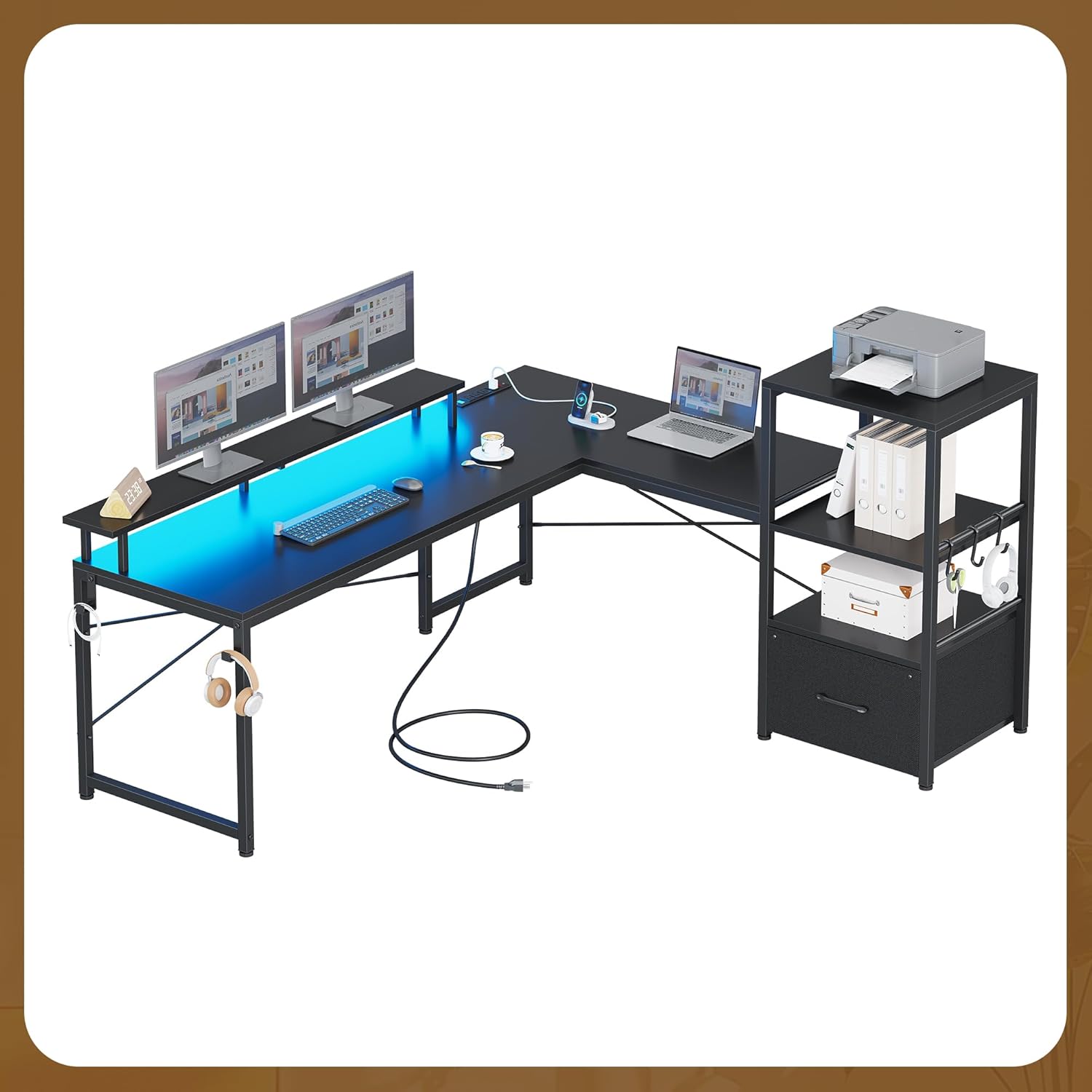
Figure 2.1: The MSmask L-Shaped Desk W69241, showcasing its design and features.
3. Setup and Assembly
The MSmask L-Shaped Desk W69241 requires assembly. Detailed, step-by-step instructions and all necessary hardware are included in the product packaging. Please follow the provided assembly guide carefully to ensure proper and safe construction.
General Assembly Tips:
- Review Instructions: Before starting, read through the entire assembly manual to familiarize yourself with the steps and components.
- Identify Parts: Lay out all parts and hardware, comparing them against the parts list to ensure everything is present.
- Clear Workspace: Assemble the desk in a spacious, clear area to prevent damage to the product or your surroundings.
- Two-Person Assembly: For certain steps, having a second person assist can make assembly easier and safer.
- Do Not Overtighten: Tighten screws and fasteners firmly, but avoid overtightening, which can strip threads or damage materials.

Figure 3.1: Product dimensions for planning your space.
4. Operating Instructions
4.1. LED Lights Operation
The integrated LED lights offer customizable illumination for your workspace. Refer to the specific instructions included with your desk for detailed guidance on connecting and controlling the LED lights.
- Power Connection: Ensure the LED light strip is properly connected to a power source as indicated in the assembly guide.
- Control Methods: The LED lights can typically be controlled via a dedicated remote control, a mobile application, or integrated buttons.
- Customization: Adjust colors, brightness levels, and lighting modes to suit your preference or activity.
4.2. Power Outlets and USB Ports
The desk features a built-in charging station for convenient power access.
- AC Outlets: Use the two standard AC outlets to power your computer, monitor, or other electronic devices.
- USB Ports: The two USB ports are suitable for charging smartphones, tablets, and other USB-powered devices.
- Safety: Always ensure devices are compatible with the power output of the outlets and avoid overloading the circuit.

Figure 4.1: Integrated power outlets and USB ports for charging devices.
5. Maintenance
Regular maintenance will help preserve the appearance and functionality of your MSmask L-Shaped Desk W69241.
- Cleaning: Wipe surfaces with a soft, damp cloth. Avoid abrasive cleaners or harsh chemicals that could damage the finish.
- Spills: Clean up spills immediately to prevent staining or damage to the engineered wood.
- Hardware Check: Periodically check all screws and fasteners to ensure they remain tight. Retighten if necessary.
- Avoid Excessive Weight: Do not place excessively heavy items on the desk or shelves beyond their intended capacity.
- Heat and Moisture: Protect the desk from direct sunlight, extreme temperatures, and excessive moisture. Use coasters for drinks.
6. Troubleshooting
If you encounter any issues with your MSmask L-Shaped Desk W69241, refer to the following common troubleshooting tips:
- Desk Wobbles: Ensure all assembly screws are securely tightened. Check that the desk is on a level surface; adjust leveling feet if present.
- LED Lights Not Working: Verify that the power adapter is correctly plugged into both the LED strip and a functional wall outlet. Check for any loose connections in the wiring. If using a remote, ensure batteries are functional.
- Power Outlets Not Functioning: Confirm the desk's main power cord is securely plugged into a live wall outlet. Check if the power strip has a reset button (often red) and press it if tripped. Test the wall outlet with another device.
- Missing Parts: If you find any parts missing during assembly, please contact customer support immediately with your purchase information.
7. Specifications
| Feature | Detail |
|---|---|
| Brand | MSmask |
| Model Number | W69241 |
| Shape | L-Shape |
| Desk Design | Computer Desk |
| Product Dimensions (D x W x H) | 55.1"D x 37.39"W x 51"H |
| Color | Black |
| Material | Engineered Wood |
| Finish Type | Powder Coated |
| Special Features | Built-In Monitor Stand, LED Lights, Power Outlets (2 AC, 2 USB) |
| Item Weight | 45 Pounds |
| Assembly Required | Yes |
8. Warranty and Support
For warranty information or if you have any questions, concerns, or require assistance with your MSmask L-Shaped Desk W69241, please contact MSmask customer service. Refer to your purchase documentation for specific contact details and warranty terms.
You can typically find support contact information on the manufacturer's website or through the retailer where the product was purchased.