
1. Introduction
The Machenike G5Pro V2 is a high-performance wireless gaming controller designed for a superior gaming experience across multiple platforms. Featuring advanced optical triggers, hot-swappable joysticks, and versatile connectivity options, this manual provides detailed instructions to help you get the most out of your controller.
2. Package Contents
Please verify that all items listed below are included in your package:
- Machenike G5Pro V2 Wireless Gaming Controller
- Smart Interactive Charging Dock
- USB-C to USB-A Charging Cable (2m)
- 2.4GHz Wireless Dongle
- Set of Hot-Swappable Joystick Caps (various sizes)
- User Manual
- Stickers (optional)

Image: Machenike G5Pro V2 Wireless Gaming Controller with its Charging Dock.
Video: Official unboxing of the Machenike G5Pro V2 PC Gaming Controller, showcasing all included accessories.
3. Product Overview
3.1 Key Features
- Innovative Optical Triggers: Provides unmatched sensitivity and stability for precise control, free from magnetic interference.
- Next-Gen JH20 Hot-Swappable Hall Joysticks: 4000-level resolution, 3x more precise than traditional joysticks, with Blade Rotation Structure for smoother operation and <1° Centering Deviation.
- Optical Micro Switches: Light-speed activation, 70% faster response than mechanical buttons, with a lifespan exceeding 10 million presses.
- Built-In 6-Axis Gyro: Enhances gaming with advanced motion control for immersive experiences.
- Tri-mode Connectivity: Supports wired (USB 2.0), 2.4GHz wireless, and Bluetooth connections.
- RGB LEDs with 5 Modes: Customizable lighting effects with adjustable key frame animation, speed, and brightness.
- Mappable Advanced Gaming Buttons: Features 2+2 Macro buttons (M1, M2, M3, M4) for up to 32 actions with a single press.
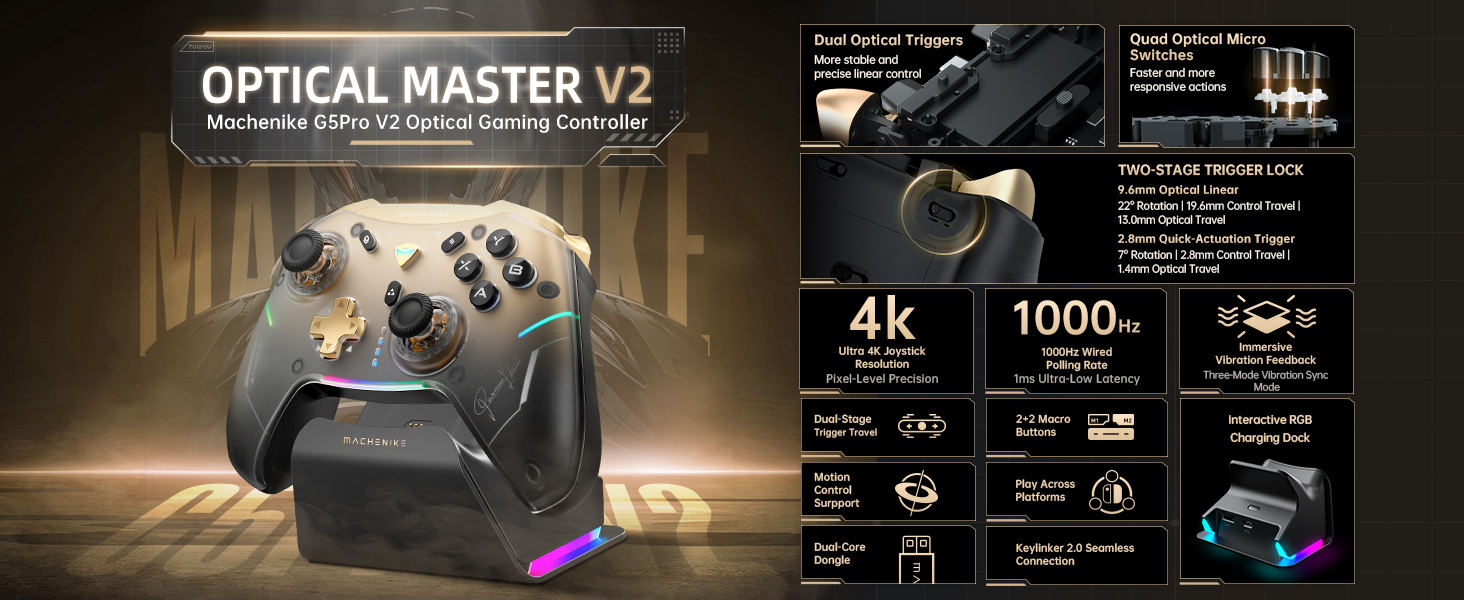
Image: Detailed overview of the Machenike G5Pro V2's core features, including optical triggers, 4K joystick, and 1000Hz polling rate.

Image: Close-up of the Next-Gen JH20 Hot-Swappable Hall Joystick, highlighting its precision and smooth operation.

Image: Illustration of the Optical Micro Switch, demonstrating its light-speed activation and durability.
4. Setup
4.1 Charging the Controller
The Machenike G5Pro V2 controller can be charged using the included charging dock or directly via the USB-C cable.
- Using the Charging Dock: Place the controller onto the Smart Interactive Charging Dock. The dock features contact pins that align with the controller's charging points. The RGB lighting on the dock will sync with the controller, indicating charging status.
- Direct Charging: Connect the USB-C end of the charging cable to the controller's USB-C port (located on the top edge) and the USB-A end to a compatible power source (e.g., PC, USB wall adapter).

Image: The Smart Interactive Charging Dock, showing its design and USB extension interface.
4.2 Connecting to Devices
The G5Pro V2 supports three connectivity modes:
- 2.4GHz Wireless Mode (PC, Switch, Android TV): Insert the 2.4GHz wireless dongle into a USB port on your device. Slide the mode toggle switch on the back of the controller to the '2.4G' position. The controller will automatically connect.
- Bluetooth Mode (PC, Switch, iOS, Android): Slide the mode toggle switch on the back of the controller to the 'NS' (Nintendo Switch) or 'PC' position for Bluetooth. On your device, search for Bluetooth devices and select 'Machenike G5Pro V2' to pair.
- Wired Mode (PC, Switch, Android): Connect the controller to your device using the USB-C to USB-A cable. The controller will be automatically recognized.

Image: Visual representation of the controller's cross-platform compatibility with PC, Nintendo Switch, TV, and mobile devices.
Video: Demonstrates the Machenike G5Pro V2 Wireless Gaming Controller's features and connectivity options across different devices.
4.3 Hot-Swappable Joystick Replacement
The joysticks can be easily swapped to suit your preference for height and feel:
- Gently pull the existing joystick cap upwards to remove it.
- Select your desired joystick cap (tall, medium, or short).
- Align the new joystick cap with the base and push down firmly until it clicks into place.

Image: Visual guide on how to replace the hot-swappable joysticks for customized gaming.
5. Operating Instructions
5.1 Customization with Mobile App
Download the dedicated mobile app (KeyLinker) to unlock over 100 detailed adjustments for your controller. The app allows you to customize:
- Button remapping
- Joystick and trigger calibration
- Combo settings
- RGB lighting effects
- Rumble motor intensity
- Macro button programming

Image: Screenshots of the mobile app interface, demonstrating various customization options for the controller.
5.2 RGB Lighting Control
The controller features vibrant RGB LEDs. You can cycle through 5 different lighting modes and adjust brightness and animation speed directly on the controller or via the mobile app.
5.3 Trigger Vibration Modes
Experience enhanced immersion with three distinct trigger vibration modes:
- Linear Response Mode: Stronger vibration feedback with longer trigger press.
- Game-native Trigger Vibration Mode: Native trigger vibration for immersive gaming experiences.
- Linked Vibration Mode: Trigger and grip vibrations synchronize for immersive feedback.

Image: Visual explanation of the three scenario-based trigger vibration modes for diverse feedback.
5.4 Motion Control
The built-in 6-axis gyro allows for precise motion control, enhancing gameplay in compatible titles. (Note: Motion sensing function is available only in Nintendo Switch mode. Manual switch to NS mode required when using 2.4G/wired connection).

Image: Depicts the 6-Axis Gyro Motion Control feature, showing how it enhances gameplay.
6. Compatibility
The Machenike G5Pro V2 is compatible with a wide range of devices:
- Nintendo Switch: Full compatibility, including motion control (in NS mode).
- PC: Compatible with Windows operating systems.
- iOS: Connects via Bluetooth for iOS gaming.
- Android: Connects via Bluetooth or 2.4GHz wireless for Android devices and Android TV.
7. Maintenance
- Cleaning: Use a soft, dry cloth to wipe the controller. Avoid harsh chemicals or abrasive materials.
- Battery Care: To prolong battery life, avoid fully discharging the controller frequently. Charge it regularly, especially if storing for extended periods.
- Storage: Store the controller in a cool, dry place away from direct sunlight and extreme temperatures.
8. Troubleshooting
- Controller not connecting: Ensure the controller is in the correct mode (2.4G, NS, or PC) for your device. Try re-pairing or reconnecting the cable. Check if the dongle is properly inserted.
- Charging issues: Verify the charging cable and dock connections. Ensure the power source is active.
- Buttons/Joysticks unresponsive: Calibrate joysticks and triggers using the mobile app. Ensure no debris is obstructing the buttons.
- Lag/Input Delay: For 2.4GHz wireless, ensure the dongle is not obstructed and is within range. For Bluetooth, minimize interference from other wireless devices. Consider using wired mode for the lowest latency.
9. Specifications
- Model: G5 PRO V2
- Connectivity: Wired (USB-C), 2.4GHz Wireless, Bluetooth
- Polling Rate: 1000Hz (wired)
- Battery: 600mAh Li-Ion (up to 8 hours playtime)
- Joysticks: JH20 Hot-Swappable Hall Joysticks (4000-level resolution)
- Triggers: Optical Triggers
- Buttons: Optical Micro Switches, Mappable Macro Buttons
- Motion Sensor: 6-Axis Gyro
- Dimensions: 7.09 x 5.91 x 2.36 inches
- Weight: 1.43 Pounds
10. Warranty and Support
Machenike products come with a limited warranty. For detailed warranty information, technical support, or customer service inquiries, please visit the official Machenike website or contact their customer support team. Keep your purchase receipt for warranty claims.

