
Introduction
Thank you for choosing the Allimity AA59-00802A Replacement Remote Control. This remote is designed as a direct replacement for various Samsung LED TV models, providing seamless functionality without the need for complex programming. This manual will guide you through the setup, operation, maintenance, and troubleshooting of your new remote control.
Compatible Models include: AA59-00802A, AA5900802A, UA32F4000, UA50F5000, UA32F4001, UA32F4100, UA32F4105, UA32F4020, UA32F5000, UA46F5020, UA32F5100, UA32F5105, UA40F5000, UA40F5020, UA46F5100, UA40F5100, UA40F5105, UA46F5000.
Setup
1. Battery Installation
The Allimity AA59-00802A remote control requires two AAA alkaline batteries (not included) for operation. Follow these steps to install the batteries:
- Locate the battery compartment on the back of the remote control.
- Slide the battery cover downwards or press the latch and lift to open.
- Insert two new AAA alkaline batteries, ensuring the positive (+) and negative (-) terminals match the diagrams inside the compartment.
- Replace the battery cover by sliding it back into place until it clicks securely.

Image: Back of the remote control with the battery compartment open, illustrating correct battery placement.
2. Initial Use
This is an infrared (IR) replacement remote control. No pairing or programming is required. Once batteries are installed, the remote is ready for use with compatible Samsung LED TVs.
Operating Instructions
To operate your TV using the Allimity AA59-00802A remote control, ensure you point the remote directly towards the infrared sensor on your Samsung LED TV. Avoid any obstructions between the remote and the TV sensor for optimal performance.
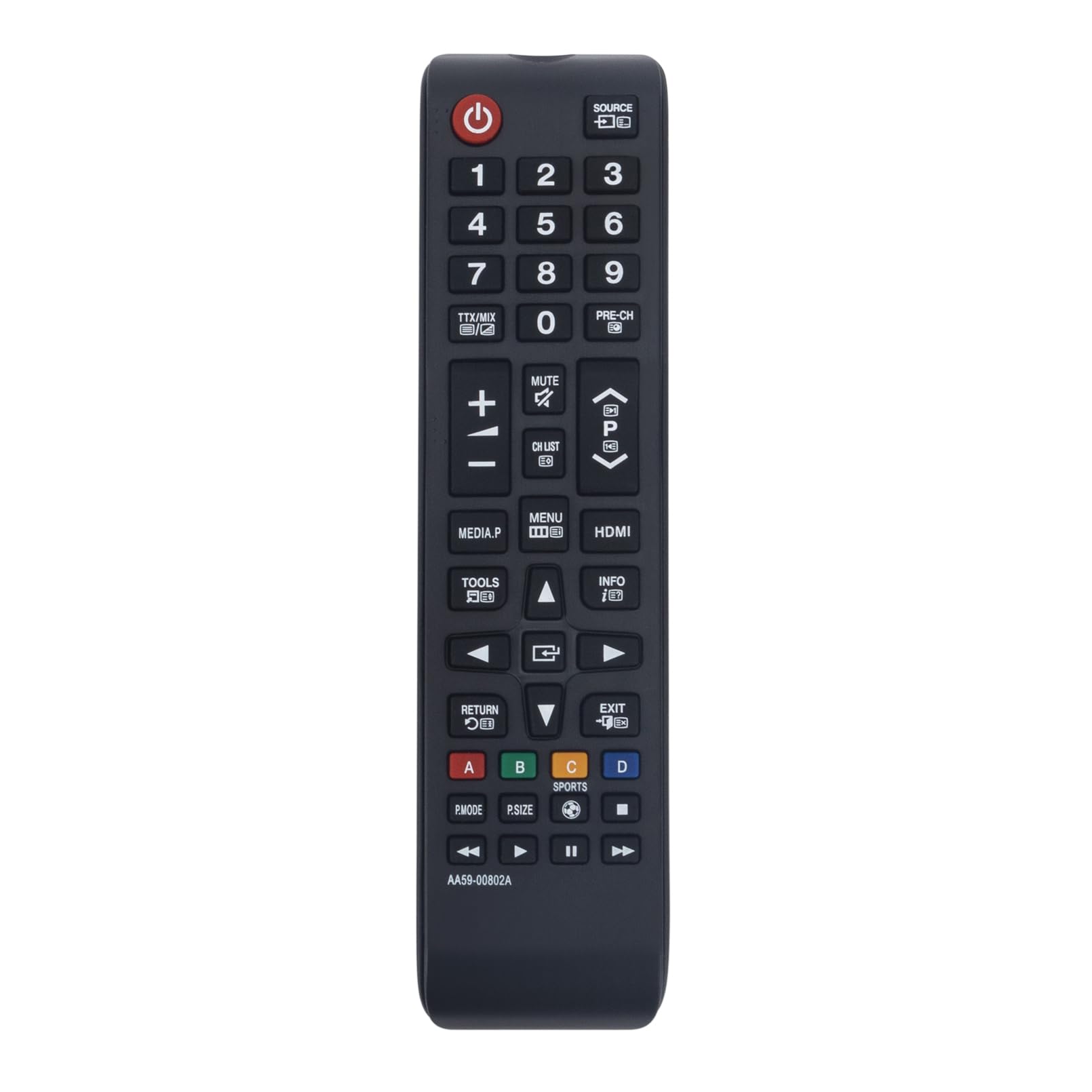
Image: Front view of the Allimity AA59-00802A remote control, displaying its button layout.
Key Functions:
- Power Button (U): Turns the TV on or off.
- Number Buttons (0-9): Directly select channels.
- Volume Up/Down (+/-): Adjusts the TV volume.
- Channel Up/Down (P+/-): Changes TV channels.
- Mute: Mutes or unmutes the TV sound.
- Source: Selects input sources (HDMI, AV, etc.).
- Menu: Accesses the TV's main menu.
- Directional Pad (Up/Down/Left/Right) & Enter: Navigates through menus and confirms selections.
- Return/Exit: Goes back to the previous screen or exits the current menu.
- Smart Hub/Home: Accesses the Smart Hub or Home screen (if supported by your TV model).
- Color Buttons (Red, Green, Yellow, Blue): Used for specific functions within certain TV applications or menus.
Maintenance
Battery Replacement
Replace batteries when the remote's response becomes sluggish or stops working. Always use new AAA alkaline batteries. Do not mix old and new batteries, or different types of batteries.
Cleaning
To clean the remote control, gently wipe it with a soft, dry cloth. Do not use liquid cleaners, sprays, or abrasive materials, as these can damage the remote's surface or internal components.
Storage
If the remote control will not be used for an extended period, it is recommended to remove the batteries to prevent leakage and potential damage to the remote.
Troubleshooting
- Remote not responding:
- Ensure new AAA alkaline batteries are correctly installed with the correct polarity.
- Check if there are any obstructions between the remote control and the TV's IR sensor.
- Make sure you are pointing the remote directly at the TV's IR sensor.
- Test the remote by pointing it at a digital camera or smartphone camera. If you see a light flashing from the remote's IR emitter when pressing buttons, the remote is likely transmitting a signal.
- Some functions not working:
- Verify that your TV model is listed as compatible with the AA59-00802A remote. While this remote is broadly compatible, specific advanced functions might vary slightly depending on your exact TV model.
- Ensure the batteries have sufficient power.
- Remote feels sluggish or buttons stick:
- Replace the batteries.
- Clean the remote as described in the Maintenance section.
If you continue to experience issues, please refer to the Support section for contact information.
Specifications
| Feature | Detail |
|---|---|
| Brand | allimity |
| Model | AA59-00802A |
| Connectivity Technology | Infrared (IR) |
| Compatible Devices | Samsung LED Televisions |
| Material | Plastic Electronic |
| Dimensions (LxWxH) | 15 x 5 x 1 cm |
| Item Weight | 63 g |
| Battery Type | AAA Alkaline (2 required, not included) |
| Special Feature | Ergonomic design |
Support
For further assistance or inquiries regarding your Allimity AA59-00802A Replacement Remote Control, please contact the seller or manufacturer directly. You may reach the manufacturer at indcandy2023@126.com.
Please provide your product model number (AA59-00802A) and a detailed description of the issue when seeking support.