
Porodo PD-LFST030-BK
Porodo Lifestyle Portable Air Duster & Vacuum Cleaner User Manual
Model: PD-LFST030-BK
Introduction
Thank you for choosing the Porodo Lifestyle Portable Air Duster & Vacuum Cleaner. This versatile 2-in-1 device is designed for efficient and convenient cleaning, offering both powerful vacuuming and air dusting capabilities. With its 110W brushless motor, washable HEPA filter, and portable design, it's an ideal solution for various cleaning tasks around your home, office, or car. Please read this manual carefully before use to ensure proper operation and maintenance.
Important Safety Information
To reduce the risk of fire, electric shock, or injury, please observe the following safety precautions:
- Do not operate the device with a damaged cord or plug.
- Do not use the device to pick up flammable or combustible liquids, such as gasoline, or use in areas where they may be present.
- Do not pick up anything that is burning or smoking, such as cigarettes, matches, or hot ashes.
- Keep hair, loose clothing, fingers, and all parts of body away from openings and moving parts.
- Use only as described in this manual. Use only manufacturer's recommended attachments.
- Do not immerse the device in water or other liquids.
- Always turn off the device before connecting or disconnecting accessories.
- Store the device indoors in a cool, dry place.
- This appliance is not intended for use by persons (including children) with reduced physical, sensory or mental capabilities, or lack of experience and knowledge, unless they have been given supervision or instruction concerning use of the appliance by a person responsible for their safety.
Package Contents
Please check the box for the following items:
- Porodo Lifestyle Portable Air Duster & Vacuum Cleaner Unit
- Extension Rod
- Washable HEPA Filter (pre-installed)
- Crevice Tool / Nozzle (for vacuuming and dusting)
- Floor Brush Attachment
- Type-C Charging Cable
- User Manual
Product Overview
Familiarize yourself with the components of your Porodo Portable Air Duster & Vacuum Cleaner:

Image: The Porodo Portable Air Duster & Vacuum Cleaner shown fully assembled with the extension rod and floor brush attachment.

Image: The main unit configured for air dusting, showing the nozzle attached to the exhaust port.
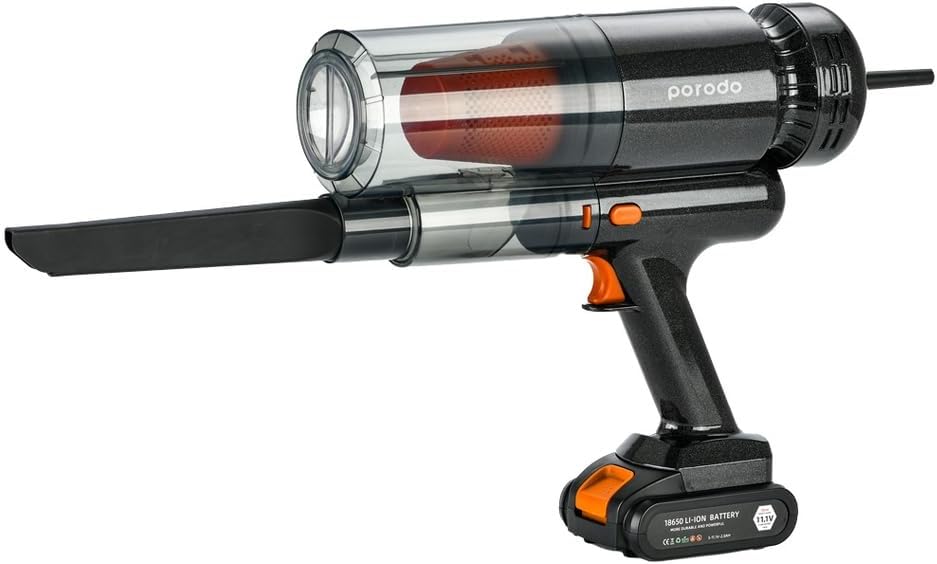
Image: The main unit configured for vacuuming, with the dust bin and washable HEPA filter clearly visible.
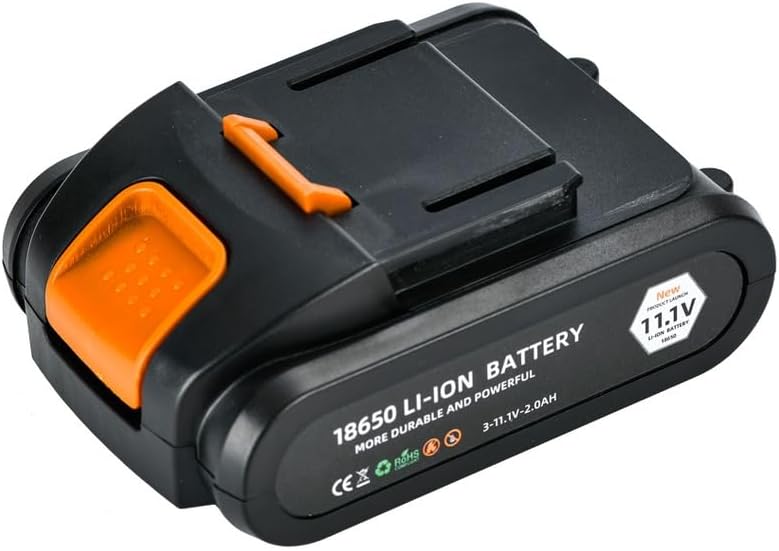
Image: Close-up of the detachable 11.1V Li-ion battery pack.
- Main Unit: Contains the 110W brushless motor, dust bin, and HEPA filter.
- Dust Bin: 680ml capacity for collecting debris.
- HEPA Filter: Washable and reusable, captures fine dust and allergens.
- Extension Rod: Extends reach for floor cleaning or high areas.
- Floor Brush Attachment: For vacuuming floors and carpets.
- Crevice Tool / Nozzle: For precise vacuuming in tight spaces or for directing airflow in duster mode.
- Power Button: Activates the device and switches between modes.
- Type-C Charging Port: For convenient and fast charging.
Setup
Assembly
- Attach Battery: Ensure the battery pack is securely attached to the main unit.
- Select Attachment:
- For floor vacuuming: Connect the extension rod to the main unit, then attach the floor brush to the end of the extension rod.
- For handheld vacuuming: Attach the crevice tool directly to the intake port of the main unit.
- For air dusting: Attach the crevice tool to the exhaust port (opposite end of the dust bin) of the main unit.
- Ensure all connections are firm before use.
Charging the Device
Before first use, fully charge the device. A full charge provides approximately 35 minutes of runtime.
- Locate the Type-C charging port on the main unit.
- Connect the provided Type-C charging cable to the device and plug the other end into a compatible USB power adapter (not included).
- The charging indicator light will illuminate during charging and change color or turn off when fully charged.
- Disconnect the charger once charging is complete.
Operating Instructions
Vacuum Mode

Image: Detailed view of the floor brush attachment, designed for efficient debris collection.
- Ensure the desired vacuuming attachment (floor brush or crevice tool) is securely connected to the intake port of the main unit (or via the extension rod).
- Press the power button to turn on the device. It will start in vacuum mode.
- Move the vacuum over the surface to be cleaned. The powerful 110W brushless motor will efficiently pick up dust and debris.
- To turn off, press the power button again.
Air Duster Mode
- Attach the crevice tool to the exhaust port of the main unit. This is the port opposite the dust bin.
- Press the power button to turn on the device.
- Direct the airflow from the nozzle towards the area you wish to dust. This mode is ideal for cleaning keyboards, electronics, car interiors, and other delicate items.
- To turn off, press the power button again.
The device features two cleaning modes, allowing you to easily switch between vacuuming and air dusting based on your needs.
Maintenance
Regular maintenance ensures optimal performance and extends the lifespan of your device.
Emptying the Dust Bin
Empty the 680ml dust bin regularly, especially when it appears full, to maintain strong suction.
- Ensure the device is turned off.
- Twist or unlatch the dust bin from the main unit (refer to product diagram for specific mechanism).
- Carefully empty the collected debris into a waste bin.
- Reattach the dust bin securely to the main unit.
Cleaning the Washable HEPA Filter
The HEPA filter is washable and reusable, promoting an eco-friendly cleaning solution.
- Ensure the device is turned off and the dust bin is removed.
- Carefully remove the HEPA filter from the dust bin assembly.
- Rinse the filter under cool, running water until the water runs clear. Do not use detergent or hot water.
- Allow the filter to air dry completely for at least 24 hours before reinserting it. Do not use a dryer or direct heat.
- Once completely dry, reinsert the HEPA filter into the dust bin and reattach the dust bin to the main unit.
Troubleshooting
If you encounter any issues, please refer to the table below for common problems and solutions.
| Problem | Possible Cause | Solution |
|---|---|---|
| Device does not turn on. | Battery is low or depleted. | Charge the device fully. |
| Weak suction/airflow. | Dust bin is full. | Empty the dust bin. |
| Weak suction/airflow. | HEPA filter is clogged. | Clean and dry the HEPA filter. |
| Weak suction/airflow. | Nozzle or hose is blocked. | Check and clear any blockages in the attachments or intake/exhaust ports. |
| Short runtime. | Battery not fully charged or aging battery. | Ensure full charge. If issue persists, battery may need replacement (contact support). |
Specifications
| Feature | Detail |
|---|---|
| Brand | Porodo |
| Model Number | PD-LFST030-BK |
| Product Dimensions | 10 x 5 x 3 cm |
| Item Weight | 910 g |
| Motor Power | 110W Brushless Motor |
| Dust Bin Capacity | 680 ml |
| Filter Type | Washable HEPA Filter |
| Cleaning Modes | 2 (Vacuum & Air Duster) |
| Charging Port | Type-C |
| Runtime | Up to 35 minutes |
| Voltage | 11 Volts |
| Material | Silicone |
Warranty and Support
Your Porodo Lifestyle Portable Air Duster & Vacuum Cleaner comes with a Free 12+12 months warranty, ensuring peace of mind with your purchase. This warranty covers manufacturing defects and issues arising from normal use.
For any questions, technical assistance, or warranty claims, please contact our customer support team. We offer 24-hour customer service and lifetime technical support to assist you.
Please refer to the contact information provided on the product packaging or our official website for the most up-to-date support channels.
Related documentsPD-LFST030-BK


Ask a question about this manual
Ask about setup, troubleshooting, compatibility, parts, safety, or missing instructions. Manuals+ will review the question and use this page’s manual context to help answer it.