
BLUETTI B300K+D100P+S1
BLUETTI Balcony Power Plant User Manual
Model: B300K+D100P+S1
1. Introduction
This manual provides essential information for the safe and efficient operation of your BLUETTI Balcony Power Plant system. Please read this manual thoroughly before installation and use, and retain it for future reference.
The BLUETTI Balcony Power Plant system is designed to capture and store solar energy, providing a sustainable power solution for your home. It includes the B300K Solarbank, D100P PV Optimizer, and S1 Smart Socket, offering a comprehensive and intelligent energy management system.
2. Safety Instructions
Always adhere to the following safety guidelines to prevent injury or damage to the system:
- Ensure all electrical connections are secure and properly insulated.
- Do not attempt to disassemble or repair the components yourself. Contact qualified personnel for service.
- Keep the system away from flammable materials and excessive heat sources.
- The D100P PV Optimizer has an IP67 rating, indicating protection against dust and temporary immersion in water. However, do not intentionally submerge the device.
- Install the system in a well-ventilated area, away from direct sunlight if possible, to prevent overheating.
- Follow all local electrical codes and regulations during installation.
3. System Components
The BLUETTI Balcony Power Plant system consists of the following main components:
- BLUETTI B300K Solarbank: A 2764.8 Wh capacity battery storage unit, expandable up to 5529.6 Wh with additional batteries. Designed for wall mounting to save space.
- BLUETTI D100P PV Optimizer: An IP67 rated device compatible with most micro-inverters, enhancing the power output of your existing micro-inverter system when paired with BLUETTI batteries.
- BLUETTI S1 Smart Socket: Enables 1-second power monitoring, precise power distribution, and energy storage. Automates your balcony system to meet power needs and reduce waste.

Image: Overview of the BLUETTI B300K Solarbank, D100P PV Optimizer, and S1 Smart Socket components.

Image: Diagram illustrating the setup of the BLUETTI Balcony Power Plant system on a balcony, showing solar panels, micro-inverters, and BLUETTI components.
4. Setup and Installation
The BLUETTI Balcony Power Plant system is designed for easy, plug-and-play installation. However, professional installation is recommended for optimal safety and performance.
4.1. Pre-installation Checklist
- Verify all components are present as listed in the package contents.
- Ensure the installation area is suitable and meets local regulations.
- Confirm compatibility with your existing micro-inverter system if applicable.
4.2. Installation Steps
- Mount the B300K Solarbank: Securely mount the B300K Solarbank to a wall in a suitable location, ensuring proper ventilation.
- Connect the D100P PV Optimizer: Integrate the D100P PV Optimizer with your solar panels and micro-inverter system. Ensure all connections are tight and weatherproof. The D100P is IP67 rated for outdoor use.
- Install the S1 Smart Socket: Plug the S1 Smart Socket into a standard wall outlet.
- Connect Components: Use the provided P090A battery extension cable, solar charging cable, and DC-to-MC4 connector cable to link the B300K, D100P, and S1 Smart Socket according to the system diagram.
- Power On: Once all connections are verified, power on the system.
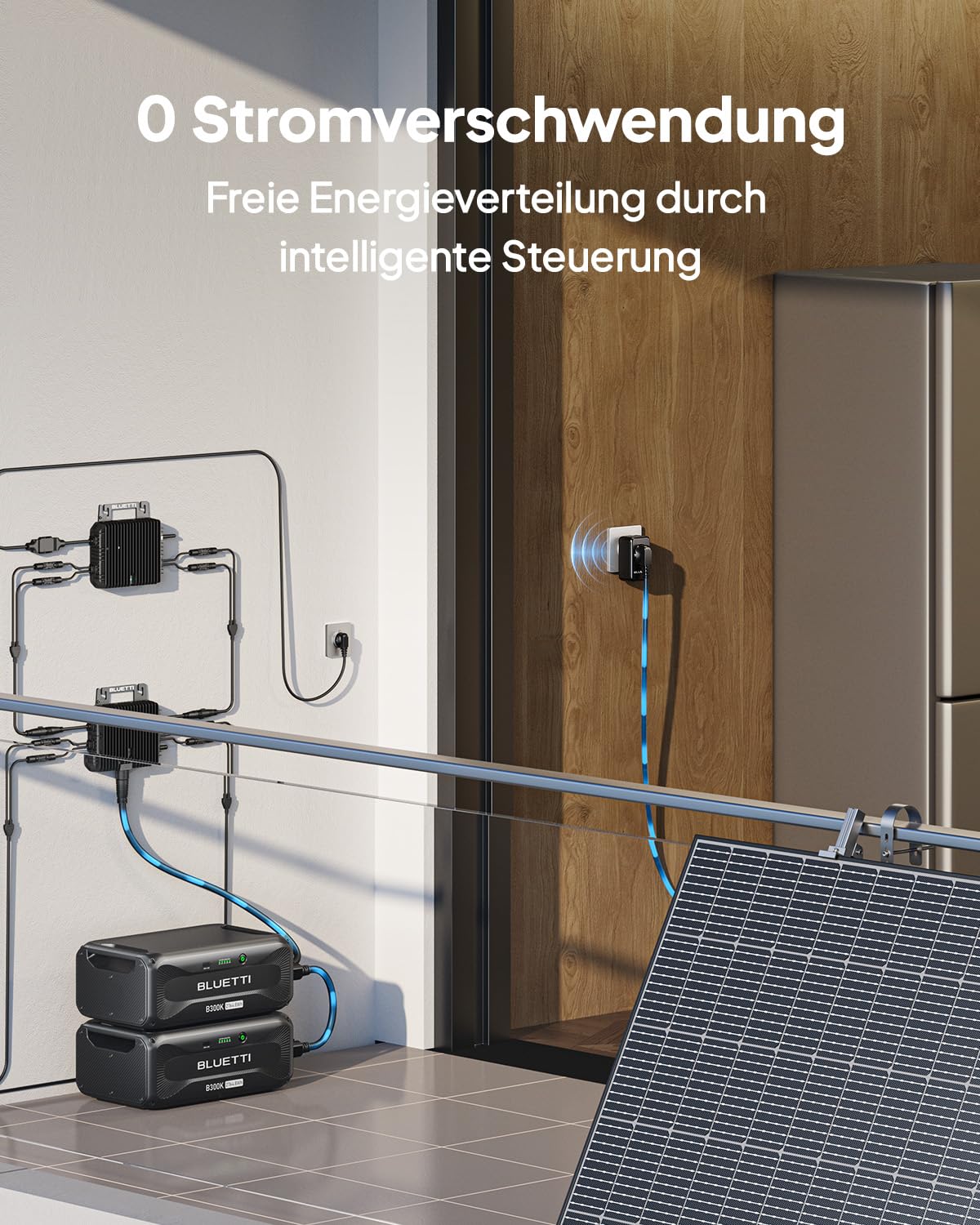
Image: Detailed diagram showing the connection points for the BLUETTI B300K, D100P, and S1 Smart Socket within a balcony solar system setup.

Image: Illustration of how multiple BLUETTI B300K Solarbanks can be stacked and connected to expand the total energy storage capacity up to 5529.6 Wh.
5. Operating Instructions
5.1. Initial Power-Up
After installation, turn on the main power switch for the system. The system will initiate self-checks. Observe the indicator lights on the B300K and D100P for status.
5.2. BLUETTI App Monitoring
The BLUETTI App provides real-time monitoring and control of your system:
- Download the BLUETTI App from your device's app store.
- Connect the app to your system via Bluetooth or Wi-Fi.
- Monitor power consumption, module status, and manage your entire balcony power plant.
- The S1 Smart Socket provides 1-second power monitoring for precise energy distribution.

Image: Screenshot of the BLUETTI mobile application interface, showing real-time power production, consumption, and energy statistics for the balcony solar system.
5.3. Energy Management
The system automatically manages energy flow, storing excess solar energy in the B300K Solarbank for later use, such as during the night or on cloudy days. The S1 Smart Socket helps optimize energy distribution to reduce waste.

Image: Close-up of the BLUETTI D100P PV Optimizer, demonstrating its IP67 water and dust resistance by showing water droplets on its surface, indicating suitability for outdoor balcony installation.
6. Maintenance
Regular maintenance ensures the longevity and optimal performance of your BLUETTI system.
- Cleaning: Periodically clean the exterior of the B300K Solarbank and D100P PV Optimizer with a soft, dry cloth. Do not use abrasive cleaners or solvents.
- Connections: Annually inspect all electrical connections for tightness and signs of corrosion.
- Software Updates: Keep the BLUETTI App and system firmware updated to the latest versions for improved features and performance.
- Environmental Check: Ensure the installation area remains well-ventilated and free from obstructions.
7. Troubleshooting
If you encounter issues with your BLUETTI Balcony Power Plant, refer to the following common troubleshooting steps:
| Problem | Possible Cause | Solution |
|---|---|---|
| System not powering on. | Loose power connection, main switch off. | Check all power cables. Ensure the main power switch is in the 'ON' position. |
| No solar charging. | Solar panels dirty, poor sunlight, faulty connection. | Clean solar panels. Ensure sufficient sunlight. Check solar charging cable and D100P connections. |
| App not connecting. | Bluetooth/Wi-Fi off, app outdated, system off. | Ensure Bluetooth/Wi-Fi is enabled on your device. Update the BLUETTI App. Verify the system is powered on. |
| Reduced power output. | Partial shading, component issue. | Check for shading on solar panels. Contact BLUETTI support if the issue persists. |
If the problem persists after attempting these solutions, please contact BLUETTI customer support.
8. Specifications
| Component | Specification |
|---|---|
| BLUETTI B300K Solarbank |
|
| BLUETTI D100P PV Optimizer |
|
| BLUETTI S1 Smart Socket |
|
| Model Number | B300K+D100P+S1 |
| Manufacturer | BLUETTI |
| First Available | September 23, 2024 |
9. Warranty and Support
BLUETTI provides a warranty for its products. For specific warranty terms and conditions, please refer to the official BLUETTI website or the warranty card included with your product. The D100P PV Optimizer specifically mentions a 10-year coverage.
For technical support, troubleshooting assistance, or warranty claims, please contact BLUETTI customer service through their official website or the contact information provided in your product packaging.
Online Registration: You can register your product online on the market data register website to facilitate approval processes.
Ask a question about this manual
Ask about setup, troubleshooting, compatibility, parts, safety, or missing instructions. Manuals+ will review the question and use this page’s manual context to help answer it.