
1. Introduction
This manual provides essential instructions for the safe and effective use of your Yeaki 71" Phone Tripod. Please read this manual thoroughly before operating the device and retain it for future reference.
2. What's Included
The Yeaki 71" Phone Tripod package includes the following components:
- 1x Phone Tripod / Selfie Stick (71 inches extended)
- 2x LED Fill Lights
- 1x Rechargeable Bluetooth Remote Control
- 1x USB Type-C Charging Cable
- 1x Carrying Case
- 1x User Manual
3. Setup Instructions
3.1 Unfolding the Tripod
To unfold the tripod, hold the main body and gently pull the three legs outwards until they lock into a stable position. The tripod features a reinforced design for enhanced stability.

Image: Reinforced Tripod Stand. The tripod legs are shown extended, highlighting their sturdy construction and anti-slip silicone feet.
3.2 Extending the Pole
The telescopic pole can be extended from 11.6 inches to 71 inches. Pull the sections upwards to extend the desired height. Ensure all sections are securely locked before use.

Image: Foldable & Extendable Tripod. Shows the tripod in its compact 11.6-inch folded state and fully extended to 71 inches, demonstrating its versatility for various shot angles.
3.3 Attaching Your Device
The phone holder is compatible with smartphones from 4 to 7 inches. Gently pull apart the spring-loaded clamps to insert your phone. The tripod also features a standard 1/4-inch thread for compatibility with cameras, GoPro, and ring lights.
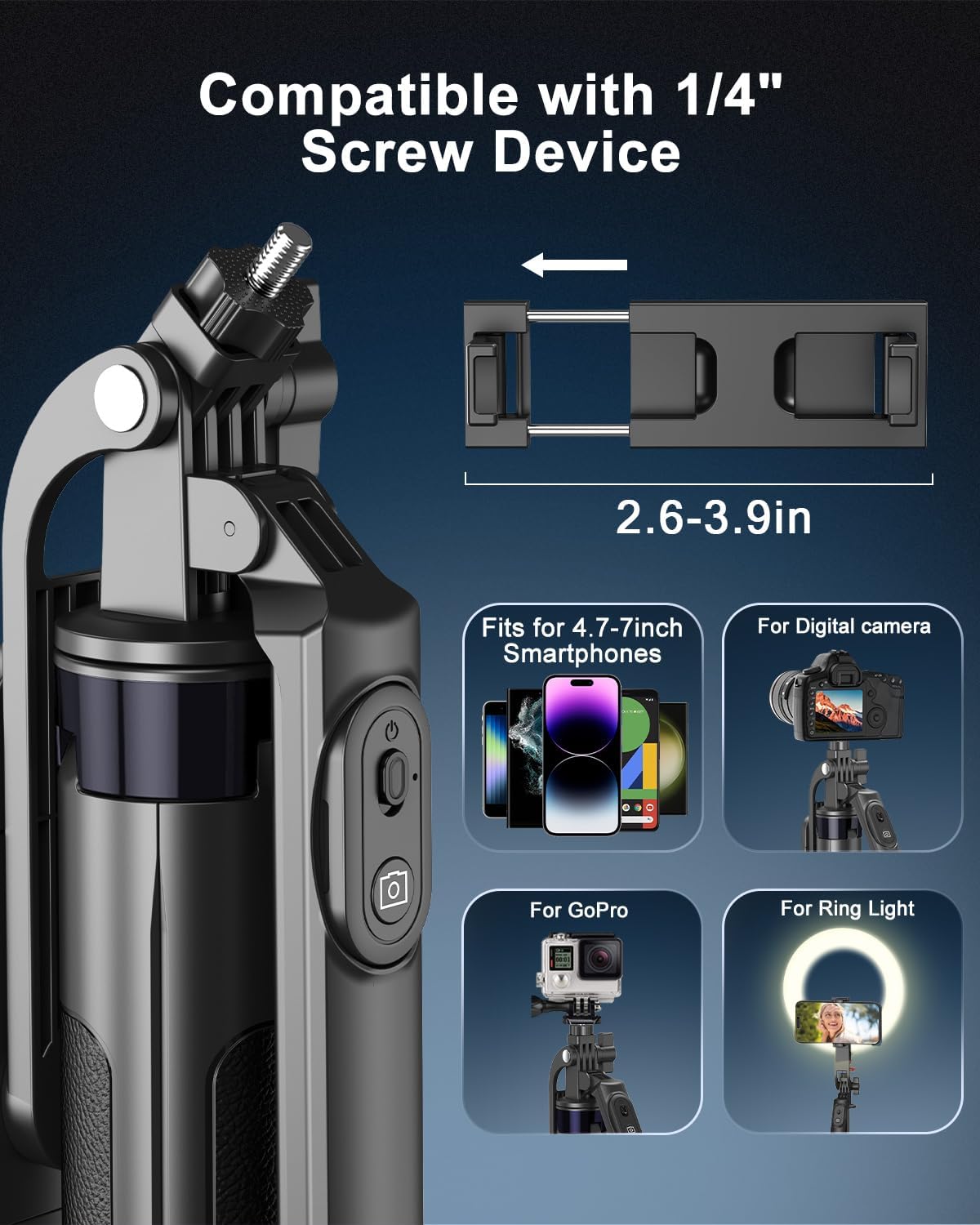
Image: Compatible with 1/4" Screw Device. Illustrates the 1/4-inch screw thread for attaching various devices like cameras, GoPros, and ring lights, alongside the phone holder.
3.4 Attaching Fill Lights
The two LED fill lights can be attached to either side of the phone holder. Simply slide them into the designated slots until they click into place.

Image: Detachable Double Fill Lights. Shows the two circular LED fill lights attached to the sides of the phone holder, with options for white, natural, and warm light settings.
4. Operating Instructions
4.1 Using the Rechargeable Remote Control
The remote control is detachable from the tripod handle. To use, ensure it is charged via the Type-C port. Pair it with your smartphone via Bluetooth. Once paired, you can take photos or start/stop video recordings from up to 10 meters away.

Image: Rechargeable Wireless Remote. Displays the remote control detached from the tripod handle, highlighting its Bluetooth connectivity and Type-C charging port.
4.2 Adjusting Fill Lights
The LED fill lights offer three adjustable modes: white, soft, and warm. Press the button on each light to cycle through the modes and adjust intensity to achieve desired lighting for various content creation needs.
4.3 Adjusting Angles and Modes
The tripod features a 360° swivel head, 270° tilt, and a 360° balancing handle. These adjustments allow you to capture unique angles and panoramic views. You can easily switch between handheld selfie stick mode and stationary tripod mode.

Image: Adjustable Balance Handle. Shows the phone holder with arrows indicating 360° rotation and 270° vertical tilt, demonstrating flexible positioning for various shots.
4.4 Official Product Video
Video: Yeaki 71" Tripod for iPhone with Light Rechargeable Remote. This video demonstrates the key features and usage of the tripod, including light adjustments and remote control functionality.
5. Maintenance
To ensure the longevity and optimal performance of your tripod:
- Keep the device clean and free from dust and debris. Use a soft, dry cloth for cleaning.
- Avoid exposing the tripod to extreme temperatures or direct sunlight for prolonged periods.
- Store the tripod in its carrying case when not in use to protect it from damage.
- Regularly charge the remote control and fill lights to ensure they are ready for use.
6. Troubleshooting
6.1 Remote Control Not Connecting
Ensure the remote control is charged and powered on. Check your phone's Bluetooth settings to confirm it is discoverable and attempt to re-pair the device. Make sure no other devices are interfering with the Bluetooth connection.
6.2 Fill Lights Not Turning On
Verify that the fill lights are fully charged. Press the power button on each light firmly to ensure activation. If issues persist, ensure they are correctly attached to the phone holder.
6.3 Tripod Instability
Ensure all tripod legs are fully extended and locked into place on a flat, stable surface. Avoid placing excessive weight on the tripod, especially when fully extended.
7. Specifications
| Feature | Detail |
|---|---|
| Brand | Yeaki |
| Model Name | Yeaki 71" Phone Tripod |
| Model Number | 351423 |
| Material | Aluminum |
| Maximum Height | 71 Inches |
| Minimum Height | 11.6 Inches |
| Folded Size | 11.6" |
| Item Weight | 0.51 Kilograms |
| Compatible Devices | Cell Phone (4-7 inches), Camera, Ring Light, DJI, GoPro |
| Special Features | Dual Chargeable LED Fill Light, Lightweight Aluminum Design, Rechargeable Remote Control |
| Head Type | Ball Heads |
| Number of Leg Sections | 3 |
8. Warranty and Support
8.1 Warranty Information
This product comes with a 1-Year Warranty from the date of purchase. Please retain your proof of purchase for warranty claims.
8.2 Customer Support
For any questions, technical support, or warranty inquiries, please contact Yeaki US customer service. Visit the Yeaki Store on Amazon for more information or to find contact details.