
SEMIER 667763782651
SEMIER Digital AM/FM Pocket Radio User Manual
Model: 667763782651
1. Introduction
Thank you for purchasing the SEMIER Digital AM/FM Pocket Radio. This manual provides essential information for the safe and efficient operation of your device. Please read it thoroughly before use and retain it for future reference.
This versatile portable radio features AM/FM tuning, Bluetooth 5.0 connectivity, TF card MP3 playback, and audio recording capabilities. It is designed for convenience and high-quality audio on the go.
2. Safety Information
To ensure safe operation and prevent damage, please observe the following precautions:
- Do not expose the device to extreme temperatures, direct sunlight, or high humidity.
- Avoid dropping or subjecting the device to strong impacts.
- Do not disassemble, repair, or modify the device yourself. Contact qualified service personnel for assistance.
- Keep the device away from water and other liquids.
- Use only the provided USB charging cable for charging.
- Do not listen at excessively high volumes for prolonged periods to prevent hearing damage.
3. Package Contents
Verify that all items are present in your package:
- SEMIER Digital AM/FM Pocket Radio
- USB Charging Cable
- User Manual (this document)
4. Product Overview
Familiarize yourself with the radio's components and controls.
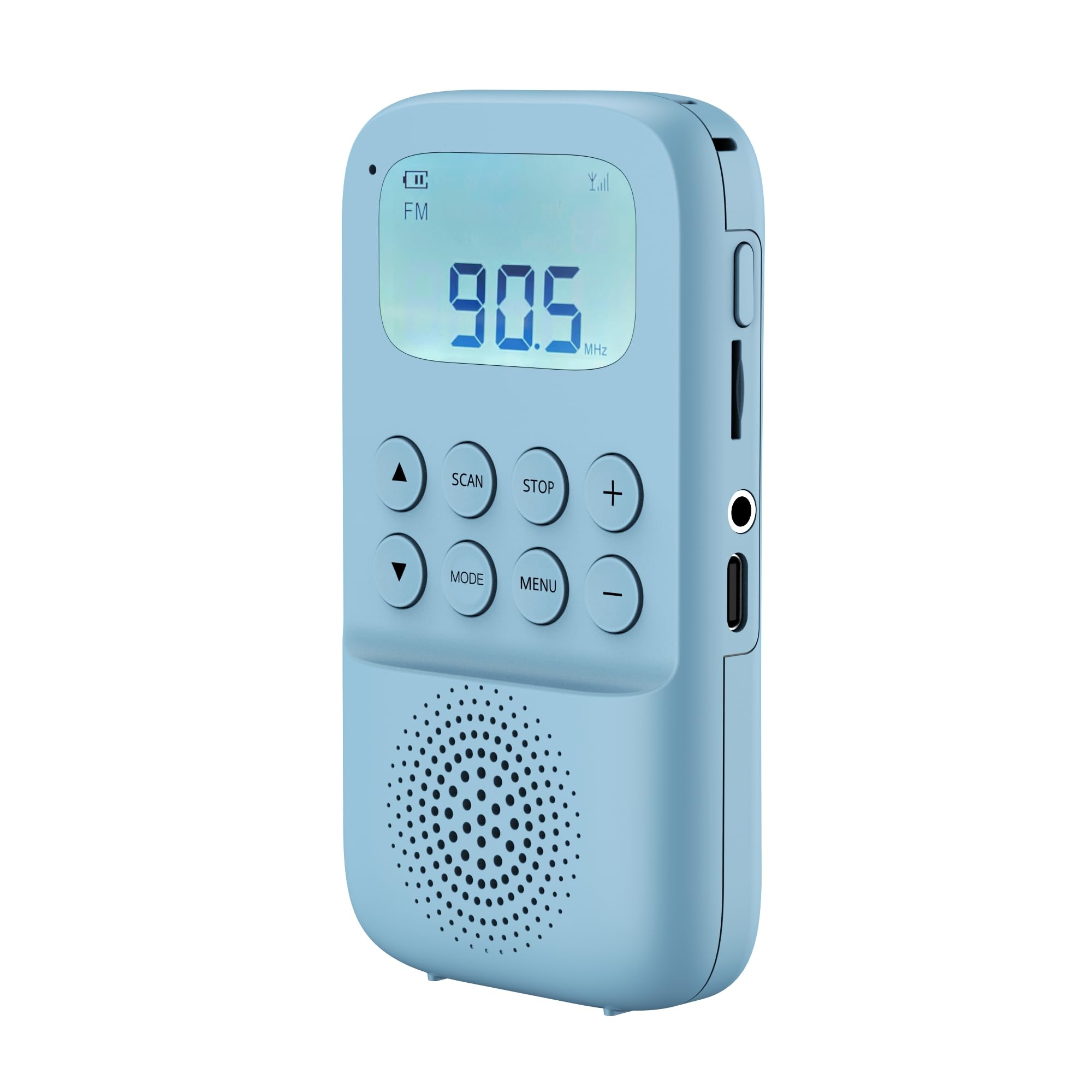
Figure 1: Front view of the SEMIER Digital AM/FM Pocket Radio, showing the LCD display, control buttons, and speaker grille.
Controls and Ports:
- LCD Display: Shows frequency, mode, battery status, and other information.
- Power Button: Press and hold to turn on/off.
- Mode Button: Cycles through AM, FM, Bluetooth, TF Card modes.
- Volume Up/Down Buttons: Adjusts audio volume.
- Tune/Track Up/Down Buttons: Changes radio frequency or skips tracks in media modes.
- Play/Pause/Scan Button: Plays/pauses media, initiates auto-scan in radio mode.
- Menu/Lock Button: Accesses menu options, locks/unlocks buttons.
- Headphone Jack (3.5mm): For private listening.
- TF Card Slot: Insert a MicroSD (TF) card for MP3 playback and recording.
- Micro USB Charging Port: Connect for charging the internal battery.
- Extendable Antenna: For improved FM/AM reception.
5. Setup
5.1 Initial Charging
Before first use, fully charge the radio. Connect the supplied USB charging cable to the Micro USB port on the radio and the other end to a USB power adapter (not included) or a computer's USB port. The charging indicator on the LCD will show charging status. A full charge typically takes 2-3 hours.
5.2 Inserting a TF Card (Optional)
If you wish to play MP3 files or record audio, insert a TF (MicroSD) card into the designated slot. Ensure the card is inserted correctly with the contacts facing down. The radio supports TF cards up to 32GB.
6. Operating Instructions
6.1 Power On/Off
Press and hold the Power button for approximately 2 seconds to turn the radio on or off.
6.2 Adjusting Volume
Press the Volume Up or Volume Down buttons to adjust the listening volume.
6.3 Changing Modes
Press the Mode button repeatedly to cycle through the available modes: FM Radio, AM Radio, Bluetooth, and TF Card Playback.
6.4 FM/AM Radio Operation
- Manual Tuning: In FM or AM mode, briefly press the Tune Up or Tune Down buttons to adjust the frequency step by step.
- Automatic Scan & Save: Press and hold the Play/Pause/Scan button to automatically scan for available stations and save them to presets.
- Accessing Presets: Briefly press the Tune Up or Tune Down buttons after an auto-scan to cycle through saved stations.
- Improving Reception: Extend the telescopic antenna fully for better FM reception. For AM, try rotating the radio for optimal signal.
6.5 Bluetooth Mode
In Bluetooth mode, the radio will enter pairing mode, indicated on the LCD. On your mobile device or computer, search for Bluetooth devices and select "SEMIER" (or "Semier SM-815" as noted in a review) to connect. Once paired, you can stream audio wirelessly to the radio.
- Play/Pause: Briefly press the Play/Pause/Scan button.
- Next/Previous Track: Briefly press the Tune Up or Tune Down buttons.
6.6 TF Card Playback
Insert a TF card with MP3 audio files. The radio will automatically switch to TF card mode or you can select it using the Mode button. The radio will begin playing MP3 files from the card.
- Play/Pause: Briefly press the Play/Pause/Scan button.
- Next/Previous Track: Briefly press the Tune Up or Tune Down buttons.
- Note: The radio plays tracks in order and does not support random playback.
6.7 Audio Recording
The radio supports recording audio directly to a TF card. Specific instructions for initiating and stopping recording will be available through the Menu button or a dedicated recording button (if present and not explicitly detailed in the provided product description). Refer to the on-screen prompts or experiment with the menu options.
6.8 Alarm Clock Function
The radio includes an alarm clock function. To set the alarm, navigate through the menu options using the Menu button. Follow the on-screen instructions to set the time and alarm preferences.
6.9 Button Lock Function
To prevent accidental button presses, especially when carrying the radio in a pocket, use the one-button lock function. Press and hold the Menu/Lock button to activate or deactivate the button lock. An icon on the LCD will indicate when the buttons are locked.
7. Charging the Battery
The radio is equipped with a 1000 mAh rechargeable lithium-ion battery. When the battery level is low, the battery indicator on the LCD will show a low status. Connect the radio to a USB power source using the provided USB cable. The charging indicator will illuminate during charging and turn off or change color when fully charged. Avoid overcharging to prolong battery life.
8. Maintenance
- Cleaning: Use a soft, dry cloth to clean the radio's exterior. Do not use abrasive cleaners or solvents.
- Storage: When not in use for extended periods, store the radio in a cool, dry place. Charge the battery periodically (e.g., every 3 months) to maintain its health.
- Battery Care: Do not expose the battery to high temperatures or dispose of it in fire. Recycle batteries according to local regulations.
9. Troubleshooting
| Problem | Possible Cause | Solution |
|---|---|---|
| Radio does not turn on. | Battery is depleted. | Charge the radio using the USB cable. |
| Poor radio reception. | Antenna not extended; weak signal area. | Extend the telescopic antenna fully. Try repositioning the radio. For AM, rotate the device. |
| Bluetooth not connecting. | Radio not in pairing mode; device too far; already connected to another device. | Ensure radio is in Bluetooth mode. Keep devices within range. Disconnect from other devices. |
| TF card not playing. | Card not inserted correctly; unsupported file format; card corrupted. | Reinsert TF card. Ensure files are MP3 format. Try a different TF card. |
| Buttons are unresponsive. | Button lock function is active. | Press and hold the Menu/Lock button to unlock. |
10. Specifications
- Brand: SEMIER
- Model Number: 667763782651
- Connectivity: Bluetooth 5.0
- Radio Frequencies: AM 520-1710 kHz, FM 87.5-108 MHz
- Display: LCD
- Battery: 1000 mAh Rechargeable Lithium-Ion
- TF Card Support: Up to 32GB (MP3 playback, audio recording)
- Audio Output: Built-in speaker, 3.5mm headphone jack
- Dimensions: Approximately 12 x 5.8 x 2 cm (4.7 x 2.3 x 0.8 inches)
- Weight: Approximately 0.1 kg (0.22 lbs)
- Included Components: USB Charging Cable, User Manual, Digital AM/FM Radio
11. Warranty and Support
SEMIER products are manufactured with high-quality materials and craftsmanship. For warranty information or technical support, please refer to the contact details provided on your purchase receipt or visit the official SEMIER website. Please have your model number (667763782651) and purchase date ready when contacting support.
Ask a question about this manual
Ask about setup, troubleshooting, compatibility, parts, safety, or missing instructions. Manuals+ will review the question and use this page’s manual context to help answer it.