
1. Introduction
The Temtop US-C1 PLUS is a portable indoor air quality monitor designed to provide real-time measurements of Carbon Dioxide (CO2) levels, temperature, and humidity. Equipped with a high-precision Sensirion CO2 sensor and Bluetooth Low Energy (BLE) connectivity, this device allows for convenient monitoring and data management via a dedicated mobile application. Its compact design and long-lasting battery make it suitable for various indoor environments such as homes, offices, and schools.

Figure 1: Temtop US-C1 PLUS device and its mobile application interface.
2. Package Contents
Verify that all items are present in the package:
- Temtop US-C1 PLUS CO2 Monitor
- User Manual
- Type-C Charging Cable
- Detachable Stand
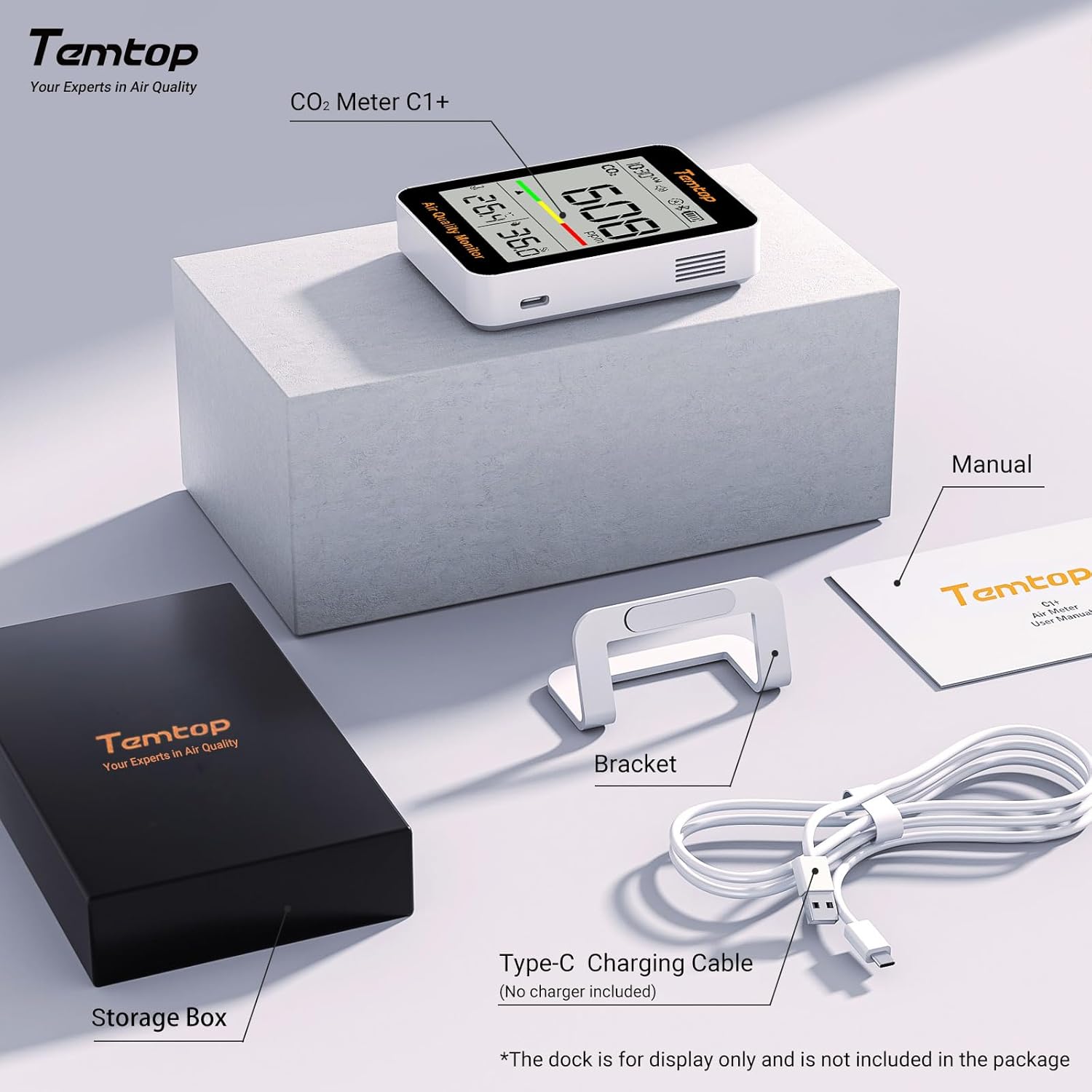
Figure 2: Included components: Temtop C1+ monitor, user manual, detachable stand, and Type-C charging cable.
3. Setup
3.1 Initial Charging
Before first use, fully charge the device using the provided Type-C charging cable. Connect the cable to the device's Type-C port and a standard USB power adapter (not included). The device features an 800mA lithium battery.
3.2 Powering On/Off
Press and hold the power button located on the device to turn it on or off.
3.3 App Installation and Connectivity
- Download the 'Temtop' application from your mobile device's app store (available on App Store and Google Play).
- Ensure Bluetooth is enabled on your mobile device.
- Open the Temtop app and follow the on-screen instructions to pair with your US-C1 PLUS monitor. The device uses BLE networking for connectivity.

Figure 3: The Temtop app facilitates seamless device management and data collection.
4. Operating the Device
4.1 Display Overview
The 3.3-inch large LCD screen simultaneously displays CO2 levels in parts per million (ppm), temperature (in °F or °C), and relative humidity (%RH). A color-coded indicator provides a quick visual assessment of CO2 concentration:
- Green: Good (400-1000 ppm)
- Yellow: Average (1001-1500 ppm)
- Red: Unhealthy (1501-5000 ppm)

Figure 4: Detailed view of the monitor's display elements.
4.2 Alert Methods
The device provides multiple alert methods for high CO2 concentrations:
- Color Coding: The display background color changes according to CO2 levels.
- Prominent CO2 Number: The CO2 reading is clearly visible.
- Optional Buzzer: An audible alarm can be enabled to notify users when CO2 levels exceed a set threshold.

Figure 5: Visual and audible alerts for high CO2 concentration.
4.3 App Features
The Temtop app offers enhanced functionality:
- Real-time Monitoring: View current CO2, temperature, and humidity readings.
- Historical Data: Access graphical representations of 24-hour and 30-day historical data.
- Data Export: Export historical data as Excel files for further analysis.
- Settings: Customize device settings, including alert thresholds and temperature units.
- OTA Updates: Receive over-the-air firmware updates to ensure continuous technological improvements.

Figure 6: Viewing and exporting historical data through the Temtop app.
4.4 Placement Options
The US-C1 PLUS offers versatile placement options:
- Use the detachable stand for desktop placement.
- Utilize the adsorptive back cover for magnetic attachment to suitable surfaces.
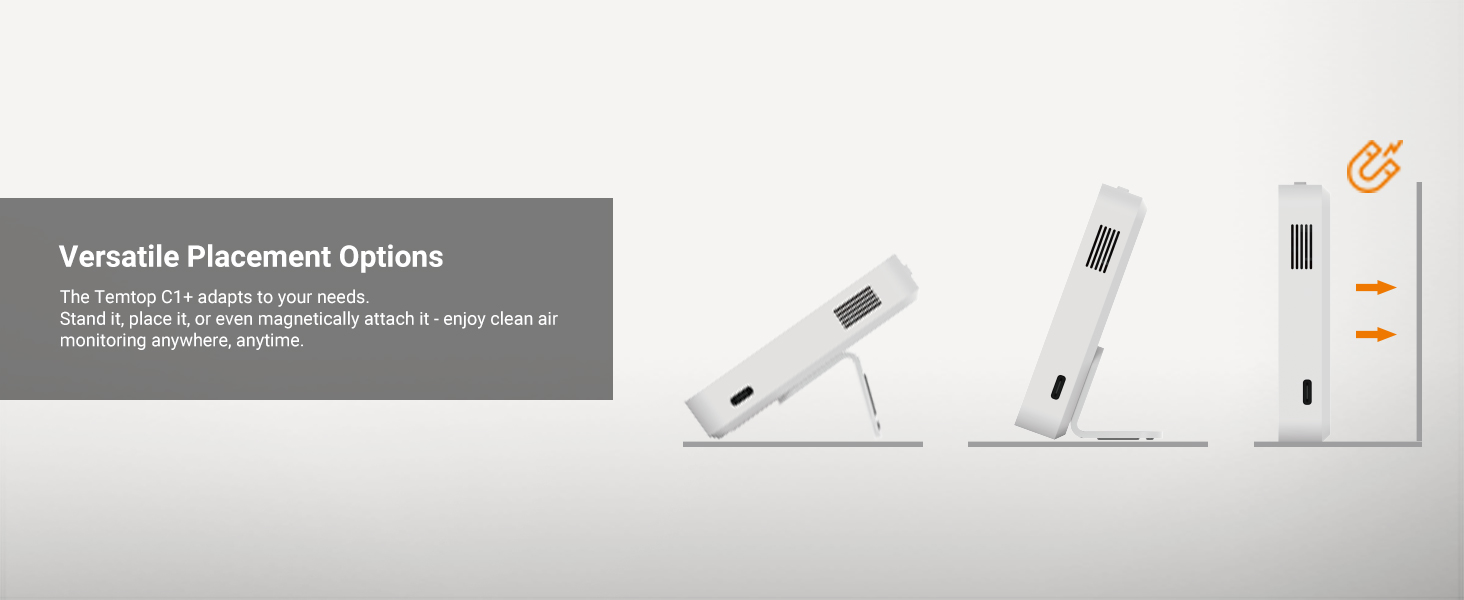
Figure 7: Flexible placement options for the Temtop C1+ monitor.
5. Maintenance
5.1 Calibration
The device may require calibration for optimal accuracy. Refer to the Temtop app or the device's settings for calibration procedures. It is recommended to calibrate the device outdoors in fresh air.
5.2 Cleaning
Wipe the device with a soft, dry cloth. Do not use abrasive cleaners or immerse the device in water.
5.3 Battery Life
The 800mA lithium battery can provide up to 70 days of operation in ECO mode. Battery life may vary based on usage and settings. Recharge the device when the battery indicator is low.
6. Troubleshooting
- Device not powering on: Ensure the device is fully charged. Connect it to a power source using the Type-C cable and try again.
- Cannot connect to the app:
- Verify Bluetooth is enabled on your mobile device.
- Ensure the device is within Bluetooth range of your phone.
- Restart both the device and the app.
- Check app permissions for Bluetooth access.
- Inaccurate readings:
- Perform a calibration outdoors in fresh air.
- Ensure the sensor is not obstructed.
- Display is faint or unreadable: Ensure the device is adequately charged. Adjust viewing angle if necessary.
7. Specifications
| Feature | Detail |
|---|---|
| Model Number | US-C1 PLUS |
| Brand | Temtop |
| Power Source | Battery Powered (1 Lithium Ion battery included) |
| Battery Capacity | 800mA |
| Battery Life (ECO mode) | Up to 70 days |
| Sensor Type | Photoelectric (Sensirion CO2 sensor) |
| CO2 Measurement Range | 400-5000 ppm |
| CO2 Accuracy | ±(40ppm + 5%) |
| Display Style | LCD |
| Alarm | Audible / Visual |
| Connectivity | BLE (Bluetooth Low Energy) |
| Item Weight | 5.6 ounces |
| Package Dimensions | 5.39 x 4.17 x 1.26 inches |
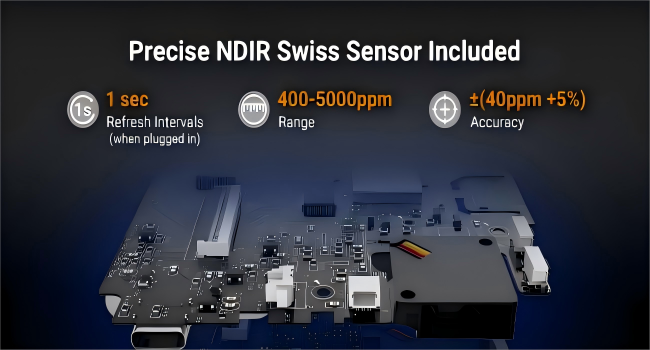
Figure 8: Internal view emphasizing the NDIR Swiss Sensor for accurate CO2 detection.
8. Warranty and Support
For warranty information and technical support, please refer to the official Temtop website or contact their customer service. Details are typically provided in the product packaging or on the manufacturer's support pages.


