
GODOX ML-SF50
Godox ML-SF50 50cm/19.7'' Honeycomb Grid Octagon Softbox Instruction Manual
Model: ML-SF50 | Brand: GODOX
Introduction
The Godox ML-SF50 Honeycomb Grid Octagon Softbox is designed to provide high-quality, soft, and even illumination for various photography and videography applications, particularly in studio environments. Its octagonal shape and included honeycomb grid allow for precise light shaping and control, making subjects appear more natural and enhancing overall image quality. This manual provides detailed instructions for the proper setup, operation, and maintenance of your ML-SF50 softbox.
Setup
The ML-SF50 softbox is engineered for quick and easy installation and disassembly, ensuring high portability for both indoor and outdoor shooting. Follow these steps to set up your softbox:
- Unpack the Softbox: Carefully remove the softbox and its components from the included carrying case. The package typically contains the softbox fabric, internal and external diffusers, and the honeycomb grid.
- Expand the Softbox: Hold the Godox mount ring and gently push the rods outwards until the softbox clicks into its fully open position. The internal structure is designed to lock securely.
- Attach Diffusers:
- Internal Diffuser: Attach the smaller, internal diffuser to the inner velcro tabs of the softbox. This helps to further soften and spread the light evenly.
- External Diffuser: Secure the larger, external diffuser to the outer velcro rim of the softbox. This provides the primary diffusion surface.
- Mount to Light: Align the Godox mount of the softbox with the Godox Mount on your compatible light source (e.g., Godox ML100Bi, ML60IIBi, ML60Bi, ML60, ML30Bi, ML30, AD300 Pro). Push firmly until it locks into place. Ensure the softbox is securely attached to prevent accidental detachment.
- Attach Honeycomb Grid (Optional): For more controlled and directional light, attach the honeycomb grid to the outer velcro rim of the external diffuser. This reduces light spill and concentrates the beam.
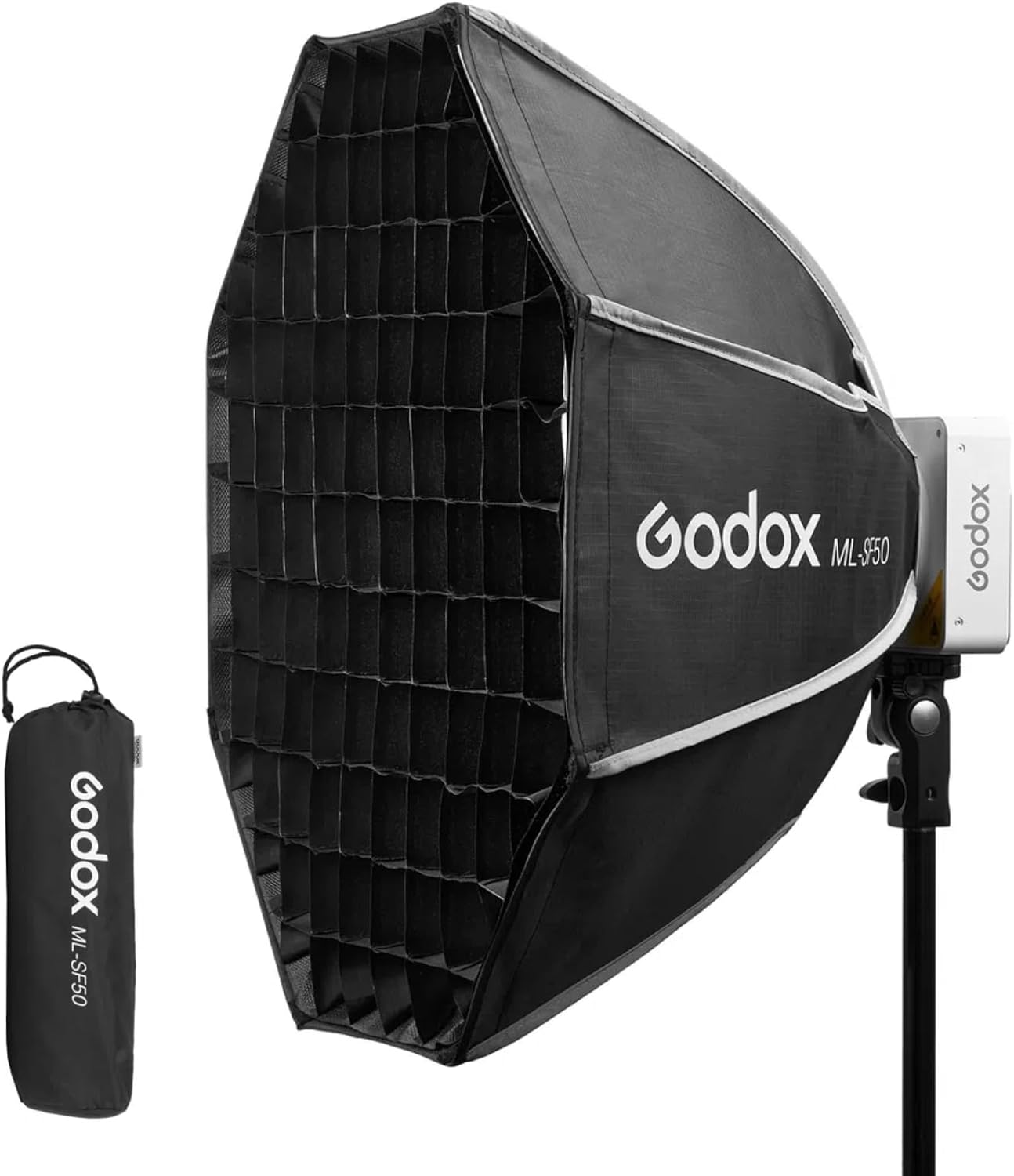
Figure 1: The Godox ML-SF50 Softbox shown with its compact carrying case, highlighting its portability.

Figure 2: The ML-SF50 Softbox securely mounted onto a compatible Godox light, ready for use.
Operating
The ML-SF50 softbox is designed to modify your light source for various photographic effects. Understanding its components will help you achieve desired lighting results.
- Soft Light Effect: The primary function of the softbox is to diffuse harsh light, creating a larger, softer, and more even light source. This reduces harsh shadows and produces a flattering illumination ideal for portraits, product photography, and general studio work.
- Using the Honeycomb Grid: The included honeycomb grid narrows the beam spread of the light, preventing light spill and directing the light more precisely onto your subject. This is useful for creating dramatic lighting, highlighting specific areas, or controlling background illumination.
- Adjusting Light Position: Once mounted, adjust the position and angle of your light stand to achieve the desired lighting direction and intensity on your subject. Experiment with different distances and angles to understand the effect on shadows and highlights.

Figure 3: Visual comparison demonstrating the effect of using two layers of diffuser versus two layers of diffuser with the honeycomb grid for light control.

Figure 4: The ML-SF50 softbox in a practical studio application, demonstrating its use in shaping light for a subject.
Maintenance
Proper maintenance will extend the lifespan and performance of your Godox ML-SF50 softbox.
- Cleaning:
- For general dust and light dirt, use a soft, dry cloth to wipe down the exterior nylon fabric and metal frame.
- For stubborn spots, lightly dampen a cloth with mild soap and water, then gently wipe the affected area. Avoid harsh chemicals or abrasive cleaners.
- Ensure the softbox is completely dry before folding and storing.
- Storage:
- Always fold the softbox according to the manufacturer's instructions to prevent damage to the frame and fabric.
- Store the softbox in its original carrying case to protect it from dust, moisture, and physical damage during transport or storage.
- Store in a cool, dry place away from direct sunlight and extreme temperatures.
- Handling: Avoid applying excessive force when expanding or folding the softbox to prevent bending or breaking the internal rods.
Troubleshooting
If you encounter issues with your ML-SF50 softbox, consider the following common solutions:
- Softbox Not Opening Fully:
- Ensure all internal rods are properly aligned and pushed outwards until they click into their locked position.
- Check for any obstructions or fabric caught in the mechanism.
- Softbox Not Attaching Securely to Light:
- Verify that your light source has a compatible Godox Mount.
- Ensure the softbox mount is correctly aligned with the light's mount and pushed firmly until it locks.
- Uneven Light Output:
- Check if the internal and external diffusers are properly attached and smooth, without wrinkles or folds.
- Ensure the light source is centered within the softbox.
- Difficulty Folding the Softbox:
- Locate the release buttons or mechanisms on the Godox mount ring. Press them firmly while gently collapsing the softbox.
- Refer to the initial setup instructions in reverse for proper folding technique.
If problems persist, contact Godox customer support or your retailer for further assistance.
Specifications
| Feature | Detail |
|---|---|
| Model Number | ML-SF50 |
| Dimensions (Package) | 14.5 x 4.7 x 4.7 inches |
| Item Weight | 12.8 ounces |
| Style | Honeycomb Grid Octagon |
| Material | Metal, Nylon |
| Color | Black |
| Compatible Mount | Godox Mount (e.g., ML100Bi, ML60IIBi, ML60Bi, ML60, ML30Bi, ML30, AD300 Pro) |
Warranty and Support
For information regarding warranty coverage, terms, and conditions for your Godox ML-SF50 softbox, please refer to the warranty card included with your product or visit the official Godox website. Warranty policies may vary by region and retailer.
For technical support, product inquiries, or service requests, please contact Godox customer service directly or reach out to your authorized dealer. You can find more information and contact details on the official GODOX store page: GODOX Official Store.
Related Documents - ML-SF50
 |
Godox ML100Bi LED Photography Light Instruction Manual Comprehensive instruction manual for the Godox ML100Bi portable LED photography light, covering safety, setup, modes, features, technical specifications, and warranty information. |
 |
Godox ML100Bi Portable LED Video Light Instruction Manual Comprehensive user manual for the Godox ML100Bi portable LED video light, covering safety instructions, specifications, operation modes, kit contents, and maintenance. |
 |
Godox ML30Bi Bi-Color LED Video Light - User Manual and Features Explore the Godox ML30Bi, a compact and versatile bi-color LED video light. This comprehensive guide covers its features, operation, technical specifications, and maintenance for professional photography and videography. |
 |
Godox ML100R 全彩 LED 摄影灯 说明书 Godox ML100R 全彩 LED 摄影灯的官方说明书,包含安全说明、产品介绍、部件列表、配件信息及使用指南。 |
 |
Godox ML100Bi LED Video Light Instruction Manual This document provides comprehensive instructions for the Godox ML100Bi portable LED video light, covering safety precautions, kit contents, product features, operation, technical specifications, and warranty information. |
 |
Godox ML80Bi Bi-color LED Video Light Instruction Manual User manual for the Godox ML80Bi Bi-color LED Video Light, detailing its features, operation, safety guidelines, and technical specifications for professional photography and videography. |
Ask a question about this manual
Ask about setup, troubleshooting, compatibility, parts, safety, or missing instructions. Manuals+ will review the question and use this page’s manual context to help answer it.