
Introduction
The Anmite 15.6 inch 4K Portable Monitor is designed to enhance your visual experience, offering stunning 3840x2160 UHD resolution with excellent color reproduction. Its lightweight and ultra-thin design make it an ideal companion for work, gaming, and entertainment on the go. This manual provides detailed instructions to help you set up, operate, and maintain your portable monitor for optimal performance.
What's in the Box
Please ensure all items listed below are included in your package. If any items are missing or damaged, please contact customer support.
- Anmite Portable Monitor x 1
- Mini-HDMI to HDMI cable x 1
- Type-C to Type-C cable x 1
- Type-C to USB-A cable x 1
- User Guide x 1
Product Overview
The Anmite 15.6 inch 4K Portable Monitor features a sleek design with multiple connectivity options and integrated speakers.
Key Features:
- Type-C and Mini HDMI Interface: Equipped with versatile ports for high-definition video signal transmission.
- IPS FHD LED Screen: Delivers stunning 3840x2160 UHD resolution visuals with awesome color reproduction and wide viewing angles.
- Portable Design: Ultra-thin (0.39 inches) and lightweight (1.76 pounds) for easy portability and mobile extensibility.
- Dual Speakers: Built-in dual speakers provide an immersive audio experience.
Physical Layout and Dimensions:

The monitor's physical dimensions are approximately 360mm x 225mm x 5-10mm. The visual area is 344.16mm x 194.59mm.

The monitor includes an integrated kickstand for flexible positioning. It also features VESA mounting holes (7.5cm x 7.5cm) for alternative mounting solutions.
Ports and Controls:
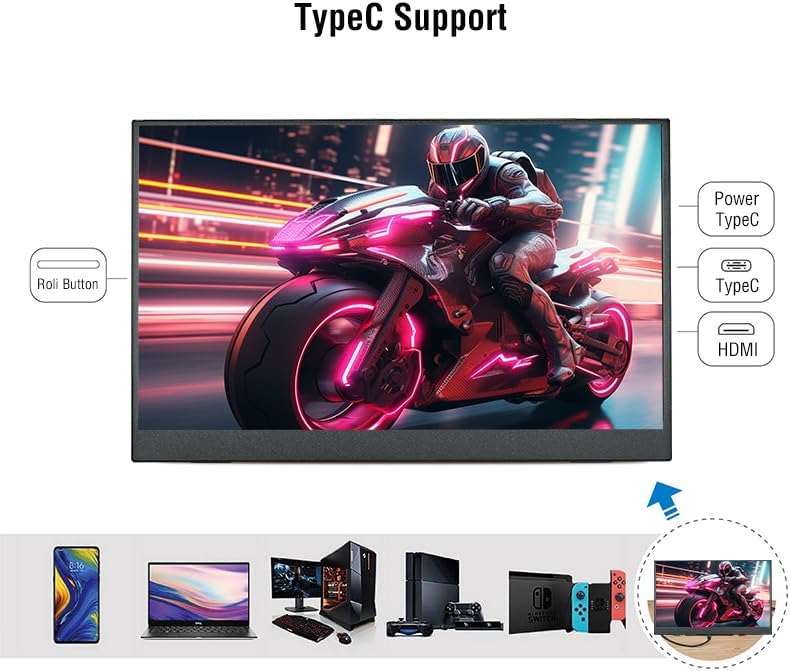
The monitor is equipped with the following interfaces:
- Mini-HDMI Input
- Type-C (Full Function) Input/Power x 1
- Type-C (Power Only) Input x 1
- 3.5mm Audio Interface Output
- Control buttons (e.g., power, menu navigation)
Setup Instructions
Follow these steps to set up your Anmite Portable Monitor:
- Positioning the Monitor:
- Unfold the integrated kickstand on the back of the monitor to your desired viewing angle.
- Alternatively, use a VESA-compatible mount (75x75mm, M4*4mm screws) for a more permanent setup.
- Connecting to a Power Source:
- Connect the provided Type-C to USB-A cable to the monitor's Type-C (Power Only) port and to a compatible USB power adapter or device.
- For optimal brightness and stable power supply, especially when using 4K resolution, it is recommended to use a dedicated power adapter.
- Connecting to a Device:
- Using Type-C (Full Function): If your device (laptop, smartphone, game console) has a full-featured Type-C port that supports video output, connect the provided Type-C to Type-C cable directly between your device and the monitor's Type-C (Full Function) port. This single cable can transmit both video and power.
- Using Mini-HDMI: Connect the provided Mini-HDMI to HDMI cable between your device's HDMI output and the monitor's Mini-HDMI input. If using HDMI, ensure the monitor is also connected to a power source via the Type-C (Power Only) port.
- Powering On: Press the power button on the monitor to turn it on. The monitor should automatically detect the input signal.
Operating Instructions
The Anmite Portable Monitor offers various settings and modes to customize your viewing experience.
Display Modes:
- Duplicate Mode: Displays the same content on both your primary device and the portable monitor.
- Extend Mode: Extends your desktop across both screens, providing more workspace.
- Second Screen Only Mode: Displays content only on the portable monitor.
To switch between display modes, use your device's display settings (e.g., Windows Key + P on Windows, Display Settings on macOS).
On-Screen Display (OSD) Menu:
Use the 'Roli Button' (roller button) on the side of the monitor to navigate the OSD menu. Press the button to enter the menu, scroll up/down to select options, and press again to confirm. Long press to go back to the previous step.
- Brightness/Contrast: Adjust the display's brightness and contrast levels.
- Color Settings: Customize color temperature, hue, and saturation for optimal visual fidelity.
- Aspect Ratio: Select between 16:9 or other available aspect ratios.
- Input Source: Manually select the input source (Type-C or HDMI) if auto-detection fails.
- Volume: Adjust the volume of the built-in dual speakers.
Video Demonstrations:
Maintenance
Proper maintenance ensures the longevity and optimal performance of your monitor.
- Cleaning the Screen: Use a soft, lint-free cloth slightly dampened with water or a screen cleaner. Avoid harsh chemicals or abrasive materials.
- Cleaning the Body: Wipe the monitor's body with a soft, dry cloth.
- Storage: When not in use, store the monitor in a cool, dry place. Use the protective cover to prevent scratches and dust accumulation.
- Avoid Extreme Conditions: Do not expose the monitor to extreme temperatures, humidity, or direct sunlight for prolonged periods.
Troubleshooting
If you encounter any issues with your Anmite Portable Monitor, refer to the following common solutions:
- No Signal / Monitor Not Turning On:
- Ensure the Type-C port of your device is a full-featured Type-C port if using a single Type-C cable.
- Verify that all cables are securely connected.
- Ensure the monitor is receiving sufficient power. If using HDMI, a separate power supply via Type-C is required.
- Try connecting to a different device or using different cables to rule out cable or device issues.
- Screen Flickering / Unstable Display:
- Ensure the monitor is receiving adequate power. Insufficient power can cause display instability, especially at 4K resolution.
- Try using the included power adapter for a stable power supply.
- Check the cable connections for any looseness or damage.
- Incorrect Resolution / Stretched Image:
- Adjust the display resolution settings on your connected device. For optimal viewing, set the resolution to 3840x2160.
- If the image appears stretched, check the aspect ratio settings in the monitor's OSD menu or your device's display settings.
- No Audio:
- Check the volume settings on both the monitor (via OSD menu) and your connected device.
- Ensure the audio output is correctly routed to the monitor in your device's sound settings.
- If using external headphones, ensure they are properly connected to the 3.5mm audio interface.
Specifications
| Feature | Detail |
|---|---|
| Net Weight | 0.7 kg (1.54 lbs) |
| Dimensions | 360 x 225 x 5-10 mm (14.17 x 8.86 x 0.2-0.39 inches) |
| Screen Size | 15.6 inches |
| Panel Type | IPS |
| Aspect Ratio | 16:9 |
| Resolution | 3840x2160 (4K UHD) |
| Display Color | 16.7M |
| Color Temperature | 6800K |
| Visual Angle | H:178° V:178° |
| Contrast Ratio | 1000:1 |
| Brightness | 280cd/m² |
| Color Gamut | 100% |
| Refresh Rate | 60Hz |
| Input Interface | Mini-HDMI, Type-C (Full Function), Type-C (Power Only) |
| Output Interface | 3.5mm audio interface |
| Speaker | Built-in speakers (1W*2) |
| VESA Mount | 75x75mm, M4*4mm |
Warranty and Support
Anmite offers a 12-month warranty for any quality issues. For support, inquiries, or to report any problems, please refer to the contact information provided in your User Guide or on the product packaging. Please retain your purchase receipt for warranty claims.


