
1. Introduction
Thank you for choosing the Comfytemp TENS/EMS/DIY Device. This device is designed to provide drug-free pain relief and muscle stimulation through Transcutaneous Electrical Nerve Stimulation (TENS), Electrical Muscle Stimulation (EMS), and customizable DIY modes. Please read this manual carefully before use to ensure safe and effective operation.
2. Product Overview
2.1 Device Components

Main Unit: The central control unit for selecting modes, adjusting intensity, and setting timers.
Electrode Pads: Self-adhesive pads that deliver electrical impulses to the skin.
Lead Wires: Connect the electrode pads to the main unit.
2.2 Key Features
- 4 Outputs, 8 Electrodes: Allows for simultaneous treatment of multiple body areas with independent A/B channels for different modes and intensities.
- 24 Modes & 20 Intensities: Includes 20 preset modes and 4 customizable DIY modes for varied therapy needs.
- Adjustable Timer: Treatment duration can be set from 10 to 90 minutes.
- Unlimited DIY Mode: Customize pulse frequency, pulse width, and on/off time for personalized therapy.
- Memory Function: Automatically saves the last used mode for convenience.
- High-Quality Electrode Pads: Durable, self-adhesive pads in various sizes for optimal skin contact.
- Portable Design: Equipped with a back clip for easy carrying.
- Rechargeable Battery: Provides up to 23 hours of continuous use on a single charge.
- Large Screen Display: Features enlarged icons for improved readability.

Illustration of electrode pad placement on the back, demonstrating the independent A/B channels for different modes and intensities.

Visual representation of the three therapy modes: TENS for pain relief, EMS for muscle stimulation, and DIY for customizable massage.

Detailed view of the DIY mode interface, highlighting adjustable parameters such as program, frequency, pulse width, and on/off time.

Key features of the device including a convenient back clip for portability, memory function for last used settings, safety lock to prevent accidental changes, and an adjustable 10-90 minute timer.
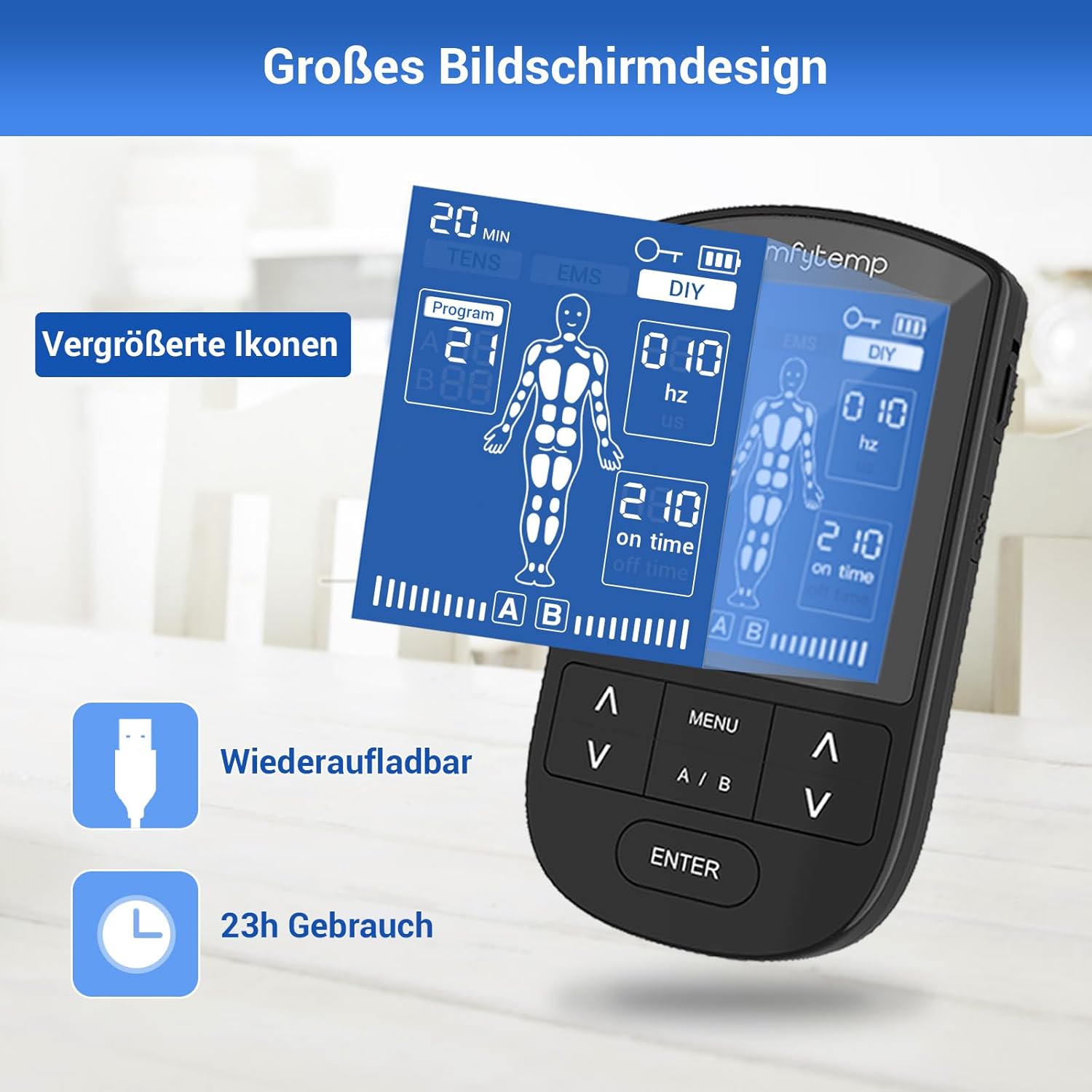
The device features a large screen with enlarged icons for easy readability, is rechargeable, and offers up to 23 hours of continuous use.

The Comfytemp TENS/EMS device provides drug-free pain relief, suitable for use by individuals of all ages.

Diagram illustrating the various controls and ports on the Comfytemp device, including output jacks, ON/OFF button, MENU button, A/B channel buttons, ENTER button, and charging port.

Cross-section view of the medical-grade electrode pads, showing layers of conductive PET, conductive wire end, conductive carbon film, and high-quality gel for optimal adhesion and conductivity.

Contents of the Comfytemp package, including the main device, small, medium, and large electrode pads, electrical wires, USB charging cable, back clip, user manual, and storage bag.
3. Setup
- Charge the Device: Before first use, fully charge the device using the provided USB cable. The battery indicator on the screen will show charging status.
- Connect Lead Wires: Insert the pin connectors of the lead wires into the output jacks (A1/A2, B1/B2) on the top of the device.
- Attach Electrode Pads: Connect the electrode pads to the snaps on the lead wires. Ensure a secure connection.
- Prepare Skin: Clean and dry the skin area where the pads will be placed. Avoid applying pads over broken skin, rashes, or sensitive areas.
- Apply Pads: Remove the protective film from the electrode pads and firmly place them on the desired treatment area. Ensure the pads are flat against the skin and not overlapping.
4. Operating Instructions
- Power On: Slide the ON/OFF switch on the side of the device to the 'ON' position.
- Select Mode: Press the 'MENU' button to cycle through the main modes: TENS, EMS, and DIY.
- Choose Program (TENS/EMS): Once TENS or EMS mode is selected, use the 'Up/Down' arrow buttons to choose from the 20 preset programs. Press 'ENTER' to confirm.
- Adjust Intensity: Use the 'A/B' button to select the channel (A or B) you wish to adjust. Then, use the 'Up/Down' arrow buttons to increase or decrease the intensity level (0-20). Start with a low intensity and gradually increase until you feel a comfortable, strong sensation.
- Set Timer: Press the 'MENU' button again to access the timer setting. Use the 'Up/Down' arrow buttons to set the desired treatment time (10-90 minutes). Press 'ENTER' to confirm.
- DIY Mode (Programs 21-24):
- Select 'DIY' mode using the 'MENU' button.
- Use 'Up/Down' arrows to select one of the 4 DIY programs.
- Press 'ENTER' to enter customization. You can adjust Frequency (10-150 Hz), Pulse Width (80-450 us), and On/Off Time (10-300, where 10=1s).
- Use 'MENU' to switch between parameters and 'Up/Down' to adjust values. Press 'ENTER' to save settings.
- Safety Lock: To prevent accidental changes during use, press and hold the 'Keylock' button (usually located on the side or bottom) to lock the screen. Repeat to unlock.
- Power Off: Slide the ON/OFF switch to the 'OFF' position when finished.
5. Maintenance
- Cleaning the Device: Wipe the main unit with a soft, damp cloth. Do not use abrasive cleaners or immerse the device in water.
- Electrode Pad Care: After each use, place the protective film back on the adhesive side of the pads. Store them in a cool, dry place. If pads lose their stickiness, clean the adhesive surface gently with a drop of water and let air dry. Replace pads when they no longer adhere well.
- Storage: Store the device and accessories in the provided storage bag, away from direct sunlight, high temperatures, and humidity.
6. Troubleshooting
| Problem | Possible Cause | Solution |
|---|---|---|
| Device does not turn on. | Low battery; Device not switched on. | Charge the device; Ensure ON/OFF switch is in 'ON' position. |
| No sensation or weak sensation. | Pads not properly attached; Lead wires loose; Intensity too low; Pads worn out. | Ensure pads are flat on skin; Check wire connections; Increase intensity gradually; Replace old pads. |
| Pads not sticking. | Skin is oily/dirty; Pads are dirty/worn out. | Clean and dry skin before application; Clean pads with water or replace them. |
| Screen is locked. | Safety lock activated. | Press and hold the 'Keylock' button to unlock the screen. |
7. Specifications
- Model: K6106
- Number of Channels: 4 (A1/A2, B1/B2)
- Number of Electrodes: 8
- Modes: 24 (20 preset TENS/EMS, 4 customizable DIY)
- Intensity Levels: 20
- Timer: 10-90 minutes
- Power Source: Rechargeable battery
- Dimensions: Approximately 14.7 x 9.4 x 7.4 cm
- Weight: Approximately 350 grams
- Manufacturer: Shenzhen Yicai Health Technology Co., Ltd.
- Country of Origin: China
8. Warranty and Support
Comfytemp is dedicated to ensuring customer satisfaction and stands behind all its products. If you encounter any issues with your device, please contact our customer service team promptly. We are committed to providing a satisfactory solution within 24 hours.
For support, please refer to the contact information provided in your product packaging or visit the official Comfytemp website.


