
Introduction
The XSDTS F8 Smart Digital Door Lock offers advanced security and convenience for your home or office. This intelligent lock integrates multiple unlocking methods and smart features, providing flexible access control and enhanced monitoring capabilities. Designed for durability and ease of use, it is suitable for various door types.
This manual provides detailed instructions for installation, operation, and maintenance of your XSDTS F8 Smart Digital Door Lock. Please read it thoroughly before use to ensure proper functionality and safety.
Product Overview

Figure 1: Overview of the XSDTS F8 Smart Digital Door Lock, showing the front and back panels, and the mortise lock mechanism.

Figure 2: Detailed diagram labeling the various components of the XSDTS F8 Smart Digital Door Lock, including the HD screen, camera, fingerprint sensor, and USB port.
Key Features:
- Multiple Unlocking Methods: Supports fingerprint, password, RFID card, Tuya app, and physical key access.
- Remote Access: Unlock the door from anywhere using the free mobile application.
- Temporary Access Granting: Conveniently provide time-limited access permissions, ideal for guests or service providers.
- Integrated Peephole Camera: Monitor the exterior of your door and receive images on your mobile app when the doorbell is pressed.
- Adjustable Handle: Universal design allows for left or right-hand door configurations.
- Child Safety Lock: Prevents accidental opening by children or pets.
- Low Battery Warning: Automatic audio alert for low battery levels.
- Emergency Power: Type-C port for emergency charging in case of complete battery depletion.
- System Language: Arabic.
Installation Guide
Proper installation is crucial for the optimal performance and security of your smart lock. Please follow these steps carefully.
1. Pre-Installation Measurements:
Before purchasing and installing, ensure your door meets the following specifications. The lock is suitable for doors with a thickness between 30mm and 75mm.

Figure 3: Essential door measurements required before installation, including door thickness, guide piece dimensions, and handle center distance.
- Measure the thickness of the door frame.
- Measure the length of the guide piece.
- Measure the width of the guide piece.
- Measure the distance from the door edge to the handle center.
- Measure the screw hole distance of the rear panel.

Figure 4: Mortise lock dimensions (22mm x 240mm) and backset measurements (50mm and 85mm) for compatibility.
2. Component Checklist:
Ensure all components are present before beginning installation:
- Front Panel (x1)
- Rear Panel (x1)
- Mortise Lock (x1, optional)
- Smart Cards (x4)
- Mechanical Keys (x2)
- Screw Set (x1)
Note: 4 AA batteries are required for operation and are not included in the package.
3. Installation Steps:
Detailed installation steps are typically provided in a separate installation template or video. Please refer to the included installation template for precise drilling and mounting instructions. General steps include:
- Prepare the door by drilling necessary holes according to the template.
- Install the mortise lock into the door edge.
- Mount the front and rear panels, ensuring cables are properly connected.
- Secure the lock with the provided screws.
- Install 4 AA batteries into the battery compartment on the rear panel.
- Test the lock's functionality with a mechanical key before programming.
Operating Instructions
The XSDTS F8 Smart Digital Door Lock offers multiple convenient ways to unlock your door.
1. Unlocking Methods:

Figure 5: Visual representation of the six available unlocking methods for the smart lock.
- Fingerprint Unlock:
Place your registered fingerprint on the sensor located on the handle. The lock will unlock in approximately 0.5 seconds if the fingerprint is recognized. Ensure your finger covers the entire sensor for accurate reading.

Figure 6: The fingerprint sensor provides fast and accurate recognition, with a low false recognition rate.
- Password Unlock:
Enter your registered password on the keypad. Press the '#' key to confirm. You can also set temporary passwords for one-time or limited-time access.
- RFID Card Unlock:
Present a registered RFID card to the card reader area on the lock's front panel. The lock will unlock automatically.
- Tuya App Unlock (Remote & Local):
Download the Tuya Smart app from your mobile app store. Follow the in-app instructions to pair your lock. Once paired, you can:
- Remote Unlock: Unlock the door from anywhere with an internet connection.
- Grant Temporary Access: Generate and send time-limited access codes to guests.
- View Access Records: Check who entered and when.
- Receive Notifications: Get alerts for doorbell presses or other events.

Figure 7: The Tuya Smart app provides comprehensive remote control and monitoring capabilities for your lock.
- Mechanical Key Unlock:
In case of emergency or battery depletion, insert the mechanical key into the keyhole and turn to unlock the door manually.
2. Peephole Camera and Doorbell Function:
The integrated peephole camera allows you to see who is at your door. When a visitor presses the doorbell button on the lock, the camera captures an image of the person outside and sends it to your paired mobile app. This feature enhances security and convenience, allowing you to screen visitors remotely.

Figure 8: The camera features automatic light adjustment and a wide-angle lens for clear visibility.
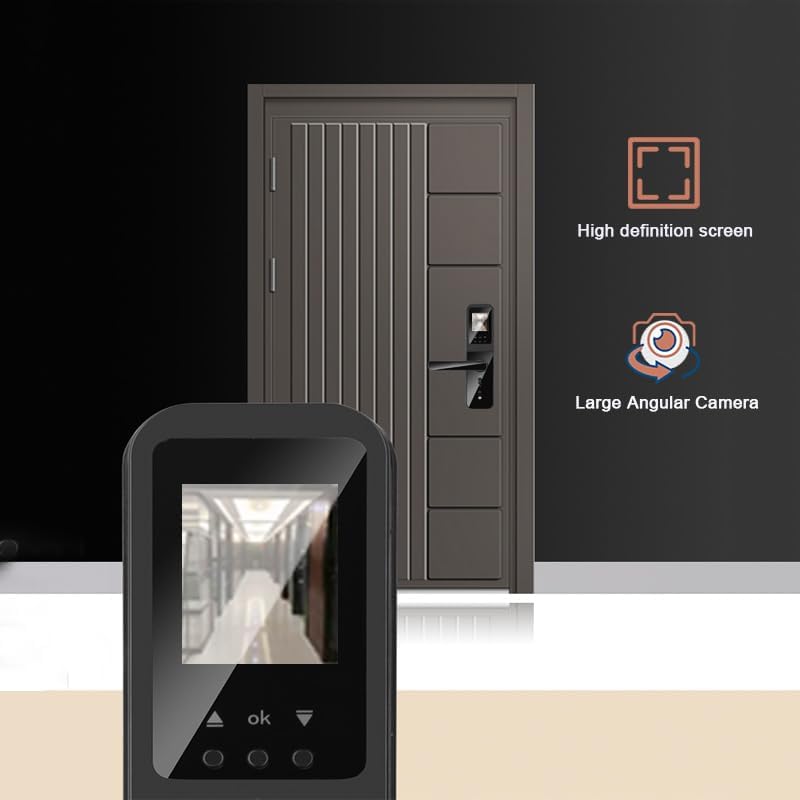
Figure 9: The high-definition screen provides a clear view from the large angular camera.
3. Child Safety Lock:
To prevent accidental unlocking from the inside by children or pets, engage the child safety lock switch located on the rear panel. This feature adds an extra layer of security for families.
Figure 10: The child safety lock switch is clearly marked on the internal panel of the lock.
Maintenance
1. Battery Replacement:
The lock requires 4 AA batteries (not included). The estimated battery life is 2-4 months, depending on usage. When the battery level is low, the lock will emit an automatic audio warning. Replace all four batteries promptly when this warning occurs to ensure continuous operation.
2. Emergency Power:
In the event of complete battery depletion, you can provide emergency power to the lock using a Type-C cable connected to a power bank or adapter. The Type-C port is located on the bottom edge of the front panel. This will allow you to unlock the door using any registered method.
3. Cleaning:
Wipe the lock's surface with a soft, dry cloth. Avoid using abrasive cleaners or solvents, as these can damage the finish and electronic components.
Troubleshooting
| Problem | Possible Cause | Solution |
|---|---|---|
| Lock does not respond. | Dead batteries. | Replace all 4 AA batteries. Use the Type-C emergency power port if needed. |
| Fingerprint not recognized. | Finger not placed correctly; unregistered fingerprint; dirty sensor. | Ensure finger covers the sensor completely. Re-register fingerprint if necessary. Clean the sensor with a soft cloth. |
| Password not working. | Incorrect password entered; password not registered. | Verify the password. Re-register the password through the app or lock interface. |
| Cannot connect to Tuya App. | Wi-Fi issue; incorrect pairing process. | Ensure your Wi-Fi network is stable. Follow the app's pairing instructions carefully. Restart the lock and your router if necessary. |
| Doorbell image not received on app. | App notification settings; internet connectivity. | Check app notification permissions on your phone. Ensure both the lock and your phone have stable internet access. |
Specifications
| Feature | Detail |
|---|---|
| Manufacturer | XSDTS |
| Model Number | F8 |
| Part Number | F8-Black |
| Item Weight | 2 Kilograms |
| Product Dimensions | 36 x 13 x 20 cm |
| Size | 5085-22*240 |
| Color | Black |
| Style | Modern |
| Finish Type | Polished |
| Material | Aluminum |
| Shape | Round |
| Number of Units | 1 |
| Number of Pieces | 1 |
| Special Features | Resettable, Fingerprint, Scratch Resistant, Password Unlock, One Touch Lock |
| Included Components | Front Panel (x1), Rear Panel (x1), Mortise Lock (x1, optional), Smart Card (x4), Mechanical Key (x2), Screw Set (x1) |
| Batteries Required | No (4 AA batteries are required for operation, not included) |
| Lock Type | Biometric |
| Recommended Uses | Ideal for families, Airbnb, rentals, offices, and business sections. |
| Country of Origin | China |
Warranty and Support
XSDTS provides unlimited technical consultations for this product. For any questions, issues, or technical assistance, please contact our support team. Refer to the product packaging or the official XSDTS website for contact information.


