
1. Introduction
Thank you for choosing the PCCOOLER RZ400 CPU Air Cooler. This manual provides detailed instructions for the proper installation, operation, and maintenance of your new CPU cooling system. Please read this manual thoroughly before proceeding with installation to ensure optimal performance and longevity of your product.
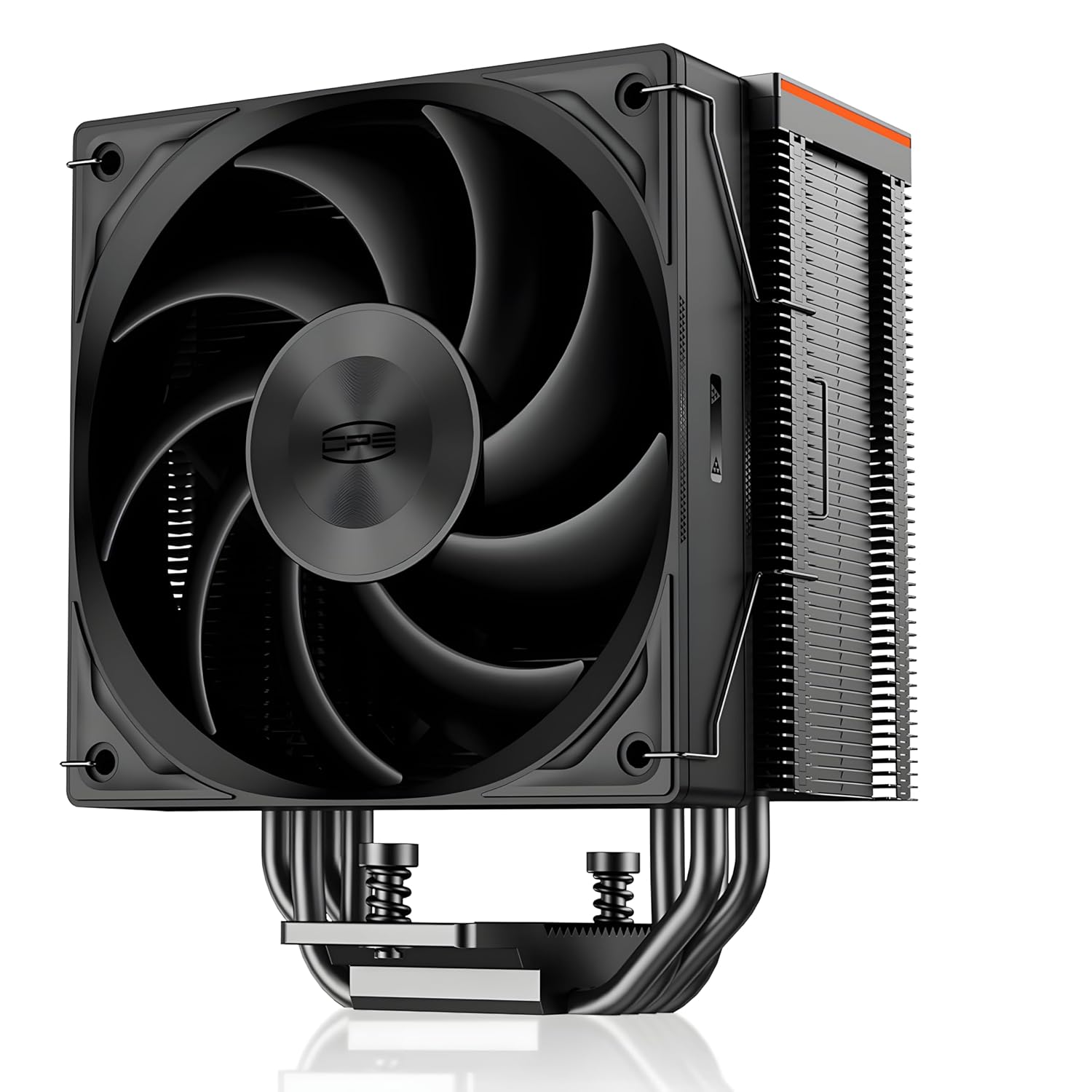
Figure 1: PCCOOLER RZ400 CPU Air Cooler, a high-performance cooling solution for your processor.
Key Features:
- Three-Speed Control Fans: Equipped with high-performance cooling fans offering three speed regulation modes to meet CPU cooling requirements in various scenarios. The strongest mode reaches 2200RPM with an air volume up to 86.73 CFM, while shock-absorbing rubber pads effectively reduce noise.
- Innovative Fin Array Design: Streamlined radiator design adhering to aerodynamic principles, enhancing visual appeal and increasing fin surface area for improved heat dissipation efficiency.
- Φ6MM*4 Heatpipes: Features a reverse gravity heatpipe design for faster and more stable CPU heat dissipation. Cooling performance remains consistent regardless of installation orientation (horizontal, vertical, or other angles).
- Dual Platform Compatibility: Compatible with Intel LGA 115X/1200/1700 and AMD AM4/AM5 sockets.
- Metallic Top Protective Cover: Crafted from aerospace-grade aluminum alloy using CNC integral molding technology, with a delicately sprayed fine finish for a premium look and feel.
2. Setup and Installation
Before beginning installation, ensure your system is powered off and unplugged. Refer to your motherboard manual for specific CPU socket and component locations.
2.1. Package Contents

Figure 2: Included installation tools and accessories for dual-platform compatibility, including thermal paste, fan governor, Intel backplate, universal screws, and mounting brackets for both Intel and AMD platforms.
2.2. Installation for Intel LGA 115X/1200/1700
- Prepare Backplate: Assemble the Intel backplate by inserting the screws into the appropriate holes for your socket type (LGA 115X/1200/1700).
- Attach Backplate: Position the backplate behind the motherboard, aligning the screws with the mounting holes around the CPU socket.
- Install Standoffs: From the front side of the motherboard, screw in the Intel standoffs onto the backplate screws.
- Apply Thermal Paste: Apply a small, pea-sized amount of thermal paste (EX90 included) to the center of your CPU's Integrated Heat Spreader (IHS).
- Mount Cooler: Carefully place the heatsink assembly onto the CPU, aligning the mounting holes on the heatsink base with the standoffs. Secure it with the provided screws, tightening them in a diagonal pattern until snug.
- Attach Fans: Use the included fan clips to attach the 120mm fans to the heatsink. Ensure the fans are oriented to push air through the heatsink towards the rear of your case.
- Connect Fan Cables: Connect the fan cables to the CPU_FAN header on your motherboard. The fans feature a daisy-chain design for simplified wiring.
Video 1: Official PCCOOLER RZ400 and RZ400 V2 CPU Air Cooler installation guide, demonstrating the step-by-step process for mounting the cooler on compatible Intel and AMD platforms.
2.3. Installation for AMD AM4/AM5
- Remove Stock Brackets: Remove the original plastic retention brackets from the motherboard around the CPU socket. Keep the stock backplate.
- Install AMD Standoffs: Screw in the AMD standoffs onto the existing backplate screws on the motherboard.
- Apply Thermal Paste: Apply a small, pea-sized amount of thermal paste (EX90 included) to the center of your CPU's Integrated Heat Spreader (IHS).
- Mount Cooler: Carefully place the heatsink assembly onto the CPU, aligning the mounting holes on the heatsink base with the standoffs. Secure it with the provided screws, tightening them in a diagonal pattern until snug.
- Attach Fans: Use the included fan clips to attach the 120mm fans to the heatsink. Ensure the fans are oriented to push air through the heatsink towards the rear of your case.
- Connect Fan Cables: Connect the fan cables to the CPU_FAN header on your motherboard. The fans feature a daisy-chain design for simplified wiring.

Figure 3: Visual guide illustrating the effortless and intuitive installation process for the PCCOOLER RZ400 CPU Air Cooler.
3. Operating Instructions
The PCCOOLER RZ400 features high-performance fans with three distinct speed modes to optimize cooling based on your system's needs. These modes are typically controlled via your motherboard's BIOS/UEFI settings or dedicated fan control software.
Fan Speed Modes:
- Silent Mode: Optimized for low noise operation, suitable for light workloads and general computing.
- Performance Mode: Balances cooling performance and noise, ideal for moderate workloads and gaming.
- Turbo Mode: Maximizes cooling performance for demanding tasks and heavy overclocking, with higher fan speeds and increased airflow.
Consult your motherboard's manual for instructions on how to adjust fan curves and select desired operating modes.

Figure 4: Overview of the high-performance fans with three modes to match different cooling needs, including Silent, Performance, and Turbo modes with their respective RPM, CFM, and noise levels.
4. Maintenance
Regular maintenance ensures optimal performance and extends the lifespan of your PCCOOLER RZ400 CPU Air Cooler.
4.1. Cleaning the Heatsink and Fans
- Frequency: It is recommended to clean the heatsink fins and fan blades every 3-6 months, or more frequently in dusty environments.
- Procedure:
- Power off your computer and unplug it from the power source.
- Carefully remove the side panel of your PC case.
- Disconnect the fan cables from the motherboard.
- Gently unclip the fans from the heatsink.
- Use compressed air to blow dust out of the heatsink fins. Hold the can upright to prevent propellant discharge.
- Wipe the fan blades with a soft, dry cloth. Avoid using liquids.
- Reattach the fans and reconnect the cables.
4.2. Thermal Paste Replacement
Thermal paste typically lasts for several years. However, if you notice a significant increase in CPU temperatures, or if you remove the cooler for any reason, it is advisable to replace the thermal paste.
- Procedure:
- Follow steps 1-3 from the cleaning procedure.
- Carefully unmount the heatsink from the CPU.
- Use a lint-free cloth and isopropyl alcohol to gently clean off all old thermal paste from both the CPU's IHS and the cooler's base.
- Apply new thermal paste as described in the installation section (pea-sized amount).
- Reinstall the cooler and fans, ensuring proper alignment and tightening.
5. Troubleshooting
This section addresses common issues you might encounter with your PCCOOLER RZ400 CPU Air Cooler.
- High CPU Temperatures:
- Ensure the cooler is securely mounted and making good contact with the CPU.
- Verify that thermal paste was applied correctly and evenly.
- Check fan orientation; they should be pushing air through the heatsink.
- Clean any dust buildup on the heatsink fins and fan blades.
- Confirm fan cables are properly connected to the CPU_FAN header and functioning.
- Adjust fan speed settings in BIOS/UEFI to a higher performance mode if necessary.
- Excessive Fan Noise:
- Check for any cables or obstructions hitting the fan blades.
- Ensure fans are securely clipped to the heatsink.
- Adjust fan speed settings in BIOS/UEFI to a quieter mode (e.g., Silent Mode) if temperatures allow.
- Clean fans and heatsink from dust buildup.
- Fans Not Spinning:
- Verify that the fan cables are correctly and securely connected to the CPU_FAN header.
- Check BIOS/UEFI settings to ensure fan control is enabled and not set to a "0 RPM" mode at low temperatures.
- Inspect cables for any damage.
6. Specifications
| Feature | Detail |
|---|---|
| Product Dimensions | 5.12 x 3.07 x 6.22 inches; 2.45 Pounds |
| Item Model Number | RZ620 (Note: This manual focuses on RZ400, but specifications provided are for RZ620 variant as per data.) |
| Manufacturer | PCCOOLER |
| Power Connector Type | 4-Pin |
| Cooling Method | Air |
| Compatible Devices | Desktop |
| Noise Level | 28 Decibels (at Silent Mode) |
| Material | Stainless Steel, Metal, Copper, Aluminum |
| Maximum Rotational Speed | 2200 RPM |
| Air Flow Capacity | 86.73 Cubic Feet Per Minute |
| Number of Items | 1 |

Figure 5: Detailed dimensions of the PCCOOLER RZ400 CPU Air Cooler and its compatibility with Intel LGA 115X/1200/1700/18XX and AMD AM4/AM5 sockets.
7. Warranty and Support
For warranty information and technical support, please refer to the official PCCOOLER website or contact their customer service directly. Keep your proof of purchase for any warranty claims.
Online resources and FAQs may also be available on the PCCOOLER Store on Amazon.
8. Additional Resources
For further visual guidance on the PCCOOLER RZ620 (similar to RZ400 in design and installation), you may find the following video helpful:
Video 2: A detailed overview of the PCCooler CPS RZ620, showcasing its features and design, which shares many similarities with the RZ400 model.


