
Dapper Supply DP-FM1301
User Manual: Dapper Supply 17" Heavy-duty Multi-Functional Floor Buffer Polisher Machine
Model: DP-FM1301
Introduction
This manual provides instructions for the safe and efficient operation, maintenance, and troubleshooting of your Dapper Supply 17" Heavy-duty Multi-Functional Floor Buffer Polisher Machine. Please read this manual thoroughly before initial use and retain it for future reference.
Important Safety Information
Always follow basic safety precautions to reduce the risk of fire, electric shock, and personal injury.
- Read all instructions before using the appliance.
- Do not operate the machine with a damaged cord or plug.
- Keep children and unauthorized persons away from the operating area.
- Use only as described in this manual. Use only manufacturer's recommended attachments.
- Unplug from outlet when not in use and before servicing.
- Do not handle plug or appliance with wet hands.
- Do not put any object into openings. Do not use with any opening blocked.
- Use extra care when cleaning on stairs.
- This machine is equipped with an anti-collision buffer rubber ring to reduce impacts and protect surfaces.
Product Overview and Included Components
The Dapper Supply 17" Heavy-duty Multi-Functional Floor Buffer Polisher Machine is designed for cleaning, buffing, scrubbing, and polishing various floor types, including carpets, hardwood, tile, grout, vinyl, concrete, marble, and travertine.

Figure 1: The Dapper Supply 17" Floor Buffer Polisher Machine shown with its main body, solution tank, power cord, and various attachments including brushes and scouring pads.
Key Features:
- Powerful Motor: 1100-watt pure copper high-power motor for continuous performance.
- Efficient Cleaning: High-torque random orbit motor delivers 175 RPM over a 17-inch cleaning path.
- Floor Protection: Simultaneous bidirectional cleaning mechanism prevents gouges, swirls, and sanding marks.
- Safety Design: Anti-collision buffer rubber ring on the nose edge.
- Ergonomic Handling: Lightweight aluminum main bracket and comfortable handle reduce user fatigue.
- Extended Reach: 39 ft. power cord for wide coverage.
- Integrated Solution Tank: Optional 3.5-gallon solution tank for simplified cleaning.
Included Components:

Figure 2: Detailed view of the interchangeable accessories, including different abrasive pads, brushes for carpet and hard floors, and the pad driver.
- Main Floor Buffer Polisher Unit
- Optional 3.5 Gallon Solution Tank
- Hard Brush for Hard Floors
- Soft Brush for Carpets
- Set of 3 Scouring Pads (Light, Medium, Heavy-duty)
- Pad Driver
- Power Cord (39 ft.)
Setup
- Unpacking: Carefully remove all components from the packaging. Inspect for any damage.
- Handle Assembly: Attach the handle assembly to the main unit. Ensure all locking mechanisms are securely fastened.
- Solution Tank Installation (Optional): If using the solution tank, securely mount it to the designated area on the machine. Connect the solution hose to the dispensing nozzle on the main unit.
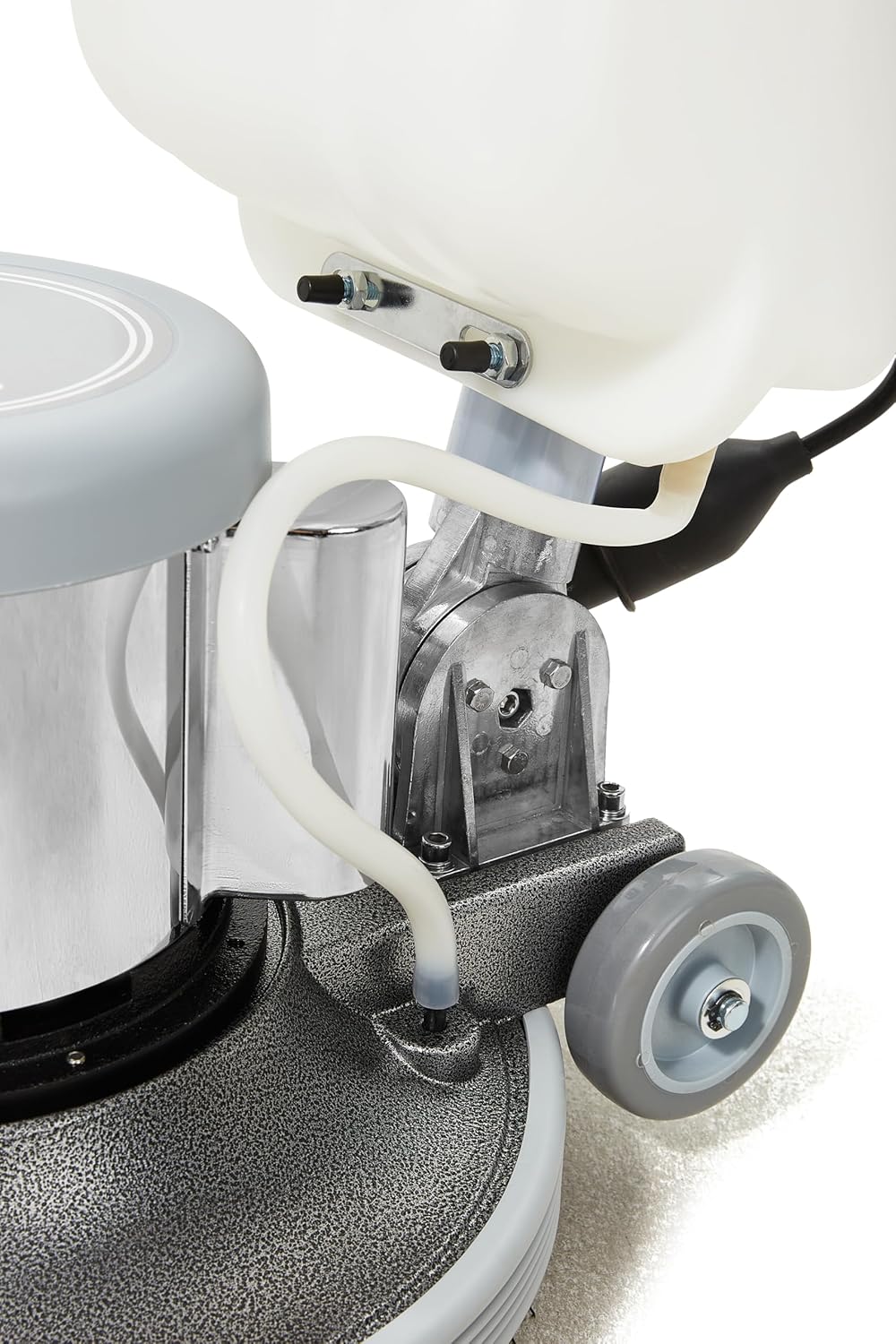
Figure 3: The solution tank connection and hose for liquid dispensing during operation.
- Attaching Accessories:
- For Pads: Attach the pad driver to the bottom of the machine. Then, center the desired scouring pad onto the pad driver.
- For Brushes: Directly attach the appropriate brush (hard floor or carpet) to the bottom of the machine, ensuring it locks into place.
- Power Connection: Plug the 39 ft. power cord into a standard 110V AC outlet. Ensure the cord is clear of the machine's path during operation.
Operating Instructions
Before operating, ensure the machine is properly assembled and the correct attachment is installed for your floor type.
Preparing the Machine:
- Fill Solution Tank (if applicable): Fill the 3.5-gallon solution tank with appropriate cleaning solution or water, according to the floor type and cleaning task. Do not overfill.
- Select Attachment: Choose the correct brush or pad for your floor surface and task:
- Hard Brush: For deep cleaning hard floors like tile, grout, concrete.
- Soft Brush: For carpets and delicate hard surfaces.
- Light Abrasive Pad: For light cleaning and polishing, providing a bright, shiny finish.
- Medium Abrasive Pad: Ideal for general cleaning and maintenance.
- Heavy-duty Abrasive Pad: For stripping tough, worn finishes and sealers from floors.
Starting and Using the Machine:
- Power On: Grip the handle firmly. Locate the power switch or trigger on the handle. Engage the power to start the machine.

Figure 4: The ergonomic handle with the power trigger for comfortable operation.
- Control Movement: The machine is designed for easy maneuverability. Guide it across the floor in overlapping passes. The counterweighted head assists in effective cleaning and polishing.
- Solution Dispensing: If using the solution tank, activate the solution flow as needed.
- Safety Buffer: The anti-collision buffer ring helps protect walls and furniture from accidental bumps.
- Coverage: The 17-inch cleaning path and 39 ft. cord allow for efficient coverage of large areas.
Floor Type Applications:

Figure 5: The multi-functional machine is suitable for a wide range of surfaces including marble, wood, carpet, and concrete floors.
- Hardwood/Laminate: Use the soft brush or a light abrasive pad for cleaning and polishing.
- Tile and Grout/Concrete/Marble/Travertine: Use the hard brush or medium/heavy-duty abrasive pads for scrubbing and deep cleaning.
- Carpets: Use the soft brush for scrubbing and cleaning carpets.
Maintenance
Regular maintenance ensures optimal performance and extends the life of your machine.
- After Each Use:
- Unplug the machine from the power outlet.
- Empty and rinse the solution tank thoroughly.
- Remove and clean the brush or pad. Allow them to dry completely before storage.
- Wipe down the exterior of the machine with a damp cloth.
- Cord Care: Inspect the power cord for any cuts, fraying, or damage. Do not use if damaged. Store the cord neatly to prevent kinks.
- Accessory Storage: Store brushes and pads in a clean, dry place.
- General Inspection: Periodically check all fasteners and connections to ensure they are secure.
Troubleshooting
This section addresses common issues you might encounter. For problems not listed here, contact customer support.
| Problem | Possible Cause | Solution |
|---|---|---|
| Machine does not start. |
|
|
| Poor cleaning performance. |
|
|
| Machine vibrates excessively. |
|
|
Specifications
| Feature | Detail |
|---|---|
| Model Number | DP-FM1301 |
| Brand | Dapper Supply |
| Power Source | Corded Electric |
| Voltage | 110 Volts (AC) |
| Maximum Power | 1100 Watts |
| Speed | 175 RPM |
| Cleaning Path | 17 inches |
| Solution Tank Capacity | 3.5 Gallons (Optional) |
| Power Cord Length | 39 feet |
| Product Dimensions (L x W x H) | 17" x 17" x 48" |
| Material | Aluminum (main bracket) |
| Color | Grey |
| UPC | 850064526066 |
Warranty and Support
Dapper Supply is committed to providing quality products and support.
- Warranty: This product includes a 2-Year Protection Plan.
- Customer Support: U.S.-Based Expert Support is available for assistance.
- Service Network: A Nationwide Technician Network is available for service needs.
- Parts: Replacement Parts are available.
- Premium Support: White-Glove Support is offered for comprehensive assistance.
For warranty claims, technical assistance, or to order replacement parts, please contact Dapper Supply customer service through their official channels.
Related documentsDP-FM1301


Ask a question about this manual
Ask about setup, troubleshooting, compatibility, parts, safety, or missing instructions. Manuals+ will review the question and use this page’s manual context to help answer it.