
JBL JBLWBEAM2BLU
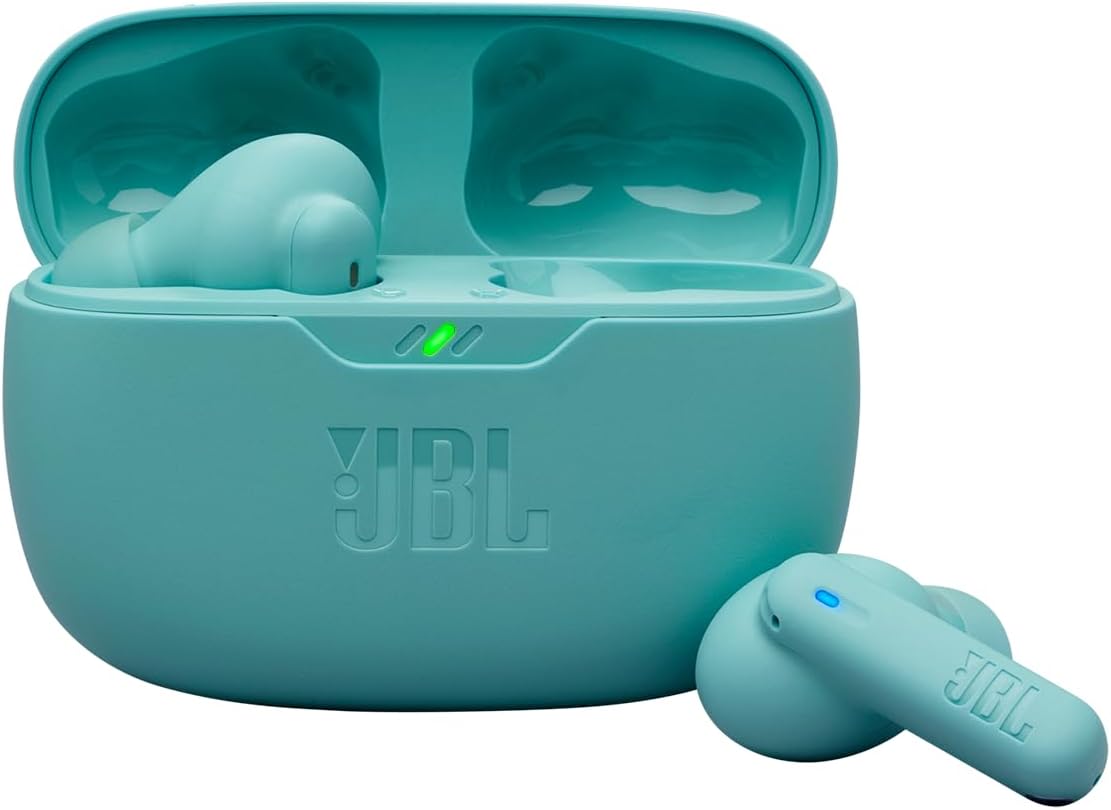
JBL Wave Beam 2 True Wireless Earbuds User Manual
Model: JBLWBEAM2BLU
Introduction
The JBL Wave Beam 2 True Wireless Earbuds deliver powerful and dynamic audio with 8mm drivers and JBL Pure Bass Sound. Featuring Active Noise Cancellation (ANC) for immersive listening and Smart Ambient technology to stay aware of your surroundings, these earbuds are designed for versatile use. Enjoy crystal-clear calls with four microphones that filter out noise, even in busy environments. With IP54 water and dust resistance, they are suitable for various conditions. Multi-point connection allows seamless switching between devices, and with up to 40 hours of playback and fast charging, your earbuds are always ready.
What's in the Box
Your JBL Wave Beam 2 package includes the following components:
- JBL Wave Beam 2 Earbuds
- Charging Case
- USB-C Charging Cable
- Multiple sizes of ear tips for a comfortable fit
- Quick Start Guide (not included in this digital manual)
- Safety Sheet (not included in this digital manual)
Setup
1. Charging the Earbuds and Case
Before first use, fully charge your JBL Wave Beam 2 earbuds and charging case.
- Place the earbuds into the charging case.
- Connect the USB-C charging cable to the charging case and a power source.
- The LED indicators on the case will show the charging status.
A full charge provides up to 40 hours of playback (with ANC off). A quick 10-minute charge can provide up to 3 extra hours of listening time.

2. Pairing with a Bluetooth Device
The JBL Wave Beam 2 earbuds support Bluetooth 5.3 for a stable connection and multi-point pairing.
- Open the charging case. The earbuds will automatically enter pairing mode.
- On your device (smartphone, tablet, laptop), enable Bluetooth and search for "JBL Wave Beam 2" in the list of available devices.
- Select "JBL Wave Beam 2" to connect.
- For multi-point connection, pair with the first device, then disconnect Bluetooth on the first device. Pair with the second device. Reconnect to the first device. The earbuds will now be connected to both.
The earbuds also feature Fast Pair by Google and Swift Pair by Microsoft for quick pairing with compatible Android devices and Windows computers with a single tap.

Operating the Earbuds
Sound Features
Experience powerful audio with JBL Pure Bass Sound, delivered by 8mm dynamic drivers.

Active Noise Cancellation (ANC) and Smart Ambient
- Active Noise Cancellation: Blocks out external noise for an immersive listening experience.
- Smart Ambient: Allows you to control how much of your surroundings you hear, enabling you to stay aware without removing your earbuds.
These features can be controlled via the JBL Headphones app.

Clear Calls
Each earbud is equipped with two microphones, totaling four, to ensure clear calls even in noisy or windy environments. The microphones are designed to filter out ambient noise, focusing on your voice.
Controls via JBL Headphones App
The JBL Wave Beam 2 earbuds are primarily controlled through the JBL Headphones application. This app allows you to:
- Customize sound settings with an equalizer (EQ).
- Toggle Active Noise Cancellation and Smart Ambient modes.
- Manage other earbud settings and features.
Download the JBL Headphones app from your device's app store for full control and customization.
Maintenance and Care
Water and Dust Resistance
The JBL Wave Beam 2 earbuds are rated IP54, meaning they are resistant to dust and splashes of water. The charging case is rated IPX2, offering protection against dripping water.
- Avoid submerging the earbuds or charging case in water.
- Do not expose them to pressurized water or high-velocity water, such as from a shower or faucet.
- Ensure the earbuds and charging port are dry before charging to prevent damage.
- Clean the earbuds regularly with a soft, dry cloth.
This resistance makes them suitable for workouts and outdoor activities in light rain, but they are not designed for swimming or extensive water exposure.
Troubleshooting
If you encounter issues with your JBL Wave Beam 2 earbuds, try the following steps:
- No Sound:
- Ensure the earbuds are charged.
- Check if the earbuds are properly paired with your device.
- Verify the volume level on both your device and the earbuds (via the app).
- Connection Issues:
- Turn Bluetooth off and on again on your device.
- Forget the "JBL Wave Beam 2" from your device's Bluetooth settings and re-pair.
- Ensure the earbuds are within the Bluetooth range of your device.
- Earbuds Not Charging:
- Ensure the charging cable is securely connected to both the case and the power source.
- Check for any debris in the charging port of the case or on the earbud charging contacts.
- Try a different USB-C cable or power adapter.
- Active Noise Cancellation Not Working:
- Ensure ANC is enabled via the JBL Headphones app.
- Adjust the fit of the earbuds in your ears to ensure a proper seal.
For further assistance, refer to the official JBL support resources.
Specifications
| Model Name | JBLWBEAM2BLU |
| Connectivity Technology | Wireless (Bluetooth) |
| Wireless Communication Technology | Bluetooth 5.3 |
| Noise Control | Active Noise Cancellation |
| Earbud Form Factor | True Wireless, In-Ear |
| Driver Size | 8mm Dynamic Drivers |
| Impedance | 16 Ohm |
| Water Resistance Level | Earbuds: IP54, Charging Case: IPX2 |
| Battery Life (Earbuds + Case) | Up to 40 Hours (ANC off) |
| Charging Time | 10 minutes charge for 3 hours playback |
| Battery Composition | Lithium-Ion |
| Control Method | Application (JBL Headphones App) |
| Compatible Devices | Mobile Phones, Tablets, Laptops |
| Product Dimensions | 8.5 x 12 x 2.75 cm |
| Product Weight | 49.4 g |
Warranty and Support
The JBL Wave Beam 2 earbuds come with a manufacturer's warranty of 12 months from the date of purchase.
For warranty claims, technical support, or additional product information, please visit the official JBL website or contact their customer service. You can also visit the JBL Store on Amazon for more details.
Related documentsJBLWBEAM2BLU


Ask a question about this manual
Ask about setup, troubleshooting, compatibility, parts, safety, or missing instructions. Manuals+ will review the question and use this page’s manual context to help answer it.