
XSDTS F17
Contents
XSDTS Tuya Wifi Electronic Smart Door Lock User Manual
Model: F17
Brand: XSDTS
1. Product Overview
The XSDTS Tuya Wifi Electronic Smart Door Lock offers advanced security and convenience for your home or office. This smart lock provides multiple access methods, including biometric fingerprint recognition, RFID smart cards, digital passcodes, mobile application control via Tuya, and traditional physical keys. Designed for ease of use and robust performance, it integrates seamlessly into modern smart living environments.
It is suitable for doors with a thickness ranging from 30mm to 70mm and features a universal adjustable handle for both left and right-hand door configurations. The lock is equipped with an emergency USB charging port to ensure access even if the batteries are depleted.

Figure 1: Overview of the XSDTS Smart Door Lock and its components.
2. Setup and Installation
2.1 Door Compatibility
This smart lock is designed for doors with a thickness between 30mm and 70mm. Ensure your door meets these specifications before installation.
2.2 Handle Adjustment
The handle is universally adjustable for both right and left-hand door orientations. This allows for flexible installation based on your door's swing direction.
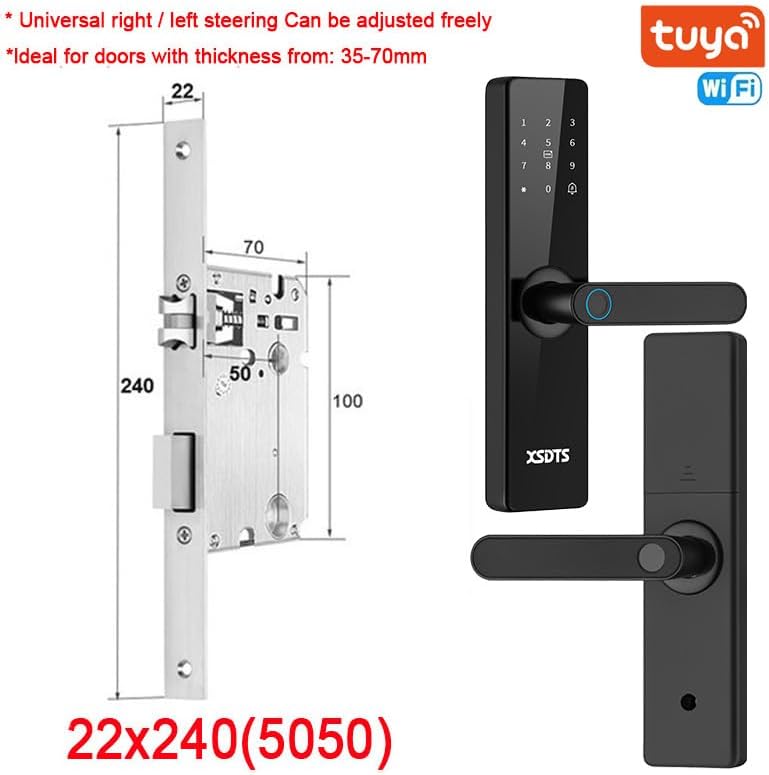
Figure 2: Door thickness compatibility and universal handle adjustment.
2.3 Battery Installation
The lock requires 4 AA batteries (not included in the package). Locate the battery cover on the rear panel of the lock. Open the cover and insert the batteries, ensuring correct polarity. Close the battery cover securely.

Figure 3: Battery cover location and other key components.
2.4 Package Contents
The product package includes:
- Front panel (x1)
- Rear panel (x1)
- Plug-in lock / Mortise (x1, optional)
- Smart card (x4)
- Mechanical key (x2)
- Screw kit (x1)
3. Operating Instructions
3.1 Unlocking Methods
The XSDTS Smart Door Lock offers five convenient ways to unlock your door:
- Fingerprint Unlock: Place your registered fingerprint on the sensor for quick access.
- IC Card Unlock: Swipe a registered RFID smart card over the designated area.
- Password Unlock: Enter your digital passcode on the keypad.
- App Unlock: Use the Tuya Smart application on your smartphone to unlock remotely via Bluetooth or Wi-Fi.
- Manual Key Unlock: Use the physical key as a traditional backup method.

Figure 4: Multiple unlocking methods for enhanced convenience.
3.2 Tuya Smart APP Control
The Tuya Smart APP provides comprehensive remote control and management features for your lock:
- APP Unlock: Remotely unlock your door from anywhere in the world.
- Scene Linkage: Integrate with other smart home devices for automated scenarios.
- Info Send: Receive notifications and alerts regarding lock activity.
- Records Check: View a history of all lock and unlock events.
- Temporary Password: Generate one-time or time-limited access codes for guests or service providers.

Figure 5: Tuya Smart APP features for remote control and management.
3.3 Locking and Unlocking Mechanism
The lock features a free handle design. To lock the door, simply push the handle upwards. To unlock, press the handle downwards. This design simplifies the locking and unlocking process.
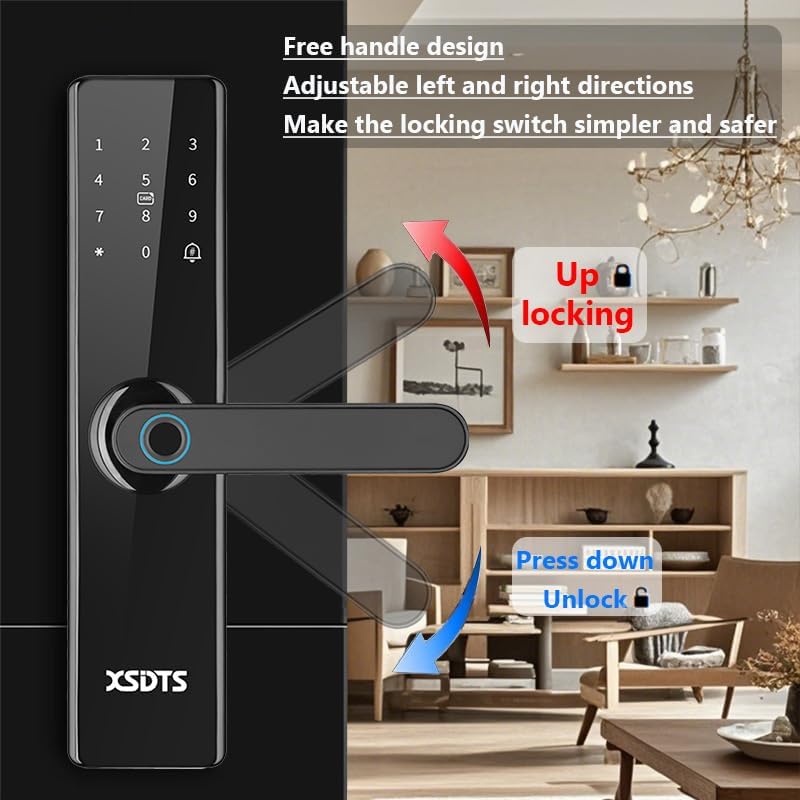
Figure 6: Handle operation for locking and unlocking.
3.4 Silent Mode
The lock operates in a silent mode, ensuring minimal noise during operation. This feature is particularly useful during quiet hours, preventing disturbance to others.

Figure 7: Silent mode operation.
3.5 Smart Encrypted IC Card
The included IC cards utilize dynamic encryption technology, providing a higher level of security and preventing unauthorized copying.

Figure 8: Secure IC card usage.
3.6 Fingerprint Recognition Performance
The fingerprint sensor offers rapid identification speed (≤0.5s), a very low false recognition rate (≤0.001%), and a low rejection rate (≤0.01%), ensuring reliable and quick access.

Figure 9: Fingerprint recognition performance metrics.
4. Maintenance
4.1 General Care
To ensure the longevity and optimal performance of your smart lock, clean the exterior surfaces with a soft, dry cloth. Avoid using abrasive cleaners or solvents that may damage the finish or electronic components.
4.2 Battery Replacement
When the battery level is low, the lock will emit an alert. Replace all four AA batteries promptly to avoid interruption of service. Refer to Section 2.3 for battery installation instructions.
5. Troubleshooting
5.1 Emergency Power Supply
If the batteries completely run out and the lock cannot be operated, you can temporarily charge the electronic lock using a mobile power source or any power supply with a micro-USB connector. Connect the micro-USB cable to the emergency charging port located on the bottom of the front panel (refer to Figure 3).
5.2 Common Issues
- Lock not responding: Check battery level. If low, replace batteries or use emergency USB charge.
- Fingerprint not recognized: Ensure your finger is clean and dry. Re-register fingerprint if issues persist.
- Card not recognized: Ensure the card is clean and properly swiped. Re-register card if necessary.
- App connectivity issues: Ensure your Wi-Fi network is stable and the lock is within range. Restart the app and lock if needed.
- Physical key not working: Ensure the key is fully inserted and turned correctly. Do not force the key.
6. Specifications
| Feature | Detail |
|---|---|
| Manufacturer | XSDTS |
| Model Number | F17 |
| Part Number | F5-Black-5050-22*240 |
| Item Weight | 2 Kilograms |
| Product Dimensions | 25 x 6 x 7.5 cm |
| Size | 5050-22*240 |
| Color | Black |
| Style | Fashion |
| Finish | Lacquered |
| Material | Aluminum |
| Shape | Round |
| Item Package Quantity | 1 |
| Number Of Pieces | 1 |
| Special Features | Fingerprint, One-Touch Lock, Passcode Unlock, Resettable, Scratch-Resistant |
| Lock Type | Biometric |
| Recommended Uses | Families, Airbnb, rental, office, business departments |
| Applicable Door Thickness | 35-75mm |
| Fingerprint Capacity | 100 |
| IC Card Capacity | 100 (issuing 4 IC cards) |
| Password Capacity | 100 |
| Door Type Compatibility | Wooden door, anti-theft door, stainless steel door, brass door |
7. Warranty and Support
7.1 Warranty Information
All XSDTS products come with a 12-month direct warranty from the date of purchase. This warranty covers manufacturing defects and ensures the proper functioning of your smart lock under normal use conditions.
7.2 Technical Support
XSDTS provides unlimited technical consultation. Our team of certified technicians is available to assist you via phone, chat, or video calls. We also offer installation, configuration, and solution videos, which can be provided upon request after your purchase.
For technical assistance or warranty claims, please refer to the contact information provided with your purchase documentation or visit the official XSDTS website.
Ask a question about this manual
Ask about setup, troubleshooting, compatibility, parts, safety, or missing instructions. Manuals+ will review the question and use this page’s manual context to help answer it.