
Introduction
Thank you for choosing the MAX Rhapsody61L Electronic Keyboard. This instrument is designed for beginners and offers an interactive and educational experience with its 61 light-up keys and various features. This manual provides essential information for the safe and effective use of your new keyboard.
Safety Instructions
- Power Supply: Use only the specified AC adapter. Ensure the voltage matches your local power supply.
- Water and Moisture: Do not expose the keyboard to water or moisture. Avoid placing liquids near the instrument.
- Ventilation: Ensure proper ventilation. Do not block ventilation openings.
- Placement: Place the keyboard on a stable, flat surface. Avoid extreme temperatures, direct sunlight, or excessive dust.
- Cleaning: Disconnect from power before cleaning. Use a soft, dry cloth. Do not use liquid cleaners or aerosols.
- Servicing: Do not attempt to repair the instrument yourself. Refer all servicing to qualified personnel.
Package Contents
The MAX Rhapsody61L Complete Pack includes the following items:
- MAX Rhapsody61L Electronic Keyboard
- Adjustable Keyboard Stand
- Keyboard Bench
- Headphones
- Microphone
- AC Power Adapter
- Music Rest
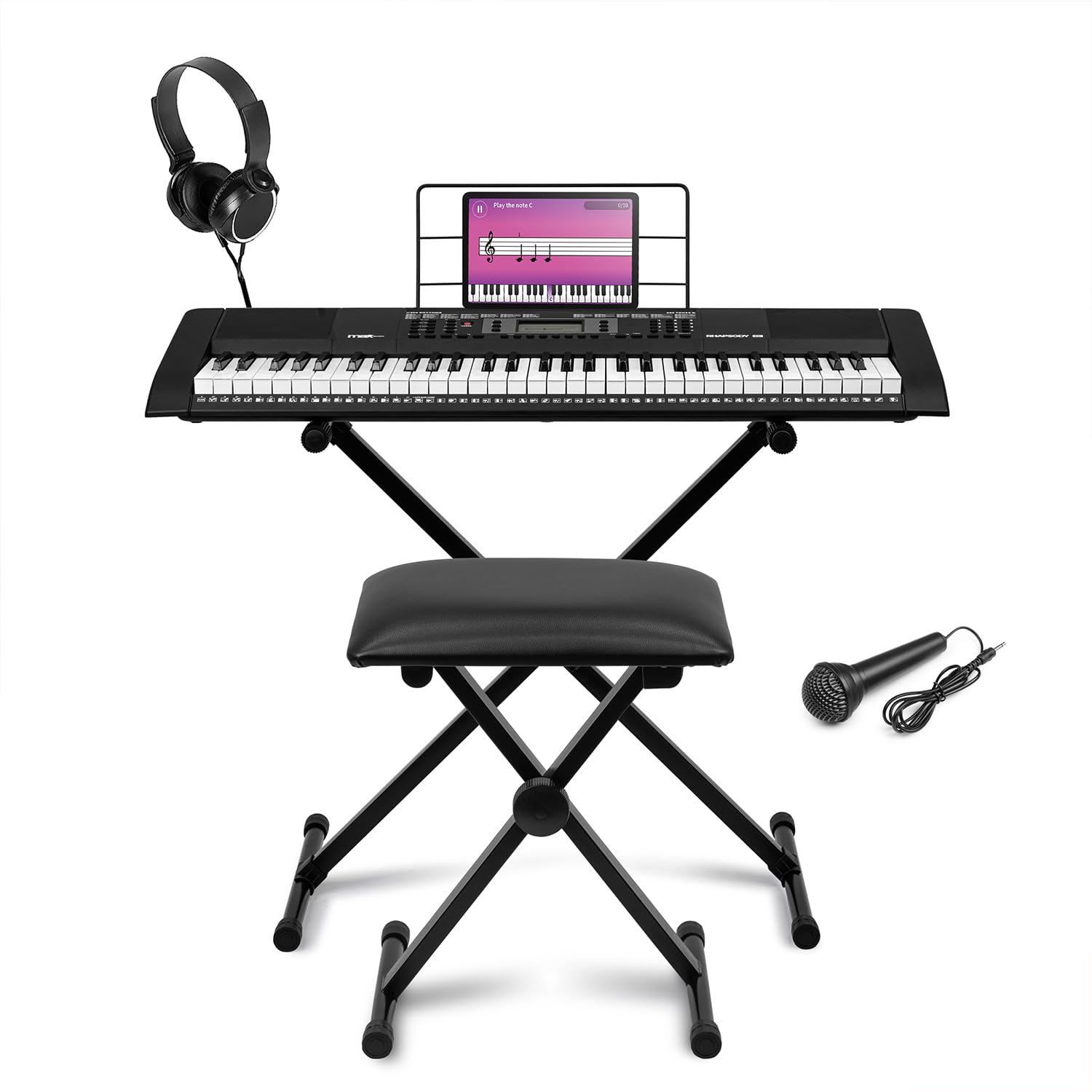
Image: The MAX Rhapsody61L Electronic Keyboard shown with its included adjustable stand, bench, and headphones, ready for use.
Product Overview
The Rhapsody61L features a user-friendly interface with a digital display, various control buttons, and 61 light-up keys designed to assist in learning.

Image: A top-down view of the MAX Rhapsody61L keyboard, highlighting the digital display, multiple control buttons, and piano keys. The background features musical note graphics.
Key Components:
- 61 Light-Up Keys: Keys illuminate to guide you during lessons and practice.
- Digital Display: Shows current settings, selected tones, rhythms, and lesson information.
- Control Panel: Buttons for power, volume, tempo, tone selection, rhythm selection, demo songs, recording, and playback.
- Speakers: Integrated stereo speakers for sound output.
- Headphone Jack (3.5mm): For private practice.
- USB-B Port: For MIDI connectivity to a computer.
- Microphone Input: For connecting the included microphone.
Setup
- Unpacking: Carefully remove all components from the packaging. Retain packaging for future transport or storage.
- Stand Assembly: Assemble the adjustable keyboard stand according to its separate instructions. Ensure it is stable.
- Bench Assembly: Assemble the keyboard bench for comfortable seating.
- Keyboard Placement: Place the Rhapsody61L keyboard securely on the assembled stand.
- Power Connection: Connect the AC power adapter to the keyboard's DC IN jack and then to a wall outlet.
- Headphones/Microphone: For private practice, plug the headphones into the 3.5mm headphone jack. To use the microphone, plug it into the microphone input.
Operating Instructions
Basic Operation:
- Power On/Off: Press the POWER button to turn the keyboard on or off.
- Volume Control: Use the MASTER VOLUME buttons to adjust the overall sound level.
- Tone Selection: Press the TONE button and use the number pad or +/- buttons to select from 255 available timbres.
- Rhythm Selection: Press the RHYTHM button and use the number pad or +/- buttons to select from 255 rhythms.
- Tempo Adjustment: Use the TEMPO +/- buttons to increase or decrease the speed of rhythms or demo songs.

Image: A close-up view of hands playing the black and white keys of the MAX Rhapsody61L electronic keyboard, with the blue illuminated display panel visible.
Light-Up Keys Feature:
The 61 light-up keys facilitate learning by indicating which notes to play. This feature is particularly useful for beginners following built-in lessons or demo songs.

Image: A close-up of the backlit keys on the MAX Rhapsody61L keyboard, with some keys illuminated to guide the user.
Recording Function:
The integrated recording function allows you to capture your performances. Press the REC button to start recording, play your piece, and then press PLAY to listen back. This is useful for evaluating progress and sharing creations.
MIDI Connectivity (USB-B):
Connect the keyboard to a computer using a USB-B cable. This allows you to use the keyboard as a MIDI controller with music production software like GarageBand. This feature is ideal for composing, recording, or modifying tracks digitally.

Image: A person wearing headphones plays the MAX Rhapsody61L electronic keyboard, which is connected via USB to a laptop displaying audio software. This illustrates the MIDI connectivity feature.
Maintenance
- Cleaning: Wipe the keyboard surface with a soft, dry cloth. For stubborn dirt, slightly dampen the cloth with water, then wipe dry immediately. Avoid abrasive cleaners.
- Storage: When not in use for extended periods, store the keyboard in a dry, cool place, away from direct sunlight and extreme temperatures. Cover it to protect against dust.
- Transportation: When moving the keyboard, ensure it is powered off and all cables are disconnected. Use original packaging if available for best protection.
Troubleshooting
| Problem | Possible Cause | Solution |
|---|---|---|
| No sound | Keyboard not powered on; Volume too low; Headphones connected. | Ensure power is on. Increase master volume. Disconnect headphones if using speakers. |
| Keys not lighting up | Light-up key feature is off; Incompatible mode. | Check the manual for activating the light-up key feature. Ensure you are in a compatible learning mode. |
| MIDI connection not working | Incorrect cable; Driver issue; Software settings. | Ensure you are using a proper USB-B cable. Install necessary drivers if prompted by your computer. Check MIDI input settings in your music software. |
| Distorted sound | Volume too high; Faulty connection. | Reduce the volume. Check all cable connections. |
Specifications
- Model Name: Rhapsody61L
- Number of Keys: 61 (Light-Up)
- Timbres: 255
- Rhythms: 255
- Demo Songs: 50
- Connectivity: USB Type B (MIDI), 3.5mm Headphone Jack, Microphone Input
- Power Source: AC Adapter
- Product Dimensions (D x W x H): 94.5 x 31.5 x 10.5 cm
- Supported Software: GarageBand (and other MIDI-compatible software)
- Manufacturer: Tronios B.V.
- Country of Origin: China
Warranty and Support
This MAX Rhapsody61L Electronic Keyboard comes with a 2-year manufacturer warranty. Please retain your proof of purchase for warranty claims.
For technical support, troubleshooting assistance beyond this manual, or warranty inquiries, please contact your retailer or visit the official MAX website for contact information.
Spare Parts Availability: Spare parts are available for 2 years from the date of purchase.


