
Introduction
This manual provides detailed instructions for the setup, operation, and maintenance of your DUKWIN Fingerprint Lock Watch Winder, Model 034-GN. Please read this manual thoroughly before using the product to ensure proper function and longevity.
Package Contents
Upon opening your DUKWIN Watch Winder package, please verify that all the following items are included:
- 1x Watch Winder Unit
- 1x AC Power Adapter
- 1x Administrator Key
- 1x Remote Control
- 1x User Manual (this document)
- 1x Cleaning Brush

Image: The DUKWIN watch winder with its complete set of accessories, including the power adapter, remote, user manual, and cleaning brush.
Product Features
The DUKWIN Fingerprint Lock Watch Winder is designed to keep your automatic watches wound and ready for use, while also providing secure storage and an elegant display.
- Premium Construction: Crafted from 100% handcrafted wood with an elegant piano polish exterior, acrylic organic glass window, and a vegan leather interior.
- Generous Capacity: Features 3 individual winding rotors for automatic watches, 4 additional static watch holders, and a dedicated jewelry storage drawer.
- Customizable Winding Settings: Offers 3 rotation directions (clockwise, counter-clockwise, and bi-directional) and adjustable Turns Per Day (TPD) values ranging from 300 to 2300, ensuring compatibility with various mechanical watch movements.
- Digital Display & Remote Control: An intuitive digital display allows for easy mode setup. A remote control provides convenient operation from up to 3 meters away.
- Adjustable Watch Pillows: Designed to accommodate over 99% of automatic mechanical watches, fitting watch dials up to 55mm, thickness up to 20mm, and bracelet/wrist diameters from 35-62mm.
- Enhanced Security: Equipped with a fingerprint lock that supports up to 10 unique fingerprints, providing secure access to your valuable timepieces.
- Integrated LED Lighting: Features elegant white LED lighting with 3 adjustable intensity levels, allowing for clear visibility and enhanced presentation of your watches, even in low light.
- Quiet Operation: Utilizes an ultra-quiet Japanese Mabuchi motor, making it suitable for placement in bedrooms or quiet office environments without causing disturbance.
- Automatic 180° Stop: When the watch winder box is opened, the watch rotors automatically stop at a 180-degree horizontal position for easy access.

Image: Overview of the watch winder's capacity, highlighting the winding rotors, static holders, and storage drawer.

Image: Detail of the adjustable watch pillow, illustrating its adaptability for various watch sizes.
Setup
- Unpacking: Carefully remove the watch winder and all accessories from its packaging. Retain the packaging for future transport or storage.
- Placement: Place the watch winder on a stable, flat surface away from direct sunlight, extreme temperatures, and high humidity.
- Power Connection: Connect the AC power adapter to the power input port located at the back of the watch winder. Plug the adapter into a suitable power outlet.
- Power On: Locate the power switch on the back of the unit and turn it to the 'ON' position. The digital display should illuminate.
- Initial Fingerprint Setup:
- Open the watch winder door using the administrator key provided.
- Locate the fingerprint sensor on the side of the unit.
- Follow the on-screen prompts or refer to the dedicated fingerprint setup section in the full manual for detailed instructions on registering your fingerprints. The unit supports up to 10 fingerprints.
- Inserting Watches:
- Gently compress the adjustable watch pillow and secure your automatic watch onto it.
- Insert the watch and pillow firmly into one of the winding rotor slots. Ensure the watch is securely seated and does not obstruct the rotation.
- For static storage, place watches on the upper watch holders.
Video: This video demonstrates the initial setup, including opening the fingerprint lock, placing watches on the winding rotors, and utilizing the storage drawer.
Operating Instructions
The DUKWIN Watch Winder features a digital display and remote control for easy customization of winding settings.
Digital Display Controls
The digital display provides access to various settings. Each winding rotor can be controlled independently.

Image: The digital display panel, illustrating the various control icons for motor, TPD, direction, power, and LED settings.
- Motor Selection (MOT): Use the up/down arrows to select which winding rotor (1, 2, or 3) you wish to configure.
- Turns Per Day (TPD): Adjust the TPD value (300-2300) using the up/down arrows to match your watch's requirements.
- Rotation Direction (DIR): Cycle through clockwise, counter-clockwise, or bi-directional modes.
- Power On/Off: Toggle the selected motor's operation.
- LED Light (LED): Turn the internal LED lighting on or off.
- Light Adjustment (ADJ): Adjust the brightness of the LED lights (3 intensity levels).
Remote Control Operation
The included remote control allows for convenient adjustment of settings without directly interacting with the unit.
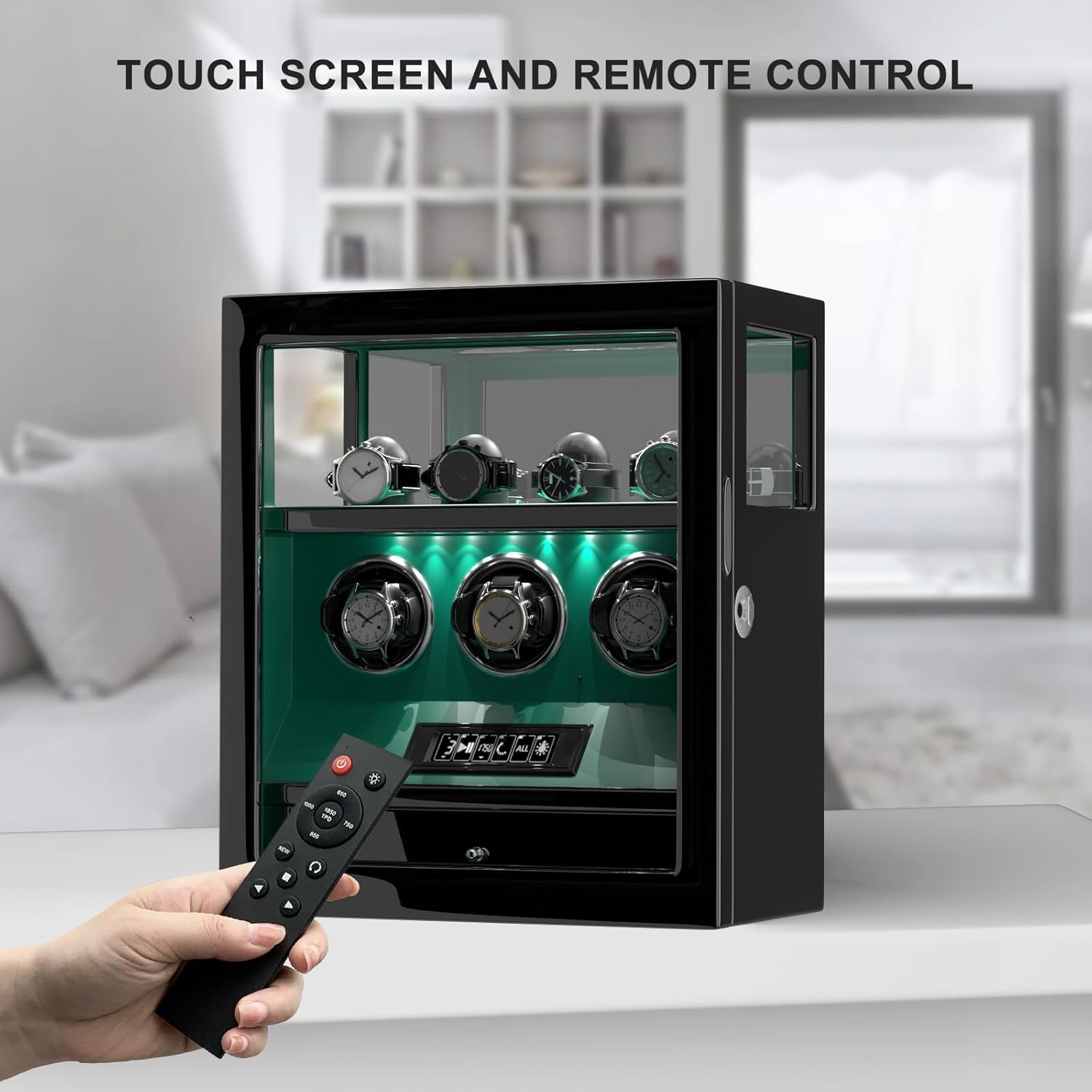
Image: Using the remote control to operate the watch winder from a distance.
- The remote mirrors the functions available on the digital display, allowing you to select motors, adjust TPD, change rotation direction, and control the LED lighting.
- Ensure the remote is pointed towards the front of the watch winder for optimal signal reception.
180° Stop Function
For ease of access, the winding rotors will automatically stop at a horizontal 180-degree position when the door is opened. They will resume operation once the door is closed and locked.
Video: This video demonstrates the 180-degree stop function when the door is opened, and the various LED light color options.
Maintenance
Proper care will ensure the longevity and optimal performance of your DUKWIN Watch Winder.
- Cleaning: Use the provided cleaning brush or a soft, dry cloth to gently wipe the exterior and interior surfaces. Avoid abrasive cleaners or solvents.
- Glass Care: For the acrylic glass window, use a soft, lint-free cloth and a mild glass cleaner. Do not use paper towels, which can scratch the surface.
- Watch Pillows: Periodically inspect the watch pillows for wear and tear. Replace if necessary to ensure watches are held securely.
- Ventilation: Ensure adequate airflow around the unit to prevent overheating.
- Storage: If storing the winder for an extended period, disconnect it from power and ensure it is clean and dry.
Troubleshooting
If you encounter any issues with your DUKWIN Watch Winder, please refer to the following common problems and solutions:
| Problem | Possible Cause | Solution |
|---|---|---|
| Winder is not operating. | No power, power switch off, or motor not activated. | Check power connection, ensure power switch is ON, and verify the motor is activated via the digital display or remote. |
| Watches are not winding correctly. | Incorrect TPD or rotation direction settings for the watch movement. | Consult your watch manufacturer's specifications for recommended TPD and direction, then adjust settings on the winder accordingly. |
| Fingerprint lock not responding. | Fingerprint not registered, sensor dirty, or temporary malfunction. | Ensure your fingerprint is registered. Clean the sensor with a soft cloth. If issues persist, use the administrator key to open and re-attempt fingerprint registration. |
| LED lights are not working. | LED function is turned off. | Activate the LED function via the digital display or remote control. Check brightness settings. |
| Noise during operation. | Watch not seated properly, or unit on an uneven surface. | Ensure watches are securely placed. Verify the winder is on a stable, level surface. While the motor is ultra-quiet, slight ambient noise is normal. |
Specifications
- Model: 034-GN
- Dimensions (L x W x H): 36cm x 20cm x 39cm (14.17" x 7.87" x 15.35")
- Weight: Approximately 23.3 Pounds
- Material: Handcrafted wood, acrylic organic glass, vegan leather
- Motor: Japanese Mabuchi Motor
- TPD Range: 300 - 2300 Turns Per Day
- Rotation Modes: Clockwise, Counter-clockwise, Bi-directional
- Security: Fingerprint Lock (supports up to 10 fingerprints)
- Lighting: White LED with 3 adjustable brightness levels
- Control: Digital Touch Display, Remote Control
Warranty and Support
DUKWIN offers a 12-month warranty on this watch winder, covering manufacturing defects and malfunctions under normal use. Please retain your proof of purchase for warranty claims.
For technical support, warranty inquiries, or any questions regarding your DUKWIN Watch Winder, please contact DUKWIN customer service through the retailer where the product was purchased or visit the official DUKWIN brand store for contact information.
DUKWIN Brand Store: Visit DUKWIN Store on Amazon


