
Dsoon DSTL2100
Dsoon DSTL2100 Time Lapse Camera User Manual
Model: DSTL2100
Introduction
The Dsoon DSTL2100 is a robust time-lapse camera designed for outdoor and construction recording. It captures high-definition 1080P video and images, featuring a wide-angle lens and extended battery life, making it suitable for long-term monitoring projects.
Package Contents
Verify that all items are present in the package:
- Camera Body
- Wall Bracket
- Round Tube Bracket
- Installation Strap and Rope
- 64GB SD Card
- USB Cable (Type-C Line)
- User Manual

Image: The Dsoon DSTL2100 camera shown with its various accessories, including mounting brackets, cables, and an SD card.
Product Features
- 1080P FHD Resolution: Captures clear images and videos with a 2MP starlight lens and 110° wide-angle view.
- Extended Standby Time: Up to 180 days of battery life with a 5-minute capture interval.
- IP66 Waterproof Rating: Designed for outdoor use, resistant to rain, dust, and fog.
- 2.4" TFT HD LCD Screen: For easy setup and review of captured content.
- Versatile Shooting Modes: Supports timed shooting, video time-lapse, and photo time-lapse.
- Manual Macro Focus: Allows for capturing both close-up and distant subjects.
- Included 64GB TF Card: Provides ample storage for recordings.

Image: The Dsoon DSTL2100 camera displaying its key technical specifications and features.
Setup
1. Battery Installation
The camera requires 12 AA batteries for operation. Open the battery compartment, typically located on the side or back of the camera, and insert the batteries according to the polarity indicators (+/-). Ensure the compartment is securely closed to maintain the waterproof seal.
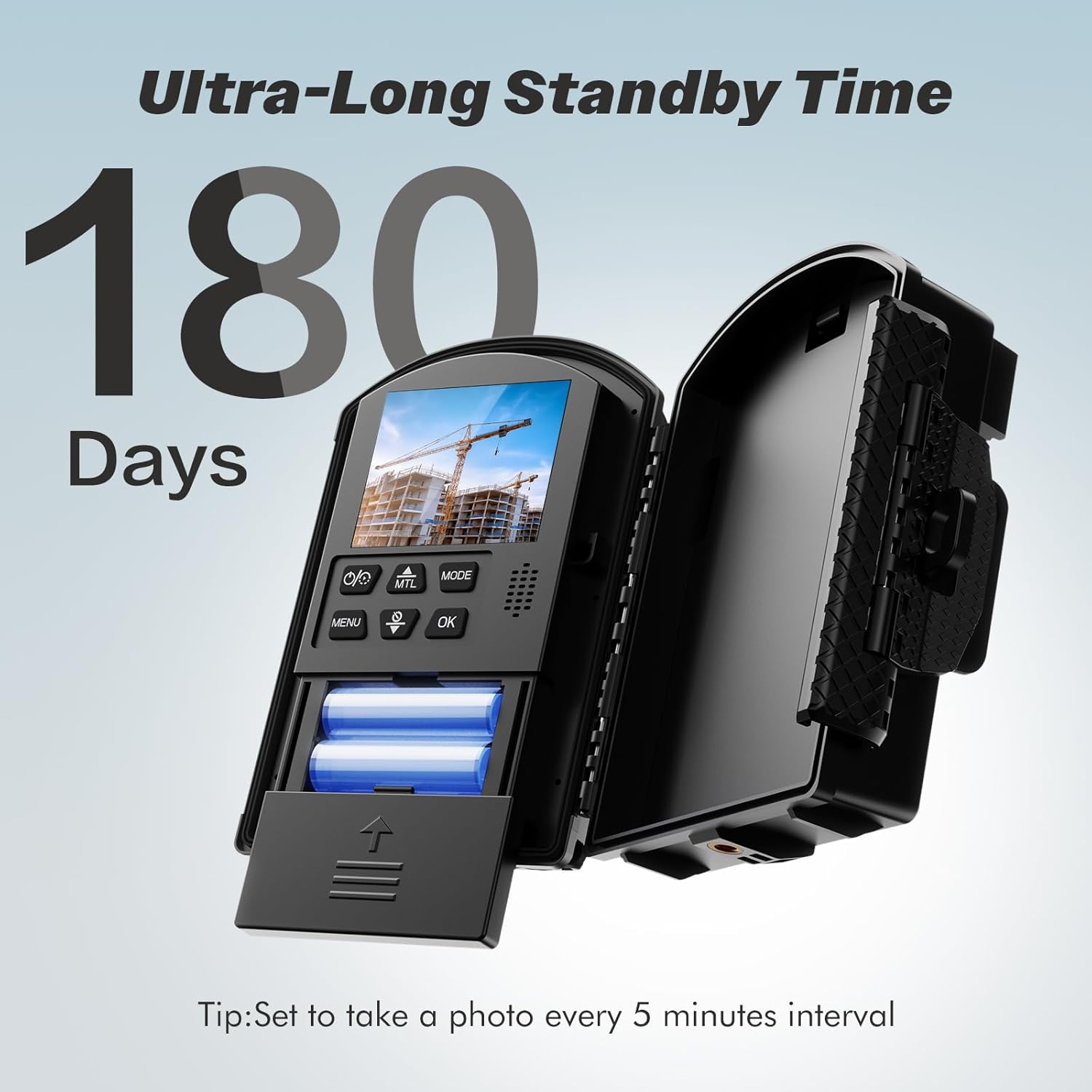
Image: The camera with its battery compartment open, illustrating the placement of AA batteries for power.
2. SD Card Installation
Locate the SD card slot, usually near the battery compartment or under a protective flap. Insert the provided 64GB Micro SD card until it clicks into place. Ensure the card is inserted correctly to avoid damage.
3. Mounting the Camera
The Dsoon DSTL2100 offers multiple installation methods:
- Wall Bracket: Use screws to attach the wall bracket to a flat surface. Secure the camera to the bracket.
- Round Tube Bracket: Ideal for poles or pipes. Attach the bracket around the tube and then secure the camera.
- Installation Strap and Rope: For flexible mounting on trees, posts, or other irregular surfaces. Thread the strap or rope through the camera's mounting points and secure it.

Image: Illustrations demonstrating different ways to mount the camera, such as on a wall, pole, or using a strap.
Operating Instructions
1. Powering On/Off
Press and hold the power button (location may vary, typically near the LCD screen) to turn the camera on or off. The 2.4" LCD screen will illuminate upon startup.
2. Navigating the Menu
Use the navigation buttons (Up, Down, Left, Right, OK/Menu) to browse through the camera's settings on the LCD screen. The "MENU" button typically accesses the main settings, and "OK" confirms selections.
3. Selecting Shooting Modes
The camera supports several modes:
- Timed Shooting: Captures individual photos or videos at set intervals.
- Video Time-Lapse: Records a series of images and compiles them into a video.
- Photo Time-Lapse: Captures a series of still images at set intervals.
- Manual Macro Focus: Adjust the lens for close-up or distant shots as needed.
Access these modes through the camera's menu and select the desired option.
4. Setting Capture Intervals and Schedule
Within the chosen shooting mode, navigate to the interval settings. You can set the time between captures (e.g., 5 seconds, 5 minutes, 30 minutes). For long-term projects, a 5-minute interval can extend battery life up to 180 days.
The camera also supports scheduled capture, allowing you to define specific operating hours (e.g., 08:00-18:00) and days of the week for recording.

Image: The camera's LCD screen displaying options for setting a recording schedule, including start/end times and active days.
Maintenance
- Cleaning: Use a soft, dry cloth to clean the camera body and lens. For stubborn dirt, slightly dampen the cloth with water. Avoid abrasive cleaners or solvents.
- Waterproof Seal: Regularly inspect the rubber seals around the battery compartment and ports to ensure they are free from debris and properly seated. This maintains the IP66 waterproof rating.
- Battery Check: For extended deployments, periodically check battery levels. Replace all batteries simultaneously for optimal performance.
- Operating Temperature: The camera is designed to operate in temperatures ranging from -20°C (-4°F) to 50°C (122°F). Avoid prolonged exposure to temperatures outside this range.

Image: The camera highlighting its IP66 waterproof rating and its operational temperature range from -20°C to 50°C.
Troubleshooting
- Camera Not Powering On:
- Ensure batteries are correctly inserted with proper polarity.
- Check if batteries are fully charged or replace them with new ones.
- Verify the battery compartment is securely closed.
- No Recording/SD Card Error:
- Ensure the SD card is properly inserted.
- Format the SD card using the camera's menu (this will erase all data).
- Check if the SD card is full; transfer data to a computer and clear the card.
- Try a different compatible SD card.
- Poor Image/Video Quality:
- Clean the camera lens.
- Ensure the camera is stable and not subject to vibrations during capture.
- Check lighting conditions; the camera performs best in adequate light, though it has a starlight lens for low-light.
- Verify focus settings, especially if using manual macro focus.
- Short Battery Life:
- Ensure high-quality AA batteries are used.
- Increase the capture interval time in settings.
- Reduce the number of active recording hours if using scheduled capture.
- Operating in extremely cold temperatures can reduce battery performance.
Specifications
| Brand | Dsoon |
| Model Number | DSTL2100 |
| Video Capture Resolution | 1080p |
| Photo Sensor Technology | CMOS |
| Lens Angle | 110° Wide Angle |
| Screen Size | 2.4 inches TFT HD LCD |
| Flash Memory Type | Micro SD (64GB included) |
| Power Source | 12 AA batteries required |
| Waterproof Rating | IP66 |
| Operating Temperature | -20°C (-4°F) to 50°C (122°F) |
| Connectivity Technology | USB |
| Item Weight | 1.4 pounds |
| Package Dimensions | 9.29 x 5.79 x 4.02 inches |
Warranty and Support
For warranty information or technical support, please refer to the contact details provided with your purchase documentation or visit the official Dsoon website. Keep your proof of purchase for warranty claims.
Related documentsDSTL2100


Ask a question about this manual
Ask about setup, troubleshooting, compatibility, parts, safety, or missing instructions. Manuals+ will review the question and use this page’s manual context to help answer it.